
fides
 fides copied to clipboard
 ethyca
Not a bug but a help post
I am using this code to generate YAML file for my synthetic data base to learn how to use fides:
fidesctl generate dataset db fides_resources/fidesfaker_dataset.yml --connection-string Provider=SQLOLEDB.1;Integrated Security=SSPI;Persist Security Info=False;Initial Catalog=fidesdatabase;Data Source=DESKTOP-ET8QFN2\SQLEXPRESS
 This is the image.
The error I get is at the bottom
Could someone please help me? Thank you.
- Version:
- OS:
- Python Version:
- Docker Version:
Additional context
Traceback (most recent call last):
File "/fides/src/fidesctl/ctl/core/utils.py", line 59, in get_db_engine
engine = sqlalchemy.create_engine(connection_string)
File "
The above exception was the direct cause of the following exception:
Traceback (most recent call last):
File "/usr/local/bin/fidesctl", line 8, in

Also used this: fidesctl generate dataset db fides_resources/fidesfaker_dataset.yml --connection-string Server=C:\Program Files\Microsoft SQL Server\MSSQL15.SQLEXPRESS\MSSQL;Database=fidesdatabase;Uid=Administrator;Pwd=******;
the error I get with this is:
Usage: fidesctl generate dataset db [OPTIONS] OUTPUT_FILENAME Try 'fidesctl generate dataset db -h' for help.
Error: Got unexpected extra arguments (FilesMicrosoft SQL ServerMSSQL15.SQLEXPRESSMSSQL)
try quoting the connection string, like Server=C:\Program Files\..., that might be the issue here

@ThomasLaPiana
Quotations didnt work, it gave the same exception error as before.
Checked my error: Could not parse rfc1738 URL from string
My problem is that not the quotations but the connection string is wrong which I do not understand why.
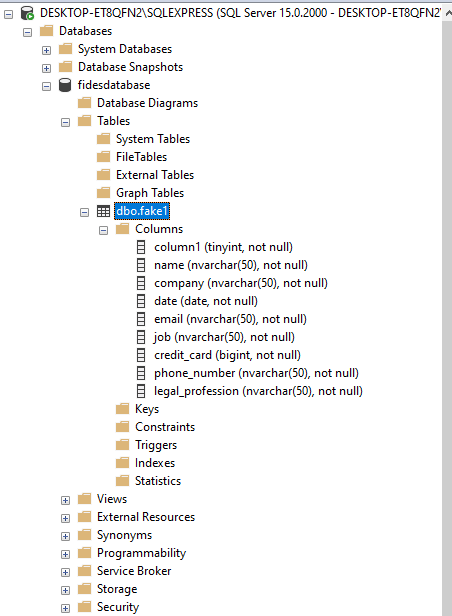
This is my current database. I do not think something is wrong with it but it would be very nice to comment a document here or tell me how can I extract connection string from this. I am using Microsoft SQL Server Management Studio
@LawyerDev68 generally the connection string should look something like found in this post
your current connection string is not valid as a URL which is where the error is coming from
@ThomasLaPiana I installed postgresql to follow up fides tutorial properly.
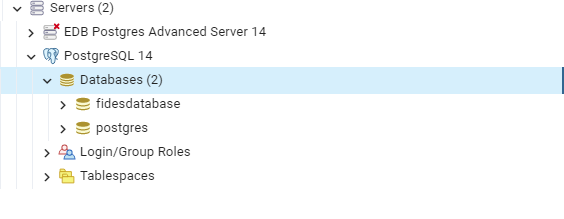 my postgresql database
--connection-string postgresql://postgres:[password]@localhost:5432/fidesdatabase
I checked the documentation here: https://hasura.io/learn/database/postgresql/installation/postgresql-connection-string/
and followed the exact steps
I am still getting the same error. Is there something I didnt see it properly? I am using Windows 10
I'm running the following command and seeing it work:
root@64cc06461b53:/fides# fides scan dataset db --connection-string postgresql+psycopg2://postgres:fides@fides-db:5432/fides_test
Loading config from: /fides/.fides/fides.toml
Loading resource manifests from: .fides/
Taxonomy successfully created.
Loaded the following dataset manifests:
        fides_db
        fides_cache
Successfully scanned the following datasets:
        public

Annotation coverage: 100%
So my biggest guess here is that the password has something that isn't getting escaped properly 🤔
Do you get the same error when you quote it? This sounds like something we should be handling, if it is for sure the password causing this
@ThomasLaPiana I had problems with password about this database, but then again if I'm able to enter the database with the password I typed through postgresql I think I should be able to do that in code too. But yeah I'll check couple of passwords, no password at all etc. Also yeah I tried to put it in the middle of the quotes but I'll try again with the new stuff too. Cant do that rn but will report here what happened
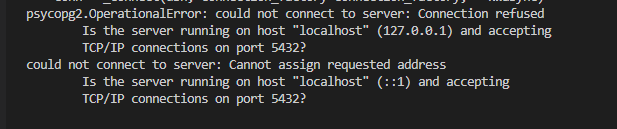

@ThomasLaPiana Something wrong with my SQL orFides ? Not sure. In the meantime I'll try to create YAML files manually
@LawyerDev68 can you run the following command to verify postgres is up and ready at the expected host and port: pg_isready --host=localhost --port=5432? You should see a response of localhost:5432 - accepting connections

@sanders41 bash: pg_isready: command not found I got this, tried to add C:\Program Files\PostgreSQL\14 this to the path but it didnt work. I guess I made a mistake here or couldnt connect postgresql to the path. What do you think?
This is an issue with the command. If it was an issue with connecting to the database the message would be localhost:5432 - no response. I think the path is C:\Program Files\PostgreSQL\14\bin. @ThomasLaPiana do you know if this is correct on Windows? You will also probably have to close and reopen your shell to pick up the new path.
@sanders41 tried to change the path to the way you proposed and restarted the shell, didnt work.
 psql variable
@sanders41 @ThomasLaPiana Also this is important to say, I installed postgresql plugin to my vs code and found my database through the plugin. So I think that means my connection string does not have any issue. It might be a bug. Problem still persists*
Ok lets try one more thing. If you run netstat -a -o do you see 0.0.0.0:5432 in the Local Address list?
bash: netstat: command not found
@sanders41 Getting this error, but VS code is in the path, I can use shell to install other stuff like Faker etc.
bash? You are on windows right? You should be able to run that command from powershell.
@sanders41 Yeah I'm on windows and I tried it on powershell but it didnt work. Hmm somethings missing in my system, what should I do? Any recommendations?
@LawyerDev68 I tested locally with a postgres database at localhost in case that was the issue, but it completed successfully:
fides> fides scan dataset db --connection-string postgresql+psycopg2://postgres:fides@localhost:5432/fides_test
Loading config from: .fides/fides.toml
Loading resource manifests from: .fides/
Taxonomy successfully created.
Loaded the following dataset manifests:
        fides_db
        fides_cache
Successfully scanned the following datasets:
        public

Annotation coverage: 100%
fides>
for us to better help you debug, can you show me the entire, unredacted command you're running for scanning now?
@ThomasLaPiana Alright this is the entire code.
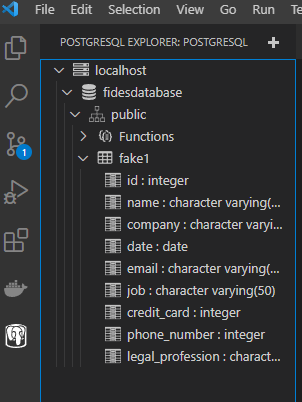
I have connected the database through postgresql extension in vs without a problem with the same parameters I entered below with the password etc.
My master password and postgres password are different from each other at pgAdmin4 if that means anything
PS C:\Users\Administrator\Desktop\Ders ve İş\VS> cd fides/ PS C:\Users\Administrator\Desktop\Ders ve İş\VS\fides> nox -s dev nox > Running session dev nox > Creating virtual environment (virtualenv) using python.exe in .nox\dev nox > docker build --target=dev --tag ethyca/fidesctl:local . [+] Building 4.3s (23/23) FINISHED => [internal] load build definition from Dockerfile 0.0s => => transferring dockerfile: 32B 0.0s => [internal] load .dockerignore 0.1s => => transferring context: 35B 0.0s => [internal] load metadata for docker.io/library/python:3.9-slim-bullseye 2.0s => [base 1/2] FROM docker.io/library/python:3.9-slim-bullseye@sha256:be8c64a08749503880e77755a1089272d4a201e395142aabd4bab54e7f547376 0.0s => [internal] load build context 2.0s => => transferring context: 51.49MB 2.0s => CACHED [base 2/2] RUN pip install -U pip 0.0s => CACHED [builder 1/15] RUN : && apt-get update && apt-get install -y --no-install-recommends curl git vim g++ gnupg gcc && apt-get clean && rm -rf /var/lib/apt/lists/* 0.0s => CACHED [builder 2/15] RUN : && apt-get update && apt-get install -y --no-install-recommends libpq-dev && apt-get clean && rm -rf /var/lib/apt/lists/* 0.0s => CACHED [builder 3/15] RUN curl https://packages.microsoft.com/keys/microsoft.asc | apt-key add - 0.0s => CACHED [builder 4/15] RUN curl https://packages.microsoft.com/config/debian/11/prod.list | tee /etc/apt/sources.list.d/msprod.list 0.0s => CACHED [builder 5/15] RUN : && apt-get update && apt-get install -y --no-install-recommends apt-transport-https unixodbc-dev mssql-tools && apt-get clean && rm -rf /var/lib/apt/lists/* 0.0s => CACHED [builder 6/15] COPY dev-requirements.txt dev-requirements.txt 0.0s => CACHED [builder 7/15] RUN pip install -r dev-requirements.txt 0.0s => CACHED [builder 8/15] COPY requirements.txt requirements.txt 0.0s => CACHED [builder 9/15] RUN pip install -r requirements.txt 0.0s => CACHED [builder 10/15] COPY optional-requirements.txt optional-requirements.txt 0.0s => CACHED [builder 11/15] RUN pip install -r optional-requirements.txt 0.0s => CACHED [builder 12/15] COPY . /fides 0.0s => CACHED [builder 13/15] WORKDIR /fides 0.0s => CACHED [builder 14/15] RUN git rm --cached -r . 0.0s => CACHED [builder 15/15] RUN git reset --hard 0.0s => CACHED [dev 1/1] RUN pip install --no-deps -e ".[all,mssql]" 0.0s => exporting to image 0.1s => => exporting layers 0.0s => => writing image sha256:1b5d4328105ee2c37e83c454badf76a95e80d4bef86a2f55c6f69ea05a2edf8e 0.1s => => naming to docker.io/ethyca/fidesctl:local 0.0s
Use 'docker scan' to run Snyk tests against images to find vulnerabilities and learn how to fix them nox > docker build --target=frontend --tag ethyca/fidesctl:local-ui . [+] Building 2.1s (10/10) FINISHED => [internal] load build definition from Dockerfile 0.0s => => transferring dockerfile: 32B 0.0s => [internal] load .dockerignore 0.1s => => transferring context: 35B 0.0s => [internal] load metadata for docker.io/library/node:16 1.7s => [internal] load build context 0.1s => => transferring context: 28.09kB 0.0s => [frontend 1/5] FROM docker.io/library/node:16@sha256:b35e76ba744a975b9a5428b6c3cde1a1cf0be53b246e1e9a4874f87034222b5a 0.0s => CACHED [frontend 2/5] WORKDIR /fides/clients/ctl/admin-ui 0.0s => CACHED [frontend 3/5] COPY clients/ctl/admin-ui/ . 0.0s => CACHED [frontend 4/5] RUN npm install 0.0s => CACHED [frontend 5/5] RUN npm run export 0.0s => exporting to image 0.1s => => exporting layers 0.0s => => writing image sha256:a60ee6a6e094221ce4b10becd3ca4900365572af6173dfca8a9489a640bb3f2f 0.1s => => naming to docker.io/ethyca/fidesctl:local-ui 0.0s
Use 'docker scan' to run Snyk tests against images to find vulnerabilities and learn how to fix them nox > docker-compose up -d fidesctl-ui time="2022-10-08T09:49:47+03:00" level=warning msg="The "FIDESCTL__CLI__ANALYTICS_ID" variable is not set. Defaulting to a blank string." [+] Running 3/3
- Container fides-fidesctl-db-1 Healthy 16.9s
- Container fides-fidesctl-1 Started 18.2s
- Container fides-fidesctl-ui-1 Started 19.6s nox > docker-compose run --rm -e FIDESCTL__CLI__ANALYTICS_ID --user=root fidesctl /bin/bash time="2022-10-08T09:50:07+03:00" level=warning msg="The "FIDESCTL__CLI__ANALYTICS_ID" variable is not set. Defaulting to a blank string." [+] Running 1/0
- Container fides-fidesctl-db-1 Running 0.0s root@d06ab49436eb:/fides# fidesctl init
███████╗██╗██████╗ ███████╗███████╗ ██████╗████████╗██╗ ██╔════╝██║██╔══██╗██╔════╝██╔════╝██╔════╝╚══██╔══╝██║ █████╗ ██║██║ ██║█████╗ ███████╗██║ ██║ ██║ ██╔══╝ ██║██║ ██║██╔══╝ ╚════██║██║ ██║ ██║ ██║ ██║██████╔╝███████╗███████║╚██████╗ ██║ ███████╗ ╚═╝ ╚═╝╚═════╝ ╚══════╝╚══════╝ ╚═════╝ ╚═╝ ╚══════╝
Initializing Fidesctl...
Directory './.fides' already exists.
Configuration file already exists: ./.fides/fidesctl.toml
For example policies and help getting started, see: https://ethyca.github.io/fides/guides/policies/
Fidesctl initialization complete. root@d06ab49436eb:/fides# fides scan dataset db --connection-string postgresql://postgres:***********@localhost:5432/fidesdatabase bash: !@localhost: event not found root@d06ab49436eb:/fides# set +H root@d06ab49436eb:/fides# fides scan dataset db --connection-string postgresql://postgres:**********@localhost:5432/fidesdatabase Loading resource manifests from: .fides/ Taxonomy successfully created. Loaded the following dataset manifests: public Traceback (most recent call last): File "/usr/local/lib/python3.9/site-packages/sqlalchemy/engine/base.py", line 3243, in _wrap_pool_connect return fn() File "/usr/local/lib/python3.9/site-packages/sqlalchemy/pool/base.py", line 310, in connect return _ConnectionFairy._checkout(self) File "/usr/local/lib/python3.9/site-packages/sqlalchemy/pool/base.py", line 868, in _checkout fairy = _ConnectionRecord.checkout(pool) File "/usr/local/lib/python3.9/site-packages/sqlalchemy/pool/base.py", line 476, in checkout rec = pool._do_get() File "/usr/local/lib/python3.9/site-packages/sqlalchemy/pool/impl.py", line 146, in do_get self.dec_overflow() File "/usr/local/lib/python3.9/site-packages/sqlalchemy/util/langhelpers.py", line 70, in exit compat.raise( File "/usr/local/lib/python3.9/site-packages/sqlalchemy/util/compat.py", line 207, in raise raise exception File "/usr/local/lib/python3.9/site-packages/sqlalchemy/pool/impl.py", line 143, in _do_get return self._create_connection() File "/usr/local/lib/python3.9/site-packages/sqlalchemy/pool/base.py", line 256, in _create_connection return _ConnectionRecord(self) File "/usr/local/lib/python3.9/site-packages/sqlalchemy/pool/base.py", line 371, in init self.__connect() File "/usr/local/lib/python3.9/site-packages/sqlalchemy/pool/base.py", line 666, in connect pool.logger.debug("Error on connect(): %s", e) File "/usr/local/lib/python3.9/site-packages/sqlalchemy/util/langhelpers.py", line 70, in exit compat.raise( File "/usr/local/lib/python3.9/site-packages/sqlalchemy/util/compat.py", line 207, in raise raise exception File "/usr/local/lib/python3.9/site-packages/sqlalchemy/pool/base.py", line 661, in __connect self.dbapi_connection = connection = pool._invoke_creator(self) File "/usr/local/lib/python3.9/site-packages/sqlalchemy/engine/create.py", line 590, in connect return dialect.connect(*cargs, **cparams) File "/usr/local/lib/python3.9/site-packages/sqlalchemy/engine/default.py", line 584, in connect return self.dbapi.connect(*cargs, **cparams) File "/usr/local/lib/python3.9/site-packages/psycopg2/init.py", line 122, in connect conn = _connect(dsn, connection_factory=connection_factory, **kwasync) psycopg2.OperationalError: could not connect to server: Connection refused Is the server running on host "localhost" (127.0.0.1) and accepting TCP/IP connections on port 5432? could not connect to server: Cannot assign requested address Is the server running on host "localhost" (::1) and accepting TCP/IP connections on port 5432?
The above exception was the direct cause of the following exception:
Traceback (most recent call last): File "/fides/src/fidesctl/ctl/core/utils.py", line 64, in get_db_engine with engine.begin() as connection: File "/usr/local/lib/python3.9/site-packages/sqlalchemy/engine/base.py", line 3025, in begin conn = self.connect(close_with_result=close_with_result) File "/usr/local/lib/python3.9/site-packages/sqlalchemy/engine/base.py", line 3197, in connect return self._connection_cls(self, close_with_result=close_with_result) File "/usr/local/lib/python3.9/site-packages/sqlalchemy/engine/base.py", line 96, in init else engine.raw_connection() File "/usr/local/lib/python3.9/site-packages/sqlalchemy/engine/base.py", line 3276, in raw_connection return self._wrap_pool_connect(self.pool.connect, _connection) File "/usr/local/lib/python3.9/site-packages/sqlalchemy/engine/base.py", line 3246, in _wrap_pool_connect Connection.handle_dbapi_exception_noconnection( File "/usr/local/lib/python3.9/site-packages/sqlalchemy/engine/base.py", line 2100, in handle_dbapi_exception_noconnection util.raise( File "/usr/local/lib/python3.9/site-packages/sqlalchemy/util/compat.py", line 207, in raise raise exception File "/usr/local/lib/python3.9/site-packages/sqlalchemy/engine/base.py", line 3243, in _wrap_pool_connect return fn() File "/usr/local/lib/python3.9/site-packages/sqlalchemy/pool/base.py", line 310, in connect return _ConnectionFairy._checkout(self) File "/usr/local/lib/python3.9/site-packages/sqlalchemy/pool/base.py", line 868, in _checkout fairy = _ConnectionRecord.checkout(pool) File "/usr/local/lib/python3.9/site-packages/sqlalchemy/pool/base.py", line 476, in checkout rec = pool._do_get() File "/usr/local/lib/python3.9/site-packages/sqlalchemy/pool/impl.py", line 146, in do_get self.dec_overflow() File "/usr/local/lib/python3.9/site-packages/sqlalchemy/util/langhelpers.py", line 70, in exit compat.raise( File "/usr/local/lib/python3.9/site-packages/sqlalchemy/util/compat.py", line 207, in raise raise exception File "/usr/local/lib/python3.9/site-packages/sqlalchemy/pool/impl.py", line 143, in _do_get return self._create_connection() File "/usr/local/lib/python3.9/site-packages/sqlalchemy/pool/base.py", line 256, in _create_connection return _ConnectionRecord(self) File "/usr/local/lib/python3.9/site-packages/sqlalchemy/pool/base.py", line 371, in init self.__connect() File "/usr/local/lib/python3.9/site-packages/sqlalchemy/pool/base.py", line 666, in connect pool.logger.debug("Error on connect(): %s", e) File "/usr/local/lib/python3.9/site-packages/sqlalchemy/util/langhelpers.py", line 70, in exit compat.raise( File "/usr/local/lib/python3.9/site-packages/sqlalchemy/util/compat.py", line 207, in raise raise exception File "/usr/local/lib/python3.9/site-packages/sqlalchemy/pool/base.py", line 661, in __connect self.dbapi_connection = connection = pool._invoke_creator(self) File "/usr/local/lib/python3.9/site-packages/sqlalchemy/engine/create.py", line 590, in connect return dialect.connect(*cargs, **cparams) File "/usr/local/lib/python3.9/site-packages/sqlalchemy/engine/default.py", line 584, in connect return self.dbapi.connect(*cargs, **cparams) File "/usr/local/lib/python3.9/site-packages/psycopg2/init.py", line 122, in connect conn = _connect(dsn, connection_factory=connection_factory, **kwasync) sqlalchemy.exc.OperationalError: (psycopg2.OperationalError) could not connect to server: Connection refused Is the server running on host "localhost" (127.0.0.1) and accepting TCP/IP connections on port 5432? could not connect to server: Cannot assign requested address Is the server running on host "localhost" (::1) and accepting TCP/IP connections on port 5432?
(Background on this error at: https://sqlalche.me/e/14/e3q8)
The above exception was the direct cause of the following exception:
Traceback (most recent call last):
File "/usr/local/bin/fides", line 8, in
can you try directly connecting to it via a python shell with sqlalchemy?
Follow this: https://docs.sqlalchemy.org/en/14/core/engines.html#postgresql
and then try to use that engine to talk to the database, such as:
engine = sqlalchemy.create_engine(connection_string)
with engine.begin() as connection:
    connection.execute("SELECT 1")
I think it works @ThomasLaPiana
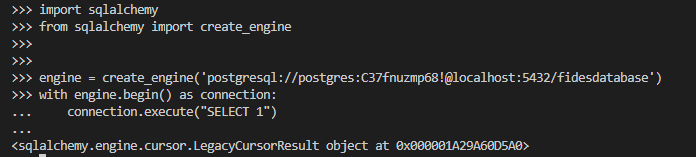 Didnt receive any error message in any terminals
Disclaimer: Writing this as a feedback and explaining my own experience. I think I wont be trying to use Fides for a while. Dealing with docker, linux systems etc. were too complicated for me. I am sure this is a good thing for senior devs and quality of the systems but for me, entrance bar was a bit high. I had a friend (Bachelors at Electrical Engineering, Masters at Data Science, has his own company, also a dev etc.) Said that this is too complicated for people like me and even mid-tier devs. Then again its an open-source system so I'm not even complaining. But yeah, just saying.
Disclaimer: Writing this as a feedback and explaining my own experience. I think I wont be trying to use Fides for a while. Dealing with docker, linux systems etc. were too complicated for me. I am sure this is a good thing for senior devs and quality of the systems but for me, entrance bar was a bit high. I had a friend (Bachelors at Electrical Engineering, Masters at Data Science, has his own company, also a dev etc.) Said that this is too complicated for people like me and even mid-tier devs. Then again its an open-source system so I'm not even complaining. But yeah, just saying.
We really appreciate the candid feedback, and are actively working to make the user experience better so that it doesn't have that feeling of impenetrability. We believe privacy is a human right, and therefore the tooling to make that a reality should be as accessible as possible 🙂 Thank you again for taking the time to try things out and even open an issue to describe your experience, it's really valuable for us!