

 eth-siplab
cannot compile with xcode
When I run xcode to compile this app, there are two errors I have installed protobuf30
Showing Recent Issues Undefined symbol: google::protobuf::internal::ExtensionSet::MergeFrom(google::protobuf::internal::ExtensionSet const&)
Undefined symbol: google::protobuf::internal::ExtensionSet::_InternalSerializeImpl(int, int, unsigned char*, google::protobuf::io::EpsCopyOutputStream*) const
my mac is 11.6.2 and canot update to mac 12 so how to figure it out? thank you.

It appears to be linking issues that are mentioned in the readme, but its not quite correctly constructed for rebuilding (at least in my environment. I had to skip basically everything. I needed to rebuild SVG2Keynote-lib after updating the protobuf generated libraries. using protoc -I=other/protos --cpp_out=gen other/protos/*.proto inside the keynote-protos off the library repo. After this I had a version libkeynote_lib.a which would successfully build this GUI repo.

I have the same problem (Unable to compile with Xcode)
I get the error: "Build input file cannot be found: 'path goes here.../KeynoteSVGUI/SwiftUIMenuBar.entitlements'
I'm not familiar with Xcode either, and would appreciate a little more detailed instruction on how to successfully compile.
Thanks,

I have the same issue with it like @Jason-belgian .
Build Failed. error build: Build input file cannot be found: '.../KeynoteSVGUI/SwiftUIMenuBar.entitlements'. Did you forget to declare this file as an output of a script phase or custom build rule which produces it?
Can someone please share a solution?

Following up on this issue i found a very simple solution.
- Download Open Office for Mac. (Its free)
- Design your shape in Illustrator and export it as .emf
- Create an Open Office empty Slideshow
- click "Insert" go on Image > From File
- choose your .emf file
- right click on the shape and click "break"
- save as Microsoft Powerpoint 2007 .ppt
- open the .ppt file with keynote DONE
Thank you @elevatemedia — I tested your strategy with Microsoft PowerPoint instead of OpenOffice, and it works the same way.

Thanks, @elevatemedia. I confirm that this also works with LibreOffice. In addition: if you don't have Illustrator, you can install Inkscape (open source) and use a simple CLI command to create an EMF file from any SVG file.
If you don't have Inkscape installed:
brew install --cask inkscape
Then, use this command to convert your SVG:
inkscape --export-type="emf" thing.svg
I just tried this, and it all worked fine on my Apple Silicon Mac. Now I can finally add custom shapes to Apple Keynote. Working with custom shapes gives you much more flexibility, such as better resizing and smoother animations.

Thank you @elevatemedia — I tested your strategy with Microsoft PowerPoint instead of OpenOffice, and it works the same way.
Hi @kitschpatrol,
How do you "break" the shape in Microsoft PowerPoint?
I followed all the @elevatemedia's instructions but when I open the PPT file in Keynote, my shape is displayed as an image and not an editable shape.
What's wrong?

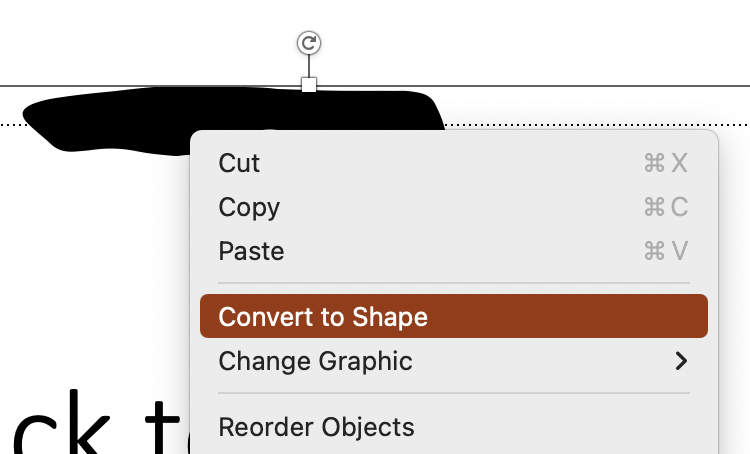
Hi @carycrusiau, after dropping the SVG onto a slide in PowerPoint, I context-clicked and chose "Convert to Shape", then saved out the pptx and opened in Keynote.
Hi @kitschpatrol,
Thank you very much! It works very well with this method!