

 etesync
Certificate Error on macOS Catalina
Can't say with certainty that this is Catalina-related, but I haven't seen the problem before.
The etesync-dav process is running on my machine as usual, but when I open my macOS Calendar application, I get:
Calendar can't verify the identity of the server "localhost" The certificate for this server is invalid. You might be connecting to a server that is pretending to be "localhost", which could put your confidential information at risk.
In the terminal where I started etesync-dav, I get:
[7000050e5000] ERROR: An exception occurred during request: SSL handshake failed: [Errno 0] Error
I tried to run the certificate generation tool again, and got:
% etesync-dav-certgen
etesync-dav-certgen: there is a certificate already, won't overwrite it
                     (but you can --force me).
etesync-dav-certgen: SSL is already set up, won't change your configuration
                     (but you can --force me).
etesync-dav-certgen: won't make the system trust the certificate
                     (unless you tell me with --trust-cert).
I ran it with --trust-cert, but was told that the certificate already exists.
I've also tried regenerating the certificate with --force to no avail.
Any idea how to proceed with debugging this?

First of all, please update etesync-dav. Certgen is now part of the main binary and a lot of issues have been fixed.
--force is no longer implemented, but you can open keychain, and remove this certificate. After it has been removed, you can try generating again (with the updated etesync-dav!).
I'm not aware of any issues with Catalina, but I don't have access to one to test for myself.
Are you able to connect to etesync-dav with safari?
Sorry for the old version, I'm used to getting updates through homebrew.
I downloaded the new version, opened the web interface, let it install the certificate and force SSL. Now I'm getting a fresh error:
[7000033b5000] ERROR: An exception occurred during request: SSL handshake failed: [SSL: WRONG_VERSION_NUMBER] wrong version number (_ssl.c:1056)
Going to try to manually remove the certificate and run it again...
Could you please make sure that you have "Use SSL" set in the calendar settings? I wonder if they maybe fixed the bugs they had in Mojave and it's now respected. This error usually just means someone is trying to connect with non-ssl to an ssl port.
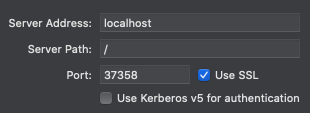
I deleted certificates pointing to localhost:37358 and localhost:37359, but the web UI doesn't seem to prompt me to install the certificates again. Can I use the CLI to do this? I checked --help, but this seems to only be options to the server instance.
Could you please try removing and re-adding the caldav account from the mac and make sure you follow the instructions in: https://github.com/etesync/etesync-dav/blob/master/macos-instructions.md
Afterwards, to make the UI suggest setting up a new certificate, you can delete the certificate and key from ~/.config/etesync-dav or whatever the mac equivalent is. I forgot. :)
Edit, the path is: ~/Library/Application\ Support/etesync-dav
I did:
- Deleted CalDAV and CardDAV accounts from the macOS Internet Accounts.
- Wiped
~/Library/Application\ Support/etesync-dav - Re-ran
etesync-dav, setup the account and let it derive the keys - Ran the SSL flow that installs the certificates
- Tried to setup the macOS CalDAV account with the new client password.
Unfortunately, same issue:

In the terminal running the process, same error:
[70000b216000] ERROR: An exception occurred during request: SSL handshake failed: [SSL: WRONG_VERSION_NUMBER] wrong version number (_ssl.c:1056)
Can you try doing it again, but this time, don't enable SSL in etesync-dav and try not ticking "Use SSL"?
I tried the same procedure (i.e., sudo rm -rf ~/Library/Application\ Support/etesync-dav before starting etesync-dav), but without clicking the "Setup SSL" button and not selecting "Use SSL" when adding the account in system preferences.
I got the same error in the accounts window, but don't see an error message from the etesync-dav process, so this doesn't seem to even reach the server. When I setup SSL, it again responded with the [70000e302000] ERROR: An exception occurred during request: SSL handshake failed: [SSL: WRONG_VERSION_NUMBER] wrong version number (_ssl.c:1056)-error, both with and without "Use SSL" (no visible difference).
OK, so it seems like they still haven't fixed the "use SSL" issue that they introduced in Mojave.
With SSL enabled again in etesync-dav, are you able to open any of the calendars in Safari? You should have a link in your user page from the web management UI.
Accessing the account from a browser, I can reach the list of calendars, which show up correctly. Clicking the calendar lets me download the .ics file after a long wait. So this works! I only get the SSL version error when trying to create the CalDAV/CardDAV account in macOS preferences.
Are you aware of any way to debug the Mac's Contacts.app and get debug output? I wonder what it thinks is going on.
Is anyone else facing issues with Catalina?
I seem to be having the same issues as definelicht on Mojave & Catalina, however I just registered for an EteSync account today now that iOS is supported. Going to keep playing around with it to see if it's something I'm doing wrong, but can also run some tests if it's not just user error. I don't know of a way to debug macOS' Contacts, but will look into it.
EDIT: Scratch that... Looks like I did get it working on my Catalina MBP. Got the certificate prompt when I tried adding CardDav but not CalDav. After accepting the cert CalDav worked. I'm going to try adding to my Mojave MBP again after work when I can get a chance to reboot. So far that was the only extra step I took on Catalina, after enabling SSL through the web GUI.

Thanks for the update @veritas06, any updates after your recent tests? It should work, and it definitely works on Mojave. I have yet to try Catalina unfortunately.
Is it even running on Catalina? I just came across https://github.com/mitchellh/gon which implies that it shouldn't.
I have not experienced that, the binary runs fine (I'm able to access the calendar through the browser, as mentioned above).
I followed the procedure of @veritas06 and got it to work. The certificate prompt does show up when adding the CardDAV account rather than the CalDAV account. After trusting this certificate, adding the CalDAV account works. So the workaround is to add contacts before calendar.
@tasn Maybe you can add this to the documentation as a temporary workaround?
This shouldn't be the case at all, because the certificate should be trusted automatically as part of certgen. God, macs are just so buggy. I'll add the comment to the mac instructions now.