

 esprfid
Support of Fingerprint readers?
Hello,
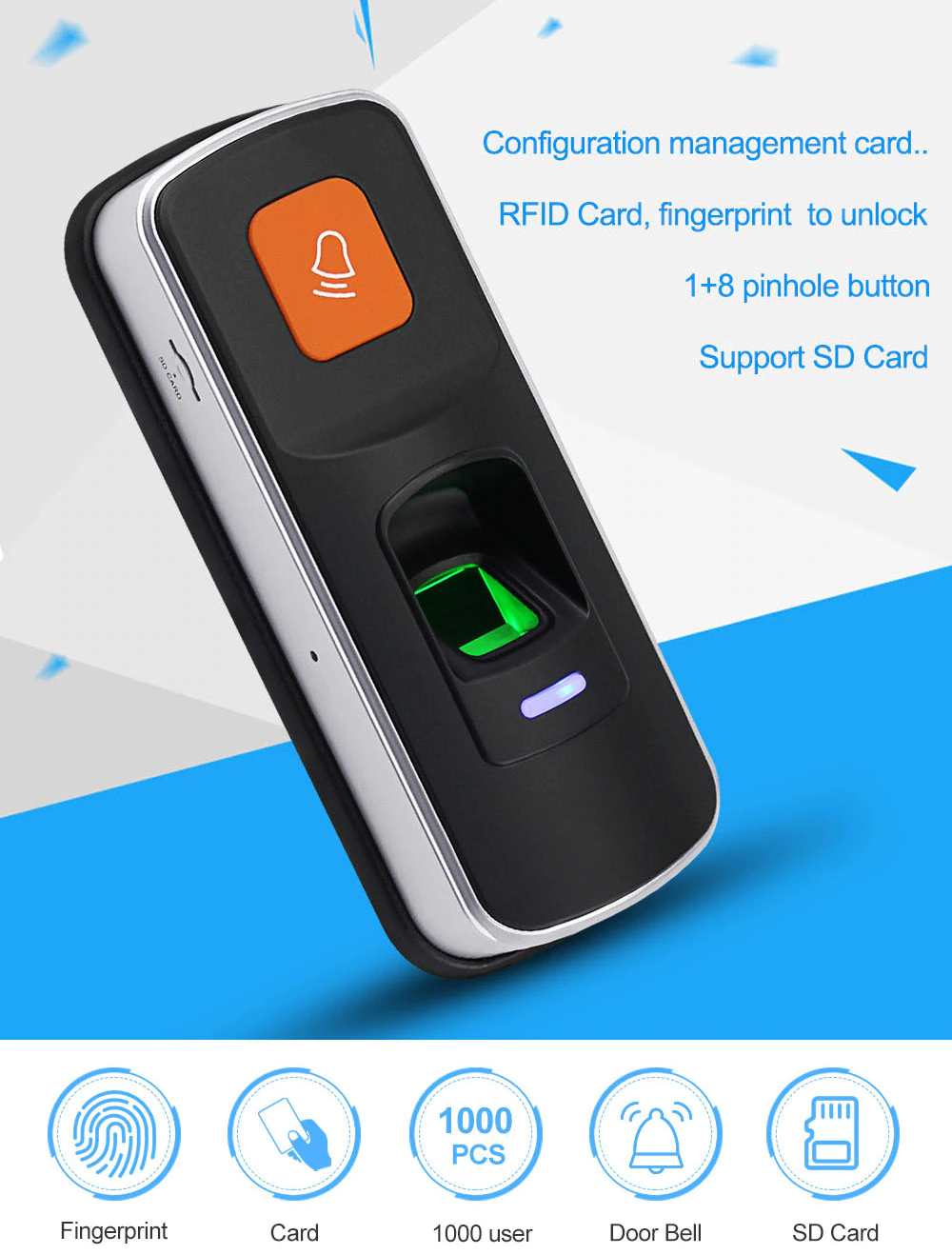
There are Wiegand Readers, that also have Fingerprint Modules, like this one.
Would this work as well? I could imagine, that this Device behaves as if a Keycard is held in front -but I am of course not sure.
Does anyone have Experience with this?
Regards, Hendrik

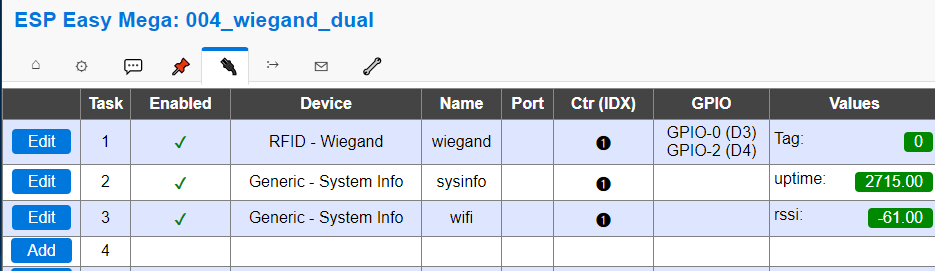
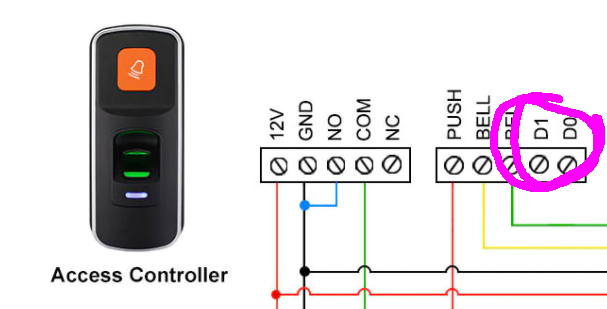
i have such fingerprint-readers running through wiegand Do/D1 on esp's with firmware "espeasy". running here like RFID or any other reader, as long as they are connected via Wiegand D0/D1 wires (is 5V).

Same for me... @ozett do you "hardcode" the passkeys inside espeasy somehow or you depend on same sort of host for code validation?
This project seems very promising for my use case... (and also interested on espeasy... i never used)

@fabiosoft the key-id is sent from esp-easy via MQTT to node-red. there i check and allow/deny the door-openings within a timeframe.

@fabiosoft the key-id is sent from esp-easy via MQTT to node-red. there i check and allow/deny the door-openings within a timeframe.
what is fingerprint ? Generic R307 Optical Fingerprint Reader?

a fingerprint-reader with a wiegand 24 output. (can also read RFID cards 125 MhZ) just 2 lines (Do/D1). in espeasy just configure already in a dropdown.
the reader is from aliexpress ~ 30€, running for years now fine outdoors,
Hello,
thanks for sharing. Did you use anything to change the Voltage? Wiegand needs 5V, whereas ESP8266 uses 3.3V.
Greetings, Hendrik
in 2016 i discovered some information that the esp-pins can take 5V (even if they are officially 3.3v). --> https://www.letscontrolit.com/forum/viewtopic.php?f=5&t=1617
since than may readers runs with 5v on the wiegand pins without levelshifter directly on the esp. working fine without any hassle since than
Hello,
thanks, I will have a look into it. Currently, I have this reader (I can currently not recommend it, as I get no support at all from the Manufacturer).
I have it connected to a level shifter using the TXS0108E.
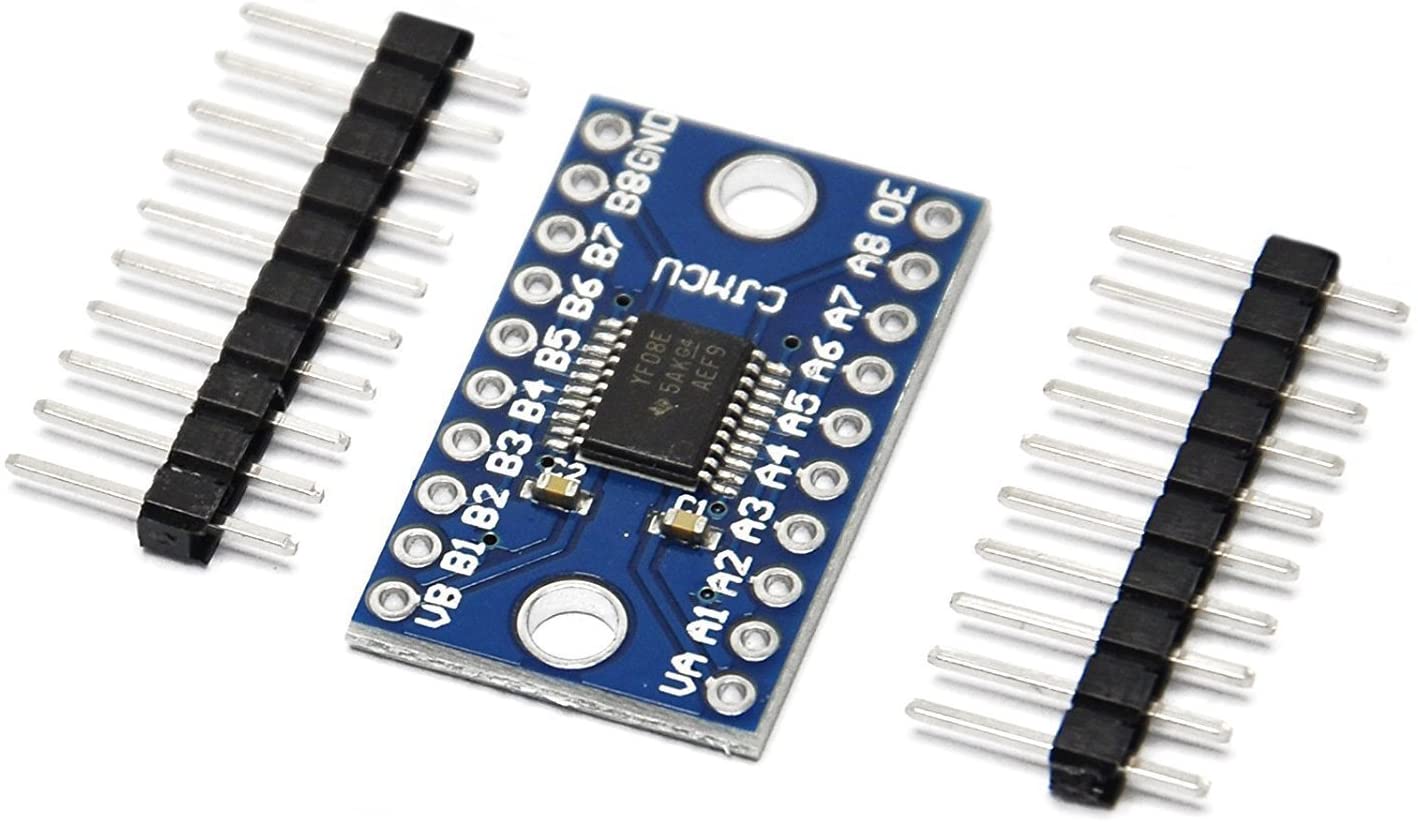
I have connected:
- GND: To the GND of the ESP which is also the GND of the Fingerprint reader
- VA to 5V on ESP module
- VB to 3.3V on ESP module
- A1, A2 to ESP D7, D6
- B1, B2 to Wiegand D0, D1
That is correct, isn't it? Nevertheless, I do not get anything from the reader in esprfid.
Do you see my mistake?
Regards, Hendrik
difficult diagnosis. i had same difficulties with level-shifter and finding an error, so i decided to risk one esp-board and connected the reader directly. (it all went well)
maybe you try this? get espeasy, the download includes the flashing tool.
wire power the reader with 12v, wire D0/D1 (5V) to two esp-pins directly. configure on espeasy a device for wiegand-reader and check log on the espeasy modul if there is key-id coming up.
or use an oszilloscope for D1/D0.. ?
by the way: How fast is the fingerprint reading on this reader? i considered to buy one...
Hello,
it works in principle (direct connection to wemos). Thanks for your hint. The problem is, that as soon as I put the reader (S4A TF1) into Reader (opposed to standalone mode), I cannot access the Admin mode anymore. Not much lock with the support yet. The fingerprint reading is fast though.
Regards, Hendrik
i dont looked up the manual. the reader seems to have wifi, too?
my reader "always"! sends card-id through wiegand. (even the readers dont allow access) with fingerprint, it sends only finger-id if the finger is allowed.
and i put the reader only for some minutes in admin-mode to read new finger. after that the reader stays in reader-mode (nomal-mode) for years..
Hello,
the Wifi is ridiculous. You can only open/close the lock. I was expecting to be able to manage Cards / Fingerprints as well, as possible for other readers (e.g. this one).
I have not yet checked cards. For fingerprints it is the same behaviour as you describe.
and i put the reader only for some minutes in admin-mode to read new finger.
Same here.
after that the reader stays in reader-mode (nomal-mode) for years..
Readermode here is not the counterpart to Admin-Mode.
The Device has three Modes:
- Standalone Access Control Mode
- Relay Toggle Mode
- Reader Mode
In 1&2 everything is done by the device itself, not via Wiegand.
So I need Mode 3. But as soon as I switch to that, I do not get into the admin mode (the one to add users) anymore.
Regards, Hendrik
is there no output on wiegand in mode 1 or 2 ? did you check?
anyways: can you acitvate admin-mode with a card or finger? or only via wifi? or never again after going into reader-mode?...
Hendrik, did you manage to resolve this? I am looking at buying the same keypad. Looking at the manual, in reader mode it seems you can only add fingerprints. So I imagine that if you add them by user id, then when you touch a fingerprint sensor, the user id would be sent via wiegand interface. Whereas when you touch the keypad by the RFID card, it should just send RFID card id via wiegand interface, and lastly if you type in a code on the keypad, in the reader mode it should just pass what you type via wiegand interface. This is probably why you can't add users in reader mode, as keypad is just passing what it reads. Are you able to confirm that TF1 is behaving in reader mode as I described? Thank you.

I have a different reader (but probably inside are the same) with keypad and fingerprint It works all independently and broadcast Wiegand information only for already registered fingerprints. it works standalone so I don’t know how useful is add to Wi-Fi network if I have to manually add and delete allowed people.
Any suggestions? I am open to solder wires if needed ahah 😂
what model? links?
suggestion: use reader wired to the esp-easy -- and than use esp-easy wireless to trigger door-opening with locks. 🧷
Hello,
the Wifi is ridiculous. You can only open/close the lock. I was expecting to be able to manage Cards / Fingerprints as well, as possible for other readers (e.g. this one).
I have not yet checked cards. For fingerprints it is the same behaviour as you describe.
and i put the reader only for some minutes in admin-mode to read new finger.
Same here.
after that the reader stays in reader-mode (nomal-mode) for years..
Readermode here is not the counterpart to Admin-Mode.
The Device has three Modes:
- Standalone Access Control Mode
- Relay Toggle Mode
- Reader Mode
In 1&2 everything is done by the device itself, not via Wiegand.
So I need Mode 3. But as soon as I switch to that, I do not get into the admin mode (the one to add users) anymore.
Regards, Hendrik
@henfri : It is not documented properly in the TF1 S4A manual. You have to really long press the * key until you get a beep followed by the mastercode and the # key. Then device is in admin mode when Wiegand reader mode is active.
best Ypo

Wow thanks. That is something that the tech-support could not tell me. I will give it a try!
How did you find out?
Did anyone find issues with S4A (tf1) in reader mode with virtual card number output setting (menu 532#)? This mode is the only one that passes actual code entered on the keypad and also the id of the programmed fingerprint. I find that despite the light on the keypad going green after entering 4 digit pin, it doesn't send anything to the controller (in my case Fanvil i32V) at times. Sometimes only 3rd attempt sends the code (or fingerprint). I am pretty sure it is not Fanvil unit, because if it gets something it can recognise, irrespective of whether it is the code that is programmed for access or not, it ends up in the log, but in cases when S4A reader lights the green light and nothing happens, there is no entry in the Fanvil log. Only the mifare tags have 100% reliable transfer of data to Fanvil unit, so it must be either a defect in my unit, or some interference that makes data completely invalid for Fanvil unit so it doesn't see it even as failed access.
Hello,
@henfri : It is not documented properly in the TF1 S4A manual. You have to really long press the * key until you get a beep followed by the mastercode and the # key. Then device is in admin mode when Wiegand reader mode is active.
I confirm this. Thanks a lot! Unbelievable that the Support could not tell me this. Again, how did you find out @ypoosn ?
Best regards, Hendrik
Hello,
I found something very concerning:
I have learned several Fingers. When a finger is now pressed on the reader, it sends the UID - starting with 1 - to the reader.
 So far so good.
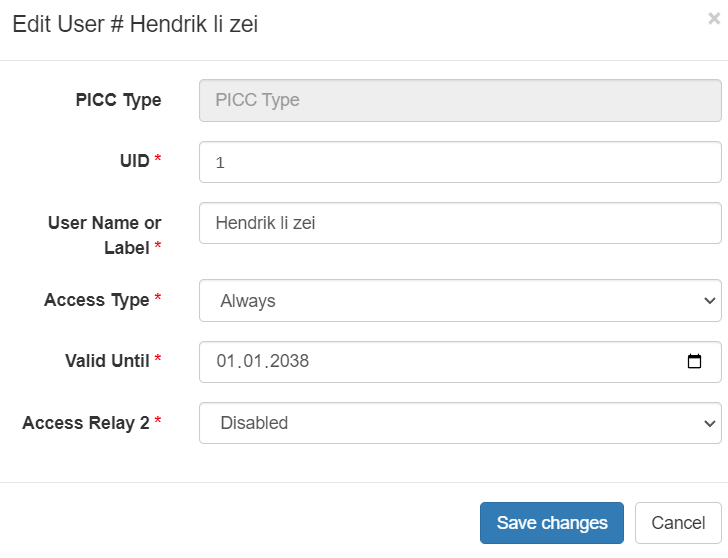
But now, if I enter just 1# via the keypad, the lock also opens - as if I had presented my finger.
Jun 19 18:54:24 esp-rfid/send {"cmd":"log","type":"access","time":1655657664,"isKnown":"true","access":"Always","username":"Hendrik li zei","uid":"1","door":"esp-rfid"}
Wow.. So, the only thing one needs to do in order to overcome the fingerprint is to enter random IDs starting with 1 followed by # ?!
Any ideas how to fix this?
Did anyone find issues with S4A (tf1) in reader mode with virtual card number output setting (menu 532#)? This mode is the only one that passes actual code entered on the keypad and also the id of the programmed fingerprint. I find that despite the light on the keypad going green after entering 4 digit pin, it doesn't send anything to the controller (in my case Fanvil i32V) at times. Sometimes only 3rd attempt sends the code (or fingerprint). I am pretty sure it is not Fanvil unit, because if it gets something it can recognise, irrespective of whether it is the code that is programmed for access or not, it ends up in the log, but in cases when S4A reader lights the green light and nothing happens, there is no entry in the Fanvil log. Only the mifare tags have 100% reliable transfer of data to Fanvil unit, so it must be either a defect in my unit, or some interference that makes data completely invalid for Fanvil unit so it doesn't see it even as failed access.
Sorry, I missed this one. I have the same problem. For all three options (Key, Finger, Card), the device seems to send only approximately evey third time something over wiegand. @luby1 were you able to solve this?
Best regards, Hendrik
Did anyone find issues with S4A (tf1) in reader mode with virtual card number output setting (menu 532#)? This mode is the only one that passes actual code entered on the keypad and also the id of the programmed fingerprint. I find that despite the light on the keypad going green after entering 4 digit pin, it doesn't send anything to the controller (in my case Fanvil i32V) at times. Sometimes only 3rd attempt sends the code (or fingerprint). I am pretty sure it is not Fanvil unit, because if it gets something it can recognise, irrespective of whether it is the code that is programmed for access or not, it ends up in the log, but in cases when S4A reader lights the green light and nothing happens, there is no entry in the Fanvil log. Only the mifare tags have 100% reliable transfer of data to Fanvil unit, so it must be either a defect in my unit, or some interference that makes data completely invalid for Fanvil unit so it doesn't see it even as failed access.
Sorry, I missed this one. I have the same problem. For all three options (Key, Finger, Card), the device seems to send only approximately evey third time something over wiegand. @luby1 were you able to solve this?
Best regards, Hendrik
Hi Hendrik, while I confirmed it is the unit itself rather than Fanvil video phone/controller, after spending too much time on the various configurations, I gave up at the end.
During initial testing when I had short cables and everything was inside, I never had a problem. Maybe it was pure luck then, but I do think it has something to do with stable temperature and/or air moisture level. For example, for the past 2 days, every time I used it, it worked the first time. I was using it when outdoor temperature was around 15-20 degrees centigrade mark. I also noticed when it fails, if I rubbed the keypad everywhere, then pressed '#' just to clear the buffer, and tried afterwards, it usually works after that. Whether this warms up the keyboard, or just 'wakes up' the reader from some kind of sleep, I don't know.
One thing that I didn't look into is the LED signal on Wiegand interface. During my initial testing indoors, I didn't bother connecting it and unit's LED appeared to be working independently fine. But when I had gate people come to install automation with 2 gates, I told them to connect LED wire since this is how fingerprint reader manual suggested it. I'll wait for summertime here in NZ in 6 months when it is dry and then try to open the pillar with wires and disconnect the LED signal, for my final test.
I also searched for similar unit that has keys you need to press, rather than this touch unit, but most of them I could find have no fingerprint reader and virtual keyboard mode, which I need.
Let me know if you get at the bottom of this issue.
Hello,
so, you gave up to improve it, but you are still using it, right?
What is your success-rate now? We are above 22°C here currently and the Device is exposed to sunlinght and thus even warmer.
Have you figured out, what the 532(virtual key) vs 531 and 530 modes mean for the Keypad usage?
I have the LED signal not connected (only 12V and the two Wiegand wires).
I was also thinking that the cable-length could be the reason. But Wiegand is supposed to be very stable.
Best regards, Hendrik
Hello,
so, you gave up to improve it, but you are still using it, right? What is your success-rate now? We are above 22°C here currently and the Device is exposed to sunlinght and thus even warmer. Have you figured out, what the
532(virtual key) vs531and530modes mean for the Keypad usage? I have the LED signal not connected (only 12V and the two Wiegand wires). I was also thinking that the cable-length could be the reason. But Wiegand is supposed to be very stable.Best regards, Hendrik
Yes, I use it and have learnt not to be too annoyed when it is not behaving. Just as I wrote that reply to you yesterday, the day became sunny and the keypad was exposed to it, and lo behold it failed first time after 2 days of stability. So I just rubbed the keypad all over, pressed '#' and then I was able to get it to go. Length of wires was my early suspicion but I have no way of proving it now when it's in use. The standard recommends using shielded wires, but my gate installer used just CAT6. The distance is around 10m, so even without being shielded, it should work, and it does work once you get it going. Once it starts working, I can just keep entering the codes and reader keeps sending them to fanvil with no issues. If length was a problem, then I would have at least intermittent issues even then, but I don't.
You see, when Fanvil gets a wrong code from the keypad (and this happens sometimes), it beeps (due to my configuration) and I can see it in the log. When keypad doesn't work, it actually doesn't send anything at all, since nothing is registered at fanvil.
Considering once you get it going, it works fine, I tend to think it is more temperature stability related, or perhaps there is a bug in its software where it just goes to sleep. For example, yesterday, the direct sun heated it up a bit, and I think this did something to the membrane or internals of the unit so it was not really doing anything until I rubbed the keypad everywhere first. So to answer your question, on average I have to intervene every few times I use the keypad. Or can use the tag instead, which seems to work reliably, provided you place the tag where it expects it (close to the fingerprint sensor). For example, if I open the gate when going for a walk with the dog with no issues, generally, I'll open it with no issues upon my return. Also, if I have to fiddle with it to get it to open when I go out, upon my return (30-45 minutes later) generally I also have no issues.
The 531 and 530 modes are for the devices that expect 8 bit burst or 4 bit burst. From what I understand, this is used when you have just a keypad and want to connect it to a mifare card reader which is also an access controller, or gets connected to another access controller. I was unsuccessful in using these modes with fanvil, because it expects wiegand data (32 bit).
I hope this helps.
Hello,
so, you gave up to improve it, but you are still using it, right? What is your success-rate now? We are above 22°C here currently and the Device is exposed to sunlinght and thus even warmer. Have you figured out, what the
532(virtual key) vs531and530modes mean for the Keypad usage? I have the LED signal not connected (only 12V and the two Wiegand wires). I was also thinking that the cable-length could be the reason. But Wiegand is supposed to be very stable.Best regards, Hendrik
BTW, I just did more tests with tag, and I can tell you that tag reading is almost 100% reliable. It has to be placed close to "0", and there is an ideal distance from the reader (not too far, but not touching it either). I also found that fingerprint is also sent to fanvil all the time, but obviously sometimes reader doesn't find the match if you don't place the finger properly, and this is indicated by a beep and red light.
So it seems only keypad is having issues in my case. Let me know if you solve this somehow at the end.