

 espressif
Where are Launcher Configurations & Targets saved (IEP-800)
I created new configurations & a new target from the Launch Bar in Eclipse CDT IDE 2022-09 for Windows that this plugin forces me to use, but I can't find the definitions for those anywhere in my project, so I can't save them to my version control repo. Am I expected to re-create them for every workspace because they're buried in the Eclipse .metadata at the root of each workspace?
Why do we have to use the legacy Launch Bar instead of the existing Debug (green bug icon) & Run (green play button icon) that are already on the Eclipse main toolbar, like every other modern plugin for Eclipse allows from within recent Eclipse versions? If I try to use those main toolbar Debug or Run Configuration to manage those configurations, it messes-up the Launcher configs. If I select one of my ESP-IDF configurations & click the Export Launch Configurations tool, I can't even export them anywhere else, that pop-up just seems to lock-up.
Is there an updated version of this plugin that integrates better with all that's available in the ESP-IDF CMD CLI console as well as with how recent Eclipse versions work? All of the environment variables are already in the ESP-IDF CMD console, why not just launch Eclipse from that CMD shell & have it import all that's already configured & working? For example, I copied the ESP-IDF CMD Windows shortcut the ESP-IDF Universal Installer for Windows created to a new "Eclipse lauched by ESP-IDF CMD" shortcut & added " && C:\App\eclipse\eclipse.exe" but the ESP-IDF plugin v2.6.0 doesn't seem to extract any information at all from the environment already provided by the ESP-IDF CMD. Instead, I have to re-install the entire ESP-IDF from within the plugin for it to learn where everything is.

Hi @JBHunterI,
Thank you for reporting this. In version 2.7.0, coming soon, we will provide a basic target list based on existing toolchains, so you will not have to create a separate target from the launch bar. It will be updated automatically after tool installation, so you need only select a port in case you are using a UART connection.
Regarding configurations. We decided to not bind the configuration to the specific project and let a user select a project inside the configuration, so you are correct, configurations are stored inside workspaces. But you can export the configuration and then import it in the other workspace. I just tried it like this and it works for me:
go to Run -> Run configurations... (or Debug configurations) -> Right click on the configuration you want to export -> Export
Or
File -> Export -> Run/Debug -> Launch Configurations -> Export
Then to import:
File -> Import -> Run/Debug -> Launch Configurations -> Import
Why do we have to use the legacy Launch Bar instead of the existing Debug (green bug icon) & Run (green play button icon) that are already on the Eclipse main toolbar, like every other modern plugin for Eclipse allows from within recent Eclipse versions?
Regarding Run & Debug icons. Do you mean these two buttons or something else?
 I was able to run and debug the project with them, can you specify please how exactly they messes-up the Launcher configs?
All of the environment variables are already in the ESP-IDF CMD console, why not just launch Eclipse from that CMD shell & have it import all that's already configured & working?
If you have already installed tools from esp-idf, they are stored in the .espressif folder. In this case, you don't need to reinstall the whole esp-idf and tools, you can select the existing esp-idf in Eclipse, click Install Tools to check if the tools are already installed, and just the plugin will just pick up and isolate the environment variables in the eclipse environment. But overall I understand your point and we will see what we can improve in this direction. Thank you

Glad to hear plugin v2.7.0 is coming soon. Looking forward to see the improvements you've made. So, correct me if I'm wrong but if I understand correctly, the Launch Bar will not be necessary anymore, instead we'll be able to use the Debug, Run, Profile, & External Tools icons (yes, as shown on the right in your Eclipse main toolbar screen capture above) exclusively?
As for exporting those configurations, I follow the menu path you gave above to bring this pop-up window:
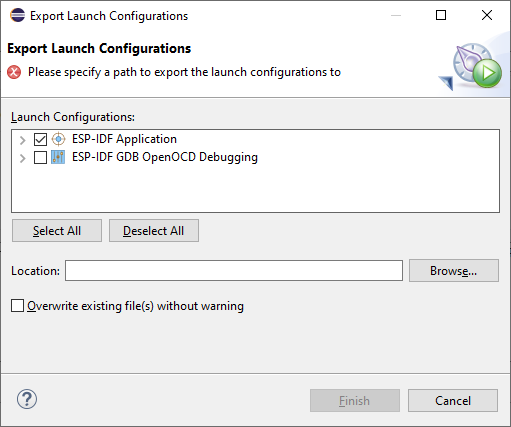 but anything else I click just rings the bell sounds, as if I clicked something that's not clickable. I can't expand either of the ESP-IDF Launch Configs by clicking the ">" icon beside each I can't even click the Cancel button or move the window. In fact, the only way I can get rid of this Export Launch Configurations window is to close the window behind it that brought it up (Run Configurations "Create, manage, and run configurations") by clicking its "X" in the top-right corner or its Close button, then click the "X" in the top-right corner of this Export Launch Configurations window.
Wait a minute, I've found that if I close its parent window (Run Configurations "Create, manage, and run configurations") by clicking its Close button, then I can access everything in the Export Launch Configurations window, including expanding the ">" icon beside each config & export them with the Finish button! I'd say that's an Eclipse bug, except I don't have this problem with STM32CubeIDE which is also Eclipse-based, where I've created/saved/version-controlled several launch configs in my projects.
In any case, I'm looking forward with simply saving them in correct place right when I initially create them with Debug/Run/Profile/External Tools -> Debug/Run/Profile/External Tools Configurations... -> New Launch Configuration icon -> Main tab ->Location -> Browse Workspace/File System.
When I install the plugin v2.6.0, then Espressif -> Download and Configure ESP-IDF -> select Use an existing ESP-IDF directory from file system -> enter %IDF_PATH%, this still downloads & extracts the entire ESP-IDF zip file & all the tools (even compiler for chips I don't want (I only use ESP32-C3)). And I don't use %USERPROFILE%.espressif because I want shorter paths in my system %PATH%, & for it to be usable by all users that can logon to my PC, so I install it in C:\App\ESP\esp-idf-vX.Y.Z. And everything gets updated again when I try to Espressif -> ESP-IDF Tools Manager -> List installed tools because:
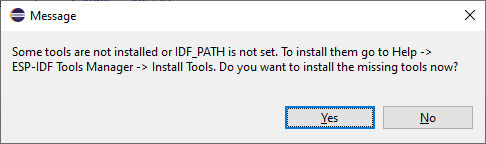 even though %IDF_PATH% (and a bunch of other variables) are already correctly defined in Window -> Preferences -> C/C++ -> Build -> Environment. Problem is, I have no choice but to run that (several times) for all the workspace environment variables to be set by the plugin. That's why I mentioned starting Eclipse from the ESP-IDF CMD shell that already has all the shell environment variables already set by the ESP-IDF Universal Installer for Windows, & make the plugin use those.
Please let me know when plugin v2.7.0 becomes available. How will I be able to upgrade plugin v2.6.0 to v2.7.0? Will I be able to uninstall v2.6.0 & install v2.7.0? Will I have to restart with a fresh install of Eclipse & then install v2.7.0?
Hi @JBHunterI
So, correct me if I'm wrong but if I understand correctly, the Launch Bar will not be necessary anymore, instead we'll be able to use the Debug, Run, Profile, & External Tools icons (yes, as shown on the right in your Eclipse main toolbar screen capture above) exclusively?
I was speaking about the launch target list
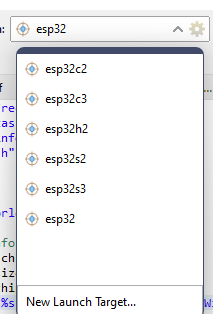
You don't have to create a new target, just need to select it from this list. And in this list will be presented all targets, that come with esp-idf toolchains. For now, the launch bar is only necessary for selecting a target (It's the only way to select a target for UART flashing) and it makes configuration more accessible (for example, you can edit the configuration with one click). But you can use standard Run and Debug buttons. I don't see problems with them. If you have any, can you specify them, please?
If you are using a JTAG connection, you don't need Launch Bar and you can use only standard buttons because you can specify targets in configuration settings. So to use standard Run & Debug buttons:
Click on Run or Debug Icon
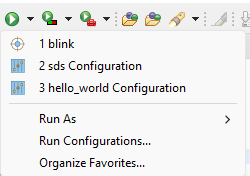 Run Configurations...-> On the next page select your project configuration, target -> Run
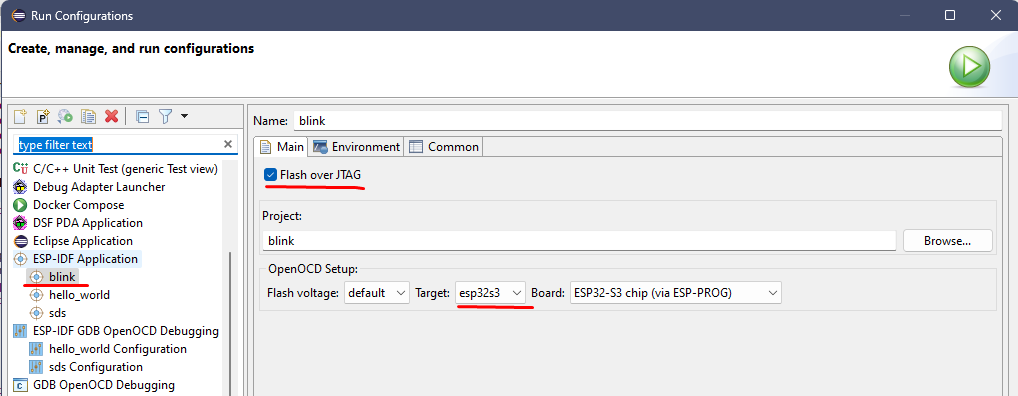 After that configuration will be added to the Run list.
Wait a minute, I've found that if I close its parent window (Run Configurations "Create, manage, and run configurations") by clicking its Close button, then I can access everything in the Export Launch Configurations window, including expanding the ">" icon beside each config & export them with the Finish button! I'd say that's an Eclipse bug, except I don't have this problem with STM32CubeIDE which is also Eclipse-based, where I've created/saved/version-controlled several launch configs in my projects.
I don't have this bug on my Eclipse either. I'll make a video tomorrow to show how it works on my Eclipse, maybe I missed something
When I install the plugin v2.6.0, then Espressif -> Download and Configure ESP-IDF -> select Use an existing ESP-IDF directory from file system -> enter %IDF_PATH%, this still downloads & extracts the entire ESP-IDF zip file & all the tools (even compiler for chips I don't want (I only use ESP32-C3)). And I don't use %USERPROFILE%.espressif because I want shorter paths in my system %PATH%, & for it to be usable by all users that can logon to my PC, so I install it in C:\App\ESP\esp-idf-vX.Y.Z. And everything gets updated again when I try to Espressif -> ESP-IDF Tools Manager -> List installed tools because:
Oh, I got your point now. For now, install tools will install all recommended tools. And it's true that for now, we are forcing users to click on "Install Tools", to prevent some issues. In 2.6.0 we added "Tools Installation Wizard", which allows you to select and install only a few of them, but it's now still in a preview state. I noted your points and we will try to implement improvements in the current behavior. Thank you.
Please let me know when plugin v2.7.0 becomes available. How will I be able to upgrade plugin v2.6.0 to v2.7.0? Will I be able to uninstall v2.6.0 & install v2.7.0? Will I have to restart with a fresh install of Eclipse & then install v2.7.0?
You can upgrade your existing version to 2.7.0 by following this. It will be available probably soon next week, I will update you on that. Also, you could use the latest Espressif-IDE (you will find it here https://github.com/espressif/idf-eclipse-plugin/releases). Espressif IDE is a standalone IDE packaged with the IDF eclipse plugin, Eclipse CDT, CMake editor plugins, OpenOCD plugins, and other useful plugins. It weighs less than 170 MB and it's portable.
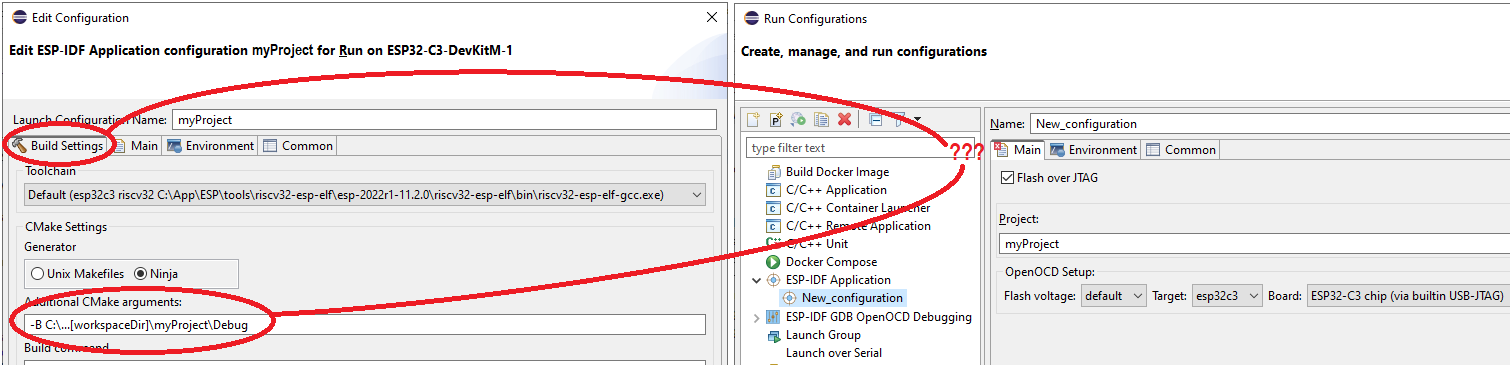
OK, so the Target Config is not the problem (although I still to enter my COM port number for the console) but when I try to create a new Run config from Run -> Run Configurations... there's no Build Settings tab to the left of the Main tab like I see in the Launch Bar's Run config of the same name, so where do I put my indispensible Additional CMake arguments "-B ${project_loc}\Debug"?
Yes, I've been using the Tools Installation Wizard (Preview) but it doesn't seem to cause the workspace environment variables to get updated at all, i.e. I still need to run Install Tools for those to get added. Also, I have to be careful I don't add old versions of tools because they all have a check-mark by default.
My company's IS dept won't let me run the Eclipse-IDE because it comes-up with:
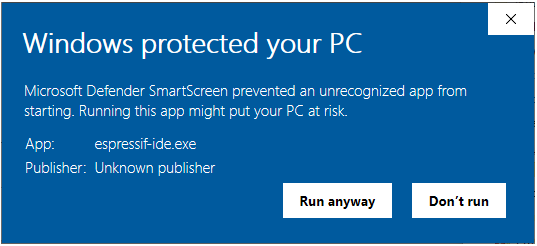 When the Eclipse Marketplace shows v1.1.0 but it's dated March & June 2020, yet my Eclipse shows:
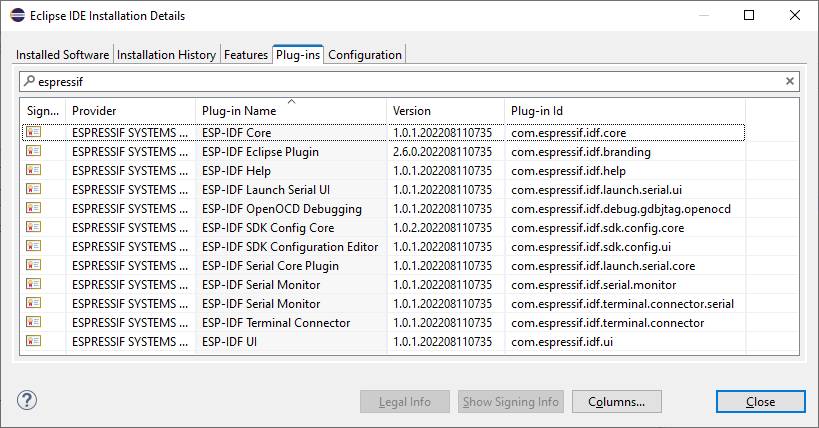 then I'm completely confused about the version numbering. Guess I'll just try to upgrade what I can when Eclipse tells me it's available. Reeeaaallly hope v2.7.0 improves this thing.
Hi @JBHunterI,
OK, so the Target Config is not the problem (although I still to enter my COM port number for the console) but when I try to create a new Run config from Run -> Run Configurations... there's no Build Settings tab to the left of the Main tab like I see in the Launch Bar's Run config of the same name, so where do I put my indispensible Additional CMake arguments "-B ${project_loc}\Debug"?
You are right, the Build Settings tab is not available on this page. We will fix it.
Yes, I've been using the Tools Installation Wizard (Preview) but it doesn't seem to cause the workspace environment variables to get updated at all, i.e. I still need to run Install Tools for those to get added. Also, I have to be careful I don't add old versions of tools because they all have a check-mark by default.
Noted. Will take a closer look at it. Thank you
Installed the Plugin v2.7.0 and can confirm that I can set the COM port when I create a new launch target (File -> New -> Other -> Launch Target (Next button) -> ESP Target (Next button)) and I can create a a new run config (right-click project -> Run As -> Run Configurations... -> right-click ESP-IDF Application -> New Configuration) and from that the chip gets set correctly during the build in the Console out (riscv32-esp-elf-g++.exe ... -march=rv32imc , esptool.py --chip esp32c3 ...) but there's no place for me to put my indispensible Additional CMake arguments "-B ${project_loc}\Debug" option because there's no Build Settings tab to the left of the Main tab like I see in the Launch Bar's Run config of the same name
 Also, the project configuration management (sun dial) and the build (hammer) tools are still grayed-out. This is a problem because the list of launch configurations gets messed-up when I use the Launch Bar & the Run Configurations screens to manage them.
Other than by passing the "-B <build_directory>" option to idf.py, how else can this ESP-IDF Eclipse Plugin build the "Multiple Build Configurations Example" (build_system -> cmake -> multi_config)?
I hadn't noticed before, but even with the "-B <build_directory>" option passed to idf.py, there's still a "${project_loc}/build/ide/esp_idf_components" that's created in my hello_world example. Why isn't that saved with all the other output in my specified <build_directory>?
Confirmed that this only occurs when building from within the Eclipse IDE, that is a "${project_loc}/build/ide/esp_idf_components" directory structure does not appear when running a clean "idf.py -B ${project_loc}\Release all" from a ESP-IDF CMD shell with the same project & the same files.
Other than by passing the "-B <build_directory>" option to idf.py, how else can this ESP-IDF Eclipse Plugin build the "Multiple Build Configurations Example" (build_system -> cmake -> multi_config)?
I wonder the same - I can build it with expected results from terminal, but I can't really build it from Eclipse at all.
