

 esp8266
ESP8266HTTPClient does not send any packets and always responds -1 as status code
Basic Infos
- [X] This issue complies with the issue POLICY doc.
- [X] I have read the documentation at readthedocs and the issue is not addressed there.
- [X] I have tested that the issue is present in current master branch (aka latest git).
- [X] I have searched the issue tracker for a similar issue.
- [X] If there is a stack dump, I have decoded it.
- [X] I have filled out all fields below.
Platform
- Hardware: ESP8266 NodeMCU V3
- Core Version: [latest git hash or date]
- Development Env: Platformio
- Operating System: Ubuntu 22.04
Settings in IDE
- Module: espressif8266
- Flash Mode:
- Flash Size: 4mb
- lwip Variant:
- Reset Method: nodemcu
- Flash Frequency:
- CPU Frequency: 80Mhz
- Upload Using: SERIAL
- Upload Speed: 115200
Problem Description
I'm trying to do an HTTP POST to a web server running on a Kubernetes cluster. Yes, the server is working, it is open (NodePort) and I can make this request with POSTMAN or javascript fetch API. CORS is allowing all fonts.
Here is some evidence:
Telnet:
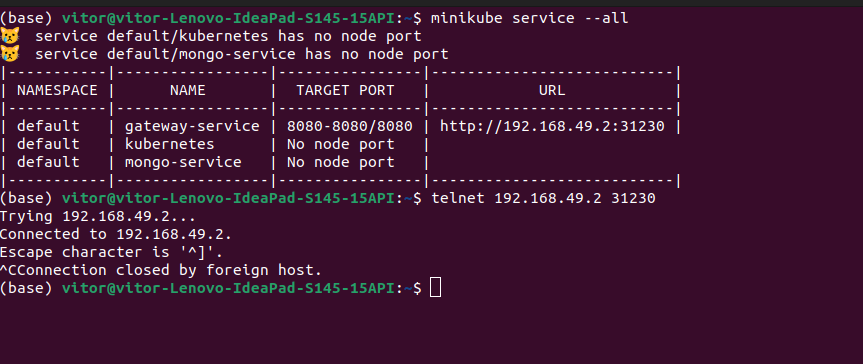
Fetch:
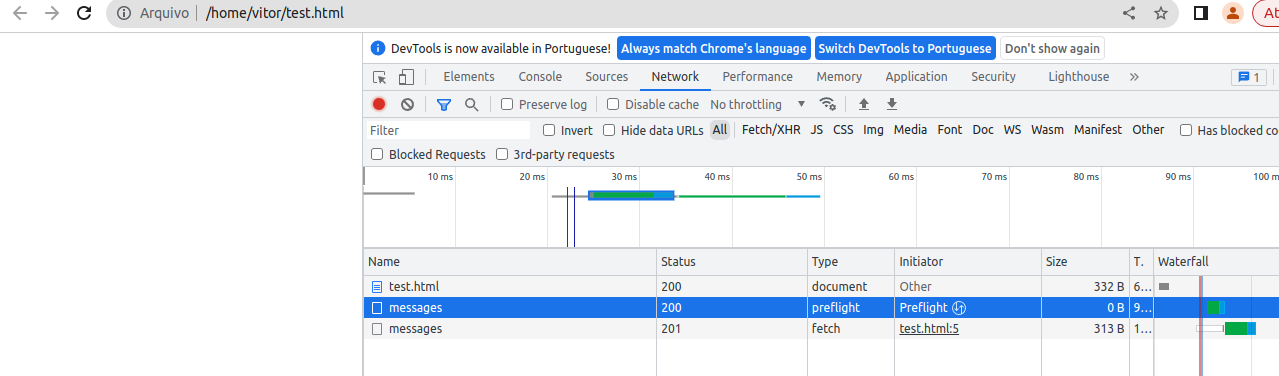
The problem is that ESP8266 does not send any packets to my application. I know this because I sniffed packets (using Wireshark) on my Kubernetes cluster and the HTTPClient code doesn't even touch my application.
(Just in case any questions: I started my web server on localhost and tried the same HTTP request and the response is also -1).
Here are the code:
main.cpp file:
#include "webserver.h"
#include "http_requests.h"


void setup()
{
    Serial.begin(115200);
    delay(1000);
// init_access_point and connect_wifi comes from webserver.h
    init_access_point();
    connect_wifi();
    delay(1000);
}

void loop()
{
// This comes from webserver.h
    get_server().handleClient();

// This comes from http_request.h
    do_post();
    delay(3000);
}
webserver.h file:
(I omitted a part of the code.)
#include <WiFiManager.h>
#include <ESP8266WiFi.h>
#include <ESP8266WebServer.h>
#include <SD.h>
#include "index.h"
#include "device.h"
#include "wifi.h"
#include <ArduinoJson.h>
#include <json_utils.h>
#include "FS.h"
#include "file_crud.h"

const char *wifi_ssid  = "my home wifi";
const char *wifi_password = "my home wifi passord";
void connect_wifi()
{

        Serial.println("Connecting to Wifi");
        IPAddress ip(192, 168, 1, 50);
        IPAddress dns(8, 8, 8, 8); // Google dns
        IPAddress gateway(192, 168, 1, 1);
        IPAddress subnet(255, 255, 255, 0);
        WiFi.config(ip, dns, gateway, subnet);
        WiFi.mode(WIFI_STA);
        WiFi.begin(wifi_ssid, wifi_password);


    int tries = 0;
    while (WiFi.status() != WL_CONNECTED && tries <= 30)
    {
        tries++;
        delay(1000);
        Serial.print(".");
    }

    Serial.println(WiFi.status() == WL_CONNECTED ? "Connected" : "Not connected");
}

const char *board_ssid = "ssid";
const char *board_password ="password" ;

void init_access_point()
{

    init_fs();
    WiFi.softAP(board_ssid, board_password);

    server.on("/something", handle_that);
    server.on("/other-stuff", handle_other_stuff);

    server.begin();
    Serial.println("Server listening");
    delay(3000);
}
And finally, here comes http_requests.h file:
#include <Arduino.h>
#include <ESP8266WiFi.h>
#include <ESP8266HTTPClient.h>
#include <json_utils.h>


void do_post()
{
    if (WiFi.status() == WL_CONNECTED)
    {
        WiFiClient client;

        HTTPClient http;

//generate_message_json is working fine!!!
        String body = generate_message_json(WiFi.macAddress(), "TEST TESTE");


        while (!http.begin(client, "http://192.168.49.2:31230/messages"))
        {
            delay(1000);
        }


        http.addHeader("Content-Type", "application/json; charset=UTF-8");

        Serial.println("body: ");
        Serial.println(body);

        Serial.println();

// httpCode allways is returning -1
        int httpCode = http.POST(body);

        Serial.println("HTTP STATUS RESPONSE: ");
        Serial.println(httpCode);

        http.end();
    }
}
DEBUG LOGS
SDK:2.2.2-dev(38a443e)/Core:3.0.2=30002000/lwIP:STABLE-2_1_2_RELEASE/glue:1.2-48-g7421258/BearSSL:6105635
fpm close 3
mode : softAP(ae:0b:fb:da:97:f7)
add if1
dhcp server start:(ip:192.168.4.1,mask:255.255.255.0,gw:192.168.4.1)
bcn 100
bcn 0
del if1
usl
add if1
dhcp server start:(ip:192.168.4.1,mask:255.255.255.0,gw:192.168.4.1)
bcn 100
Server listening
Connecting to Wifi
mode : sta(ac:0b:fb:da:97:f7) + softAP(ae:0b:fb:da:97:f7)
add if0
bcn 0
del if1
mode : sta(ac:0b:fb:da:97:f7)
..scandone
state: 0 -> 2 (b0)
.state: 2 -> 3 (0)
state: 3 -> 5 (10)
add 0
aid 1
cnt

connected with MY HOME WIFI, channel 4
ip:192.168.1.50,mask:255.255.255.0,gw:192.168.1.1
ip:192.168.1.50,mask:255.255.255.0,gw:192.168.1.1
.Connected
[HTTP-Client][begin] url: http://192.168.49.2:31230/messages
[HTTP-Client][begin] host: 192.168.49.2 port: 31230 url: /messages
body:
{"macAddress":"AC:0B:FB:DA:97:F7","operation":"TEST TESTE"}

[HTTP-Client][sendRequest] type: 'POST' redirCount: 0
[HTTP-Client] failed connect to 192.168.49.2:31230
[HTTP-Client][returnError] error(-1): connection failed
HTTP STATUS RESPONSE:
-1
Why the code is allways returning -1 and what can I do to solve it?


IPAddress gateway(192, 168, 1, 1);
...and you sure it is routable? I don't see any issues with the current http client version
I'm sorry for the lack on the time on my reply. I was really busy.
I don't know how to get version of the library with platformio. Can you give me some help?
Here are my platformio.ini:
[env:esp01_1m]
platform = espressif8266
board = nodemcuv2
framework = arduino
upload_port = /dev/ttyUSB0
lib_deps =
	567
	; alanswx/ESPAsyncWiFiManager@^0.31
	; me-no-dev/ESP Async WebServer@^1.2.3
	bblanchon/ArduinoJson@^6.19.4
	ESP8266HTTPClient
	SPIFFS
monitor_speed = 115200
And, yes, the my webserver is routable and accessible as I showed on the prints.
Here are the debug logs:
SDK:2.2.2-dev(38a443e)/Core:3.0.2=30002000/lwIP:STABLE-2_1_2_RELEASE/glue:1.2-48-g7421258/BearSSL:6105635
fpm close 3
mode : softAP(ae:0b:fb:da:97:f7)
add if1
dhcp server start:(ip:192.168.4.1,mask:255.255.255.0,gw:192.168.4.1)
bcn 100
bcn 0
del if1
usl
add if1
dhcp server start:(ip:192.168.4.1,mask:255.255.255.0,gw:192.168.4.1)
bcn 100
Server listening
Connecting to Wifi
mode : sta(ac:0b:fb:da:97:f7) + softAP(ae:0b:fb:da:97:f7)
add if0
bcn 0
del if1
mode : sta(ac:0b:fb:da:97:f7)
..scandone
state: 0 -> 2 (b0)
.state: 2 -> 3 (0)
state: 3 -> 5 (10)
add 0
aid 1
cnt

connected with MY HOME WIFI, channel 4
ip:192.168.1.50,mask:255.255.255.0,gw:192.168.1.1
ip:192.168.1.50,mask:255.255.255.0,gw:192.168.1.1
.Connected
[HTTP-Client][begin] url: http://192.168.49.2:31230/messages
[HTTP-Client][begin] host: 192.168.49.2 port: 31230 url: /messages
body:
{"macAddress":"AC:0B:FB:DA:97:F7","operation":"TEST TESTE"}

[HTTP-Client][sendRequest] type: 'POST' redirCount: 0
[HTTP-Client] failed connect to 192.168.49.2:31230
[HTTP-Client][returnError] error(-1): connection failed
HTTP STATUS RESPONSE:
-1
I don't know how to get version of the library with platformio. Can you give me some help?
See PACKAGES list in PIO output, platform = espressif8266 without a version means it uses whatever you have installed and not necessarily the latest version
And, yes, the my webserver is routable and accessible as I showed on the prints.
I meant from the device itself, using some other connection method. In the message above I don't see anything checking that, only that you attempt connection from your local machine.
Meaning, something like to connect with WiFiClient to echo blah | ncat server. Or, WiFiTelnetToSerial.ino
Hello, i'd like to come back here and say that the problem was on my infrastructure.
For somehow, the firewall was blocking WiFiClient to reach a port.
I changed my Kubernertes flavor and everything goes fine. I even put my Kubernetes on cloud and everything goes ok.
So thank you for your time.