
evobot
 evobot copied to clipboard
 eritislami
🐛 Evobot 2.3.1 stops music queue twice and the object destroys itself
Describe the bug A description of what the bug is.
How To Reproduce Steps to reproduce the behavior:
- play a song
- stop the song with the emoji (stop button reaction)
- bot ended the queue twice
Expected behavior A description of what you expected to happen. bot end the queue once. When it ends the queue twice should destroy 2 objects and the bot crash Environment (add if possible)
- Node.js version: 18.9.0
Additional information & screenshots

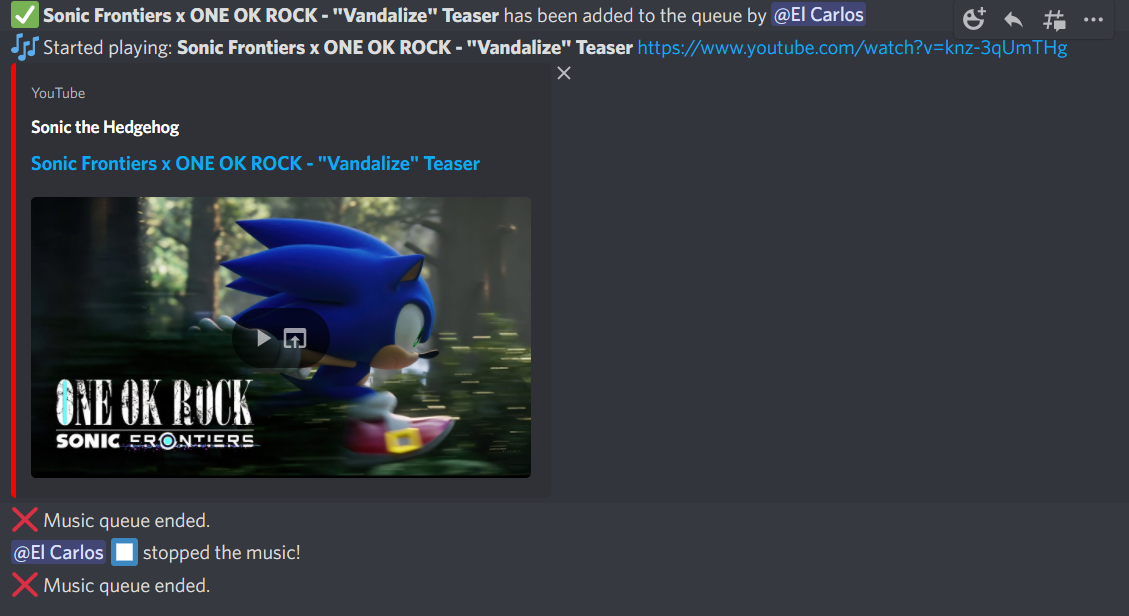
Add any other context or screenshots about the problem here.


I'm not too familiar with Node so it might not be the best way, but I managed to fix it by editing the file structs/MusicQueue.ts and replacing the line 121:
this.connection.destroy();
with the following:
if (this.connection.state.status !== VoiceConnectionStatus.Destroyed) {
  try {
     this.connection.destroy();
  } catch {}
}

This issue has been automatically marked as stale because it has not had recent activity. It will be closed if no further activity occurs. Thank you for your contributions.
![stale[bot] avatar](https://avatars.githubusercontent.com/in/1724?v=4 "Published by a pub.dev verified publisher")
I'm not too familiar with Node so it might not be the best way, but I managed to fix it by editing the file
structs/MusicQueue.tsand replacing the line 121:this.connection.destroy();with the following:
if (this.connection.state.status !== VoiceConnectionStatus.Destroyed) {
  try {
     this.connection.destroy();
  } catch {}
}
Thanks for the solution.
It fix the object destroying itself twice and killing the process. But it's still destroying the object and leaving the channel when you add more songs to the queue after a "stop" command.
Should be handled by #1318
When @Quack6666 posted the solution (same as the commit) I've been testing and it fixes partially the solution as I mentioned here
I'm not too familiar with Node so it might not be the best way, but I managed to fix it by editing the file
structs/MusicQueue.tsand replacing the line 121:this.connection.destroy();with the following:
if (this.connection.state.status !== VoiceConnectionStatus.Destroyed) {
  try {
     this.connection.destroy();
  } catch {}
}
Thanks for the solution.
It fix the object destroying itself twice and killing the process. But it's still destroying the object and leaving the channel when you add more songs to the queue after a "stop" command.
Should be handled by #1318
When @Quack6666 posted the solution (same as the commit) I've been testing and it fixes partially the solution as I mentioned here
I'm not too familiar with Node so it might not be the best way, but I managed to fix it by editing the file
structs/MusicQueue.tsand replacing the line 121:this.connection.destroy();with the following:
if (this.connection.state.status !== VoiceConnectionStatus.Destroyed) {
  try {
     this.connection.destroy();
  } catch {}
}
Thanks for the solution. It fix the object destroying itself twice and killing the process. But it's still destroying the object and leaving the channel when you add more songs to the queue after a "stop" command.
Same thing here, sometimes it doesn't do it but sometimes it does still.

Should be handled by #1318
When @Quack6666 posted the solution (same as the commit) I've been testing and it fixes partially the solution as I mentioned here
I'm not too familiar with Node so it might not be the best way, but I managed to fix it by editing the file
structs/MusicQueue.tsand replacing the line 121:this.connection.destroy();with the following:
if (this.connection.state.status !== VoiceConnectionStatus.Destroyed) {
  try {
     this.connection.destroy();
  } catch {}
}
Thanks for the solution. It fix the object destroying itself twice and killing the process. But it's still destroying the object and leaving the channel when you add more songs to the queue after a "stop" command.
Same thing here, sometimes it doesn't do it but sometimes it does still.
Everytime I use Stop command (my "STAY_TIME" is 30 seconds) if I play another song before that, the bot will play the song but It will leave the channel anyways after that 30s. That happens to me.