

 eranif
[bug] : SFTP plugin not working anymore on Windows version 16.0.0 and 17.0.0
Hello,
I'm not able to use anymore the SFTP plugin on codelite 17.0.0, windows version.
I always have this error when I test the connection :
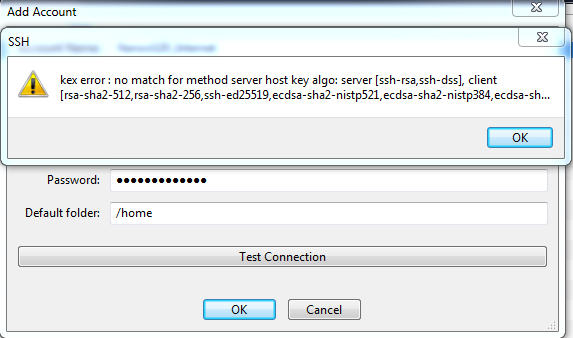
Version : 17.0.0 for windows ExtraPutty configure as client for SFTP

Hi,
The error indicates that the client's HostKeyAlgorithms don't match any of the server's, in this case ssh-rsa and ssh-dss (considered legacy algorithms/insecure).
Possible solutions:
- update/reconfigure the server to use modern HostKeyAlgorithms
- configure the client to use legacy HostKeyAlgorithms
- use an older client
Regards,

Thanks for the answer but to be honest I'm not sure to understand. Out of Codelite, I'm using extraPutty to connect to the server and it is working perfectly. In codelite, I configured extraPutty as the client to use for SFTP. I can only configure that, no other options. This worked like a charm until a certain version. Now in v16.0.0 and v17.0.0 I have this message when I test the connection and I'm not able to establish the connection. I'm ok to change something in my server configuration but this behavior appears to me as a regression since it was functional before.
btw, I did find this bug report:
https://bugzilla.redhat.com/show_bug.cgi?id=1953591
Which has the exact same error you as (and CodeLite, too, is using libssh)

No guarantees but you could try adding HostkeyAlgorithms +ssh-rsa to ~\.ssh\config.
@nullptrdevs you mean on the server itself ?
My server is a SBC board (linux embedded) and currently the Openssh version used on it is 5.1. It is only supporting rsa + dss key algorithm. The solutions I see for the moment :
- Try to recompile openssh for my linux board : out of my skills I think
- Used a previous version of Codelite : it works. Version 15.0.0 is ok.
- Try to copy paste libssh DLL of version 15.0.0 on version 17.0.0. Not done yet... do you think it will work ?
Anyway, thank you for your support.
Client side (edit or create the file %USERPROFILE%\.ssh\config), feel like libssh should be checking it.
BTW, with this commit: https://github.com/eranif/codelite/commit/b1005a7d2b26552f48700a831f9cebebb46e2281 You should be able to alter the key algorithms
Thank you @eranif ! Do you know when it will be possible to download a build/pre-build of codelite including this modification ?
I can probably upload a build in the next hour and will send you a link. This serves us both, as this way you can confirm that the fix works
You can try this version (not public yet):
https://downloads.codelite.org/codelite/17.1.0/codelite-amd64-17.1.0.exe
Sorry @eranif I didn't had time to test it. I'll try today or tomorrow and let you know the result.
@eranif I used thhe version 17.1.0 and it is not working.
According to your commit I have to set some environment variables if I'm not wrong. Here is the variables I used :
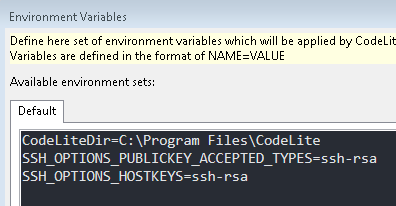
Is it right ?
the original error was about KEX kex error:...
Did you try setting the environment variable SSH_OPTIONS_KEY_EXCHANGE?
Here is the doc: https://api.libssh.org/stable/group__libssh__session.html#ga7a801b85800baa3f4e16f5b47db0a73d
I have enabled these 3:
SSH_OPTIONS_KEY_EXCHANGE
SSH_OPTIONS_HOSTKEYS
SSH_OPTIONS_PUBLICKEY_ACCEPTED_TYPES
I tried this config :
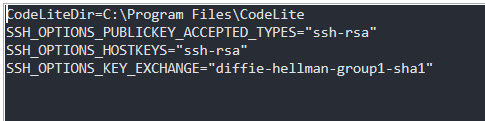
But I still have the exact same issue when I test the connection :
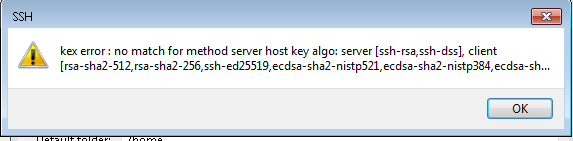
Looks like the SSH client (in CodeLite) does not apply the environment you defined in the above dialog...
- You can try and set them in Windows environment and then launch CodeLite
- Wait for a new CodeLite to try
I have uploaded another installer. You can use the same link - this time, it should be able to apply the environment variables before launching the ssh
Same issue with this last version. I have the same error message when I test the connection.
The only way to reproduce it on your side is to try to connect to a SSH server with old key alo (ssh-rsa or ssh-dss).
can you:
- Run
sshfrom a terminal with-vand paste the output here? - Did you try adding this to your config file?
HostkeyAlgorithms +ssh-rsa(as suggested above) On Windows, CodeLite is using this file:%HOMEPATH%\.ssh\config(if it does not exist, create it) Something like this:
Host 127.0.0.1
  HostName 127.0.0.1
  HostkeyAlgorithms +ssh-rsa
On my linux board, ssh -v is giving this :

On windows, I created a "config" file with the information you gave to me but I still have the same issue.
This issue has been automatically marked as stale because it has not had recent activity. It will be closed if no further activity occurs (within 5 days). Thank you for your contributions.
![stale[bot] avatar](https://avatars.githubusercontent.com/in/1724?v=4 "Published by a pub.dev verified publisher")