text-detection-ctpn
 text-detection-ctpn copied to clipboard
 eragonruan
run demo successfully!(在windows下成功运行demo.py)
I mainly follow issue#73 with some changes. my environment is: windows10 , python3.7 , tensorflow1.13 , vs2019
step 1:make some change change "np.int_t " to "np.intp_t" in line 25 of the file lib\utils\bbox\nms.pyx otherwise appear " ValueError: Buffer dtype mismatch, expected 'int_t' but got 'long long' " in step 6.
step 2:updata c file execute:cd your_dir\text-detection-ctpn-master\lib\utils\bbox execute:cython bbox.pyx execute:cython nms.pyx
step 3:create setup file as setup_new.py import numpy as np from distutils.core import setup from Cython.Build import cythonize from distutils.extension import Extension numpy_include = np.get_include() setup(ext_modules=cythonize("bbox.pyx"),include_dirs=[numpy_include]) setup(ext_modules=cythonize("nms.pyx"),include_dirs=[numpy_include])
step 4:build .pyd file execute:python setup_new.py install copy bbox/build/bbox.cp36-win_amd64.pyd and cython_nms.cp36-win_amd64.pyd to your_dir\text-detection-ctpn-master\lib\utils\bbox step 5:run demo execute:cd your_dir\text-detection-ctpn-master execute:python ./ctpn/demo.py


While I run step 4, I got this error
$ python setup_new.py install running install running build running build_ext building 'lib.utils.bbox' extension error: Unable to find vcvarsall.bat
My machine is windows 10, does anyone have clue about this?

While I run step 4, I got this error
$ python setup_new.py install
running install running build running build_ext building 'lib.utils.bbox' extension error: Unable to find vcvarsall.bat My machine is windows 10, does anyone have clue about this?
your vs need to support c++ compile

run demo.py successfully on the environment: windows10, anaconda python3.5, tensorflow1.14, vs2015
when i come to step 4 'python setup_new.py install', it came up with ''error: don't know how to compile C/C++ code on platform 'nt' with 'mingw32.exe' compiler'',any help?

While I run step 4, I got this error
$ python setup_new.py install
running install running build running build_ext building 'lib.utils.bbox' extension error: Unable to find vcvarsall.bat My machine is windows 10, does anyone have clue about this
You just need to install MS Build 2017. it should work because cython needs a compiler

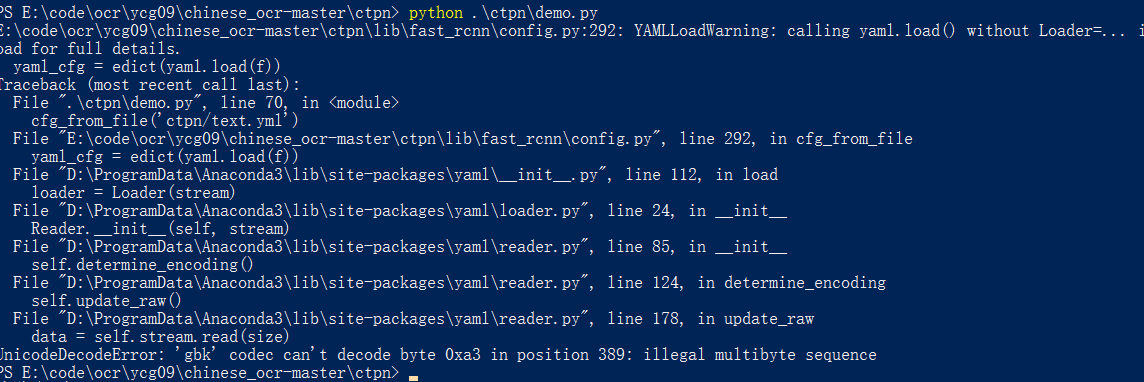
hello, i got this problem. my environment is: win10 python3.6 tensorflow 1.8
i build the cpu version following the top topic. by these command:
enter 'ctpn\lib\utils' cython .\bbox.pyx cython .\cython_nms.pyx python .\setup_new.py install copy the 'cython_nms.cp36-win_amd64.pyd' and 'bbox.cp36-win_amd64.pyd' to the 'ctpn\lib\utils' run '.\ctpn\demon.py'
how to solve this problem, thank you very much.

Regarding the above issue, I solved it by modifying the encoding of config file text.yml.
'NoneType' object has no attribute 'model_checkpoint_path' how to fix this question

'NoneType' object has no attribute 'model_checkpoint_path' how to fix this question
i mat same problem in line 73, in main model_path = os.path.join(FLAGS.checkpoint_path, os.path.basename(ckpt_state.model_checkpoint_path))

While I run step 4, I got this error
$ python setup_new.py install
running install running build running build_ext building 'lib.utils.bbox' extension error: Unable to find vcvarsall.bat My machine is windows 10, does anyone have clue about this?
If u have visual studio in your system just install "Desktop Development With C++" which will create vcvarsall.bat file.


hi, I have followed the above operation ,but why i run demo.py
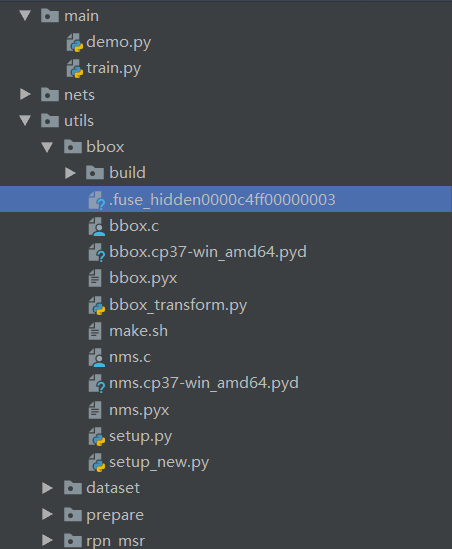
it will occur this problem
 this is my Contents