
linkedin

linkedin copied to clipboard
 eracle
Pin playwright to latest version 1.56.0
This PR pins playwright to the latest release 1.56.0.
Changelog
1.56.0
New APIs
- New methods [page. console_messages()](https://playwright.dev/python/docs/api/class-page#page-console-messages) and [page.page_errors()](https://playwright.dev/python/docs/api/class-page#page-page-errors) for retrieving the most recent console messages from the page
- New method [page.requests()](https://playwright.dev/python/docs/api/class-page#page-requests) for retrieving the most recent network requests from the page

Breaking Changes
- Event [browserContext.on("backgroundpage")](https://playwright.dev/python/docs/api/class-browsercontext#browser-context-event-background-page) has been deprecated and will not be emitted. Method [browserContext. background_pages()](https://playwright.dev/python/docs/api/class-browsercontext#browser-context-background-pages) will return an empty list

Miscellaneous
- Aria snapshots render and compare `input` `placeholder`

Browser Versions
- Chromium 141.0.7390.37
- Mozilla Firefox 142.0.1
- WebKit 26.0
1.55.1
Highlights

https://github.com/microsoft/playwright/issues/37479 - [Bug]: Upgrade Chromium to 140.0.7339.186.
https://github.com/microsoft/playwright/issues/37147 - [Regression]: Internal error: step id not found.
https://github.com/microsoft/playwright/issues/37146 - [Regression]: HTML reporter displays a broken chip link when there are no projects.
https://github.com/microsoft/playwright/pull/37137 - Revert "fix(a11y): track inert elements as hidden".
https://github.com/microsoft/playwright/pull/37532 - chore: do not use -k option

Browser Versions

- Chromium 140.0.7339.186
- Mozilla Firefox 141.0
- WebKit 26.0

This version was also tested against the following stable channels:
- Google Chrome 139
- Microsoft Edge 139
1.55.0
Codegen
- Automatic `to_be_visible()` assertions: Codegen can now generate automatic `to_be_visible()` assertions for common UI interactions. This feature can be enabled in the Codegen settings UI.

Breaking Changes
- ⚠️ Dropped support for Chromium extension manifest v2.

Miscellaneous
- Added support for Debian 13 "Trixie".

Browser Versions
- Chromium 140.0.7339.16
- Mozilla Firefox 141.0
- WebKit 26.0

This version was also tested against the following stable channels:
- Google Chrome 139
- Microsoft Edge 139
1.54.2
Highlights

https://github.com/microsoft/playwright/issues/36714 - [Regression]: Codegen is not able to launch in Administrator Terminal on Windows (ProtocolError: Protocol error)
https://github.com/microsoft/playwright/issues/36828 - [Regression]: Playwright Codegen keeps spamming with selected option
https://github.com/microsoft/playwright/issues/36810 - [Regression]: Starting Codegen with target language doesn't work anymore

Browser Versions

- Chromium 139.0.7258.5
- Mozilla Firefox 140.0.2
- WebKit 26.0

This version was also tested against the following stable channels:
- Google Chrome 140
- Microsoft Edge 140
1.54.1
Highlights

https://github.com/microsoft/playwright/issues/36650 - [Regression]: 1.54.0 breaks downloading browsers when an HTTP(S) proxy is used

Browser Versions

- Chromium 139.0.7258.5
- Mozilla Firefox 140.0.2
- WebKit 26.0

This version was also tested against the following stable channels:
- Google Chrome 140
- Microsoft Edge 140
1.54.0
Highlights
- New cookie property `partition_key` in [BrowserContext.cookies()](https://playwright.dev/python/docs/api/class-browsercontext#browser-context-cookies) and [browserContext.add_cookies()](https://playwright.dev/python/docs/api/class-browsercontext#browser-context-add-cookies). This property allows to save and restore partitioned cookies. See [CHIPS MDN article](https://developer.mozilla.org/en-US/docs/Web/Privacy/Guides/Privacy_sandbox/Partitioned_cookies) for more information. Note that browsers have different support and defaults for cookie partitioning.
- New option `--user-data-dir` in multiple commands. You can specify the same user data dir to reuse browsing state, like authentication, between sessions.

bash
playwright codegen --user-data-dir=./user-data


- `playwright open` does not open the test recorder anymore. Use `playwright codegen` instead.

Browser Versions
- Chromium 139.0.7258.5
- Mozilla Firefox 140.0.2
- WebKit 26.0

This version was also tested against the following stable channels:
- Google Chrome 140
- Microsoft Edge 140
1.53.2
Highlights

https://github.com/microsoft/playwright/issues/36317 - [Regression]: Merging pre-1.53 blob reports loses attachments
https://github.com/microsoft/playwright/pull/36357 - [Regression (Chromium)]: CDP missing trailing slash
https://github.com/microsoft/playwright/issues/36292 - [Bug (MSEdge)]: Edge fails to launch when using `msRelaunchNoCompatLayer`

Browser Versions

- Chromium 138.0.7204.23
- Mozilla Firefox 139.0
- WebKit 18.5

This version was also tested against the following stable channels:
- Google Chrome 137
- Microsoft Edge 137
1.53.1
Highlights

https://github.com/microsoft/playwright/issues/36339 - [Regression]: Click can fail when scrolling required
https://github.com/microsoft/playwright/issues/36307 - [Regression (Chromium)]: Under some scenarios filling a `textarea` doesn't fill
https://github.com/microsoft/playwright/issues/36294 - [Regression (Firefox)]: `setViewportSize` times out
https://github.com/microsoft/playwright/pull/36350 - [Fix]: Display HTTP method for fetch trace entries


Browser Versions

- Chromium 138.0.7204.23
- Mozilla Firefox 139.0
- WebKit 18.5

This version was also tested against the following stable channels:
- Google Chrome 137
- Microsoft Edge 137
1.53.0
Miscellaneous
- New Steps in Trace Viewer:

- New method [locator.describe()](https://playwright.dev/python/docs/api/class-locator#locator-describe) to describe a locator. Used for trace viewer.
python
button = page.get_by_test_id("btn-sub").describe("Subscribe button")
button.click()
- `python -m playwright install --list` will now list all installed browsers, versions and locations.
Browser Versions
- Chromium 138.0.7204.4
- Mozilla Firefox 139.0
- WebKit 18.5
This version was also tested against the following stable channels:
- Google Chrome 137
- Microsoft Edge 137
1.52.0
Highlights
- New method [expect(locator).to_contain_class()](https://playwright.dev/python/docs/api/class-locatorassertions#locator-assertions-to-contain-class) to ergonomically assert individual class names on the element.

python
 expect(page.get_by_role("listitem", name="Ship v1.52")).to_contain_class("done")


- [Aria Snapshots](https://playwright.dev/python/docs/aria-snapshots) got two new properties: [`/children`](https://playwright.dev/python/docs/aria-snapshots#strict-matching) for strict matching and `/url` for links.

python
expect(locator).to_match_aria_snapshot("""
 - list
   - /children: equal
   - listitem: Feature A
   - listitem:
     - link "Feature B":
       - /url: "https://playwright.dev"
""")


Miscellaneous
- New option [`max_redirects`](https://playwright.dev/python/docs/api/class-apirequest#api-request-new-context-option-max-redirects) in [apiRequest.new_context()](https://playwright.dev/python/docs/api/class-apirequest#api-request-new-context) to control the maximum number of redirects.
- New option [`ref`](https://playwright.dev/python/docs/api/class-locator#locator-aria-snapshot-option-ref) in [locator.aria_snapshot()](https://playwright.dev/python/docs/api/class-locator#locator-aria-snapshot) to generate reference for each element in the snapshot which can later be used to locate the element.

Breaking Changes

- Method [route.continue()](https://playwright.dev/python/docs/api/class-route#route-continue) does not allow to override the `Cookie` header anymore. If a `Cookie` header is provided, it will be ignored, and the cookie will be loaded from the browser's cookie store. To set custom cookies, use [browserContext.add_cookies()](https://playwright.dev/python/docs/api/class-browsercontext#browser-context-add-cookies).
- macOS 13 is now deprecated and will no longer receive WebKit updates. Please upgrade to a more recent macOS version to continue benefiting from the latest WebKit improvements.

Browser Versions
- Chromium 136.0.7103.25
- Mozilla Firefox 137.0
- WebKit 18.4

This version was also tested against the following stable channels:
- Google Chrome 135
- Microsoft Edge 135
1.51.1
Highlights

https://github.com/microsoft/playwright/issues/35093 - [Regression]: TimeoutOverflowWarning: 2149630296.634 does not fit into a 32-bit signed integer
https://github.com/microsoft/playwright/issues/35138 - [Regression]: TypeError: Cannot read properties of undefined (reading 'expectInfo')

Browser Versions

* Chromium 134.0.6998.35
* Mozilla Firefox 135.0
* WebKit 18.4

This version was also tested against the following stable channels:

* Google Chrome 133
* Microsoft Edge 133
1.51.0
Highlights
* New option [`indexed_db`](https://playwright.dev/python/docs/api/class-browsercontext#browser-context-storage-state-option-indexed-db) for [browserContext.storage_state()](https://playwright.dev/python/docs/api/class-browsercontext#browser-context-storage-state) allows to save and restore IndexedDB contents. Useful when your application uses [IndexedDB API](https://developer.mozilla.org/en-US/docs/Web/API/IndexedDB_API) to store authentication tokens, like Firebase Authentication.

Here is an example following the [authentication guide](https://playwright.dev/python/docs/auth#reusing-signed-in-state):

python
Save storage state into the file. Make sure to include IndexedDB.
storage = context.storage_state(path="state.json", indexed_db=True)

Create a new context with the saved storage state.
context = browser.new_context(storage_state="state.json")


* New option [`visible`](https://playwright.dev/python/docs/api/class-locator#locator-filter-option-visible) for [locator.filter()](https://playwright.dev/python/docs/api/class-locator#locator-filter) allows matching only visible elements.

python
Ignore invisible todo items.
todo_items = page.get_by_test_id("todo-item").filter(visible=True)
Check there are exactly 3 visible ones.
expect(todo_items).to_have_count(3)


* New option `contrast` for methods [page.emulate_media()](https://playwright.dev/python/docs/api/class-page#page-emulate-media) and [browser.new_context()](https://playwright.dev/python/docs/api/class-browser#browser-new-context) allows to emulate the `prefers-contrast` media feature.
* New option [`fail_on_status_code`](https://playwright.dev/python/docs/api/class-apirequest#api-request-new-context-option-fail-on-status-code) makes all fetch requests made through the [APIRequestContext](https://playwright.dev/python/docs/api/class-apirequestcontext) throw on response codes other than 2xx and 3xx.

Browser Versions
* Chromium 134.0.6998.35
* Mozilla Firefox 135.0
* WebKit 18.4

This version was also tested against the following stable channels:
* Google Chrome 133
* Microsoft Edge 133
1.50.1
Highlights

https://github.com/microsoft/playwright/issues/34483 - [Feature]: single aria snapshot for different engines/browsers
https://github.com/microsoft/playwright/issues/34497 - [Bug]: Firefox not handling keepalive: true fetch requests
https://github.com/microsoft/playwright/issues/34504 - [Bug]: update snapshots not creating good diffs
https://github.com/microsoft/playwright/issues/34507 - [Bug]: snapshotPathTemplate doesnt work when multiple projects
https://github.com/microsoft/playwright/issues/34462 - [Bug]: updateSnapshots "changed" throws an error

Browser Versions

* Chromium 133.0.6943.16
* Mozilla Firefox 134.0
* WebKit 18.2

This version was also tested against the following stable channels:
* Google Chrome 132
* Microsoft Edge 132
1.50.0
Async Pytest Plugin
* [Playwright's Pytest plugin](https://playwright.dev/python/docs/test-runners) now has support for [Async Fixtures](https://playwright.dev/python/docs/test-runners#async-fixtures).

Miscellaneous
* Added method [expect(locator).to_have_accessible_error_message()](https://playwright.dev/python/docs/api/class-locatorassertions#locator-assertions-to-have-accessible-error-message) to assert the Locator points to an element with a given [aria errormessage](https://w3c.github.io/aria/#aria-errormessage).

UI updates
* New button in Codegen for picking elements to produce aria snapshots.
* Additional details (such as keys pressed) are now displayed alongside action API calls in traces.
* Display of `canvas` content in traces is error-prone. Display is now disabled by default, and can be enabled via the `Display canvas content` UI setting.
* `Call` and `Network` panels now display additional time information.

Breaking
* [expect(locator).to_be_editable()](https://playwright.dev/python/docs/api/class-locatorassertions#locator-assertions-to-be-editable) and [locator.is_editable()](https://playwright.dev/python/docs/api/class-locator#locator-is-editable) now throw if the target element is not `<input>`, `<select>`, or a number of other editable elements.

Browser Versions
* Chromium 133.0.6943.16
* Mozilla Firefox 134.0
* WebKit 18.2

This version was also tested against the following stable channels:
* Google Chrome 132
* Microsoft Edge 132
1.49.1
Highlights

https://github.com/microsoft/playwright-python/issues/2679 - [Bug]: Warning: Validation of the RECORD file of playwright-1.49.0-py3-none-manylinux1_x86_64.whl failed

Browser Versions

- Chromium 131.0.6778.33
- Mozilla Firefox 132.0
- WebKit 18.2

This version was also tested against the following stable channels:
- Google Chrome 130
- Microsoft Edge 130
1.49.0
Aria snapshots

New assertion [expect(locator).toMatchAriaSnapshot()](https://playwright.dev/python/docs/api/class-locatorassertions#locator-assertions-to-match-aria-snapshot) verifies page structure by comparing to an expected accessibility tree, represented as YAML.

python
page.goto("https://playwright.dev")
expect(page.locator('body')).to_match_aria_snapshot('''
- banner:
 - heading /Playwright enables reliable/ [level=1]
 - link "Get started"
 - link "Star microsoft/playwright on GitHub"
- main:
 - img "Browsers (Chromium, Firefox, WebKit)"
 - heading "Any browser • Any platform • One API"
''')


You can generate this assertion with [Test Generator](https://playwright.dev/python/docs/codegen) or by calling [locator.ariaSnapshot()](https://playwright.dev/python/docs/api/class-locator#locator-aria-snapshot).

Learn more in the [aria snapshots guide](https://playwright.dev/python/docs/aria-snapshots).

Tracing groups

New method [tracing.group()](https://playwright.dev/python/docs/api/class-tracing#tracing-group) allows you to visually group actions in the trace viewer.

python
All actions between group and group_end
will be shown in the trace viewer as a group.
page.context.tracing.group("Open Playwright.dev > API")
page.goto("https://playwright.dev/")
page.get_by_role("link", name="API").click()
page.context.tracing.group_end()


Breaking: `chrome` and `msedge` channels switch to new headless mode

This change affects you if you're using one of the following channels in your `playwright.config.ts`:
- `chrome`, `chrome-dev`, `chrome-beta`, or `chrome-canary`
- `msedge`, `msedge-dev`, `msedge-beta`, or `msedge-canary`

After updating to Playwright v1.49, run your test suite. If it still passes, you're good to go. If not, you will probably need to update your snapshots, and adapt some of your test code around PDF viewers and extensions. See [issue 33566](https://github.com/microsoft/playwright/issues/33566) for more details.

Try new Chromium headless

You can opt into the new headless mode by using `'chromium'` channel. As [official Chrome documentation puts it](https://developer.chrome.com/blog/chrome-headless-shell):

> New Headless on the other hand is the real Chrome browser, and is thus more authentic, reliable, and offers more features. This makes it more suitable for high-accuracy end-to-end web app testing or browser extension testing.

See [issue 33566](https://github.com/microsoft/playwright/issues/33566) for the list of possible breakages you could encounter and more details on Chromium headless. Please file an issue if you see any problems after opting in.

bash python
pytest test_login.py --browser-channel chromium


Miscellaneous
- There will be no more updates for WebKit on Ubuntu 20.04 and Debian 11. We recommend updating your OS to a later version.
- `<canvas>` elements inside a snapshot now draw a preview.
- Python 3.8 is not supported anymore.

Browser Versions
- Chromium 131.0.6778.33
- Mozilla Firefox 132.0
- WebKit 18.2

This version was also tested against the following stable channels:
- Google Chrome 130
- Microsoft Edge 130
1.48.2
Highlights

https://github.com/microsoft/playwright/issues/33141 - [Bug]: UI Mode crashed
https://github.com/microsoft/playwright/issues/33219 - [BUG] Trace Viewer PWA crashes with "Aw, Snap!"
https://github.com/microsoft/playwright/issues/33086 - [Bug]: UI Mode Memory problem
https://github.com/microsoft/playwright/issues/33000 - [Regression]: Inspector and Browser doesn't close on CTRL+C
https://github.com/microsoft/playwright/issues/33204 - [Bug]: Chrome tab and inspector not closing after terminating session in terminal

Browser Versions
- Chromium 130.0.6723.19
- Mozilla Firefox 130.0
- WebKit 18.0

This version was also tested against the following stable channels:
- Google Chrome 129
- Microsoft Edge 129
1.48.1
Highlights

https://github.com/microsoft/playwright/issues/33023 - [Bug]: command line flag --headed has no effect in ui mode
1.48.0
WebSocket routing

New methods [page.route_web_socket()](https://playwright.dev/python/docs/api/class-page#page-route-web-socket) and [browser_context.route_web_socket()](https://playwright.dev/python/docs/api/class-browsercontext#browser-context-route-web-socket) allow to intercept, modify and mock WebSocket connections initiated in the page. Below is a simple example that mocks WebSocket communication by responding to a `"request"` with a `"response"`.

python
def message_handler(ws: WebSocketRoute, message: Union[str, bytes]):
if message == "request":
 ws.send("response")

page.route_web_socket("/ws", lambda ws: ws.on_message(
 lambda message: message_handler(ws, message)
))


See [WebSocketRoute](https://playwright.dev/python/docs/api/class-websocketroute) for more details.

UI updates
- New "copy" buttons for annotations and test location in the HTML report.
- Route method calls like [route.fulfill()](https://playwright.dev/python/docs/api/class-route#route-fulfill) are not shown in the report and trace viewer anymore. You can see which network requests were routed in the network tab instead.
- New "Copy as cURL" and "Copy as fetch" buttons for requests in the network tab.

Miscellaneous
- New method [page.request_gc()](https://playwright.dev/python/docs/api/class-page#page-request-gc) may help detect memory leaks.
- Requests made by [APIRequestContext](https://playwright.dev/python/docs/api/class-apirequestcontext) now record detailed timing and security information in the HAR.
- This version adds support for Python 3.13
- This version is the last version supporting Python 3.8

Browser Versions
- Chromium 130.0.6723.19
- Mozilla Firefox 130.0
- WebKit 18.0

This version was also tested against the following stable channels:
- Google Chrome 129
- Microsoft Edge 129
1.47.2
Highlights

https://github.com/microsoft/playwright/pull/32699- [REGRESSION]: fix(codegen): use content_frame property in python/.NET
1.47.1
Highlights
1.47
https://github.com/microsoft/playwright/issues/32552 - [REGRESSION]: broken UI in Trace Viewer while showing network response body

Browser Versions
- Chromium 129.0.6668.29
- Mozilla Firefox 130.0
- WebKit 18.0

This version was also tested against the following stable channels:
- Google Chrome 128
- Microsoft Edge 128
1.47.0
Network Tab improvements
The Network tab in the trace viewer has several nice improvements:
- filtering by asset type and URL
- better display of query string parameters
- preview of font assets

Miscellaneous
- The `mcr.microsoft.com/playwright-python:v1.47.0` now serves a Playwright image based on Ubuntu 24.04 Noble.
To use the 22.04 jammy-based image, please use `mcr.microsoft.com/playwright-python:v1.47.0-jammy` instead.
- The `:latest`/`:focal`/`:jammy` tag for Playwright Docker images is no longer being published. Pin to a specific version for better stability and reproducibility.
- TLS client certificates can now be passed from memory by passing `cert` and `key` as bytes instead of file paths.
- `no_wait_after` in [locator.selectOption()](https://playwright.dev/python/docs/api/class-locator#locator-select-option) was deprecated.
- We've seen reports of WebGL in Webkit misbehaving on GitHub Actions `macos-13`. We recommend upgrading GitHub Actions to `macos-14`.
Browser Versions
- Chromium 129.0.6668.29
- Mozilla Firefox 130.0
- WebKit 18.0
This version was also tested against the following stable channels:
- Google Chrome 128
- Microsoft Edge 128
1.46.1
Highlights

https://github.com/microsoft/playwright/issues/32004 - [REGRESSION]: Client Certificates don't work with Microsoft IIS
https://github.com/microsoft/playwright/issues/32004 - [REGRESSION]: Websites stall on TLS handshake errors when using Client Certificates
https://github.com/microsoft/playwright/issues/32146 - [BUG]: Credential scanners warn about internal socks-proxy TLS certificates
https://github.com/microsoft/playwright/issues/32056 - [REGRESSION]: 1.46.0 (TypeScript) - custom fixtures extend no longer chainable
https://github.com/microsoft/playwright/issues/32070 - [Bug]: --only-changed flag and project dependencies
https://github.com/microsoft/playwright/issues/32188 - [Bug]: --only-changed with shallow clone throws "unknown revision" error

Browser Versions
- Chromium 128.0.6613.18
- Mozilla Firefox 128.0
- WebKit 18.0

This version was also tested against the following stable channels:
- Google Chrome 127
- Microsoft Edge 127
1.46.0
TLS Client Certificates

Playwright now allows to supply client-side certificates, so that server can verify them, as specified by TLS Client Authentication.

You can provide client certificates as a parameter of [browser.new_context()](https://playwright.dev/python/docs/api/class-browser#browser-new-context) and [api_request.new_context()](https://playwright.dev/python/docs/api/class-apirequest#api-request-new-context). The following snippet sets up a client certificate for `https://example.com`:

python
context = browser.new_context(
 client_certificates=[
     {
         "origin": "https://example.com",
         "certPath": "client-certificates/cert.pem",
         "keyPath": "client-certificates/key.pem",
     }
 ],
)


When using the [Pytest plugin](https://playwright.dev/python/docs/test-runners), it can be added like this:

python
pytest.fixture(scope="session")
def browser_context_args(browser_context_args):
 return {
     **browser_context_args,
     "client_certificates": [
         {
             "origin": "https://example.com",
             "certPath": "client-certificates/cert.pem",
             "keyPath": "client-certificates/key.pem",
         }
     ],
 }


Trace Viewer Updates
- Content of text attachments is now rendered inline in the attachments pane.
- New setting to show/hide routing actions like [route.continue_()](https://playwright.dev/python/docs/api/class-route#route-continue).
- Request method and status are shown in the network details tab.
- New button to copy source file location to clipboard.
- Metadata pane now displays the `base_url`.

Miscellaneous
- New `max_retries` option in [apiRequestContext.fetch()](https://playwright.dev/python/docs/api/class-apirequestcontext#api-request-context-fetch) which retries on the `ECONNRESET` network error.

Browser Versions
- Chromium 128.0.6613.18
- Mozilla Firefox 128.0
- WebKit 18.0

This version was also tested against the following stable channels:
- Google Chrome 127
- Microsoft Edge 127
1.45.3
Highlights

https://github.com/microsoft/playwright/issues/31764 - [Bug]: some actions do not appear in the trace file
https://github.com/microsoft/playwright-java/issues/1617 - [Bug]: Traceviewer not reporting all actions

Browser Versions

* Chromium 127.0.6533.5
* Mozilla Firefox 127.0
* WebKit 17.4

This version was also tested against the following stable channels:
* Google Chrome 126
* Microsoft Edge 126
1.45.2
Highlights

https://github.com/microsoft/playwright/issues/31613 - [REGRESSION]: Trace is not showing any screenshots nor test name
https://github.com/microsoft/playwright/issues/31601 - [REGRESSION]: missing trace for 2nd browser
https://github.com/microsoft/playwright/issues/31541 - [REGRESSION]: Failing tests have a trace with no images and with steps missing

Browser Versions

* Chromium 127.0.6533.5
* Mozilla Firefox 127.0
* WebKit 17.4

This version was also tested against the following stable channels:
* Google Chrome 126
* Microsoft Edge 126
1.45.1
Highlights

https://github.com/microsoft/playwright-java/issues/1617 - [Bug]: Trace Viewer not reporting all actions
https://github.com/microsoft/playwright/issues/31764 - [Bug]: some actions do not appear in the trace file

Browser Versions

* Chromium 127.0.6533.5
* Mozilla Firefox 127.0
* WebKit 17.4

This version was also tested against the following stable channels:
* Google Chrome 126
* Microsoft Edge 126
1.45.0
Clock

Utilizing the new [Clock](https://playwright.dev/python/docs/api/class-clock) API allows to manipulate and control time within tests to verify time-related behavior. This API covers many common scenarios, including:
* testing with predefined time;
* keeping consistent time and timers;
* monitoring inactivity;
* ticking through time manually.

python
Initialize clock with some time before the test time and let the page load
naturally. `Date.now` will progress as the timers fire.
page.clock.install(time=datetime.datetime(2024, 2, 2, 8, 0, 0))
page.goto("http://localhost:3333")

Pretend that the user closed the laptop lid and opened it again at 10am.
Pause the time once reached that point.
page.clock.pause_at(datetime.datetime(2024, 2, 2, 10, 0, 0))

Assert the page state.
expect(page.get_by_test_id("current-time")).to_have_text("2/2/2024, 10:00:00 AM")

Close the laptop lid again and open it at 10:30am.
page.clock.fast_forward("30:00")
expect(page.get_by_test_id("current-time")).to_have_text("2/2/2024, 10:30:00 AM")


See [the clock guide](https://playwright.dev/python/docs/clock) for more details.

Miscellaneous
- Method [locator.setInputFiles()](https://playwright.dev/python/docs/api/class-locator#locator-set-input-files) now supports uploading a directory for `<input type=file webkitdirectory>` elements.
python
page.get_by_label("Upload directory").set_input_files('mydir')

- Multiple methods like [locator.click()](https://playwright.dev/python/docs/api/class-locator#locator-click) or [locator.press()](https://playwright.dev/python/docs/api/class-locator#locator-press) now support a `ControlOrMeta` modifier key. This key maps to `Meta` on macOS and maps to `Control` on Windows and Linux.
python
Press the common keyboard shortcut Control+S or Meta+S to trigger a "Save" operation.
page.keyboard.press("ControlOrMeta+S")

- New property `httpCredentials.send` in [apiRequest.newContext()](https://playwright.dev/python/docs/api/class-apirequest#api-request-new-context) that allows to either always send the `Authorization` header or only send it in response to `401 Unauthorized`.
- Playwright now supports Chromium, Firefox and WebKit on Ubuntu 24.04.
- v1.45 is the last release to receive WebKit update for macOS 12 Monterey. Please update macOS to keep using the latest WebKit.

Browser Versions
* Chromium 127.0.6533.5
* Mozilla Firefox 127.0
* WebKit 17.4

This version was also tested against the following stable channels:
* Google Chrome 126
* Microsoft Edge 126
1.44.1
Highlights

https://github.com/microsoft/playwright/issues/30779 - [REGRESSION]: When using `video: 'on'` with VSCode extension the browser got closed
https://github.com/microsoft/playwright/issues/30755 - [REGRESSION]: Electron launch with spaces inside executablePath didn't work
https://github.com/microsoft/playwright/issues/30770 - [REGRESSION]: Mask elements outside of viewport when creating fullscreen screenshots didn't work
https://github.com/microsoft/playwright/issues/30858 - [REGRESSION]: ipv6 got shown instead of localhost in show-trace/show-report

Browser Versions

* Chromium 125.0.6422.14
* Mozilla Firefox 125.0.1
* WebKit 17.4

This version was also tested against the following stable channels:
* Google Chrome 124
* Microsoft Edge 124
1.44.0
New APIs

**Accessibility assertions**
- [expect(locator).to_have_accessible_name()](https://playwright.dev/python/docs/api/class-locatorassertions#locator-assertions-to-have-accessible-name) checks if the element has the specified accessible name:

python
locator = page.get_by_role("button")
expect(locator).to_have_accessible_name("Submit")


- [expect(locator).to_have_accessible_description()](https://playwright.dev/python/docs/api/class-locatorassertions#locator-assertions-to-have-accessible-description) checks if the element has the specified accessible description:

python
locator = page.get_by_role("button")
expect(locator).to_have_accessible_description("Upload a photo")


- [expect(locator).to_have_role()](https://playwright.dev/python/docs/api/class-locatorassertions#locator-assertions-to-have-role) checks if the element has the specified ARIA role:

python
locator = page.get_by_test_id("save-button")
expect(locator).to_have_role("button")


**Locator handler**
- After executing the handler added with [page.add_locator_handler()](https://playwright.dev/python/docs/api/class-page#page-add-locator-handler), Playwright will now wait until the overlay that triggered the handler is not visible anymore. You can opt-out of this behavior with the new `no_wait_after` option.
- You can use new `times` option in [page.add_locator_handler()](https://playwright.dev/python/docs/api/class-page#page-add-locator-handler) to specify maximum number of times the handler should be run.
- The handler in [page.add_locator_handler()](https://playwright.dev/python/docs/api/class-page#page-add-locator-handler) now accepts the locator as argument.
- New [page.remove_locator_handler()](https://playwright.dev/python/docs/api/class-page#page-remove-locator-handler) method for removing previously added locator handlers.

python
locator = page.get_by_text("This interstitial covers the button")
page.add_locator_handler(locator, lambda overlay: overlay.locator("close").click(), times=3, no_wait_after=True)
Run your tests that can be interrupted by the overlay.
...
page.remove_locator_handler(locator)


**Miscellaneous options**
- [expect(page).to_have_url()](https://playwright.dev/python/docs/api/class-pageassertions#page-assertions-to-have-url) now supports `ignore_case` [option](https://playwright.dev/python/docs/api/class-pageassertions#page-assertions-to-have-url-option-ignore-case).

Browser Versions
* Chromium 125.0.6422.14
* Mozilla Firefox 125.0.1
* WebKit 17.4

This version was also tested against the following stable channels:
* Google Chrome 124
* Microsoft Edge 124
1.43.1
Highlights

https://github.com/microsoft/playwright/issues/30300 - [REGRESSION]: UI mode restarts if keep storage state
https://github.com/microsoft/playwright/issues/30339 - [REGRESSION]: Brand new install of playwright, unable to run chromium with show browser using vscode

Browser Versions
* Chromium 124.0.6367.29
* Mozilla Firefox 124.0
* WebKit 17.4

This version was also tested against the following stable channels:
* Google Chrome 123
* Microsoft Edge 123
1.43.0
New APIs
- Method [BrowserContext.clear_cookies([options])](https://playwright.dev/python/docs/api/class-browsercontext#browser-context-clear-cookies) now supports filters to remove only some cookies.

python
Clear all cookies.
context.clear_cookies()
New: clear cookies with a particular name.
context.clear_cookies(name="session-id")
New: clear cookies for a particular domain.
context.clear_cookies(domain="my-origin.com")


- New method [locator.content_frame](https://playwright.dev/python/docs/api/class-locator#locator-content-frame) converts a {link Locator} object to a [FrameLocator](https://playwright.dev/python/docs/api/class-framelocator). This can be useful when you have a [Locator](https://playwright.dev/python/docs/api/class-locator) object obtained somewhere, and later on would like to interact with the content inside the frame.

python
locator = page.locator("iframe[name='embedded']")
...
frame_locator = locator.content_frame
frame_locator.getByRole("button").click()


- New method [frameLocator.owner](https://playwright.dev/python/docs/api/class-framelocator#frame-locator-owner) converts a [FrameLocator](https://playwright.dev/python/docs/api/class-framelocator) object to a [Locator](https://playwright.dev/python/docs/api/class-locator). This can be useful when you have a [FrameLocator](https://playwright.dev/python/docs/api/class-framelocator) object obtained somewhere, and later on would like to interact with the `iframe` element.

python
frame_locator = page.frame_locator("iframe[name='embedded']")
...
locator = frame_locator.owner
expect(locator).to_be_visible()


- Conda builds are now published for macOS-arm64 and Linux-arm64.

Browser Versions
* Chromium 124.0.6367.8
* Mozilla Firefox 124.0
* WebKit 17.4

This version was also tested against the following stable channels:
* Google Chrome 123
* Microsoft Edge 123
1.42.1
Highlights
1.42
Browser Versions
* Chromium 123.0.6312.4
* Mozilla Firefox 123.0
* WebKit 17.4

This version was also tested against the following stable channels:
* Google Chrome 122
* Microsoft Edge 123
1.42.0
New Locator Handler

New method [page.add_locator_handler(locator, handler)](https://playwright.dev/python/docs/api/class-page#page-add-locator-handler) registers a callback that will be invoked when specified element becomes visible and may block Playwright actions. The callback can get rid of the overlay. Here is an example that closes a cookie dialog when it appears.

python
Setup the handler.
page.add_locator_handler(
 page.get_by_role("heading", name="Hej! You are in control of your cookies."),
 lambda: page.get_by_role("button", name="Accept all").click(),
)
Write the test as usual.
page.goto("https://www.ikea.com/")
page.get_by_role("link", name="Collection of blue and white").click()
expect(page.get_by_role("heading", name="Light and easy")).to_be_visible()


New APIs
- [page.pdf([options])](https://playwright.dev/python/docs/api/class-page#page-pdf) accepts two new options `tagged` and `outline`.

Announcements
* ⚠️ Ubuntu 18 is not supported anymore.

Browser Versions
* Chromium 123.0.6312.4
* Mozilla Firefox 123.0
* WebKit 17.4

This version was also tested against the following stable channels:
* Google Chrome 122
* Microsoft Edge 123
1.41.2
Highlights
1.41.1
Highlights

https://github.com/microsoft/playwright/issues/29067 - [REGRESSION] Codegen/Recorder: not all clicks are being actioned nor recorded
https://github.com/microsoft/playwright/issues/29019 - [REGRESSION] trace.playwright.dev does not currently support the loading from URL

Browser Versions
* Chromium 121.0.6167.57
* Mozilla Firefox 121.0
* WebKit 17.4

This version was also tested against the following stable channels:
* Google Chrome 120
* Microsoft Edge 120
1.41.0
New APIs
- New method [page.unroute_all()](https://playwright.dev/python/docs/api/class-page#page-unroute-all) removes all routes registered by [page.route()](https://playwright.dev/python/docs/api/class-page#page-route) and [page.route_from_har()](https://playwright.dev/python/docs/api/class-page#page-route-from-har). Optionally allows to wait for ongoing routes to finish, or ignore any errors from them.
- New method [browserContext.unroute_all()](https://playwright.dev/python/docs/api/class-browsercontext#browser-context-unroute-all) removes all routes registered by [browserContext.route()](https://playwright.dev/python/docs/api/class-browsercontext#browser-context-route) and [browserContext.route_from_har()](https://playwright.dev/python/docs/api/class-browsercontext#browser-context-route-from-har). Optionally allows to wait for ongoing routes to finish, or ignore any errors from them.
- New option `style` in [page.screenshot()](https://playwright.dev/python/docs/api/class-page#page-screenshot) and [locator.screenshot()](https://playwright.dev/python/docs/api/class-locator#locator-screenshot) to add custom CSS to the page before taking a screenshot.

Browser Versions
* Chromium 121.0.6167.57
* Mozilla Firefox 121.0
* WebKit 17.4

This version was also tested against the following stable channels:
* Google Chrome 120
* Microsoft Edge 120
1.40.1
Highlights

https://github.com/microsoft/playwright/issues/28319 - [REGRESSION]: Version 1.40.0 Produces corrupted traces
https://github.com/microsoft/playwright/issues/28371 - [BUG] The color of the 'ok' text did not change to green in the vs code test results section
https://github.com/microsoft/playwright/issues/28321 - [BUG] Ambiguous test outcome and status for serial mode
https://github.com/microsoft/playwright/issues/28362 - [BUG] Merging blobs ends up in Error: Cannot create a string longer than 0x1fffffe8 characters
https://github.com/microsoft/playwright/pull/28239 - fix: collect all errors in removeFolders


Browser Versions
* Chromium 120.0.6099.28
* Mozilla Firefox 119.0
* WebKit 17.4

This version was also tested against the following stable channels:
* Google Chrome 119
* Microsoft Edge 119
1.40.0
Test Generator Update
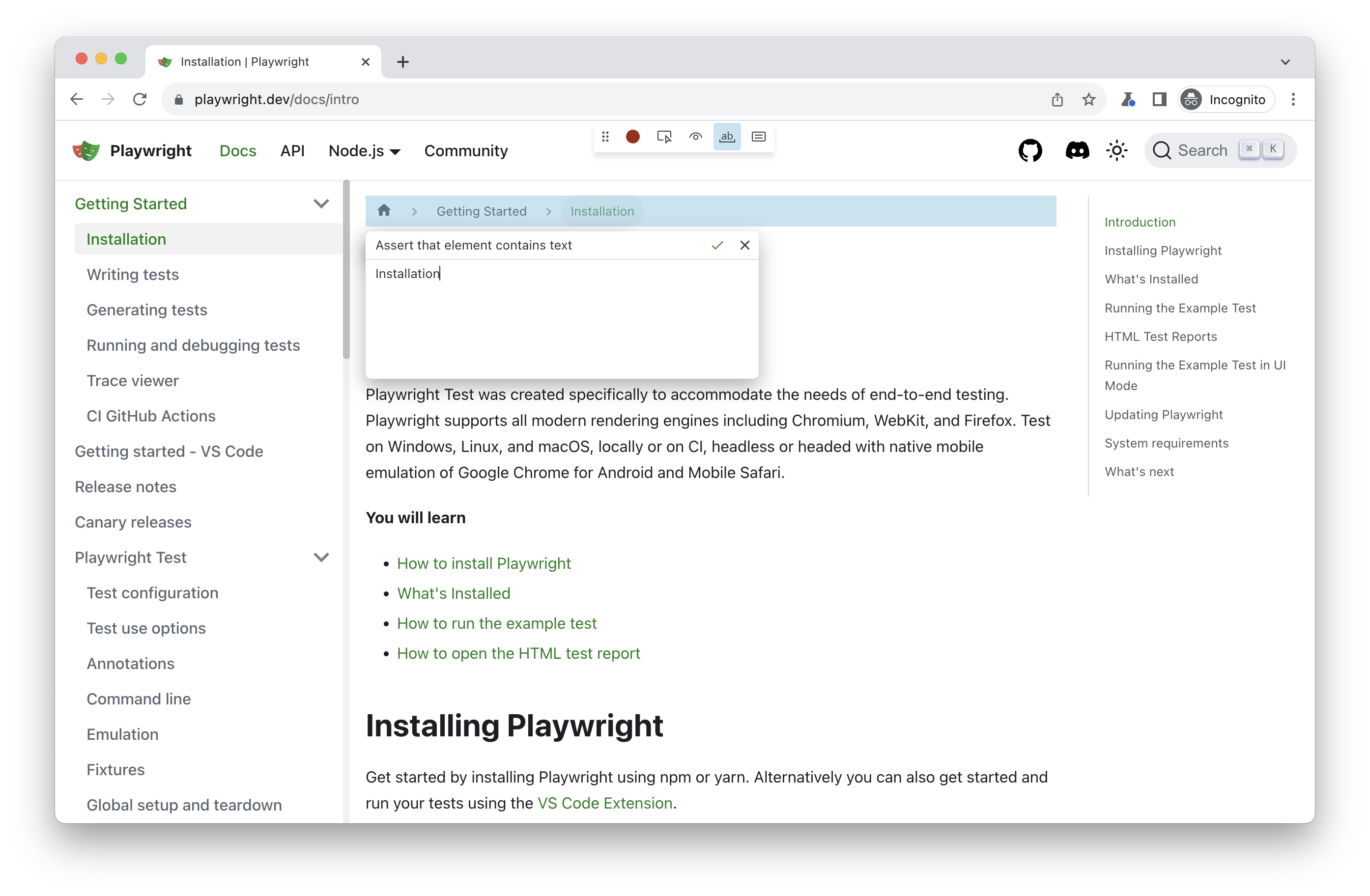
New tools to generate assertions:
- "Assert visibility" tool generates [expect(locator).to_be_visible()](https://playwright.dev/python/docs/api/class-locatorassertions#locator-assertions-to-be-visible).
- "Assert value" tool generates [expect(locator).to_have_value(value)](https://playwright.dev/python/docs/api/class-locatorassertions#locator-assertions-to-have-value).
- "Assert text" tool generates [expect(locator).to_contain_text(expected)](https://playwright.dev/python/docs/api/class-locatorassertions#locator-assertions-to-contain-text).
Here is an example of a generated test with assertions:
python
from playwright.sync_api import Page, expect
def test_example(page: Page) -> None:
page.goto("https://playwright.dev/")
page.get_by_role("link", name="Get started").click()
expect(page.get_by_label("Breadcrumbs").get_by_role("list")).to_contain_text("Installation")
expect(page.get_by_label("Search")).to_be_visible()
page.get_by_label("Search").click()
page.get_by_placeholder("Search docs").fill("locator")
expect(page.get_by_placeholder("Search docs")).to_have_value("locator");
New APIs
- Option `reason` in [page.close([options])](https://playwright.dev/python/docs/api/class-page#page-close), [browserContext.close([options])](https://playwright.dev/python/docs/api/class-browsercontext#browser-context-close) and [browser.close([options])](https://playwright.dev/python/docs/api/class-browser#browser-close). Close reason is reported for all operations interrupted by the closure.
- Option `firefox_user_prefs` in [browserType.launch_persistent_context(userDataDir[, options])](https://playwright.dev/python/docs/api/class-browsertype#browser-type-launch-persistent-context).
Other Changes
- Method [download.path()](https://playwright.dev/python/docs/api/class-download#download-path) throws an error for failed and cancelled downloads.
Browser Versions
* Chromium 120.0.6099.28
* Mozilla Firefox 119.0
* WebKit 17.4
This version was also tested against the following stable channels:
* Google Chrome 119
* Microsoft Edge 119
1.39.0
Features

Python 3.12 support.

Browser Versions

* Chromium 119.0.6045.9
* Mozilla Firefox 118.0.1
* WebKit 17.4

This version was also tested against the following stable channels:
* Google Chrome 118
* Microsoft Edge 118
1.38.1
Highlights
1.38
`playwright` and `playwright/test` packages do not download browsers during `npm install`.

**Recommended migration**

Run `npx playwright install` to download browsers after `npm install`. For example, in your CI configuration:

yml
- run: npm ci
- run: npx playwright install --with-deps


**Alternative migration option - not recommended**

Add `playwright/browser-chromium`, `playwright/browser-firefox` and `playwright/browser-webkit` as a dependency. These packages download respective browsers during `npm install`. Make sure you keep the version of all playwright packages in sync:

json5
// package.json
{
"devDependencies": {
 "playwright": "1.38.0",
 "playwright/browser-chromium": "1.38.0",
 "playwright/browser-firefox": "1.38.0",
 "playwright/browser-webkit": "1.38.0"
}
}


Browser Versions

* Chromium 117.0.5938.62
* Mozilla Firefox 117.0
* WebKit 17.0

This version was also tested against the following stable channels:

* Google Chrome 116
* Microsoft Edge 116


[`browserContext.on('weberror')`]: https://playwright.dev/docs/api/class-browsercontext#browser-context-event-web-error
[`locator.pressSequentially()`]: https://playwright.dev/docs/api/class-locator#locator-press-sequentially
[`reporter.onEnd()`]: https://playwright.dev/docs/api/class-reporter#reporter-on-end
[`page.type()`]: https://playwright.dev/docs/api/class-page#page-type
[`frame.type()`]: https://playwright.dev/docs/api/class-frame#frame-type
[`locator.type()`]: https://playwright.dev/docs/api/class-locator#locator-type
[`elementHandle.type()`]: https://playwright.dev/docs/api/class-elementhandle#element-handle-type
[`locator.fill()`]: https://playwright.dev/docs/api/class-locator#locator-fill
[`expect(value).toMatchSnapshot()`]: https://playwright.dev/docs/api/class-snapshotassertions#snapshot-assertions-to-match-snapshot-1
[`expect(page).toHaveScreenshot()`]: https://playwright.dev/docs/api/class-pageassertions#page-assertions-to-have-screenshot-1
[`expect(locator).toHaveScreenshot()`]: https://playwright.dev/docs/api/class-locatorassertions#locator-assertions-to-have-screenshot-1
1.38.0
Trace Viewer Updates

1. Zoom into time range.
2. Network panel redesign.
New APIs
- [`browserContext.on('weberror')`]
- [`locator.press_sequentially()`]
Deprecations
- The following methods were deprecated: [`page.type()`], [`frame.type()`], [`locator.type()`] and [`elementHandle.type()`].
Please use [`locator.fill()`] instead which is much faster. Use [`locator.press_sequentially()`] only if there is a
special keyboard handling on the page, and you need to press keys one-by-one.
Browser Versions
* Chromium 117.0.5938.62
* Mozilla Firefox 117.0
* WebKit 17.0
This version was also tested against the following stable channels:
* Google Chrome 116
* Microsoft Edge 116
[`browserContext.on('weberror')`]: https://playwright.dev/python/docs/api/class-browsercontext#browser-context-event-web-error
[`locator.press_sequentially()`]: https://playwright.dev/python/docs/api/class-locator#locator-press-sequentially
[`page.type()`]: https://playwright.dev/python/docs/api/class-page#page-type
[`frame.type()`]: https://playwright.dev/python/docs/api/class-frame#frame-type
[`locator.type()`]: https://playwright.dev/python/docs/api/class-locator#locator-type
[`elementHandle.type()`]: https://playwright.dev/python/docs/api/class-elementhandle#element-handle-type
[`locator.fill()`]: https://playwright.dev/python/docs/api/class-locator#locator-fill
1.37.1
Highlights

https://github.com/microsoft/playwright/issues/26496 - [REGRESSION] webServer stdout is always getting printed
https://github.com/microsoft/playwright/issues/26492 - [REGRESSION] test.only with project dependency is not working

Browser Versions

* Chromium 116.0.5845.82
* Mozilla Firefox 115.0
* WebKit 17.0

This version was also tested against the following stable channels:

* Google Chrome 115
* Microsoft Edge 115
1.37
`playwright` package was downloading browsers during `npm install`, while `playwright/test` was not.
1.37.0
Highlights

* New [--full-page-screenshot](https://playwright.dev/python/docs/test-runners#cli-arguments) command line flag allows taking a
full page screenshot on failure.

* It is now possible to override the context options for a single test by using the [browser_context_args](https://playwright.dev/python/docs/test-runners#fixtures) marker.

* `pytest-playwright` is now also getting published [on Anaconda](https://anaconda.org/Microsoft/pytest-playwright/)

📚 Debian 12 Bookworm Support

Playwright now supports Debian 12 Bookworm on both x86_64 and arm64 for Chromium, Firefox and WebKit.
Let us know if you encounter any issues!

Linux support looks like this:

|          | Ubuntu 20.04 | Ubuntu 22.04 | Debian 11 | Debian 12 |
| :--- | :---: | :---: | :---: | :---: |
| Chromium | ✅ | ✅ | ✅ | ✅ |
| WebKit | ✅ | ✅ | ✅ | ✅ |
| Firefox | ✅ | ✅ | ✅ | ✅ |

Browser Versions

* Chromium 116.0.5845.82
* Mozilla Firefox 115.0
* WebKit 17.0

This version was also tested against the following stable channels:

* Google Chrome 115
* Microsoft Edge 115
1.36.2
Highlights
1.36.1
Highlights

https://github.com/microsoft/playwright/issues/24184 - [REGRESSION]: Snapshot name contains some random string after test name when tests are run in container

Browser Versions

* Chromium 115.0.5790.75
* Mozilla Firefox 115.0
* WebKit 17.0

This version was also tested against the following stable channels:

* Google Chrome 114
* Microsoft Edge 114
1.36
Browser Versions

* Chromium 115.0.5790.75
* Mozilla Firefox 115.0
* WebKit 17.0

This version was also tested against the following stable channels:

* Google Chrome 114
* Microsoft Edge 114
1.36.0
Highlights

🏝️ Summer maintenance release.

Browser Versions

* Chromium 115.0.5790.75
* Mozilla Firefox 115.0
* WebKit 17.0

This version was also tested against the following stable channels:

* Google Chrome 114
* Microsoft Edge 114
1.35.1
Highlights

https://github.com/microsoft/playwright/issues/23622 - [Docs] Provide a description how to correctly use expect.configure with poll parameter
https://github.com/microsoft/playwright/issues/23666 - [BUG] Live Trace does not work with Codespaces
https://github.com/microsoft/playwright/issues/23693 - [BUG] attachment steps are not hidden inside expect.toHaveScreenshot()

Browser Versions

* Chromium 115.0.5790.13
* Mozilla Firefox 113.0
* WebKit 16.4

This version was also tested against the following stable channels:

* Google Chrome 114
* Microsoft Edge 114
1.35.0
Highlights

* New option `mask_color` for methods [`Page.screenshot()`](https://playwright.dev/python/docs/api/class-page#page-screenshot) and [`Locator.screenshot()`](https://playwright.dev/python/docs/api/class-locator#locator-screenshot) to change default masking color.

* New `uninstall` CLI command to uninstall browser binaries:
bash
$ playwright uninstall  remove browsers installed by this installation
$ playwright uninstall --all  remove all ever-install Playwright browsers


Browser Versions

* Chromium 115.0.5790.13
* Mozilla Firefox 113.0
* WebKit 16.4

This version was also tested against the following stable channels:

* Google Chrome 114
* Microsoft Edge 114
1.34.3
Highlights
1.34.2
Highlights
1.34.1
Highlights

https://github.com/microsoft/playwright/issues/23186 - [BUG] Container image for v1.34.0 missing library for webkit
https://github.com/microsoft/playwright/issues/23206 - [BUG] Unable to install supported browsers for v1.34.0 from playwright-core
1.34
Browser Versions

* Chromium 114.0.5735.26
* Mozilla Firefox 113.0
* WebKit 16.4

This version was also tested against the following stable channels:

* Google Chrome 113
* Microsoft Edge 113
1.34.0
Highlights

* New [`Locator.and_`](https://playwright.dev/python/docs/api/class-locator#locator-and) to create a locator that matches both locators.

 python
 button = page.get_by_role("button").and_(page.get_by_title("Subscribe"))


* Its now possible to set a global expect timeout and change the 5 second default:

python
from playwright.sync_api import expect

expect.set_options(timeout=10_000)


* New events [`BrowserContext.on("console")`](https://playwright.dev/python/docs/api/class-browsercontext#browser-context-event-console) and [`BrowserContext.on("dialog")`](https://playwright.dev/python/docs/api/class-browsercontext#browser-context-event-dialog) to subscribe to any dialogs
and console messages from any page from the given browser context. Use the new properties [`ConsoleMessage.page`](https://playwright.dev/python/docs/api/class-consolemessage#console-message-page)
and [`Dialog.page`](https://playwright.dev/python/docs/api/class-dialog#dialog-page) to pin-point event source.

Browser Versions

* Chromium 114.0.5735.26
* Mozilla Firefox 113.0
* WebKit 16.4

This version was also tested against the following stable channels:

* Google Chrome 113
* Microsoft Edge 113
1.33.0
Highlights

Locators Update

* Use [`Locator.or_`](https://playwright.dev/python/docs/api/class-locator#locator-or) to create a locator that matches either of the two locators.
Consider a scenario where you'd like to click on a "New email" button, but sometimes a security settings dialog shows up instead.
In this case, you can wait for either a "New email" button, or a dialog and act accordingly:

 python
 new_email = page.get_by_role("button", name="New email")
 dialog = page.get_by_text("Confirm security settings")
 expect(new_email.or_(dialog)).is_visible()
 if (dialog.is_visible())
   page.get_by_role("button", name="Dismiss").click()
 new_email.click()

* Use new options [`has_not`](https://playwright.dev/python/docs/api/class-locator#locator-filter-option-has-not) and [`has_not_text`](https://playwright.dev/python/docs/api/class-locator#locator-filter-option-has-not-text) in [`Locator.filter`](https://playwright.dev/python/docs/api/class-locator#locator-filter)
to find elements that **do not match** certain conditions.

 python
 row_locator = page.locator("tr")
 row_locator
     .filter(has_not_text="text in column 1")
     .filter(has_not=page.get_by_role("button", name="column 2 button"))
     .screenshot()

* Use new web-first assertion [`expect(locator).to_be_attached()`](https://playwright.dev/python/docs/api/class-locatorassertions#locator-assertions-to-be-attached) to ensure that the element
is present in the page's DOM. Do not confuse with the [`expect(locator).to_be_visible()`](https://playwright.dev/python/docs/api/class-locatorassertions#locator-assertions-to-be-visible) that ensures that
element is both attached & visible.

New APIs

- [`Locator.or`](https://playwright.dev/python/docs/api/class-locator#locator-or)
- New option [`has_not`](https://playwright.dev/python/docs/api/class-locator#locator-filter-option-has-not) in [`Locator.filter`](https://playwright.dev/python/docs/api/class-locator#locator-filter)
- New option [`has_not_text`](https://playwright.dev/python/docs/api/class-locator#locator-filter-option-has-not-text) in [`Locator.filter`](https://playwright.dev/python/docs/api/class-locator#locator-filter)
- [`expect(locator).to_be_attached`](https://playwright.dev/python/docs/api/class-locatorassertions#locator-assertions-to-be-attached)
- New option [`timeout`](https://playwright.dev/python/docs/api/class-route#route-fetch-option-timeout) in [`method: Route.fetch`](https://playwright.dev/python/docs/api/class-route#route-fetch)

⚠️ Breaking change

* The `mcr.microsoft.com/playwright/python:v1.33.0` now serves a Playwright image based on Ubuntu Jammy.
To use the focal-based image, please use `mcr.microsoft.com/playwright/python:v1.33.0-focal` instead.

Browser Versions

* Chromium 113.0.5672.53
* Mozilla Firefox 112.0
* WebKit 16.4

This version was also tested against the following stable channels:

* Google Chrome 112
* Microsoft Edge 112
1.32.3
Highlights

https://github.com/microsoft/playwright/issues/22144 - [BUG] WebServer only starting after timeout
https://github.com/microsoft/playwright/pull/22191 - chore: allow reusing browser between the tests
https://github.com/microsoft/playwright/issues/22215 - [BUG] Tests failing in toPass often marked as passed

Browser Versions

* Chromium 112.0.5615.29
* Mozilla Firefox 111.0
* WebKit 16.4

This version was also tested against the following stable channels:

* Google Chrome 111
* Microsoft Edge 111
1.32.2
Highlights

https://github.com/microsoft/playwright/issues/21993 - [BUG] Browser crash when using Playwright VSC extension and trace-viewer enabled in config
https://github.com/microsoft/playwright/issues/22003 - [Feature] Make Vue component mount props less restrictive
https://github.com/microsoft/playwright/issues/22089 - [REGRESSION]: Tests failing with "Error: tracing.stopChunk"

Browser Versions

* Chromium 112.0.5615.29
* Mozilla Firefox 111.0
* WebKit 16.4

This version was also tested against the following stable channels:

* Google Chrome 111
* Microsoft Edge 111
1.32.1
Bugfixes

* [BUG]: fix: discard trace without path did not work in https://github.com/microsoft/playwright-python/pull/1836
1.32.0
New APIs

- Custom expect message, see [test assertions documentation](https://playwright.dev/python/docs/test-assertions#custom-expect-message).
- Chaining existing locator objects, see [locator docs](https://playwright.dev/python/docs/locators#chaining-locators) for details.
- New options `update_mode` and `update_content` in [`page.route_from_har()`](https://playwright.dev/python/docs/api/class-page#page-route-from-har) and [`browser_context.route_from_har()`](https://playwright.dev/python/docs/api/class-browsercontext#browser-context-route-from-har).
- New option `name` in method [`tracing.start_chunk()`](https://playwright.dev/python/docs/api/class-tracing#tracing-start-chunk).

Browser Versions

* Chromium 112.0.5615.29
* Mozilla Firefox 111.0
* WebKit 16.4

This version was also tested against the following stable channels:

* Google Chrome 111
* Microsoft Edge 111
1.31.2
Highlights

https://github.com/microsoft/playwright/issues/20784 - [BUG] ECONNREFUSED on GitHub Actions with Node 18
https://github.com/microsoft/playwright/issues/21145 - [REGRESSION]: firefox-1378 times out on await page.reload() when URL contains a #hash
https://github.com/microsoft/playwright/issues/21226 - [BUG] Playwright seems to get stuck when using shard option and last test is skipped
https://github.com/microsoft/playwright/issues/21227 - Using the webServer config with a Vite dev server?
https://github.com/microsoft/playwright/issues/21312 - throw if defineConfig is not used for component testing

Browser Versions

- Chromium 111.0.5563.19
- Mozilla Firefox 109.0
- WebKit 16.4

This version was also tested against the following stable channels:

- Google Chrome 110
- Microsoft Edge 110
1.31.1
Highlights

https://github.com/microsoft/playwright/issues/21093 - [Regression v1.31] Headless Windows shows cascading cmd windows

Browser Versions

- Chromium 111.0.5563.19
- Mozilla Firefox 109.0
- WebKit 16.4

This version was also tested against the following stable channels:

- Google Chrome 110
- Microsoft Edge 110
1.31.0
New APIs

- New assertion [`expect(locator).to_be_in_viewport()`](https://playwright.dev/python/docs/api/class-locatorassertions#locator-assertions-to-be-in-viewport) ensures that locator points to an element that intersects viewport, according to the [intersection observer API](https://developer.mozilla.org/en-US/docs/Web/API/Intersection_Observer_API).

python
from playwright.sync_api import expect

locator = page.get_by_role("button")

Make sure at least some part of element intersects viewport.
expect(locator).to_be_in_viewport()

Make sure element is fully outside of viewport.
expect(locator).not_to_be_in_viewport()

Make sure that at least half of the element intersects viewport.
expect(locator).to_be_in_viewport(ratio=0.5)


Miscellaneous

- DOM snapshots in trace viewer can be now opened in a separate window.
- New option `max_redirects` for method [`Route.fetch`](https://playwright.dev/python/docs/api/class-route#route-fetch).
- Playwright now supports Debian 11 arm64.

Browser Versions

* Chromium 111.0.5563.19
* Mozilla Firefox 109.0
* WebKit 16.4

This version was also tested against the following stable channels:

* Google Chrome 110
* Microsoft Edge 110
1.30.0
🎉 Happy New Year 🎉

Maintenance release with bugfixes and new browsers only.

Browser Versions

* Chromium 110.0.5481.38
* Mozilla Firefox 108.0.2
* WebKit 16.4

This version was also tested against the following stable channels:

* Google Chrome 109
* Microsoft Edge 109
1.29.2
Highlights

https://github.com/microsoft/playwright/issues/19661 - [BUG] 1.29.1 browserserver + page.goto = net::ERR_SOCKS_CONNECTION_FAILED

Browser Versions

* Chromium 109.0.5414.46
* Mozilla Firefox 107.0
* WebKit 16.4

This version was also tested against the following stable channels:

* Google Chrome 108
* Microsoft Edge 108
1.29.1
Bugfixes

* fix: fulfill with json in https://github.com/microsoft/playwright-python/pull/1701
1.29.0
Highlights

New APIs

- New method [`Route.fetch`](https://playwright.dev/python/docs/api/class-route#route-fetch) and new option `json` for [`Route.fulfill`](https://playwright.dev/python/docs/api/class-route#route-fulfill):

 python
 def handle_route(route: Route):
    Fetch original settings.
   response = route.fetch()
    Force settings theme to a predefined value.
   json = response.json()
   json["theme"] = "Solorized"
    Fulfill with modified data.
   route.fulfill(json=json)
 page.route("**/api/settings", handle_route)


- New method [`Locator.all`](https://playwright.dev/python/docs/api/class-locator#locator-all) to iterate over all matching elements:

 python
  Check all checkboxes!
 checkboxes = page.get_by_role("checkbox")
 for checkbox in checkboxes.all():
   checkbox.check()


- [`Locator.select_option`](https://playwright.dev/python/docs/api/class-locator#locator-select-option) matches now by value or label:

html
<select multiple>
 <option value="red">Red</div>
 <option value="green">Green</div>
 <option value="blue">Blue</div>
</select>


python
element.select_option("Red")


Miscellaneous

- Option `postData` in method [`Route.continue`](https://playwright.dev/python/docs/api/class-route#route-continue) now supports any values.

Browser Versions

* Chromium 109.0.5414.46
* Mozilla Firefox 107.0
* WebKit 16.4

This version was also tested against the following stable channels:

* Google Chrome 108
* Microsoft Edge 108
1.28.1
Highlights

This patch release includes the following bug fixes:
1.28.0
Highlights
Playwright Tools
* **Live Locators in CodeGen.** Generate a locator for any element on the page using "Explore" tool.

New APIs
- [`method: Locator.blur`](https://playwright.dev/python/docs/api/class-locator#locator-blur)
- [`method: Locator.clear`](https://playwright.dev/python/docs/api/class-locator#locator-clear)
Browser Versions
* Chromium 108.0.5359.29
* Mozilla Firefox 106.0
* WebKit 16.4
This version was also tested against the following stable channels:
* Google Chrome 107
* Microsoft Edge 107
1.27.1
Highlights

This patch release includes the following bug fixes:

https://github.com/microsoft/playwright/pull/18010 - fix(generator): generate nice locators for arbitrary selectors
https://github.com/microsoft/playwright/pull/17952 - fix: fix typo in treeitem role typing

Browser Versions

* Chromium 107.0.5304.18
* Mozilla Firefox 105.0.1
* WebKit 16.0

This version was also tested against the following stable channels:

* Google Chrome 106
* Microsoft Edge 106
1.27.0
Locators

With these new APIs, inspired by [Testing Library](https://testing-library.com/), writing locators is a joy:
- [`page.get_by_text(text)`](https://playwright.dev/python/docs/api/class-page#page-get-by-text) to locate by text content.
- [`page.get_by_role(role)`](https://playwright.dev/python/docs/api/class-page#page-get-by-role) to locate by [ARIA role](https://www.w3.org/TR/wai-aria-1.2/#roles), [ARIA attributes](https://www.w3.org/TR/wai-aria-1.2/#aria-attributes) and [accessible
