

 equinor
Date offset in observations compared to simulation results
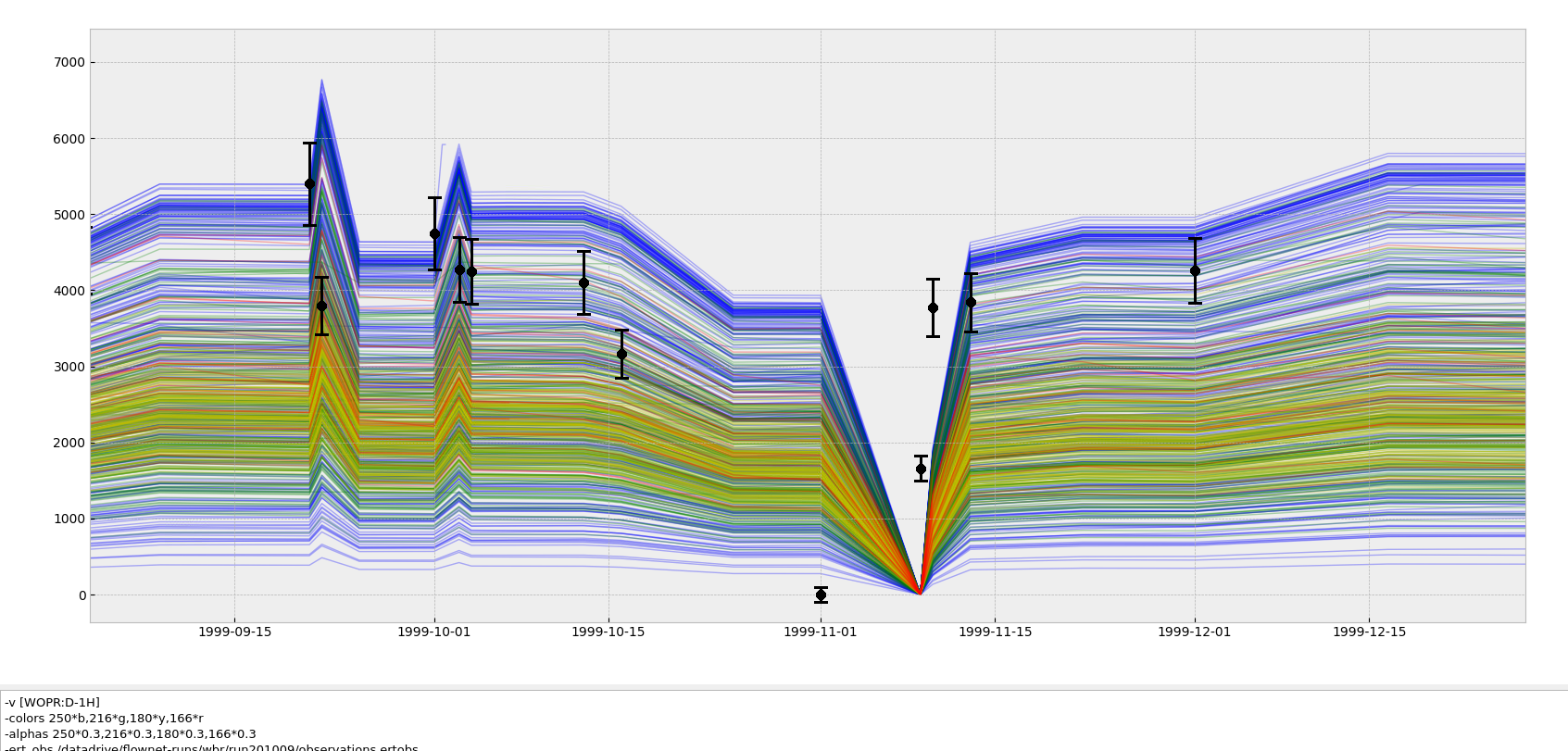

Looking into some simulation files.
Clip from HISTORIC_SCHEDULE.inc:
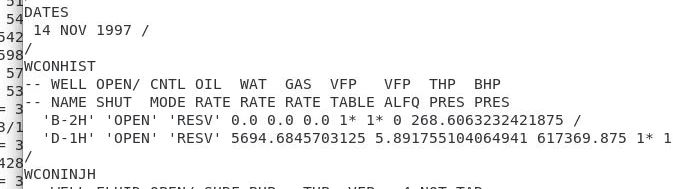
Clips from observations.ertobs:

WOPR:D-1H and WOPRH:D-1H (from running summary2csv after simulation, --time_index raw & daily):
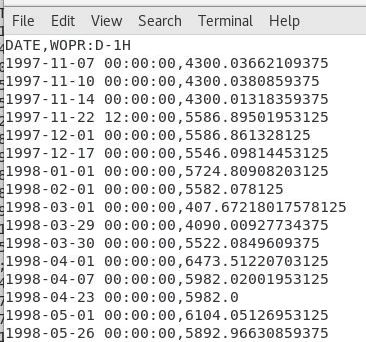
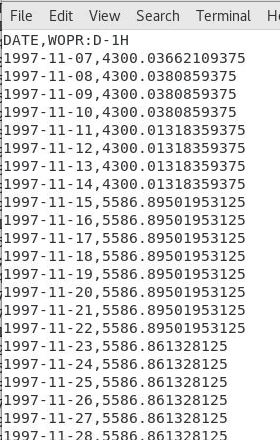
It seems like the changes happens from after the date in question, not at the date. So is this just a plotting issue, or a one-day-shift-issue? What does ERT compare the observation at 14 Nov 1997 with? 4300 or 5586?
Same numbers for WOPRH:
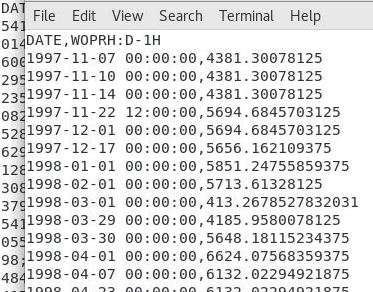
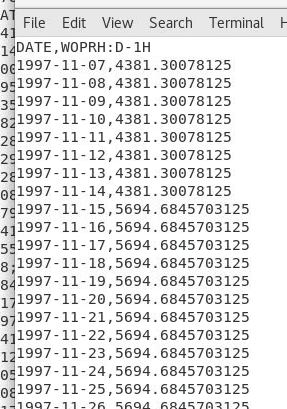

This is a well known challenge I think within AHM, which of course is most visible on large sudden changes in rates.
My experience:
- ERT will take what it gets from
UNSMRY(i.e. what it gets when usinglibecl) on date specified in ERT obs.file. - Schlumberger Eclipse (and probably also Flow?) will for rate vectors wait until next date when it comes to reporting used rate in
UNSMRY. I.e. reported rate at timet_iinUNSMRYis within Eclipse used for[t_(i-1), t_i)(so for plotting purposes, it is usually most correct to backfill from a date to previous date, for rate vectors). For cumulative vectors it is easier as it is more uniquely defined, there Eclipse simply reports the state of the cumulative vector at the given time.
Since it is obviously too late to change Eclipse behaviour :nerd_face: I guess the only "fix" would be that schedule files are created such that rate entered at date/time t_i is the one to be used for time interval [t_i, t_i+1) (as today?), but thanks to Eclipse, the created ERT observation file would need to shift its date one step into the future compared with schedule dates.
Maybe @eivindsm, @markusdregi or @asnyv has additional comments/experience/suggestions.

Yes, this is a well known issue. @anders-kiaer is spot on, the rates specified in the WCONHIST section of eclipse and OPMFlow are target rates taking effect from the next day, the reporting dates in the schedule file however refers to the simulated production from that date particular, eg before the target rate takes effect.
The E&P company that I work in has therefor issued a clear warning in their recommended practice document and advised against extracting observations from the schedule file. You will have to create a workaround, @wouterjdb

From my experince I also think that @anders-kiaer is spot on here 👍
But @eivindsm (might be that this is what you meant, and that you were only a bit unprecise in the chosen phrasing :wink:):
Just to add some details:
I am quite sure that the new target rate takes effect immediately after definition, not the next day (or report step)? (this is also how I interpret @anders-kiaer's time intervals above). It is only the reported values that are lagging behind, and reporting from the previous step. It is possible to define much finer steps in the Eclipse DATES keyword than a day, e.g. is this valid input as far as I know:
DATES
1 JAN 2000 00:00:00 /
/
So I believe the issue here is basically that you request a rate at a time where the rate is actually ill-defined, since it is at the instant the rate target changes, and in Eclipse it was apparently decided that they would report the previous value instead of the next. Maybe to make sure that they had a consistent way to report reasonable values at the last report step?
Taking a small next step would as far as I know report the new rate at a later time the same day.
I also believe libecl makes this assumption for EclSum's numpy_vector, even without including new report steps in the actual simulation.
E.g. if you set a new value JAN 1 2000 in Eclipse, requesting a rate value at time_index=[datetime.datetime(2000,1,1,0,0)] returns the previous value, whilst requesting a rate a second later at time_index=[datetime.datetime(2000,1,1,0,1)] returns the new value?
Note though that libecl only works on a list of mainly rate vectors (as far as I know), so it is risky to use/assume this behavior. The rest I believe are interpolated linearly between report steps, including e.g. WBHP which in my opinion should rather behave as an instant change like the rate.

Result of a new check of this issue:
 Above: display of WOPR:D-1H from the Norne full model simulation (line) and measurements used by Flownet (dots and error bars).
 Above: display of WOPR:D-1H from the simulation of prior FlowNet realization 0 (line) and measurements used by Flownet (dots and error bars).
Conclusion: measurement data are placed at the correct time (i.e. consistent with full model output), while it seems that FlowNet is lagging behind (as observed at least at times where zero rates should be realized). Wells are opened at the right time in Flownet, but receive a zero target at the time of opening. Target data therefore have to be shifted in time to get the Flownet schedule properly synced. In order for Flownet to realize a certain rate at time step k (where it will be compared to data), that rate needs to be prescribed as a target at the preceding time step k-1. A solution could perhaps be to create and use 2 production dataframes: an unshifted one to select the measurement data from, and a shifted one to create the Flownet schedule.
Above: display of WOPR:D-1H from the simulation of prior FlowNet realization 0 (line) and measurements used by Flownet (dots and error bars).
Conclusion: measurement data are placed at the correct time (i.e. consistent with full model output), while it seems that FlowNet is lagging behind (as observed at least at times where zero rates should be realized). Wells are opened at the right time in Flownet, but receive a zero target at the time of opening. Target data therefore have to be shifted in time to get the Flownet schedule properly synced. In order for Flownet to realize a certain rate at time step k (where it will be compared to data), that rate needs to be prescribed as a target at the preceding time step k-1. A solution could perhaps be to create and use 2 production dataframes: an unshifted one to select the measurement data from, and a shifted one to create the Flownet schedule.

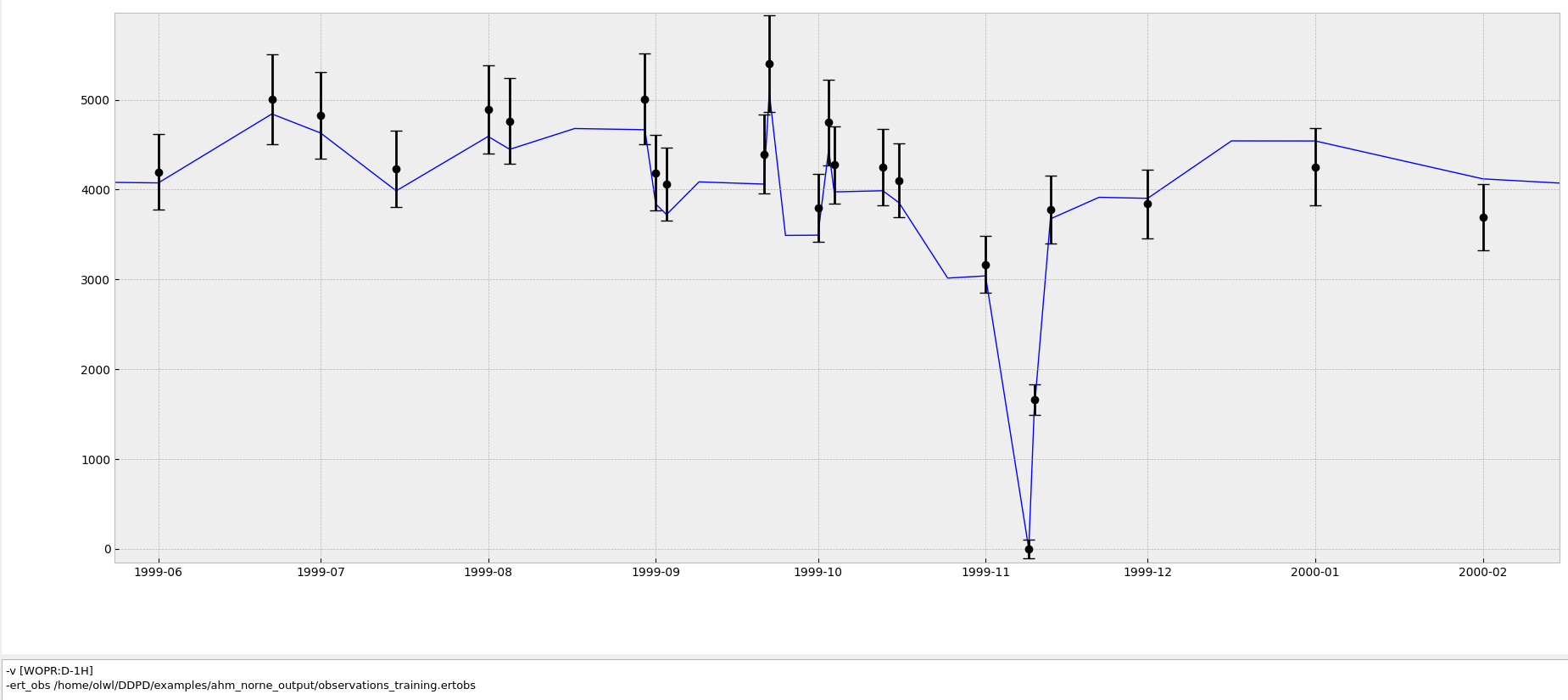
 The problem is now solved. The solution may not be ideal since it requires the creation of 2 'Schedule' class instances instead of 1: one to create the FlowNet SCHEDULE section, and a second one to be used in creating the observations. But it works.
FYI: Quite sure this behavior doesn't apply to total/cumulative vectors, e.g. FOPT, FOIP and etc. They are handled by (at least Eclipse) as continuous vectors, so that the rate defined e.g. 2000-01-01 is actually used from 2000-01-01 to calculate the total over the next timestep. The point here is that Eclipse handles the new WCONHIST input as an instant shift, and if you define WCONHIST e.g. 2000-01-01; there are two states at the same time, the original one, and the updated. Eclipse has decided to report the original one, but for the continuous vectors like FOPT it doesn't matter, as the total doesn't change over the instant shift of WCONHIST.
By just shifting the historical data you are therefore introducing new errors...
Not sure if I fully understand the raised concern, but I did 2 simulation just to check if prescribing rates through WCONPROD or WCONHIST makes any difference. The blue line is the result of a simulation in which all wells are operated with a constant BHP target. The yellow line represents a (short) simulation in which the reported WLPR values from the first simulation are prescribed as targets through the WCONHIST keyword (so the reported WLPR value at time step t is prescribed as a target for the simulation from time t to t+1, as we now do in the FlowNet schedule).
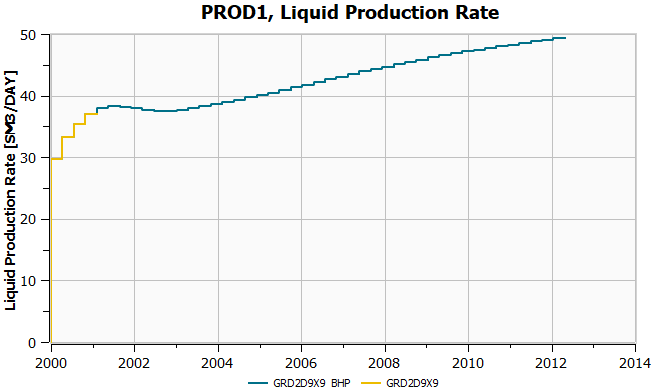
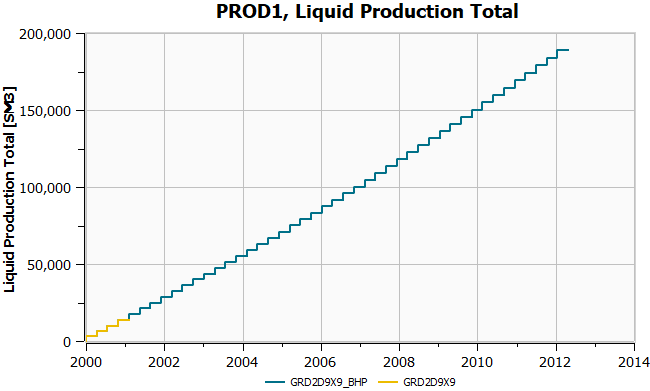 The 2 simulations produce consistent results. Does this address the concern?
This I don't believe @olwijn 😅 (unless you have also shifted your inputdata with one step). If so, you should in any case not diverge from the standard Eclipse output, that will just create other issues and confusions.
The point is that this behavior is not an Eclipse bug or anything like that, it is just that Eclipse (and hopefully FLOW) reports the (constant) rates for the timestep t0->t1 as (t0, t1] and not [t0, t1), so it is the value at t1 (the end) which is the valid value for the timestep, and not the first one at t0. While you are probably using your input to WCONHIST/WCONINJH at t0 as an observation, and then you get a mismatch?
Tried to make a simple example of what I mean. The yellow dots are what you give at a timestep in the schedule (after the DATES keyword for that date). The green dots are the rates as reported in e.g. UNSMRY from Eclipse. The orange line is how Eclipse behaves over the timesteps, and the blue is the cumulative (on the secondary axis).
My point is thus that I think you are trying to match observations as the yellow dots, with the reported values which are the green dots? Shifting the whole schedule with one timestep should would lift the orange line by 1000, and also affect your cumulative?
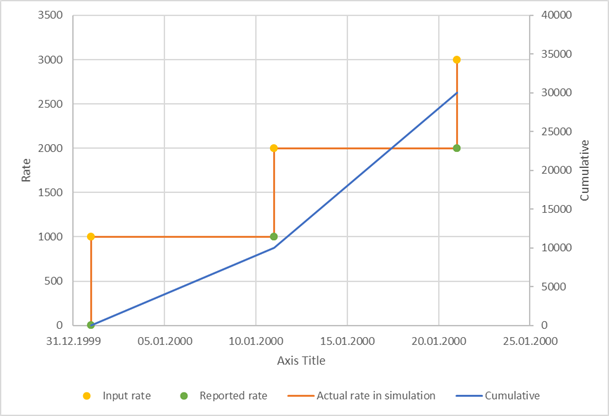
Thanks Atgeir for the example. The data that we extract from an ECLIPSE run for matching with FlowNet are the green dots in your figure, i.e. values reported by ECLIPSE at the initial time (0) and at the end of each simulation time step. In order to be able to match these data with FlowNet we have to make sure that these values are set as well targets for the Flownet simulation at the beginning of the time step (the yellow dots). So what we do when we create the FlowNet schedule is ignore the very first green dot at time 0 and shift the subsequent remaining green dots back in time by one time step, resulting in the yellow dots that are in your figure, which are used as the well targets that are used in the schedule. So based on the data from this example, at the initial time (01.01.2000) we would write a WCONPROD keyword with a target rate value of 1000. If Flownet is able to realize that target rate over the entire subsequent 10-day simulation interval, it would produce the same total/cumulative rate as reported by ECLIPSE at day 10. Do you agree?
Hmm, since I don't know any of the FlowNet stack, I am a bit confused: you basically say that you create the FlowNet input from the Eclipses simulation output? In that case, what you do makes sense (I think) as long as you only handle vectors like rates and network pressures (which is what you need for WCONXXXX), and not totals/cumulatives.
If the case is that you create a schedule based on Eclipse output, I have a "stupid question": Why not use the Eclipse input directly? Do you run the Eclipse simulation and then try to match that in FlowNet as the "truth"?
Yes, we generate the FLowNet input from the ECLIPSE output instaed of from the ECLIPSE deck (schedule text file). This is because we ultimatley want to generate FlowNet directly from measured data in cases where we do not have an ECLIPSE schedule file. We do not (at this moment) use totals/cumulatives to generate the FlowNet schedule, but we do have an option to match Flownet totals to ECLIPSE totals (but in the history matching workflow). So yes, your final sentence is correct. Hope this clarifies things,