

 equeim
Can't open files even when browsing from localhost?
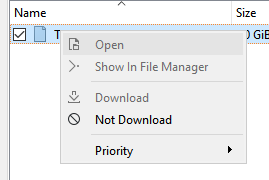
I am unable to open any files, even when using tremotesf on the same PC Transmission is running on.
The option is not even available, not is open in folder.

How do you specify server's hostname in connection settings (localhost, 127.0.0.1?), and what OS are you using?

How do you specify server's hostname in connection settings (localhost, 127.0.0.1?), and what OS are you using?
I use localhost on Windows 10 64 bit.
Edit: same issue with 127.0.0.1
Opps, question about hostname was about old Tremotesf version.
Currently Tremotesf determines whether Transmission is running locally by looking for special file in filesystem. On Windows its path is C:\ProgramData\Transmission\tr_session_id_<session id>, where <session id> is returned from Transmission via HTTP header.
You can get current value of session id from Transmission running on the system using Powershell (check that port, etc are correct for your setup):
Invoke-WebRequest -Uri "http://localhost:9091/transmission/rpc"
echo $error[0].Exception.Response.Headers.GetValues("X-Transmission-Session-Id")
If this file exists, then Tremotesf decides that Transmission is running locally and acts accordingly. Could you check whether this file exists on your system when Transmission is running?
Also, in "Add torrent link/file" dialogs, does Tremotesf allows to select download directory using file picker (it shouldn't if session id file check failed)? I just found a bug that causes "Open" menu item to be always disabled if torrent is single-file. "Show in file manager" should be enabled though (if file at least started downloading).
Did you install Transmission from their website (transmissionbt.com) or GitHub (https://github.com/transmission/transmission/releases)?
Oh I see. I run a custom transmission-daemon.exe so that's probably the issue. I just thought it would work by opening from recognizing the folder running on the same machine that tremotesf is running on. Is there a way for tremotesf to just use the same folder from the machine it is running on when using localhost?