cloud-pipeline
 cloud-pipeline copied to clipboard
Published
20 hours ago •
 epam
epam
epam
[Billing reports] Show main info in a widget
Background
Currently, users can view their spending reports at the billing page. In some cases, to know the summary info about spendings is enough. Especially for such cases, we shall put the main summary of the user's spending info to a new widget and show that widget at the main Dashboard.
Approach
Add a new widget to the main Dashboard (e.g. "My costs"):
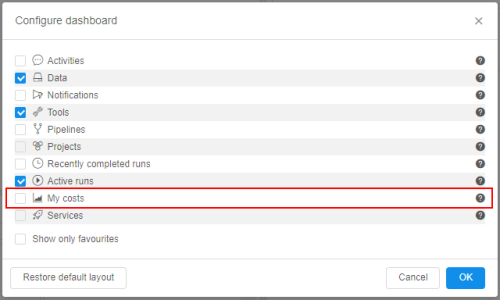 By default, this widget shall be disabled.
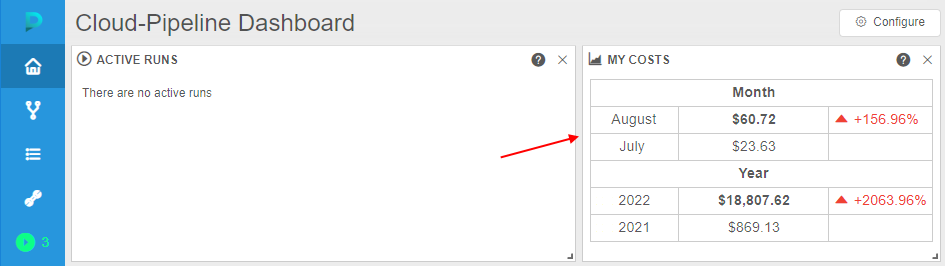
When enabled, this widget shall display spending of the current user (only user spendings, independing of the user role):
- for the month:
- summary spending during the current calendar month (from the 1st day of the month till yesterday)
- summary spending during the previous calendar month for the same period (from the 1st day of the previous month till the day of the month that was yesterday)
- the field that displays the difference between that two numbers:
- if spending in the current month is greater than in previous - the difference shall be colorized in red. Near, the up-arrow shall be displayed
- if spending in the current month is less than in previous - the difference shall be colorized in green. Near, the bottom-arrow shall be displayed
- for the year:
- summary spending during the current calendar year (from the 1st day of the year till yesterday)
- summary spending during the previous calendar year for the same period (from the 1st day of the previous year till the day of the year that was yesterday)
- the field that displays the difference between that two numbers:
- if spending in the current year is greater than in previous - the difference shall be colorized in red. Near, the up-arrow shall be displayed
- if spending in the current year is less than in previous - the difference shall be colorized in green. Near, the bottom-arrow shall be displayed
Example of the widget view:
Other options
- Spending in the widget shall be calculated as a single summary for the compute instances launched by the user and data storages created by the user. These costs shall be the same ones if user opens the Billing page and views only own spending reports.
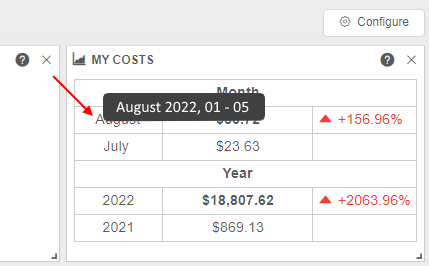
- When hover over the time period in the widget (first column) - in a tooltip, detailed info about the period shall appear, e.g.: