

 epam
epam
Flat search results option for LazyDataSource
Description
Consider we have a huge tree-like data structure. Examples: world locations from continents, via countries, to cities.
I can use LazyDataSource to display such tree and load it on demand.
However, if I need to implement searching on top of it (e.g. - for Pickers), I face numerous issues:
- LazyDataSource loads data top-down - first layer items (continents), then second level (countries) - only for unfolded nodes. To implement API correctly, I'd need to return a continent, if it contains something matching the search. E.g.: if I search "London", I'd need to return "Europe" - as it contain London. This can be really hard to implement on backend.
- UX-wise, search results needs to be sorted in order of relevance, not hierarchically.
- If the tree is deep, we'll show several levels of hierarchy before actual result. This consumes useful space, and breaks keyboard shortcuts (just hit enter to select the first one)
Describe the solution you'd like
Let's flatten the search results:
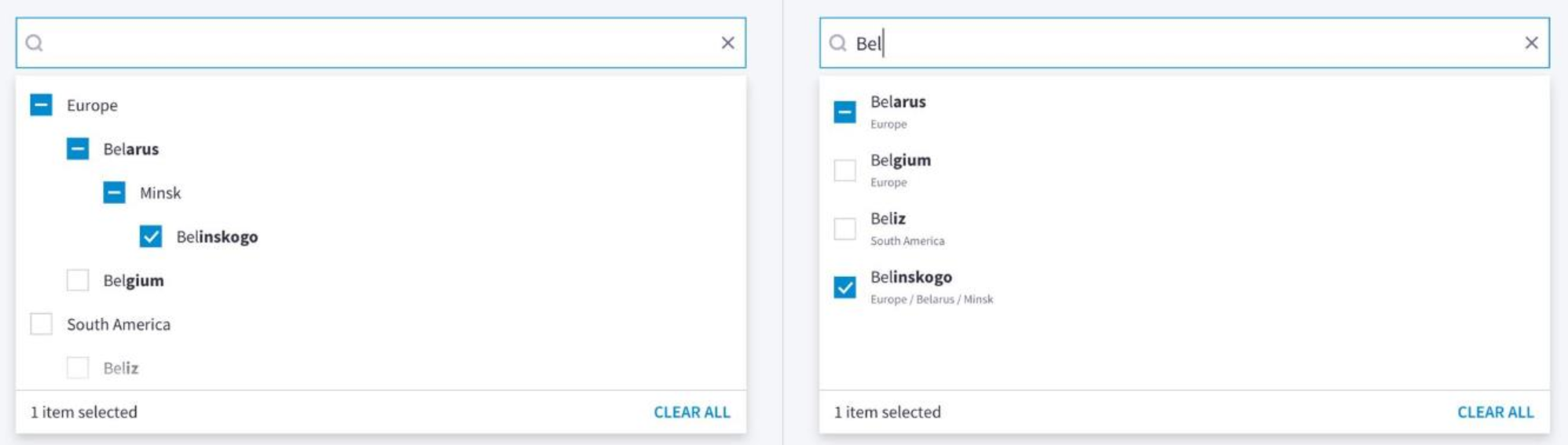
'Naive' approach
A simplest solution would be to extend the PickerInput component with a prop like getPath: (i: TItem) => string[] - very much like getName we already have. It can also default to i => (i as any).path.
This solely would give an ability to implement a Picker on top of a tree-like structure w/o displaying a tree at all.
Also, one can have both tree when there's no search, and a flat list for search, with a trick like:
api: (rq, option) => rq.search
   ? /* call search api, returning a flat list. Item would be something like { id: 1, name: "London", path: ["Europe", "Great Britain"] } */
   : /* call api to extract required level, using options.parentId. Each item would contain childCount to trigger loading hierarchy */;
Caveat 1 - displaying nodes with selected children
We show highlight nodes checkboxes in a special way if they had some children selected:
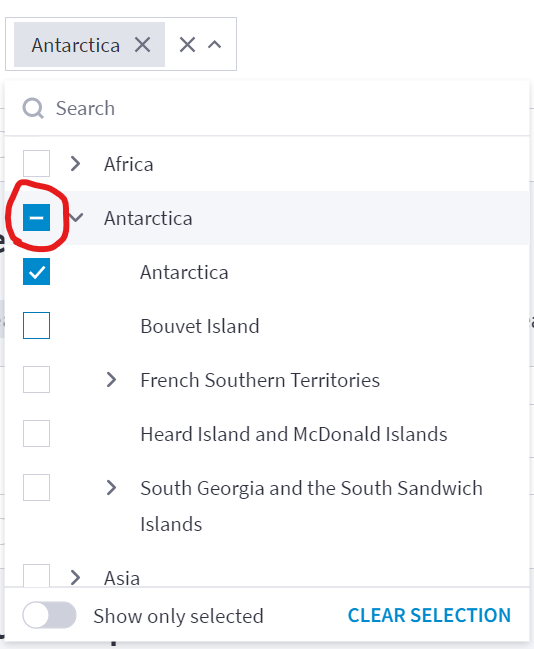
With the Naive Approach above, there will be an issue:
- Search for "london"
- Select it
- remove search
- open Europe and scroll to Great Britain
You'll find that Great Britain is not highlighted this way, as we haven't load it's children yet.
The solution here is something like:
- add getParentId(item: TItem) => TId to the LazyDataSourceProps
- use api to fetch all parent for all items in checkedIds list
This can be done along with the Naive Approach. However, we need to consider it here, as we actually fetched all the parents of "London" in item.path property. Maybe we re-use this already fetched data somehow?
Caveat 2 - selection cascading
With cascadeSelection: true, we select all children inside selected node.
To support this, we need to tweak LazyDataSource so it:
- in selection cascading logic, it should check if there's currently a search
- if no - it should behave as it is now - load the whole sub-tree into existing this.tree
- if yes - child sub-tree should be retrieved separately, into another prop like this.selectionTree, without passing 'search' prop to API
- both this.tree and this.selectionTree should be reset on filter/sorting changes
Note: this caveat is not directly connected with this particular issue. Cascade Selection currently doesn't work correctly with search - it selects only found children, which is definitely not what user wants.
Caveat 3 - path is not visible in the Picker Input badges
While we show path to the item in PickerBody, it would be impossible to distinguish items with the same name if a Picker is folded:
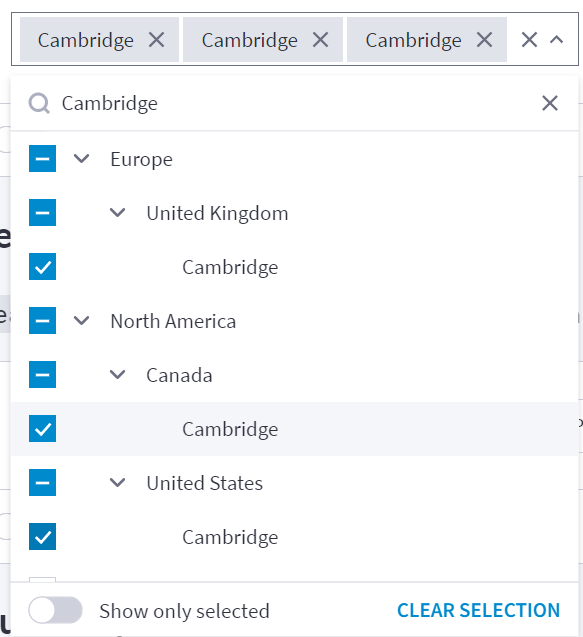
DataSource-centric approach
LazyDataSource returns row.path for every item displayed.
We can do a 'flattenSearchResults" option, which wouldn't pass parentId and check getChildCount() to build a tree, turning a tree into a flat list.
To get parents (which wouldn't be fetched in this case) we can:
- use getParentId-based approach from the Caveat 1, to fetch all item's parents
- allow to pass pre-fetched parents along with API response. We can put them into the same cache we use for items
What's next
As far I can see, the "Naive" and "DataSource-centric" approach can be merged, if we find a way to extend LazyDataSourceAPI in way that it can contain all parents for particular item.
We need to consider the following:
- when loading trees, it would be useful to also pre-fetch childrens for parents. Probably even not all, but top N children
- when querying parents for missing selection, it would also be nice to fetch them in a single request, instead of doing N calls
- it's not a good idea to return parents as field in TItem. In such case, it would be accessible both as row.value.parents, and row.path. But the first one would be opaque for the DataSource. If we would update items, these two copies would get out of sync.
Let's decide the way we go (especially on API changes), and target this to the nearest version.
