

 emoacht
Not support for displays used via Thunderbolt USB-C
I use 3 screens:
- My laptop screen
- A screen via HDMI
- A screen via USB C Thunderbolt 3.1 (because there are no other HDMI ports on my laptop)
The screens of my laptop and HDMI are detected and work perfectly. Display via USB C Thunderbolt is not detected.
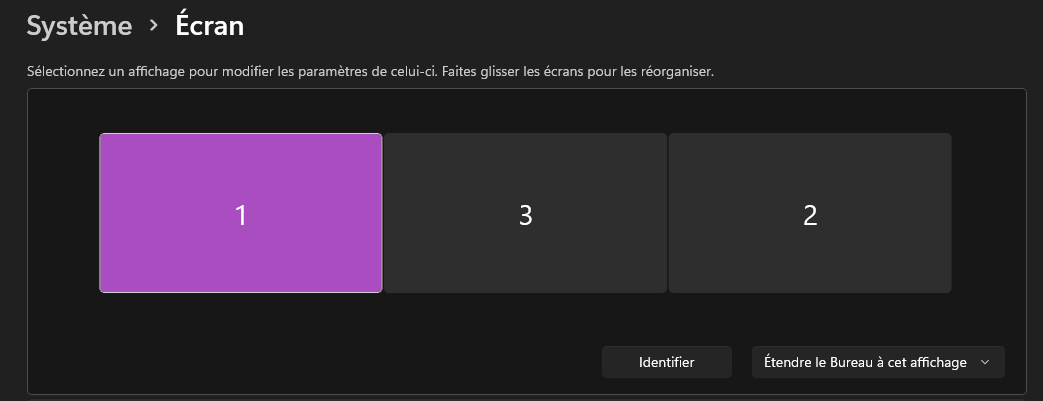
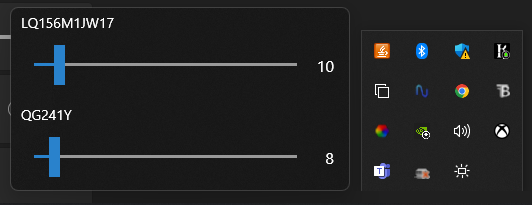

I have the same problem. The monitor connected to my USB-C hub is detected by the app. But the monitor connected to a simple USB-C to HDMI adapter is not showing up.

Could you read reporting? In fact, I must say, just saying "my monitor is not detected" has no value at all.

[Date: 8/12/2022 7:42:28 AM Ver: 3.12.1.0]
{
  "System": "Manufacturer: Dell Inc., Model: XPS 13 9310, OS: 10.0.19044.0",
  "Device Context - DeviceItems": [
    {
      "DeviceInstanceId": "DISPLAY\\DELA19A\\4&226dbb3c&0&UID8259",
      "Description": "Generic PnP Monitor",
      "DisplayIndex": 1,
      "MonitorIndex": 0
    },
    {
      "DeviceInstanceId": "DISPLAY\\DELA19A\\4&226dbb3c&0&UID41029",
      "Description": "Generic PnP Monitor",
      "DisplayIndex": 2,
      "MonitorIndex": 0
    }
  ],
  "DisplayMonitor - DisplayItems": [
    {
      "DeviceInstanceId": "DISPLAY\\SHP14F9\\4&226dbb3c&0&UID8388688",
      "DisplayName": "",
      "IsInternal": true,
      "ConnectionDescription": "Internal",
      "PhysicalSize": 13.3709974
    },
    {
      "DeviceInstanceId": "DISPLAY\\DELA19A\\4&226dbb3c&0&UID41029",
      "DisplayName": "DELL S2721D",
      "IsInternal": false,
      "ConnectionDescription": "DisplayPort",
      "PhysicalSize": 26.9708023
    },
    {
      "DeviceInstanceId": "DISPLAY\\DELA19A\\4&226dbb3c&0&UID8259",
      "DisplayName": "DELL S2721D",
      "IsInternal": false,
      "ConnectionDescription": "DisplayPort",
      "PhysicalSize": 26.9708023
    }
  ],
  "Display Config - DisplayItems": [
    {
      "DeviceInstanceId": "DISPLAY\\DELA19A\\4&226dbb3c&0&UID8259",
      "DisplayName": "DELL S2721D",
      "IsInternal": false,
      "RefreshRate": 59.95055,
      "ConnectionDescription": "DisplayPort",
      "IsAvailable": true
    },
    {
      "DeviceInstanceId": "DISPLAY\\DELA19A\\4&226dbb3c&0&UID41029",
      "DisplayName": "DELL S2721D",
      "IsInternal": false,
      "RefreshRate": 59.95055,
      "ConnectionDescription": "DisplayPort",
      "IsAvailable": true
    }
  ],
  "Device Installation - InstalledItems": [
    {
      "DeviceInstanceId": "DISPLAY\\SHP14F9\\4&226DBB3C&0&UID8388688",
      "Description": "Dell XPS 13 SHP14F9 Display",
      "IsRemovable": false
    },
    {
      "DeviceInstanceId": "DISPLAY\\DELA19A\\4&226DBB3C&0&UID41029",
      "Description": "Generic PnP Monitor",
      "IsRemovable": true
    },
    {
      "DeviceInstanceId": "DISPLAY\\DELA19A\\4&226DBB3C&0&UID8259",
      "Description": "Generic PnP Monitor",
      "IsRemovable": true
    }
  ],
  "Monitor Configuration - PhysicalItems": [
    {
      "Key": {
        "DisplayIndex": 1,
        "MonitorRect": "Location:2560,-355, Size:1440,2560"
      },
      "Value": [
        {
          "Description": "Generic PnP Monitor",
          "MonitorIndex": 0,
          "Capability": {
            "IsHighLevelBrightnessSupported": false,
            "IsLowLevelBrightnessSupported": false,
            "IsContrastSupported": false,
            "IsPrecleared": false,
            "CapabilitiesString": null,
            "CapabilitiesReport": null,
            "CapabilitiesData": null
          },
          "GetBrightness": "Success: False",
          "SetBrightness": "Success: True, Match: False (Expected: 9, Actual: 0)"
        }
      ]
    },
    {
      "Key": {
        "DisplayIndex": 2,
        "MonitorRect": "Location:0,0, Size:2560,1440"
      },
      "Value": [
        {
          "Description": "Generic PnP Monitor",
          "MonitorIndex": 0,
          "Capability": {
            "IsHighLevelBrightnessSupported": true,
            "IsLowLevelBrightnessSupported": true,
            "IsContrastSupported": true,
            "IsPrecleared": false,
            "CapabilitiesString": "(prot(monitor)type(LCD)model(S2721D)cmds(01 02 03 07 0C E3 F3)vcp(02 04 05 08 10 12 14(05 08 0B 0C) 16 18 1A 52 60(0F 11 12 ) 62 AC AE B2 B6 C6 C8 C9 CA CC(02 0A 03 04 08 09 0D 06 ) D6(01 04 05) DC(00 03 05 ) DF E0 E1 E2(00 1D 02 22 20 21 0E 12 14 ) F0(0C 0F 10 11 ) F1 F2 FD)mswhql(1)asset_eep(40)mccs_ver(2.1))",
            "CapabilitiesReport": "Luminance: True, Contrast: True, Speaker Volume: True, Power Mode: True",
            "CapabilitiesData": null
          },
          "GetBrightness": "Success: True, Valid: True (Minimum: 0, Current: 27, Maximum: 100)",
          "SetBrightness": "Success: True, Match: True (Expected: 32, Actual: 32)"
        }
      ]
    }
  ],
  "MSMonitorClass - DesktopItems": [
    {
      "DeviceInstanceId": "DISPLAY\\SHP14F9\\4&226DBB3C&0&UID8388688",
      "Description": "Dell XPS 13 SHP14F9 Display",
      "BrightnessLevels": "5 6 7 8 9 10 11 12 13 14 15 16 17 18 19 20 21 22 23 24 25 26 27 28 29 30 31 32 33 34 35 36 37 38 40 41 42 43 45 46 47 49 50 52 53 55 57 59 60 62 64 66 68 70 72 74 77 79 80 81 84 86 89 92 95 97 100"
    }
  ],
  "ElapsedTime": [
    "DeviceItems    -> 0.026",
    "DisplayMonitorItems -> 0.016",
    "DisplayConfigItems -> 0.013",
    "InstalledItems -> 0.016",
    "PhysicalItems  -> 3.559",
    "DesktopItems   -> 0.039"
  ]
}
Here's my probe.log. It looks like my 2 DELL S2721D are in there, but only 1 shows up in the app. The third display is the laptop internal one, which I disabled, so that's fine if I can't control it.
@LouWii Thanks for the log. All Dells? Interesting. Then, one of 2 S2721D (probably secondary one) does not respond to DDC/CI. It is the reason.
That makes sense. Both monitors show up properly in the app when connected to my desktop computer, so it's really just because of the thunderbolt dongle I have. I found this reddit thread which contains some explanation as to why it might not work.
The compatibility with DDC/CI depends on each cable and adaptor as well as the monitor itself. I guess you have tried already, the connection by a Thunderbolt to DisplayPort cable could solve the issue.
Unfortunately I don't have a thunderbolt to display port adapter. I might buy one to try at some point, but for now it's fine, it's my secondary monitor which is less important. The app works for my primary monitor.
Thanks for the help @emoacht, and thanks for the app!