

 emmetio
[Vue] Inserts attribute inside interpolation on pressing dot
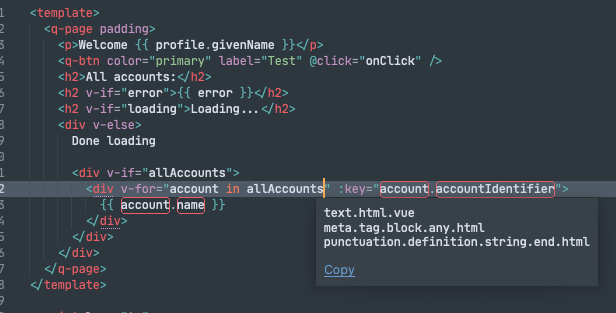


Oh, I’ve just copy-pasted this feature from previous Emmet plugin. You can disable it with auto_id_class preference

It doesn't insert an attribute if cursor is not exactly beneath the closing quote
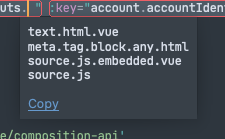
But in any case, maybe the feature should not be enabled by default or the scopes where it triggers should be tweaked (although it might be tricky here).
Oh, I’ve just copy-pasted this feature from previous Emmet plugin. You can disable it with
auto_id_classpreference
Could you give an example of the code please?
I've been trying to make a twig template and cannot currently write any Twig code that involves a .... which is a lot of it.

@prwhitehead go to Preferences > Package Settings > Emmet > Settings menu item and set auto_id_class to false. Also, please give a Twig template sample where dot behaves incorrectly so I can tweak scopes
BTW. Here is another tricky example where typing a dot would insert an attribute:
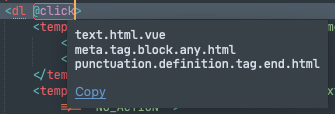
It's common to type dot in this place to insert @click.prevent for example.
Unfortunately, the scopes don't seem to make this case any different from a normal case...
I suppose a good heuristic might be to only trigger this action when the cursor is preceded by white space.
please give a Twig template sample where dot behaves incorrectly so I can tweak scopes
I found that the default behaviour is when the cursor is inside twig brackets {% ... %} or {{ ... }} then any keydown of . will cause class="" to be inserted. Outside of the twig brackets, this behaviour does not occur.
A snippet is:
 {% if entry.%}
 {{ entry.}}
This is turned into:
{% if entry class=""%}
{{ entry class=""}}
Incase its a settings related issue, my keymap file is as follows:
[
	{ "keys": ["super+e"], "args": { "action": "expand_abbreviation" }, "command": "run_emmet_action", "context": [{"key": "emmet_action_enabled.expand_abbreviation"}]},
{ "keys": ["super+shift+a"], "command": "alignment" },

{ "keys": ["super+t"], "command": "show_overlay", "args": {"overlay": "goto", "show_files": true} },
{ "keys": ["super+p"], "command": "show_overlay", "args": {"overlay": "goto", "show_files": true} },
{ "keys": ["super+shift+p"], "command": "show_overlay", "args": {"overlay": "command_palette"} },
{ "keys": ["super+ctrl+p"], "command": "prompt_select_workspace" },
{ "keys": ["super+r"], "command": "show_overlay", "args": {"overlay": "goto", "text": "@"} },
{ "keys": ["super+g"], "command": "show_overlay", "args": {"overlay": "goto", "text": ":"} },
{ "keys": ["f12"], "command": "goto_definition" },
{ "keys": ["super+alt+down"], "command": "goto_definition" },
{ "keys": ["super+ctrl+f"], "command": "toggle_full_screen" },
{ "keys": ["super+ctrl+shift+f"], "command": "toggle_distraction_free" },
{ "keys": ["super+f"], "command": "show_panel", "args": {"panel": "replace", "reverse": false} },
{ "keys": ["super+v"], "command": "paste_and_indent" },
{ "keys": ["alt+up"], "command": "swap_line_up" },
	{ "keys": ["alt+down"], "command": "swap_line_down" },
	{
			"keys": ["super+e"],
			"command": "emmet_expand_abbreviation"
	}
]