

 emberjs
Cannot select any element with an in-element block.
Describe the bug
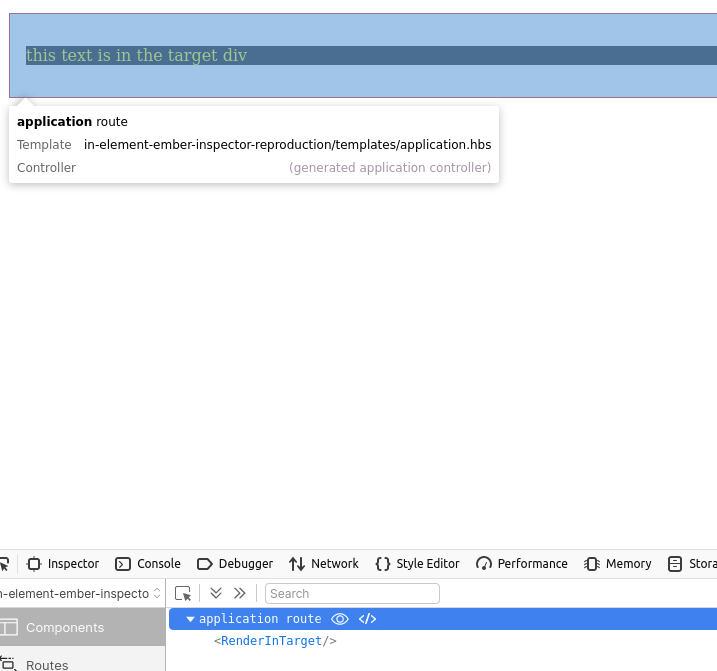
When clicking the black box with yellow text,
the component that contains that element is not selected in the component tree, RenderInTarget
instead, the template containing the in-element target is highlighted -- I don't think this is the desired behavior?
To Reproduce Steps to reproduce the behavior:
-
Clone https://github.com/NullVoxPopuli/repro-repo-ember-inspector-1255
-
start app
-
Click the component picker button:
-
see that the application route is highlighted and selected instead of
RenderInTarget
Expected behavior RenderInTarget should be highlighted and selected
Environment Firefox Ember Inspector 4.1.0 Ember 3.18.1

@NullVoxPopuli if you move the element outside of the application template, does it work?

Yeah, that is what I expected. That is accounted for by this code, so it's not that this generally doesn't work.
We may want to take a somewhat different approach in fixing the issue. This code is somewhat performance sensitive, in that it is run every time the mouse moves (when in the "live inspection" mode), and if we have to search through all the render nodes in a big app, it will be quite slow and feels very laggy. We could debounce it to avoid the unnecessary work, but the end result is that it would still feel laggy.
So the current code has a bunch of optimizations built in to it and tries to return an answer as quickly as possible and eliminate as much of the search space as possible (i.e. don't even bother checking most of the render nodes that we know for sure can't contain the component). It is one of these optimizations that is causing the failure mode you reported here.
The logic used by the current code is that if the DOM node we are looking at (the cursor is pointing at) is physically contained/nested inside the DOM range of a given render node, then it is either already the answer (the render node) we are looking for, or that the answer (render node) we are looking for is one of its children.
This generally works, except for the case where an element is wormholed into somewhere inside the DOM range owned by a different render node, such as when you in-element into somewhere in the application template (I don't remember whether this is explicitly supported – but I don't disagree that it's pretty common).
When we visit that render node – in this case, the application template – L352 sees that the element you are pointing at is contained within its DOM range, so it tries to find it in one of its children, and failing that, it assumes it must therefore be rendered inside the application template itself – because how else could it have gotten there; therefore it returns the application template as the answer. Maybe this is not technically wrong, but it is missing a more precise answer.
I think a better approach would probably to treat the in-element nodes as "roots" for the purpose of this search only. The in-element render nodes should be checked first, because the actual roots are checked, and when we encounter an in-element render node as part of the tree walk we can stop traversing further, to avoid duplicating the work.
It's a bit trickier than that because we don't currently have a render node for in-element. I think that would be nice to have, but it's not super easy to add right now because in-element is implemented in Glimmer VM not in Ember, and the debug render tree is implemented in Ember right now (@pzuraq is trying to move it, but it's not ready yet). I think we probably have enough information to do this anyway, but looking at the bounds – if the bounds of a render node is not contained inside its parents, there must be an in-element call in between the two.
Ideally we would do this just once instead of doing that on every mouse movement. So either we can do the processing to keep a list of the "DOM roots" after we receive the tree from Ember, or we can be lazier and do it when the "live inspection" mode is enabled.