elsa-core
 elsa-core copied to clipboard
 elsa-workflows
When a workflow is blocked, how can I programmatically go straight back to a blocked node that has been historically executed?
Hello, there is a problem bothering me, please help me to check, thank you very much!
Requirements: When the workflow stays at a blocked node waiting for the user to approve, the user can choose to go back to any blocked node that the current workflow passes through.
Example:
- Node 'Blocking Activities 2.1' is waiting for user Sam's approval, but the user manually rolls back to node 'Blocking Activities 1'

- After the rollback, the node stays in node 'Blocking Activities 1'
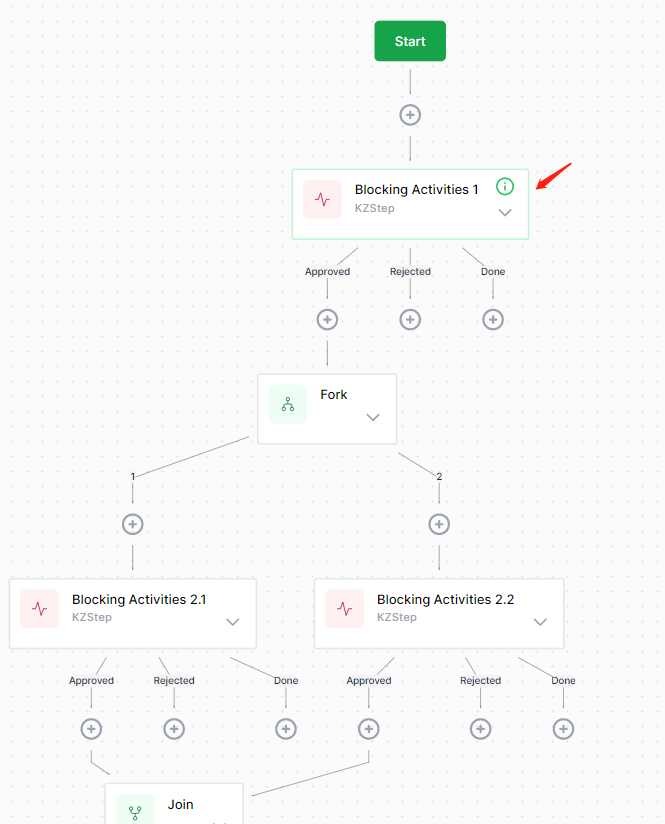
Current programming implementation: Is there any other way to implement it?
- Delete all Bookmarks
- Add Bookmarks for the new node
- Rebuild the JSON in WorkflowInstances
Problems: There is no way to access the execution context 'OnExecuteAsync(ActivityExecutionContext context)' of node 'Blocking Activities 1'! Please help me,thanks.

i also have this problem and very anxious about how to deal with it.


i also have this problem 你把elsa-core ,引用到生产项目里吗?
no, i consider to use this
@fearless87
Yes, the way to return back to a previous node is to connect to it using the designer. One thing to take care of however is that with Elsa 2, there has to be at least one root node (which means nou inbound connections).
In your case, I would just add a "dummy" activity between the Start button and the "Blocking Activities 1" activity. This dummy activity could be a simple "WriteLine" activity.
This way, you can connect any activity back to the "Blocking Activities 1" activity.
Here's an example of connecting an existing activity to another one:
https://miro.medium.com/max/720/1*m98zNmHo-O3gPqGaksrnBA.gif
I took the image from this blog post: https://sipkeschoorstra.medium.com/part-7-of-building-workflow-driven-net-applications-with-elsa-2-e369e7784555