

 elkowar
[BUG] Button With Rounded Corners Has Transparent Square Box Behind It That Won't Go Away
Checklist before submitting an issue
- [X] I have searched through the existing closed and open issues for eww and made sure this is not a duplicate
- [X] I have specifically verified that this bug is not a common user error
- [X] I am providing as much relevant information as I am able to in this bug report (Minimal config to reproduce the issue for example, if applicable)
Description of the bug
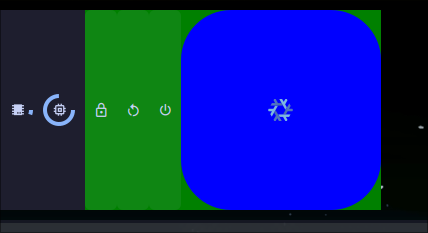
When I round the corners of a button, the button still has a transparent square box behind it that will not go away.
Reproducing the issue
Run my linked bar (make sure to use the linked commit). For testing purposes, the powermenu is expanded by default and I've used bright blue and green and made the bar oversized so the issue is easy to see. You'll notice that the NixOS logo has a blue background with rounded corners, yet for some reason also has a transparent square box behind it.
https://gitlab.com/IsaacBrown92/dotfiles/-/tree/532f6135b25e13c25f4ba99dfb75bb50c20e1781/modules/eww/config
Expected behaviour
There should not be a transparent square box behind the blue NixOS logo background.
Additional context
No response


To my knowledge, this is just the nature of GTK. Styling only changes the appearance of the items, not the actual structure. However, I'm struggling to see where this would be an issue? If it's transparent, it shouldn't be a problem?

I'm having also having this issue. It seems that when you have a rounded box, the corners take the wallpaper color instead of what is there. The stylesheet I use is here, although I have increased the border radius for the purpose of the photo: Stylesheet

I'm having also having this issue. It seems that when you have a rounded box, the corners take the wallpaper color instead of what is there. The stylesheet I use is here, although I have increased the border radius for the purpose of the photo: Stylesheet
Define the background color using RGBA.
That is, instead of using a hex color code like #24273a, define the color like so: rgba(36, 39, 58, 0.99).
The first three numbers are the red, blue, and green values (out of 255). The fourth number is the alpha value. We need to use a high alpha value to enable transparency — for the corners — without making the widget itself appear transparent.
Tech note: Alpha compositing is a digital imaging technique that involves combining visual elements — foreground and background — to achieve the illusion of transparency.

