
fvtt-module-narrator-tools
 fvtt-module-narrator-tools copied to clipboard
 elizeuangelo
QOL Request/Idea
I think this module is great. Thanks for working on it.
I keep forgetting what the difference between narrate and describe is for this module. Maybe "send to chat" and "display over scene" might be more descriptive.
I like to use text to speech to make audio sounds that read the dungeon room descriptions to players. I tried using this module with the playlist sounds by including the journal playlist link in the narration/description. The sound icon shows, but doesn't play and can't be activated on screen. It functions in chat, but players don't have permission to activate it, because it would play for everyone.
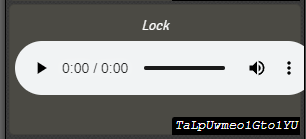
I tried using the HTML audio player but it won't copy to the screen or chat. It seems you can't select it for narration/description. That would be a way for a player to hear the sound again without having others listen to it, but it can't be sent to the screen or chat using this module.
I guess I have to play the sound and use this module separately, and that's fine. I was looking for a way to easily show text while playing a sound, and sending the text to chat with a button for the sound that players can listen to by themselves.

You can select Audio Elements in HTML, but by standard if you dont start by selecting some text first it doesnt reckognize you want to select anything at all, this is due to browser behavior, not javascript coding.
As it is, the easier way to describe audio in a user-based context is by creating a Title and the audio element below it, and select it all starting with the title.
I could create some new kind of entity to make it easier (by translating text into 'single-play audios') but I believe 99.99% of users wouldnt use it because they wouldnt know its there, creating new kind of entity-links is better done as a suggestion in Core Foundry IMO.
