

 elgalu
Could not use `chromeOptions.prefs.profile.default_content_setting_values.notifications` in chrome browsers
Please make sure that the boxes below are checked before you submit your issue. Thank you!
Operating System
- [x] I provided my operating system name and version, e.g. output of
uname -a
macOS High Sierra version 10.13.5
uname -a
Darwin Kernel Version 17.6.0: Tue May 8 15:22:16 PDT 2018; root:xnu-4570.61.1~1/RELEASE_X86_64 x86_64
Image version
elgalu/selenium:3.12.0-p7
latest as of this issue created.
- [x] I have latest version of this image. Upgrade with
docker pull elgalu/selenium
Docker version
Docker version 18.03.1-ce, build 9ee9f40
- [x] I have latest version of docker and I will specify here the output of
docker --version
What I want to do
- suppress permission prompt for push notifications in chrome browsers.
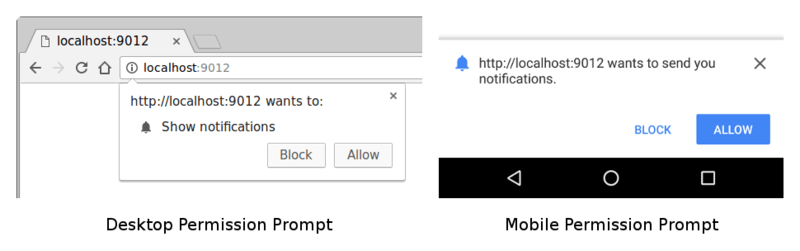
For the purpose, we can use prefs of chromeOptions in capabilities.
Example ruby code is like this.
require 'selenium-webdriver'
driver_options = {chromeOptions: {prefs: {profile: {default_content_setting_values: {notifications: 2}}}}}
caps = Selenium::WebDriver::Remote::Capabilities.chrome(driver_options)
driver = Selenium::WebDriver.for :remote, url: "http://localhost:4444/wd/hub", desired_capabilities: caps
Using chromedriver directly or using selenium-standalone-server, we could successfully suppress the notification permission prompt.
However, with docker-selenium, we could not.
Execution Logs.
Using the above ruby code, we got driver logs (driver.manage.logs.get(:driver)) and compare the debug logs of the chrome preferences file.
with standalone servers
Server launch command
java -jar ~/local/jar/selenium-server-standalone-3.12.0.jar
Driver Logs
profile.default_content_setting_values.notifications is set to 2. Expected behavior.
We could suppress the notification permission prompt.
INFO 2018-06-19 11:24:14 +0900: Populating Preferences file: {
   "alternate_error_pages": {
      "enabled": false
   },
   "autofill": {
      "enabled": false
   },
   "browser": {
      "check_default_browser": false
   },
   "distribution": {
      "import_bookmarks": false,
      "import_history": false,
      "import_search_engine": false,
      "make_chrome_default_for_user": false,
      "skip_first_run_ui": true
   },
   "dns_prefetching": {
      "enabled": false
   },
   "profile": {
      "default_content_setting_values": {
         "notifications": 2
      }
   },
   "safebrowsing": {
      "enabled": false
   },
   "search": {
      "suggest_enabled": false
   },
   "translate": {
      "enabled": false
   }
}
with docker-selenium
server launch command
docker run -d --name=grid -p 4444:24444 -p 5901:25900 -e VNC_PASSWORD=no -e TZ="Asia/Tokyo" -v /dev/shm:/dev/shm --privileged elgalu/selenium:3.12.0-p7
Driver Logs
profile.default_content_setting_values.notifications is not set.
We could not suppress the notification permission prompt.
INFO 2018-06-19 11:20:24 +0900: Populating Preferences file: {
   "alternate_error_pages": {
      "enabled": false
   },
   "autofill": {
      "enabled": false
   },
   "browser": {
      "check_default_browser": false
   },
   "distribution": {
      "import_bookmarks": false,
      "import_history": false,
      "import_search_engine": false,
      "make_chrome_default_for_user": false,
      "skip_first_run_ui": true
   },
   "dns_prefetching": {
      "enabled": false
   },
   "profile": {
      "content_settings": {
         "pattern_pairs": {
            "https://*,*": {
               "media-stream": {
                  "audio": "Default",
                  "video": "Default"
               }
            }
         }
      },
      "default_content_setting_values": {
         "geolocation": 1
      },
      "default_content_settings": {
         "geolocation": 1,
         "mouselock": 1,
         "notifications": 1,
         "popups": 1,
         "ppapi-broker": 1
      },
      "password_manager_enabled": false
   },
   "safebrowsing": {
      "enabled": false
   },
   "search": {
      "suggest_enabled": false
   },
   "translate": {
      "enabled": false
   }
}
It may be the issue of chrome or chrome drivers.
Thanks,
The topic was discussed in slack


@elgalu Could this be looked into? This used to work earlier and due to this we are not able to run our tests.
Hi, could you send a PR adding some tests? that way we find out when something breaks, for now the PR could contain a test that re-creates the problem and will be useful to solve it plus also prevent this from happening again.
