

 elementor
Feature Request: Error validation in the Login Widget
- [X] I have searched for similar features requests in both open and closed tickets and cannot find a duplicate.
- [X] The feature is still missing in the latest stable version of Elementor ( Elementor Pro. )
What problem is your feature request going to solve? Please describe. Hello guys!
If the purpose of the Login Widget is to have a cool and nice experience for the users to login in our sites, Elementor should integrate the error validation feature. If not, when the user uses invalid usernames or passwords Elementor drives the user again to the Login Wordpress screen, something that is the opposite experience of the porpuse of the Login widget.
Describe the solution you'd like I would like Elementor prompts the error validations in the widget itself.
(Optional 1) - A feature to register a new user or at least, open the change to put an URL to create the new user registration.
(Optional 2) - A feature for the users that lost their passwords, sending them an email with a new password if the system detects the email exits.
Thanks!

@JulimanS
This will only be possible if we validate the login ourselves using the Forms Widget and log in as an action.

@bainternet Thanks Raz.
Forgive me if I said something that sounds ilogical, I'm not an expert but I guess right now the Elementor Login Widget doesn't validate the info, is Wordpress. Am I right?
It wouldn't be possible that when Wordpress validate that info and there is an error, drives that error from Wordpress and promp it on the Login Widget?
@JulimanS
You are right, the validation part is done by WordPress and currently, there is no way of telling WordPress where to display the errors. not without custom coding.
For those looking for a solution to this, here is what I came up with:
Add this to your functions.php or code snippets plugin:
//add hook to redirect the user back to the elementor login page if the login failed
add_action( 'wp_login_failed', 'elementor_form_login_fail' );
function elementor_form_login_fail( $username ) {
    $referrer = $_SERVER['HTTP_REFERER'];  // where did the post submission come from?
    // if there's a valid referrer, and it's not the default log-in screen
    if ( !empty($referrer) && !strstr($referrer,'wp-login') && !strstr($referrer,'wp-admin') ) {
        //redirect back to the referrer page, appending the login=failed parameter and removing any previous query strings
        //maybe could be smarter here and parse/rebuild the query strings from the referrer if they are important
        wp_redirect(preg_replace('/\?.*/', '', $referrer) . '/?login=failed' );
        exit;
    }
}
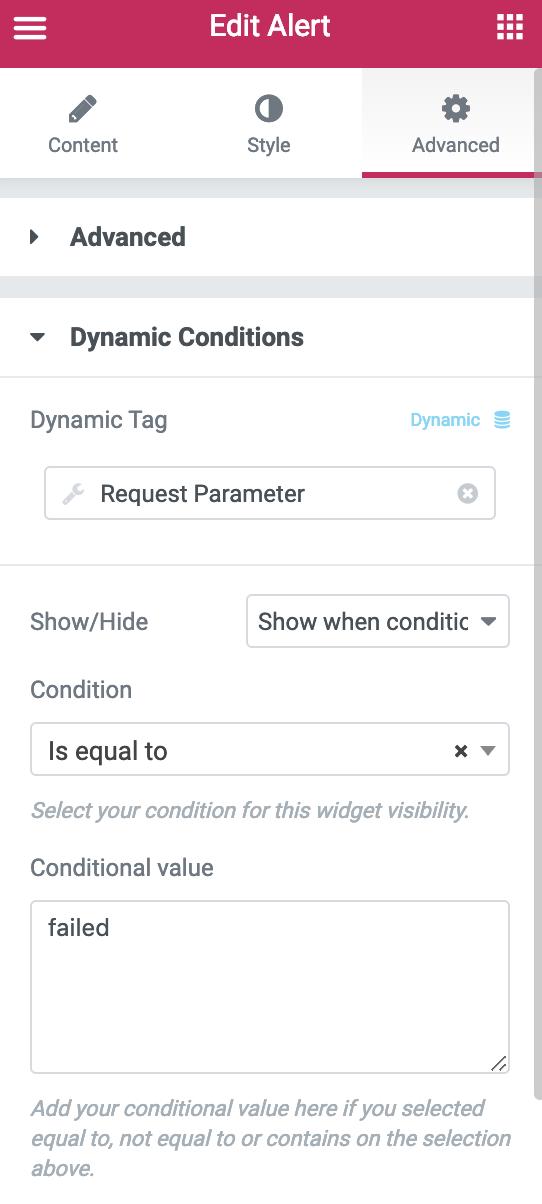
Then using the dynamicconditions plugin (https://wordpress.org/plugins/dynamicconditions/) you can configure a text/alert element above/below your form to only show up when "Request Parameter login is equal to failed" in the Advanced->Dynamic Conditions configuration on your widget (see attached image). Cheers!


The OP's request is perfectly valid and makes good sense. Professional looking websites have intuitive redirects on error conditions. Many users register at multiple sites and don't always remember registration details for all sites of interest. If they haven't already registered the site should articulate that clearly and ask them to do so. Anything less than that is amateurish. I don't see why this should be an implementation conundrum, surely "not registered" can be trapped and appropriate action taken. For example, consider the "action on submit" option for the contact form. As a developer I fully expect an "action on error" option if it's appropriate for a particular widget. Kudos to wilsonwc for rolling up his sleeves and providing a workaround, but this should not have been necessary. I was counting on Elementor Pro to develop a professional website, but I keep stubbing my toes on one oversight after another and am forced to spend extra time researching workarounds. Please get the OP's request implemented ASAP. Thank you.

@wilsonwc Thanks that is great, I got it, yet it does not work perfectly. When the password or username is incorrect it refreshes the page but the login popup doesn't reopen. And since the message is in the popup it isn't visible. What can I do?

Had the same issue where you have a login page made in elementor and then you have issues like incorrect password redirects to the WP login page. Here is a handy bit of code to help with this. It goes in your theme functions file.
function redirect_login_page() {
  $login_page  = home_url( '/login/' );
  $page_viewed = basename($_SERVER['REQUEST_URI']);

  if( $page_viewed == "wp-login.php" && $_SERVER['REQUEST_METHOD'] == 'GET') {
    wp_redirect($login_page);
    exit;
  }
}
add_action('init','redirect_login_page');

function login_failed() {
  $login_page  = home_url( '/login/' );
  wp_redirect( $login_page . '?login=failed' );
  exit;
}
add_action( 'wp_login_failed', 'login_failed' );


add_action( 'init', 'my_login_redirect' );

function my_login_redirect() {

  $page_viewed1 = basename($_SERVER['REQUEST_URI']);
  $my_account_page  = home_url( '/my-account/' );
  $my_login_page  = home_url( '/login/' );

    if ( is_user_logged_in() ) {
        if ( $page_viewed1 == "login" ) {
            wp_redirect($my_account_page);
            exit();
        }
    }else{

		if ( $page_viewed1 == "my-account" ) {
            wp_redirect($my_login_page);
            exit();
		}

	}

}


function verify_username_password( $user, $username, $password ) {
  $login_page  = home_url( '/login/' );
    if( $username == "" || $password == "" ) {
        wp_redirect( $login_page . "?login=empty" );
        exit;
    }
}
add_filter( 'authenticate', 'verify_username_password', 1, 3);

function logout_page() {
  $login_page  = home_url( '/login/' );
  wp_redirect( $login_page . "?login=false" );
  exit;
}
add_action('wp_logout','logout_page');


/**
 * Logout redirect
*/

add_action('wp_logout','auto_redirect_after_logout');
function auto_redirect_after_logout(){
wp_redirect( 'domain.example/login' );
exit();
}
Just to note I didn't write this, it was a developer friend of mine who doesn't have an online handle I can accredit but I thought this was super handy bit of code.

+1 this or something like that should be implemented. It would be such a large improvement to the way we could build client portals.


// Redirect the user back to the login page after the login failed, and add a $_GET parameter to let us know
add_action( 'wp_login_failed', 'elementor_form_login_fail', 9999999 );
function elementor_form_login_fail( $username ) {
    $referrer = $_SERVER['HTTP_REFERER'];  // where did the post submission come from?
    // if there's a valid referrer, and it's not the default log-in screen
    if ((!empty($referrer) && !strstr($referrer,'wp-login') && !strstr($referrer,'wp-admin') )) {
        //redirect back to the referrer page, appending the login=failed parameter and removing any previous query strings
        //maybe could be smarter here and parse/rebuild the query strings from the referrer if they are important
        wp_redirect(preg_replace('/\?.*/', '', $referrer) . '/?login=failed' );
        exit;
    }
}
// This is also important. Make sure that the redirect still runs if the username and/or password are empty.
add_action( 'wp_authenticate', 'elementor_form_login_empty', 1, 2 );
function elementor_form_login_empty( $username, $pwd ) {
    $referrer = $_SERVER['HTTP_REFERER'];  // where did the post submission come from?
 if ( empty( $username ) || empty( $pwd ) ) {
    if ((!strstr($referrer,'wp-login') && !strstr($referrer,'wp-admin') )) {
        //redirect back to the referrer page, appending the login=failed parameter and removing any previous query strings
        //maybe could be smarter here and parse/rebuild the query strings from the referrer if they are important
        wp_redirect(preg_replace('/\?.*/', '', $referrer) . '/?login=failed' );
        exit;
    }
   exit();
 }
}
+999 thanks to wilsonwc he solved the problem. solution work. but there is another problem ... yes yes.. the popup login! the real problem now is how to make the popup reappear after page refresh , how to tell the popup to reappear when there is an error (?login=failed) in url ? I failed to make it appear automatically

// Redirect the user back to the login page after the login failed, and add a $_GET parameter to let us know
add_action( 'wp_login_failed', 'elementor_form_login_fail', 9999999 );
function elementor_form_login_fail( $username ) {
    $referrer = $_SERVER['HTTP_REFERER'];  // where did the post submission come from?
    // if there's a valid referrer, and it's not the default log-in screen
    if ((!empty($referrer) && !strstr($referrer,'wp-login') && !strstr($referrer,'wp-admin') )) {
        //redirect back to the referrer page, appending the login=failed parameter and removing any previous query strings
        //maybe could be smarter here and parse/rebuild the query strings from the referrer if they are important
        wp_redirect(preg_replace('/\?.*/', '', $referrer) . '/?login=failed' );
        exit;
    }
}
// This is also important. Make sure that the redirect still runs if the username and/or password are empty.
add_action( 'wp_authenticate', 'elementor_form_login_empty', 1, 2 );
function elementor_form_login_empty( $username, $pwd ) {
    $referrer = $_SERVER['HTTP_REFERER'];  // where did the post submission come from?
 if ( empty( $username ) || empty( $pwd ) ) {
    if ((!strstr($referrer,'wp-login') && !strstr($referrer,'wp-admin') )) {
        //redirect back to the referrer page, appending the login=failed parameter and removing any previous query strings
        //maybe could be smarter here and parse/rebuild the query strings from the referrer if they are important
        wp_redirect(preg_replace('/\?.*/', '', $referrer) . '/?login=failed' );
        exit;
    }
   exit();
 }
}
+999 thanks to wilsonwc he solved the problem. solution work. but there is another problem ... yes yes.. the popup login! the real problem now is how to make the popup reappear after page refresh , how to tell the popup to reappear when there is an error (?login=failed) in url ? I failed to make it appear automatically
Has anyone been able to solve this popup issue?
I love Elementor, but I think the login widget isn't really useable if when a user submits an incorrect username/password you get taken to the default wordpress login page (wp-login.php).

I need to second this issue... It's a big problem to me to not be able to handle incorrect password etc on a popup login page.

+1. I also have this problem. The code that corrects the user's stay on the page works. However, the Dynamic Conditions message does not work.

+1. I also have this problem. The code that corrects the user's stay on the page works. However, the Dynamic Conditions message does not work.
Same here :S
Fixed. You must to set the Parameter name to "login" into settings of "Request Parameter".

// Redirect the user back to the login page after the login failed, and add a $_GET parameter to let us know
add_action( 'wp_login_failed', 'elementor_form_login_fail', 9999999 );
function elementor_form_login_fail( $username ) {
    $referrer = $_SERVER['HTTP_REFERER'];  // where did the post submission come from?
    // if there's a valid referrer, and it's not the default log-in screen
    if ((!empty($referrer) && !strstr($referrer,'wp-login') && !strstr($referrer,'wp-admin') )) {
        //redirect back to the referrer page, appending the login=failed parameter and removing any previous query strings
        //maybe could be smarter here and parse/rebuild the query strings from the referrer if they are important
        wp_redirect(preg_replace('/\?.*/', '', $referrer) . '/?login=failed' );
        exit;
    }
}
// This is also important. Make sure that the redirect still runs if the username and/or password are empty.
add_action( 'wp_authenticate', 'elementor_form_login_empty', 1, 2 );
function elementor_form_login_empty( $username, $pwd ) {
    $referrer = $_SERVER['HTTP_REFERER'];  // where did the post submission come from?
 if ( empty( $username ) || empty( $pwd ) ) {
    if ((!strstr($referrer,'wp-login') && !strstr($referrer,'wp-admin') )) {
        //redirect back to the referrer page, appending the login=failed parameter and removing any previous query strings
        //maybe could be smarter here and parse/rebuild the query strings from the referrer if they are important
        wp_redirect(preg_replace('/\?.*/', '', $referrer) . '/?login=failed' );
        exit;
    }
   exit();
 }
}
+999 thanks to wilsonwc he solved the problem. solution work. but there is another problem ... yes yes.. the popup login! the real problem now is how to make the popup reappear after page refresh , how to tell the popup to reappear when there is an error (?login=failed) in url ? I failed to make it appear automatically
Has anyone been able to solve this popup issue?
I love Elementor, but I think the login widget isn't really useable if when a user submits an incorrect username/password you get taken to the default wordpress login page (wp-login.php).
Cannot be used on mobile This is the information I searched
ELEMENTOR: ON FAILED LOGINS ON THE LOGIN FORM, REDIRECT BACK TO THE LOGIN PAGE AND ADD A FAILED MESSAGE https://wordpressflow.com/elementor-on-failed-logins-on-the-login-form-redirect-back-to-the-login-page-and-add-a-failed-message/
Perfectly solve the mobile problem

For those looking for a solution to this, here is what I came up with:
Add this to your functions.php or code snippets plugin:
//add hook to redirect the user back to the elementor login page if the login failed
add_action( 'wp_login_failed', 'elementor_form_login_fail' );
function elementor_form_login_fail( $username ) {
    $referrer = $_SERVER['HTTP_REFERER'];  // where did the post submission come from?
    // if there's a valid referrer, and it's not the default log-in screen
    if ( !empty($referrer) && !strstr($referrer,'wp-login') && !strstr($referrer,'wp-admin') ) {
        //redirect back to the referrer page, appending the login=failed parameter and removing any previous query strings
        //maybe could be smarter here and parse/rebuild the query strings from the referrer if they are important
        wp_redirect(preg_replace('/\?.*/', '', $referrer) . '/?login=failed' );
        exit;
    }
}
Then using the dynamicconditions plugin (https://wordpress.org/plugins/dynamicconditions/) you can configure a text/alert element above/below your form to only show up when "Request Parameter login is equal to failed" in the Advanced->Dynamic Conditions configuration on your widget (see attached image). Cheers!
Cannot be used on mobile This is the information I searched
ELEMENTOR: ON FAILED LOGINS ON THE LOGIN FORM, REDIRECT BACK TO THE LOGIN PAGE AND ADD A FAILED MESSAGE https://wordpressflow.com/elementor-on-failed-logins-on-the-login-form-redirect-back-to-the-login-page-and-add-a-failed-message/
Perfectly solve the mobile problem

I was able to fix the pop up problem
Hello, How did you fix the problem? Can you detail the procedure and provide the information? Even if it's draft and not complete. The point is to notify the elementor team and show them that their dear customers are really suffering by trying to find a solution to this incomplete login module. Create a totally custom and autonomous WordPress login page (in pop-up mode included) Hoping that one day someone will notice what's going on here 👍☺️

Had the same issue where you have a login page made in elementor and then you have issues like incorrect password redirects to the WP login page. Here is a handy bit of code to help with this. It goes in your theme functions file.
function redirect_login_page() {
  $login_page  = home_url( '/login/' );
  $page_viewed = basename($_SERVER['REQUEST_URI']);

  if( $page_viewed == "wp-login.php" && $_SERVER['REQUEST_METHOD'] == 'GET') {
    wp_redirect($login_page);
    exit;
  }
}
add_action('init','redirect_login_page');

function login_failed() {
  $login_page  = home_url( '/login/' );
  wp_redirect( $login_page . '?login=failed' );
  exit;
}
add_action( 'wp_login_failed', 'login_failed' );


add_action( 'init', 'my_login_redirect' );

function my_login_redirect() {

  $page_viewed1 = basename($_SERVER['REQUEST_URI']);
  $my_account_page  = home_url( '/my-account/' );
  $my_login_page  = home_url( '/login/' );

    if ( is_user_logged_in() ) {
        if ( $page_viewed1 == "login" ) {
            wp_redirect($my_account_page);
            exit();
        }
    }else{

		if ( $page_viewed1 == "my-account" ) {
            wp_redirect($my_login_page);
            exit();
		}

	}

}


function verify_username_password( $user, $username, $password ) {
  $login_page  = home_url( '/login/' );
    if( $username == "" || $password == "" ) {
        wp_redirect( $login_page . "?login=empty" );
        exit;
    }
}
add_filter( 'authenticate', 'verify_username_password', 1, 3);

function logout_page() {
  $login_page  = home_url( '/login/' );
  wp_redirect( $login_page . "?login=false" );
  exit;
}
add_action('wp_logout','logout_page');


/**
 * Logout redirect
*/

add_action('wp_logout','auto_redirect_after_logout');
function auto_redirect_after_logout(){
wp_redirect( 'domain.example/login' );
exit();
}
Just to note I didn't write this, it was a developer friend of mine who doesn't have an online handle I can accredit but I thought this was super handy bit of code.
This works for me - how do you add a 'message' to say the login details were incorrect as right now it just reloads the login page without user knowing the error.

This works for me - how do you add a 'message' to say the login details were incorrect as right now it just reloads the login page without user knowing the error.
@ofmm-ie I created the message in a text field and used the dynamicconditions plugin (https://wordpress.org/plugins/dynamicconditions/) mentioned above to show it when needed.
Hoping that this functionality can be added natively to Elementor! 🤞

Can this be fixed with an update? Incorrect login details should NOT redirect a user to the admin login screen. Please build in form validation somehow.


I tried the first method to stop redirect user after wrong password for my customer login form. By adding the snippet code i am unable to access my default wp-login.php can anyone help me? how can i access my admin dashboard?

For those who are not programmers and looking for an easy and advanced solution, they may find this small plugin Actions Pack very useful.

same problem here , i dont see why they've added this widget if it does not do the job, its just to supercharge the number of widget in there ads while its useles at all if it redirect prople to the wp-admin page in the end why i would use it !!

Have anyone figured it out how to fix the issue if the login form is served via a popup?

For popup fix -install plugin Popup Trigger URL for Elementor Pro -get the open url for your popup and append it in the code like this wp_redirect(preg_replace('/?.*/', '', $referrer) . '/?login=failed#YOURPOPUPOPENURLGOESHERE' );

I'm now facing this problem too. Really bad to see this problem already more then 2 years old. What's the point of offering an half working widget?
