

 elementary
Installer not showing disk or partitions, can't install.
What happened
The new installer does not seem to recognize the ssd disk on a 2016 Macbook Pro. Trying to "erase and install" gives a "no enough space" message (and shows no disk), and the "custom install" option shows no disk. Gparted gives a "Invalid argument during the preparation for reading at /dev/nvme0n2" (I think that must be some minimal size recovery mac-related memory). The message can be ignored, and the partitions can be made in nvme0n1, but the installer does not recognize it. There's some snapshots here.
Note that I've checked that Ubuntu 20.04, 21.04 and elementary 5.1 recognize the disk correctly, so it seems that this could be the new installer's fault.
Expected Behavior
The disk should be recognized to perform the installation.
Steps to Reproduce
- Launch the ISO
- Select the disk
- Install
Platform Information
- elementary OS 6 Odin
- Macbook Pro 2016

I can confirm this also occurs with a 2017 MacBook Pro. It could not detect any of my drives, though GParted could recognize them without issues. Trying to erase the drives and formatting them didn't resolve the issue. I can also confirm that Ubiquity recognizes the drives and tries installing to them (though it fails for some reason; I don't have the logs, sorry).

Thanks for the report!
If possible, could you try booting a Pop!_OS iso and confirming whether or not the same issue exists there? We share the same installer backend (distinst) with them, so it would be good to confirm if the issue exists there too or if it's elementary specific.
Thanks!
Pop!_OS installer crashes just after selecting language, so I can't make it to the next screen.
Thanks for the report!
If possible, could you try booting a Pop!_OS iso and confirming whether or not the same issue exists there? We share the same installer backend (distinst) with them, so it would be good to confirm if the issue exists there too or if it's elementary specific.
Thanks!
I would love to, but I no longer use a 2017 MacBook Pro; instead, I use an M1 MacBook Air.
Same issue here, on my HP laptop with a HDD. GParted sees everything just fine.
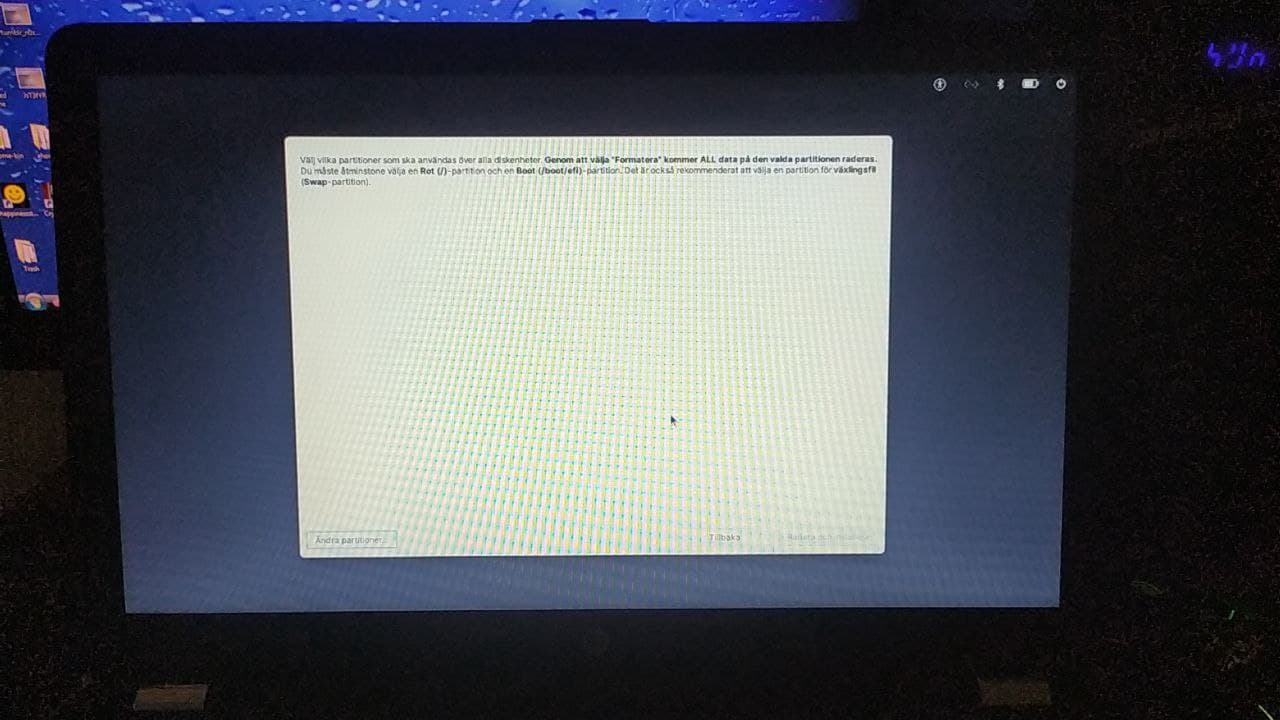

Those that are experiencing this issue, if possible, please reproduce this issue by booting the iso again and getting to this blank screen. Then:
- Go back and enter "demo mode"
- Open the terminal
- Run
sudo journalctl > ~/log.txt - Upload
log.txtin your home folder somewhere and attach/link it to this issue
Those that are experiencing this issue, if possible, please reproduce this issue by booting the iso again and getting to this blank screen. Then:
* Go back and enter "demo mode"

* Open the terminal

* Run `sudo journalctl > ~/log.txt`

* Upload `log.txt` in your home folder somewhere and attach/link it to this issue
Those that are experiencing this issue, if possible, please reproduce this issue by booting the iso again and getting to this blank screen. Then:
- Go back and enter "demo mode"
- Open the terminal
- Run
sudo journalctl > ~/log.txt- Upload
log.txtin your home folder somewhere and attach/link it to this issue
https://pastebin.com/YqBNBJx2
thanks for the bug report, I'll wait a bit then before trying to install odin on my mb pro 2016 ^^

I can confirm the same behavior on my MBP 13,1 (late 2016). The Pop!_OS 21.04 installer also crashes after selecting a language.
This machine previously had Hera installed on it, and I don't recall any installation issues with that release.

Can confirm the same issue on my HP Pavilion au-003tx. I ran into this blocker, while trying to dual boot Odin alongside Win 10. GParted works just fine though.

Pop!_OS installer crashes just after selecting language, so I can't make it to the next screen.
You can start the installer from the terminal with io-elementary-installer , but it doesn't show any drive or usb for me (macbook pro 2017).

I encountered the same problem during installation, no disk or partition showing up (like in "BetaC4094" screenshot), but Gparted was working fine.
Futh2

I encountered the same problem during installation, no disk or partition showing up (like in "BetaC4094" screenshot), but Gparted was working fine.
Futh2
Hello there :) Could you describe us with a bit more details how you made it work please? :)
Hi, i have the same problem, i have tried everything and the installer still not showing disk. GParted works just fine though too.

I have the same problem, i tried running in demo mode and doing sudo apt upgrade that made the drive show when i got back to the installer but it failed after that while unsquashing

I have the same problem, i tried running in demo mode and doing
sudo apt upgradethat made the drive show when i got back to the installer but it failed after that while unsquashing
I tried upgrading but it made no difference to me.
I have the same problem, i tried running in demo mode and doing
sudo apt upgradethat made the drive show when i got back to the installer but it failed after that while unsquashingI tried upgrading but it made no difference to me.
After backtracking everything,
I did:
Open demo mode
Mounting every partition
sudo apt update
sudo apt upgrade
Trying to install again without unmounting anything
It showed the drive then failed half way
I can't see partitions too, but Pop os installer shows my partitions, but before that it crashes for about 5min.


 Exactly same issue for me. I can't able to install Elementary OS in dual boot with manual option. It does not show me any disk of my laptop. Although when I click to the bottom left option Modify Partition it shows me all my disks but after modifying all partition when I apply it and go back to proceed the option of "Erase and Install" does not appear as because it does not show any disk. Changing from SATA mode to AHCI in BIOS? I don't think this is good option for many people.
2021:12:02 - Sadly, I tried again today as the new update came and still the problem won't fix. (By the way I tried AHCI in BIOS and it didn't work).
My Laptop specification- Acer Nitro 5 2500U Ryzen 5 AN515-42 ( RX 560X ) log.txt
I hope this will fix in next update.
2021:12:04 - Today, I tried Pop OS 21.04 which uses the same installer of Elementary OS and that one shows all the partition / all disks available in my laptop. I don't know why Elementary OS themselves did not solve this problem yet. I liked Pop OS but to be frank I feel 21.04 is still buggy and not fully usable right now.


Hi I faced the same problem of not listing the available discs in the custom menu and I had 2 hdds in my machine so I remove all the other hdds only keeping the hdd which I am going to install elementry os and then the available disc was shown an I was able to successfully install elementry os 6
Just wanted to add I'm having a similar issue on my Acer Aspire TC-780 desktop, with a Kaby Lake i7. It's been present on every release since the April 30 RC build.

Hello,
MacBook Pro (13-inch, 2017, Four Thunderbolt 3 Ports) Same Issue. Not showing partitions. Downloaded Elementary OS 6.1 Jólnir. Trying to "erase and install" gives a "no enough space" message (and shows no disk), and the "custom install" option shows no disk. Gparted gives a "Invalid argument during the preparation for reading at /dev/nvme0n2". The message can be ignored, and the partitions can be made in nvme0n1, but the installer does not recognize it.
Here's the Log: log.txt

Hello,
Hardware:
- Macbook Pro 2016 (A1708)
- SanDisk 3.1 Type USB-C Flashdrive with Elementary OS 6.1 Jólnir mounted
Issue:
- As mentioned above.
- Partitions not appearing.
- Specifically /dev/nvme0n2 causing issues such as: "Invalid argument during the preparation for reading at /dev/nvme0n2"
- Unable to install Elementary OS.
Notes:
- Attempting to create a partition under /dev/nvme0n2 and selecting 'None' from alignment drop down prompts error dialogue stating 'Partition can not have -251 sectors,' while selecting 'Circle' doesn't cause an error dialogue.

I had a similar issue when setting up a dual boot with Windows 10, and the issue was mounting the partitions in rw mode
remount didn't work so here is what i did that worked
1- Make sure you are booting in UEFI mode if your windows was installed in UEFI (grub installation would otherwise fail at the last step)
2- Use the demo mode and run ntfsfix on all ntfs partitions
3- open gparted from applications menu and make your partitions (/ , swap & boot)
4- create a new folder in / (this will be on your elementary OS usb drive) and name it drive
5- run lsblk and note down your partitions for the drive you are installing os on. ( /sda1 /sda2)
repeat the steps 6-12 for all your partitions
6- umount /dev/your_partition
7- mount -o rw /dev/your_partition /drive
8- chmod 777 /drive
9- touch /drive/test.txt (just to test the drive is mounted in rw)
10- umount /dev/your_partition
11- open file explorer and open the partition from storage section (this will mount the drive in rw mode in /media)
12- delete test.txt
open the installer from the applications menu and install

I had a similar issue. I was running OS 5 on a 2013 MacBook Pro. Upgraded to OS 6 no issues. I downloaded a few programmes then when I downloaded a battery management programme things stopped working, I could no longer download software. I attempted a clean install but it would not do that. I have tried a custom install but same issue. I downloaded the latest version od the OS 6 installer. I have taken a log.txt. log.txt

I have resolved the issue. I went into demo mode, opened Gparted, deleted all the partitions, wrote a new ext4 partition and clicked on "Install elementary" from applications whilst still in demo mode. Worked fine. I hope this helps others.
I'm trying to dual-boot install on a MacBook Pro 2017 and having the same issue. I have been able to successfully install Ubuntu and Bodhi Linux. I've tried all the solutions here (new partitions, leave free space, install from demo, etc.) and never seen any partitions to choose from. Demo mode seems to work fine, though. Log attached.
