

 elementary
Greeter doesn't appear on external monitor after lock/suspend
Prerequisites
- [X] I have searched open and closed issues for duplicates.
Describe the bug
Running Elementary OS 5.1.4 on a laptop hooked up to a external monitor. I usually keep the laptop closed and use a external keyboard and mouse. Whenever Elementary goes to sleep or is locked I can't seem to wake it up without opening the lid of the laptop. During suspend it will turn on the lock screen.
A work around for me was to install gnome-screensaver instead and let it take over the lock-screen. That works fine with displaying output on the external monitor and waking from suspend.
To Reproduce
- Laptop hooked up to a external monitor.
- Close the lid on the laptop.
- Lock the screen/suspend the machine
- Wait for the screen to go blank
- Press any keyboard button to make the lock screen pop appear.
- This won't work
Workaround is open the lid on the laptop and the screen will sync up and the lock screen will pop up.
Expected behavior
Make the lock screen appear on the primary and only active monitor
Platform Information
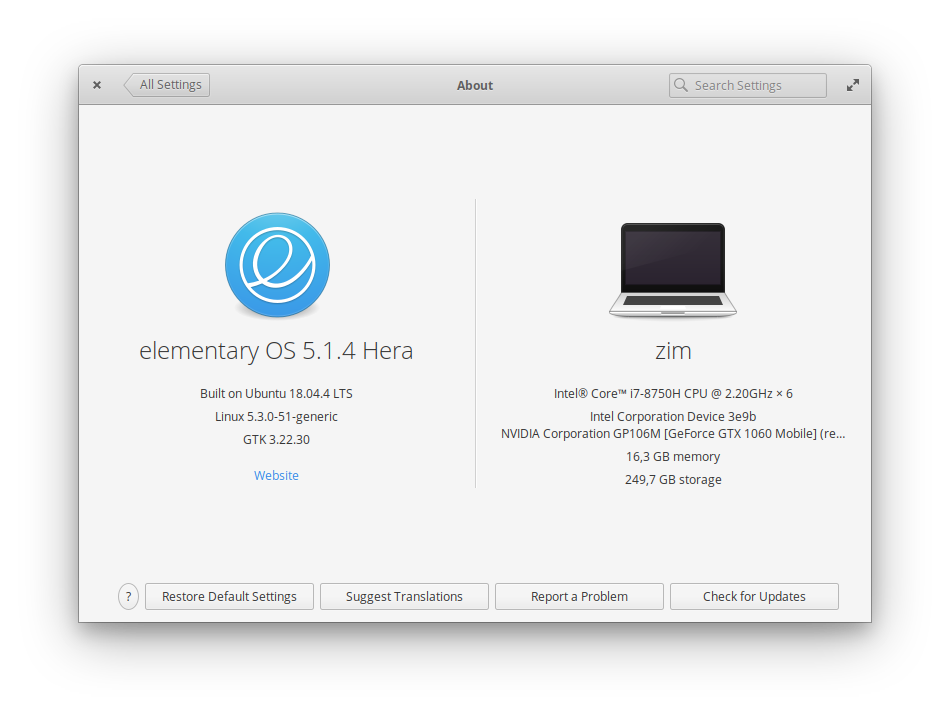
- [ ] I'm using the latest version from git that I've manually compiled
- [X] I'm using the latest released stable version

I have a similar issue, it's very intermittent. Been working fine all week, but just had it happen 5 times in a row.
To reproduce:
- Boot laptop with external monitor plugged in.
- Close laptop. Display switches to external monitor only, no problems.
- Lock screen.
At that point, when the issue is occurring, I get a blank screen on my external monitor. If I open the laptop and then close it, then the login screen appears on my external monitor as it should.
I tailed some log files as I reproduced this. Started tailing them when logged in, locked the screen, waited about 30 seconds, opened and closed the laptop, and then logged back in. During this 30 seconds, the external screen was blank.
lightdm.log lightdm-x-0.log seat0-greeter.log syslog xorg.log

I've moved this issue to the greeter repository for now as the issue more likely lies here than in the window manager. There are likely some very similar and/or duplicate issues too which I would appreciate help in finding and consolidating.
@sbarrow has generously sponsored me to look into this issue. So thank you for that!
Can people facing this issue confirm whether locking the computer using the command dm-tool lock improves the issue over using the Lock option in the GUI?

Thanks.
There are a few different ways a lock is triggered:
- Using the "Lock" option from the session indicator/menu in Wingpanel
- Pressing the key combination Super+L
- Closing the laptop lid without an external monitor connected (though I haven't seen issues resuming from this)
The only one of these directly in elementary's control is the Wingpanel option which appears to be using a method of locking the session that triggers this issue.
The other two locking methods are controlled by light-locker and to a lesser extend gnome-settings-daemon, which are both inherited from upstream Ubuntu repositories. I've found many posts about similar issues on other distros that use light-locker, normally when using Xfce.
~~I'll look at making some changes in the wingpanel indicator to get the lock option in there to use the equivalent of dm-tool lock. Looking into why the upstream Ubuntu components are causing these issues is a much larger undertaking.~~
~~In the mean-time, as a workaround, you could disable the default Super+L shortcut with the following command:~~
~~gsettings set org.gnome.settings-daemon.plugins.media-keys screensaver []~~
~~Then you can set up a new custom keybinding in the keyboard settings that runs dm-tool lock~~
Edit: I no longer recommend the above workaround as I've found that there are issues with dm-tool lock that mean it's sometimes possible to unlock the session without a password.
The other thing worth noting for other people that are reading this in the future is that I have a BIOS setting on my laptop that allows/disallows waking from sleep using external USB devices. On my laptop it's under "Power Management -> USB -> Allow wake on USB".
This was set to disabled on my laptop meaning that if my laptop was asleep, an external USB keyboard/mouse couldn't wake it and I had to open the lid anyway.
Worth a check for anyone that's experiencing similar issues.
Could this be related? https://github.com/the-cavalry/light-locker/issues/102
Come to think of it, I was toying with these flags before, weeks ago. If they were somehow reverted back to the default, that might be why the issue started up again. I'll put them back and do some testing.
Now I can no longer replicate the issue. Even before changing light-locker config.
Exec=light-locker currently in /etc/xdg/autostart/light-locker.desktop
Was finally able to replicate reliably by doing the following. I think this is what's responsible for the intermittency.
- Started at logged in session with lid closed and external monitor plugged in, everything works at this point, including Super+L default lock.
- Open laptop.
- Close laptop.
- Now if I lock screen using Super+L default, I get a blank screen and have to open/close laptop to log in.
- If I lock using dm-tool, it works.
- Log out (this works fine with external monitor btw).
- Log back in.
- Now it works using Super+L default or dm-tool.
Basically, if I open/close the laptop during a login session (the effect of which is that the display configuration changes), that login session becomes infected with this issue. I have to log out and back in to fix it.
Edit: If I kill and restart light-locker during this infected session, it seems to fix the issue as well. My assumption is that something is being broken within light-locker when the display configuration changes, requiring a restart.
Great, that narrows it down a lot. One thing that might help further is adding --debug to the Exec line of the light-locker autostart . This should make it produce some extra messages in syslog.
It would be interesting to see if there's any difference in those messages between it being in a broken and unbroken state.
Here you go. The --debug flag makes its own output so I just redirected that to files, nothing came up in syslog.
openandclosethenlock.txt - Blank screen afterrestartinglightlocker.txt - Works fine
@sbarrow that's super interesting!
So on the second one, after restarting light-locker, the screen definitely locked and you had to enter your password again?
It looks as though light-locker didn't handle the lock at all the second time around. So it makes me wonder if we have two things competing to the lock the screen when the lid closes and that's what's causing the issue.
Definitely locked the second time, entered my password and everything.
When you say "when the lid closes" what do you mean? Because both of these locks were triggered manually with Super+L. When you have an external monitor plugged in, it doesn't lock when the lid closes, it just switches the external monitor (as it should).
I don't see how light-locker couldn't be involved, when I kill light-locker and don't restart it, Super+L does nothing.
To me it feels like this is related to light-locker as well. Just by locking the screen I can't the login-screen to appear on the external monitor.
Yep, I've found that the light-locker code doesn't really account for a lid closed with external monitor situation.
It works if you start the laptop up with the lid closed or restart light locker because it assumes the lid is open at first and doesn't know the actual state until you open/close the lid at least once.
I'm working on a fix and I've definitely improved the situation on my machine but the code is complex and I risk introducing other regressions. I'll update this ticket when I have something worth testing.
The more I work with light-locker, the more I realise its the cause of quite a few issues.
The other issue is that it doesn't really have any active maintainers and it will only work in X11. When we transition over to Wayland, it will no longer be a suitable component for screen locking.
We have the following issue open in Gala to implement the screensaver/locking there: https://github.com/elementary/gala/issues/716
After that's done, we'd be able to remove light-locker altogether. I think it's better for me to focus my time on that rather than trying to fix light-locker when we're inevitably going to drop it anyway.
@davidmhewitt Maybe an intermediate solution would be to make light-locker automatically restart on some sort of event when the screen is unlocked or when the display configuration changes? That would fix the problem based on my testing and not require any changes to light-locker itself.
Hm, interesting, although that wouldn't be that easy to implement in itself. And I'm not sure what horrible things would happen if light-locker was killed/restarted while the machine was locked.
I'm pretty close to having an MVP of a screen saver/locker branch for gala. It builds and largely works on our internal builds of elementary OS 6.0.
I'm hoping to have it building for 5.1 by this weekend and I can post some instructions for how to test it if you're interested in being a screen locking guinea pig.
If all else fails, I can go back to pursuing my patch for light locker which improved things quite a lot. But as it's pretty much obsolete with no maintainers I don't think it's worth trying that hard.
I know very little about this sort of programming, I just assumed you could hook into dbus or something for the restart. I'm just restarting light-locker manually when I switch from laptop to monitor or vice versa which works fine so I'll just wait on the update. Thanks for the work on this.
Quick update, I've opened a PR against gala that implements the potential replacement for light-locker:
https://github.com/elementary/gala/pull/809
If you're interested in some super early testing of that, then there are some testing instructions on the PR description.
Hi, I have the same issue. My system is a Lenovo x1 extreme with eOS 5.1.4. When locking/suspending with the lid closed and connected to an external monitor, I don't get the greeter screen when trying to wake up with a USB connected keyboard. The greeter appears on the closed laptop screen and while the external monitor is not showing it, if I type my password I manage to get in and the monitor configuration is back to only external screen. So maybe it's not a gala issue? I think I saw that the PR was merged and my system is up-do-date. Willing to help as much as I can.

@liorlobel see this issue, there's an updated version of gala and i wrote instructions to test it on 5.1.4 - elementary/gala#809 - its only merged for version 6
post is here - https://github.com/elementary/gala/pull/809#issuecomment-634872190
Thanks a lot! I'll have a look. On Mon, Jun 1, 2020 at 12:35 PM, Sam Barrow [email protected] wrote:
@liorlobel see this issue, there's an updated version of gala and i wrote instructions to test it on 5.1.4 - elementary/gala#809
— You are receiving this because you were mentioned. Reply to this email directly, view it on GitHub, or unsubscribe.