

 elementary
Proper support for minimizing all/show dekstop
Problem
Currently there is half-baked support for this feature (it's possible to control this using wmctrl but there are no animations and if a notification is received it's impossible to get the old windows back up except manually). Currently I have a script that I have called on a hot corner and keyboard shortcut to allow toggling this. I have had a cursory look at implementing this but have no clue where in the 10k lines controls this or how to do it properly instead of bodging it.
Proposal
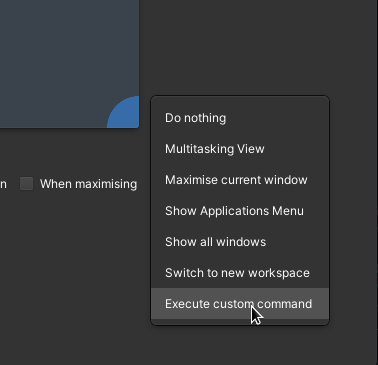
Fully implement show desktop, preferably with a slick animation. This would allow users to set a keyboard shortcut or hot corner to toggle show desktop without touching the command line.
Prior Art (Optional)
https://youtu.be/uPFK-QC3kTY?t=28
Hard to find videos of this online but Mac OS seems to slide all windows under the header bar.

But there isn't a desktop to show. I'd say this is a design conflict unless there is utility that I'm not seeing

Ah, so I use this for if I want to quickly minimise all my apps if someone is coming in. It's more about minimising and restoring all the apps than showing the desktop but that's what most DEs call it
Would the 'Switch to new workspace' shortcut (super + End) achieve the same thing if it's to hide screen contents?
This still seems like a completely roundabout solution for your use-case - wouldn't a 'blank screen' multitasking shortcut be better?
Yeah, Pantheon is built around workspaces, not minimize. Closing as "Design conflict" since we don't support a minimize concept and there's nothing to minimize to
