

 elementary
Give feedback while multimonitor setup changes
Behaviour right now:
If I press SUPER + P with an additional monitor it changes the multi monitor setup: from clone the main monitor to give an additional workspace to just show secondary monitor etc.
Wished behaviour:
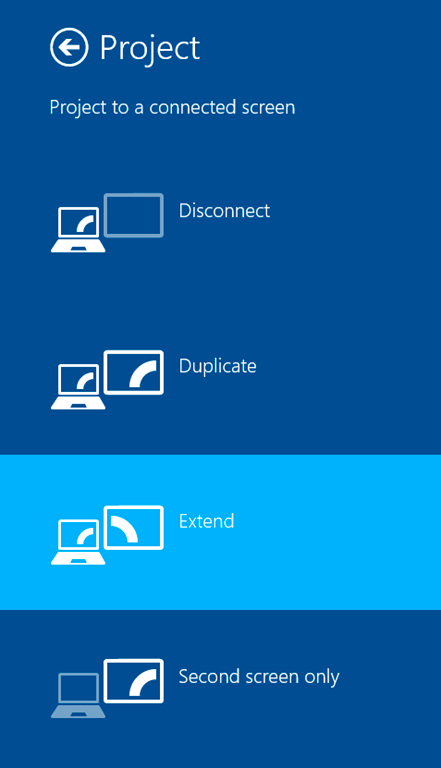
There should a (maybe visual) feedback which is a current setup and which will follow after. Honestly Windows is quiet straight forward :p

Here's what it looks like in GNOME Shell:
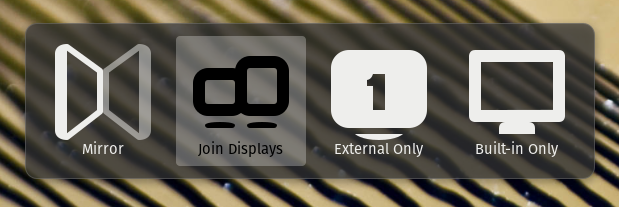
Looks like the icon names in question are:
-
view-mirror-symbolic -
video-joined-displays-symbolic -
video-single-display-symbolic -
video-display-symbolic

I'm thinking maybe something like:
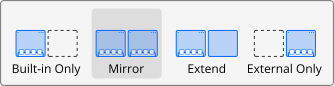
Talking in slack, I think it would be better to gresource these icons here and use video-mirror-displays-symbolic and maybe something like video-internal-display-symbolic and video-external-display-symbolic. It seems like using single-display and video-display is not really semantically correct.
@danrabbit
If I see your mockup, I think, it is not really clear what is the internal monitor and what is the external. I dont any reason why left is the metaphor for internal and right is the metaphor for external.
@danrabbit the "Built-in" should go after "Extend" and "Mirror", IMHO. Also, the Windows implementation contains something inside the screen pic to understand better the idea, I really like that.
Extra: if we know the monitor types (e.g. internal is a notebook 13' display so we can display a notebook-like img and external is HDMI-tv big size so we can show a diff. monitor img) we could create more real images/sizes (are we using xrandr or similar?). Maybe Windows is doing that?
