

 elementary
unable to start after crash
What Happened?
So my Files froze again due to this bug. I terminated it using the "app unresponsive" dialog that showed up (I still don't have any sysmonitor app on my new OS 6.1).
Trying to relaunch it failed a couple of times, so I tried it from terminal and got this message:
$ io.elementary.files

** (io.elementary.files:110344): CRITICAL **: 10:05:33.921: files_view_view_container_change_view_mode: assertion 'self != NULL' failed
Zabit (SIGKILL)
I don't have a core dump as coredumpctl was not installed on my system.
Steps to Reproduce
I started with a tab with connection to an ssh server from previous day (when asked for password, I let it forget the password immediatelly (first option of the three)). It's one of those servers that drops connection after inactivity (as I mentioned in my previous report), but in this case it doesn't matter, because the laptop was suspended over night, so the connection had been dropped regardless.
- I closed the ssh server tab first.
- Then I remembered I wanted to download some results, so I reopened it from the history menu.
- At this point Files froze, the same way as reported before. So far the same.
- At this point killing Files should make it work again, so I killed it using the "unresponsive app" dialog.
- Trying to relaunch failed. Terminal prints the above message.
- Reboot to finally launch the Files. Success.
Expected Behavior
As I said before, Files should not freeze just because a connection to a server was dropped. But even then, terminating it should resolve the problem.
OS Version
6.x (Odin)
Software Version
Latest release (I have run all updates)
Log Output
$ io.elementary.files

** (io.elementary.files:110344): CRITICAL **: 10:05:33.921: files_view_view_container_change_view_mode: assertion 'self != NULL' failed
Zabit (SIGKILL)
Hardware Info
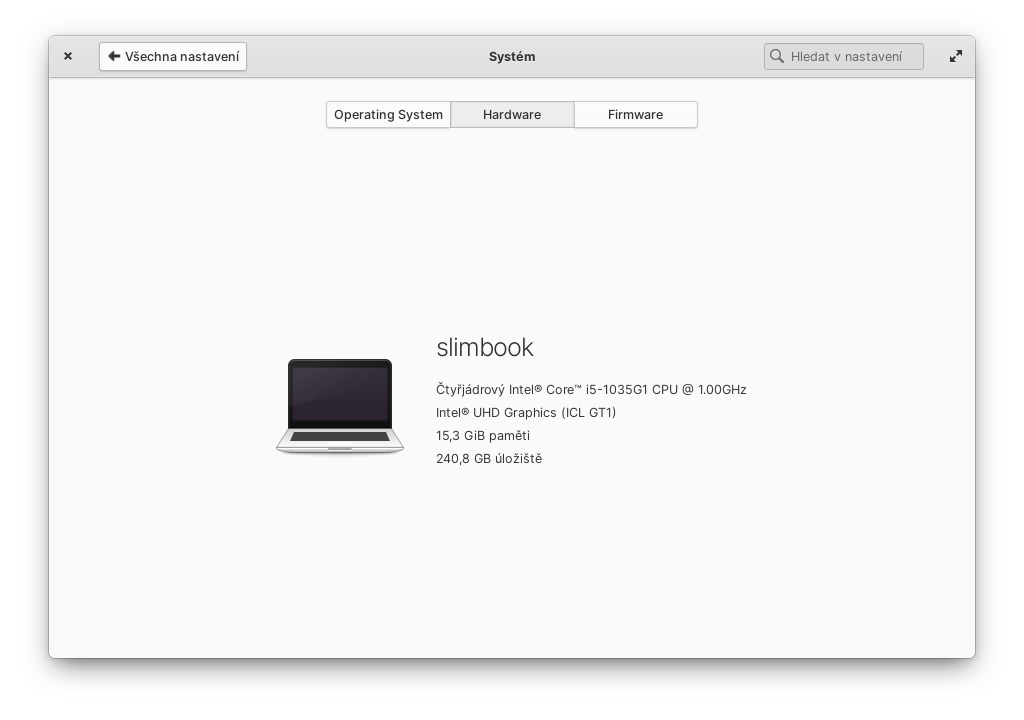

You should be able to restart Files without a reboot from the terminal with io.elementary.files -t ~/. This should stop Files trying to load a problematic location. You are right of course that this should not be necessary. I'll look into the code for switching view mode to make sure it does not try to switch the mode of a view that has blocked during construction.

Thank you @jeremypw. Do you think you can also do something about the freezing? I described another test case today in the linked issue.
I tried closing and restarting Files after connecting to an FTP server and breaking the network connection (turning off wifi) inbetween. As you say, Files does freeze while attempting to reconnect to the server but only for about 30 seconds after which it gives up and continues as normal without creating the relevant tab. I did get the change_view_mode critical warning but not a crash. I can easily suppress the warning - which is caused by a "change view mode" action being incidentally triggered during startup before the current tab is assigned. Not sure why the UI is being blocked temporarily as loading the tabs is supposed to be asynchronous.
Alright, I will try to test it some more. However, it would be cool if it didn't freeze at all. Taxi doesn't freeze, why should Files, right?
Thank you for looking into it 🙂️
it gives up and continues as normal without creating the relevant tab
Did you also try without creating the tab? I mean create the tab with connection first, then drop the connection, wait and try to interact with the existing tab. For me it doesn't come back from a freeze induced this way, I have to kill it.
Update: It came back, but it took like 10 minutes. The tab went "home" after.
I'll try breaking the connection while a tab is open. 10 minutes is a very long timeout! Presumably it is hardwired in one of the frameworks used (gtk/glib/gvfs) as the Files timeouts, where used, are much shorter.
I've also discovered that at least part of the delay in unfreezing during startup is in fact due to the sidebar trying to recreate a network bookmark for the connection. This is not asynchronous so blocks the interface until it times out.
Hi again, my Files froze again, so I'm trying the trick you suggested with io.elementary.files -t ~/ but Files keep dying, showing the "unresponsive app" dialog. The terminal shows this:
$ io.elementary.files -t ~/

** (io.elementary.files:77521): CRITICAL **: 18:04:39.010: files_view_view_container_change_view_mode: assertion 'self != NULL' failed

** (io.elementary.files:77521): CRITICAL **: 18:04:39.138: granite_widgets_dynamic_notebook_get_tab_position: assertion 'tab != NULL' failed
Zabit (SIGKILL)
Update: Killing one of the gvfsd processes from htop worked, now Files can be launched again. Moreover my Code got also stuck in the same limbo after I opened a remote file from the same server. It was the only file before I closed Code and so I could not launch it anymore. Killing the gvfsd process caused an empty Code window to pop up (I tried to open Code before suspending my laptop and running to office to deal with some problem).
Sorry that did not work for you. I am working on a fix for the general network/server disconnection case but it is proving quite complex. I'll try and split out a simpler fix that will at least enable Files to be restarted.
I can confirm that Files freezes more seriously if the network is still available but the server is unavailable (or blocked). There is an easy way to check when the network goes down but it is less easy to check that a server has become unavailable. Working on it.