

 elementary
When connecting iPhone, only its "Documents" directory is mounted
Description
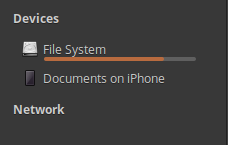
When I conntect an iPhone I see this in the sidebar of Files:
When I click on "Documents on iPhone" I see this (after waiting for Files to unfreeze, as mentioned in #1541):

The contents above is just the "Documents". I can't easily navigate to the DCIM directory to see pictures, access Downloads, etc. In order to access the "root" directory of iPhone I have to manually edit the path at the top:

I had to remove :3 from the end of the path. This way I finally get access to the "root" directory:

Why it's wrong
I believe that access to the "root" directory should be mounted by default, instead of the "Document" directory. It is not easy to figure out how the path should be modified to get to what you need.
Version
eOS 5.1.7

Btw, you could notice the "iPhone" thing that appeared in the sidebar. I do not know why it is there sometimes, and sometimes it is not. Anyway, when I click on it I see this:
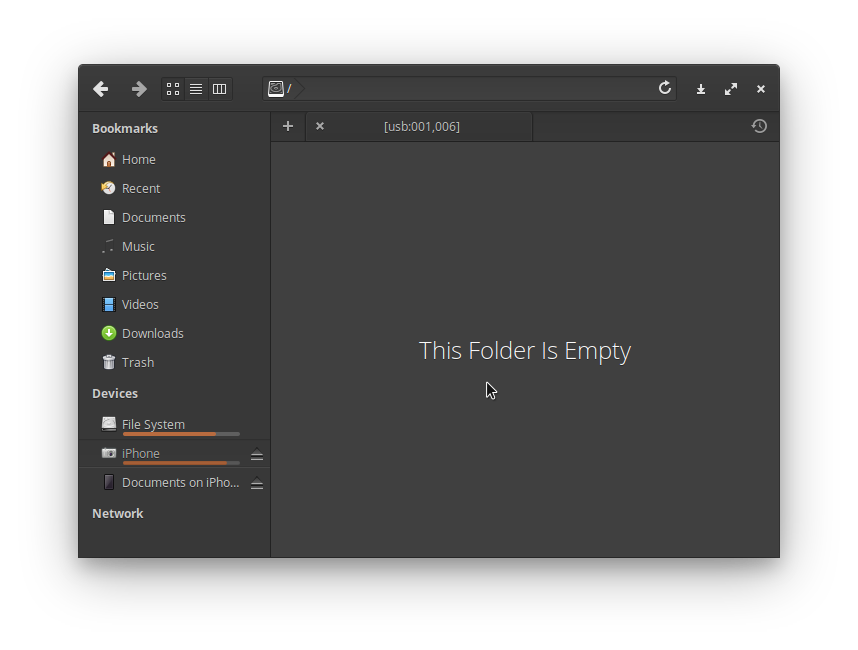
Not very useful view.
The mounting of the Documents and Photos drives is normal behaviour, iOS (from iOS 11 onwards afaik) only exposes those 2 folders to file managers. iOS does not under any circumstances expose it's root filesystem to anyone other than itself (not intentionally anyway), what you are seeing is the limit of what libimobiledevice can read.
It would be backwards to mount the /dev/disk0s1s2s (which is the folder you are seeing) directly, since the only remotely useful 2 things you can do in that directory is managing Documents, or importing photos.

I think it brings much more value to mount the “/dev/disk...” (which I was calling “root”) by default instead of the Documents folder. Then you get access to any directory that you need. And this is actually more than just Photos and Documents there. You can:
- get Photos (DCIM)
- get Documents
- get Podcasts
- get Recordings
With the default behavior, a typical user gets an impression that he can access ONLY Documents. This is clearly an issue.
The camera you see at the side is supposed to be the DCIM folder, I'm not sure why yours is empty. What iOS version is your iPhone?
The camera you see at the side is supposed to be the DCIM folder, I'm not sure why yours is empty. What iOS version is your iPhone?
It's 14.2
This looks similar to #1119 which was closed by c1a8ace18f3de8bf25d84571b44f1aa1c48192a6. This was committed after the latest stable release so will not be generally available until elementary 6.0 is released.

This looks similar to #1119 which was closed by c1a8ace. This was committed after the latest stable release so will not be generally available until elementary 6.0 is released.
Right, this is the same thing.
@jeremypw What is then the current behavior in eOS6 when iPhone/iPod is connected? What will be in the sidebar of Files?
@Loreno10 I do not actually have an iPhone to fully test this but my understanding is that the afore-mentioned commit at least allows the missing directory to be mounted and used although it may not appear in the best place in the Sidebar. As Sidebar code is potentially going to be re-written cosmetic issues may not get fixed before then. Ideally an iPhone using dev should work on this.
@jeremypw I should probably mention that I'm not able to mount the "Documents" folder with iOS 14 or iOS 12 on Odin. I presume this is because Files is mounting /private/var/mobile/Media which seems to be useless for anything other than accessing DCIM and voice recording.
@hanaral Files relies on gvfs and the underlying system to be informed of Drives/Volumes/Mounts that appear when a device is connected. As I am not an iOS user I am unable to test where the problem lies so I'll have to wait for another dev to address this.
@jeremypw I just tested this on Fedora: reading and writing to file provider storage with nautilus on Fedora works almost flawlessly, while trying to do the same (with nautilus) on elementary results in the app hanging and at worst, blocking unmounting. While it would be very cool for Files to be able to list file provider storage from iDevices, the underlying issue of not at all being to write to iOS needs to be solved. @Loreno10 Are you able to test whether Nautilus to iPhone file transfers work?
@hanaral What kind of data would you want to write TO iOS device? Usually, I think the other way is more desired - being able to read data from the iOS device to PC.
However, I tried to copy something from my PC into Downloads folder on iPhone - the file copied there and I see it in both eOS Files and Nautilus, but on iPhone's Files app it's not visible there.
Btw, Nautilus behaves pretty much the same as eOS Files when iPhone is connected to the PC:
- when opening the program (Nautilus or Files), it may take around 10 seconds for it to show up
- when navigating to iPhone, both apps freeze for some time, becoming unusable.
I'm on eOS 5.1.7 if that matters. If you need me to check anything else, let me know.
Being able to read from the iPhone isn't too much of an issue for me, apart from the lock ups. Due to iOS presenting the DCIM folder and images via the same standard that cameras use (I believe it just presents itself as a storage device, which is why you can read downloaded iTunes songs too), it's functions are mostly fine. However, the ability to go in to and write to file provider storage (FPS) is broken. I presume this is due to a lower level permission or communication issue, because manually using ifuse to mount the iPhone FPS as root amounts to the same thing on elementary OS. However, devices on iOS 12 or before have no such issues, and on latest Fedora everything works as good as you'd expect for an iOS device :^) @Loreno10 would you be able to test whether copy/pasting files onto and off your iOS device works on the lastest Fedora Workstation live USB? (no need to install it)
@hanaral Actually I am able to write data onto iPhone, and then (I disconnected it and connected again), I am able to get the file back. (eOS 5.1.7 - Files)
I wrote the file into "Downloads" folder on iPhone.
@Loreno10 I am aware, and this is useful - if you’re jailbroken, because otherwise there is ironically no way to access that virtual folder on the iPhone 😂 The problem of accessing FPS is still a no-go, I am only able to write empty files and empty folders. This is a pretty big issue since on windows and Linux the only way to transfer music on to an iPhone without a network is by using FPS
Hello everyone, I had the same issue today (5 years later, yes) with PC on Ubuntu 24.04.3 LTS and iPhone 14 Pro on iOS 18.6.2. Took me an hour of web research when I just had to remove ":3" from the path and you indicated here. Thanks a lot for the tip @marcinjahn I also believe, as OP, that the filesystem should not just mount "Documents on iPhone" which does not allow to access DCIM folder. Photos can be transfered very easily through filesystem, and web research leads to installing non necessary components for this basic task.

@pierrebluteau Thanks for the updated report. So, when mounting the iPhone, the address has :3 at the end again? This was being automatically removed at one point by the sanitize () function so there appears to have been a regression. That function is still passing the unit tests, which include some afc: protocol related tests. I assume the protocol showing in the address is still afc:? So maybe the address is not being sanitized where before it was. I'll look into it but without an iPhone this may have to wait for another dev to step up.
Please confirm if you are mounting the phone via the sidebar or some other way.
When I insert the USB cable between iPhone and the computer, I see immediately appearing (without any specific action):
- on the left bar of file explorer, the "Documents sur iPhone de Pierre" (in French)
- within the list of open apps, the icon of a smartphone leading to the same folder
Nothing else. Both lead to afc://XXXXXXXX-XXXXXXXXXXXXXXXE:3/ Editing this path and removing ":3" allows access to much more on the phone.
@pierrebluteau When you say list of open apps do mean the dock - i.e. the bar that appears along the bottom of the desktop workspace? That might outside the scope of the Files project to fix. I will concentrate on fixing it for the Files sidebar.
When you remove the :3 manually, you presumably get a new grid of file items other folders as well as the Documents? What happens if you click on the Documents folder? Does the address change back to the one that includes the :3?
Yes, I meant the dock, sorry. Wasn't sure how to call it and I did set it at the bottom (similar to Windows) but I believe it was a left panel by default. Fixing it in the Files explorer would be more than enough I think.
When I remove the :3 I get a list of 16 folders including the most useful DCIM but no I don't see the folder "Documents". I would need to put back the :3 to see the same folder with app-specific icons.
@pierrebluteau Thanks for additional info. Another couple of questions: What happens if while showing "Documents" you press <Alt>Up (I suspect nothing will happen). What happens if after removing the ":3" you perform a search for a folder in "Documents" e.g. "Word" or "Excel"?
Its a bit worrying if you cannot get back to the "Documents" folder after removing ":3" - I'll have to implement a more complex solution if so.
When I plug the iPhone, this smartphone icon appears:
Today (I'm sure it wasn't the case last time) I get, on the left part of the file explorer, not only Documents of iPhone of USER, but also just "iPhone" with a camera icon:
That would have been great and enough to solve the DCIM access issues, if it was reliable. It sorts the pictures by year and month (e.g. "202506__") which is nicer than "DCIM/119APPLE" but takes time to load and wasn't there last time despite reboots.
In this folder (with :3), ALT + UP does nothing. In any of these subfolders, ALT+UP brings me back one level in the folder path.
If I am in the :3 folder and I do a search I get a result ,port=3$ find . -name order-status.html ./org.mozilla.ios.Firefox/Downloads/order-status.html
But the same command in the "not :3" folder will not give a result (at least not within a couple of minutes), and the search will make the file explorer lag. I guess the iPhone doesn't like to be searched deeply in its filesystem.
@pierrebluteau A partial fix for this issue was accidentally merged a couple of weeks ago so if you are on the daily version of elementary you may have got different behaviour for a while (the change is now reverted pending further work).
It sounds like the :3 folder is not accessible from the mount without :3 so maybe we will have to mount both when the iPhone is plugged in.