

 elementary
Automatically retry connection to Samba network drive, after connection problem
Prerequisites
- [X] I have searched open and closed issues for duplicates.
Feature
Today I configured a shared USB drive, connected to the home router (Samba network). I connected to the router successfully, by inserting the credentials, and selected to remember credentials forever, as this is a private network.
Suddenly while repositioning the drive, the USB cable disconnected. After reseating it, the connection was broken: it wasn't possible to reopen the shared drive in files, and apparently there's no option to reset this network connection.
Thinking about a problem with the router (I didn't eject the drive from the control panel), I've opened the router console, but the drive was there, recognized correctly.
Casually I've found out that to fix the problem and access the drive again without rebooting, you can follow these steps:
1. Eject the drive from "network bookmarks" in the sidebar,
2. Navigate again to the samba network address (like smb://192.168.1.1/)
3. Now you will see that access is restored
Without doing point n°1, you cannot reconnect, doesn't matter if you try from the address bar, bookmark, or any other kind of shortcut. Pressing the eject button seems to reset something that is not accessible elsewhere.
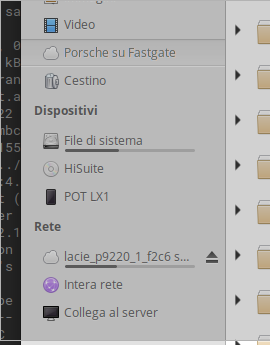 As you can see the shared network drive has an eject button ("Rete" is the italian for "Network")
Describe the solution you'd like I think that a simple solution would be to automatically eject the drive after the error showing up:
- If the drive is still unconnected, there's no need to have it in the shortcuts, it can show off
- If the drive has been reconnected, it will be available again
Existing work I've tested in gnome "files" and it behaves the same as elementary os file app
Yes that's not a mandatory feature, but it's nice to give some kind of tip to the user, on how to proceed. Being not an expert of Samba + Linux I've started googling and ended installing smbclient and other stuff, thinking of a configuration problem. Instead it was simple as pressing a button!
Bye :-)

I am not sure about retrying to connect (how many times, what interval etc) but ejecting the mount seems logical. If there is a signal indicating the loss of network connection that can be connected to then this is straightforward otherwise some kind of polling would be required.

Well, I've noticed the problem when I've tried to open the folder again, from bookmarks. Maybe that could be the trigger: if the device was already mounted, then a new attempt can be done, then if it fails the user can be warned (to give some time to check what's going on). Then the user can push the "reconnect" button, or "abort" to forget the device.
After reporting the issue I've found that automatic mount at boot is possible, even if you need to enter an username and password to access the resource.
To mount the network drive automatically, the cifs-utils package needs to be installed, then a new entry must be added to /etc/fstab:
#      <file system - source>                        <mount point>      <type>                   <options>                     <dump> <pass>
//192.168.1.254/lacie_p9220_1_f2c6         /media/username/device_folder cifs  username=123456,password=78901234_,rw,uid=1000     0      0
I suppose that is not an easy implementation but having the possibility to configure this from the settings panel would be very nice. It's a nice solution for backups, or sharing multimedia with other devices in your network, like photos, music, etc. You can download all you need in the drive, and access the content from everywhere (in the network).
My router shares the drive also as DLNA server... I think that if one uploads some media into it, then it becomes discoverable from any smart TV or similar device.
I'm thinking about loading the photo archive on the drive, and being able to see it from the TV with the family...it's definitely a macOS like feature :-)