

 elementary
Mount and browse ISO files straight from the Files context menu
Prerequisites
- [x] I have searched open and closed issues for duplicates.
Feature
It would be handy to be able to right click on an ISO file in Files and be able to mount the ISO file so you can browse it from the Files app.
Describe the solution you'd like To be able to mount, browse and unmount an ISO files from the Files right click context menu and for the mounted ISO show up under Devices in the Files app on the left hand side.
Existing work Was only able to find work related to how to mount ISO file from Terminal
Describe alternatives you've considered I have not considered any alternatives as what I would like to see would be the Files app to be able to mount, unmount and browse ISO files from the GUI
Additional context N/A

One possible alternative is to use the "Furius ISO Mount" (https://en.wikipedia.org/wiki/Furius_ISO_Mount, available in the AppCenter as well) to mount the ISO. I agree this would be a sweet feature to have in Files.

This probably doable now with a custom contractor file, at least the mounting part of it. You would have to navigate into the mounted iso manually at the moment as a contractor cannot communicate back to the Files instance. You could probably have the contract launch a script that mounts the iso and opens a new Files window at the mount.
Otherwise a plugin could be written to do it all within Files.

I do not have the skills for this really. All I know is that I saw the feature in a video showing KDE plasma and have previously used it in Windows 10. It just seemed like a nice neat little feature that would make sense in the Files app without the added complexity to mess about in Terminal.
Understood. I'll look into it and post a suitable contractor file if I succeed. Its only a short text file that you place into a certain folder in your home directory.
Looks like it cannot be done with a single contractor file, which is designed to execute a single fairly simple command, so probably needs a script as well.
You can mount an iso with the following contractor file, with the restriction that you have to have a fixed pre-existing mount point. In the following example the mount point is a folder named "Iso" under the users home directory. To change that substitute ~/Iso with the full path to the mount point (quoted if it contains spaces).
[Contractor Entry]
Name=Mount Iso
Description=Mount an iso file
MimeType=application/x-cd-image
Exec=bash -c "pkexec mount $0 ~/Iso -o loop" %f
Gettext-Domain=io.elementary.files
You need to create a text file containing the above in the hidden directory .local/share/contractor which is in your home folder.
With this done, you get a menu option "Mount Iso" when you right click on an iso file. You will need to enter an administrator password to mount and unmount the iso.
In theory, I believe Files could support this natively without having to run commands because GVFS/Gio (the Files backend) supports mounting iso files. We can demonstrate that using a command like this:
gio mount "archive://file%3A%2F%2F%2Fhome%2Fdavid%2FDownloads%2Felementaryos-6.0-daily.20200530.iso"
Yes, the URL encoding of the file:// part is necessary :shrug:
However, there's something odd about the way Files handles that mount. It appears in the network section of the sidebar and when I select it, I get the following:
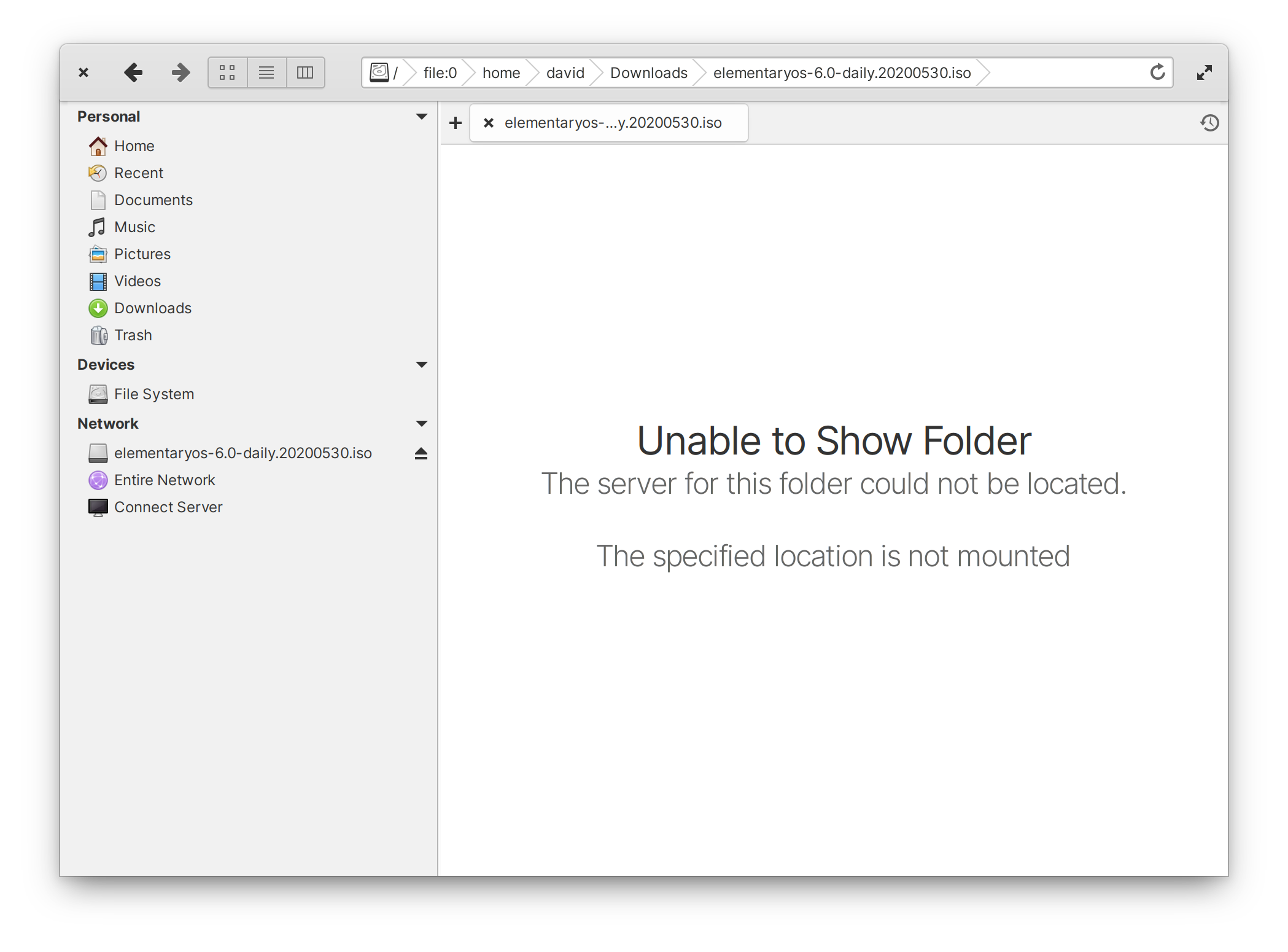
We can see that the iso is correctly mounted however:
$ ls /run/user/1000/gvfs/archive\:host\=file%253A%252F%252F%252Fhome%252Fdavid%252FDownloads%252Felementaryos-6.0-daily.20200530.iso/
boot  casper  dists  EFI  efi.img  isolinux  live  md5sum.txt  pool
If we browse to that path from the root of the filesystem using Files, then it works correctly and we can see the content of the iso. The path in the path bar after that is:
archive://file:/home/david/Downloads/elementaryos-6.0-daily.20200530.iso
Clicking the item in the sidebar still does not work and the path in the path bar then changes back to:
archive://file:0/home/david/Downloads/elementaryos-6.0-daily.20200530.iso
Removing the additional 0 or trying to paste the correct path and press enter just results in the same non-working behaviour as clicking on the sidebar entry.

Thanks David. I suspect Files is choking on that unusual url. I look into whether this can be made to work.
Its odd that navigation to the location works but pasting the same path fails. Maybe due to the sanitizing function that is applied to entered paths not considering this kind of path
Looks like archive:// scheme mounts are deliberately treated as network mounts by Sidebar. Not sure why - easily changed if required.
Looks like
archive://scheme mounts are deliberately treated as network mounts by Sidebar. Not sure why - easily changed if required.
Looks like this was inherited from Marlin. That bit was added back in https://github.com/elementary/files/commit/6f066b64b4ab4976b9423292107caa7d1046516f#diff-7cf7985f3d12deed2090af4295cf027eR595 (compare line 595, if (strcmp(scheme, "archive"))) with no explicitly stated rationale.

I found that Nautilus installs a desktop file "Archive Mounter" which mounts isos using gvfs directly rather than gio mount. This works well. We could easily ship a similar file without changing dependencies. However, the problem of the weird uri of the resulting mount is the same. I had a go at fixing it but it very difficult without breaking something else :-( It will need substantial rewriting of the breadcrumb handling and sanitizing functionality. It was easy to move the mount into the Device category though.