

 elastic
ci: store docker logs if any failure
What
Remove the artificial error and use try/finally, there is nothing else to do when an error happens but report the error.
Store the docker log context (docker logs, inspect and so on) using filebeat. See https://github.com/elastic/apm-pipeline-library/blob/main/vars/filebeat.groovy
Why
When there are some unhealthy errors there is no way to see what's causing the error as the CI workers are ephemeral.
Issues
Similar to https://github.com/elastic/apm-integration-testing/pull/1029

:green_heart: Build Succeeded
the below badges are clickable and redirect to their specific view in the CI or DOCS






Expand to view the summary
Build stats
-
Start Time: 2022-10-03T18:53:49.114+0000
-
Duration: 26 min 53 sec
Test stats :test_tube:
| Test | Results |
|---|---|
| Failed | 0 |
| Passed | 269908 |
| Skipped | 0 |
| Total | 269908 |
:robot: GitHub comments
Expand to view the GitHub comments
To re-run your PR in the CI, just comment with:
-
/test: Re-trigger the build. -
run module tests for <modules>: Run TAV tests for one or more modules, where<modules>can be either a comma separated list of modules (e.g. memcached,redis) or the string literal ALL to test all modules -
run benchmark tests: Run the benchmark test only. -
runelasticsearch-ci/docs: Re-trigger the docs validation. (use unformatted text in the comment!)

I discussed with @v1v. ^^ I added a commit to attempt to force a failure to test out this log collection: https://apm-ci.elastic.co/job/apm-agent-nodejs/job/apm-agent-nodejs-mbp/job/PR-2950/2/

@v1v (or others), That change triggered a build error in each test step, as expected. For example: https://apm-ci.elastic.co/blue/organizations/jenkins/apm-agent-nodejs%2Fapm-agent-nodejs-mbp/detail/PR-2950/2/pipeline
[2022-09-26T16:06:04.694Z] .ci/scripts/test.sh:250: main(): docker-compose --no-ansi --log-level ERROR -f .ci/docker/docker-compose-all.yml up --exit-code-from node_tests --remove-orphans --abort-on-container-exit node_tests
...
[2022-09-26T16:06:56.208Z] ERROR: for node_tests  Container "0d66ff0027b3" is unhealthy.
[2022-09-26T16:06:56.208Z] Encountered errors while bringing up the project.
script returned exit code 1
And I see this log output about filebeat creating a log:
[2022-09-26T16:05:38.670Z] OUTPUT_DIR=/var/lib/jenkins/workspace/PR-2950-2-f2c6f104-1177-4711-b54a-b7a01b58122e
[2022-09-26T16:05:38.676Z] OUTPUT_FILE=docker-10-release.log
[2022-09-26T16:05:38.676Z] CONFIG_PATH=/var/lib/jenkins/workspace/PR-2950-2-f2c6f104-1177-4711-b54a-b7a01b58122e/filebeat_conf.yml
[2022-09-26T16:05:38.676Z] DOCKER_IMAGE=docker.elastic.co/beats/filebeat:8.4.2
-
However, should I expect to have that "docker-10-release.log" as a build artifact, so I can inspect it via the Jenkins UI? I don't see it in the list of artifacts: https://apm-ci.elastic.co/job/apm-agent-nodejs/job/apm-agent-nodejs-mbp/job/PR-2950/2/
-
(less important) The https://apm-ci.elastic.co/blue/organizations/jenkins/apm-agent-nodejs%2Fapm-agent-nodejs-mbp/detail/PR-2950/2/pipeline test step also has this message:
[2022-09-26T16:07:19.202Z] [INFO] There is no configuration file to stop filebeat.
Why is that? My read of "vars/filebeat.groovy" is that the end of start() should have created that configFile:
writeJSON(file: "${workdir}/filebeat_container_${env.NODE_NAME}.json", json: json)
Why is that? My read of "vars/filebeat.groovy" is that the end of start() should have created that configFile:
That's correct, I think it was created, but I wonder if the env variable could be the problem within the build context.
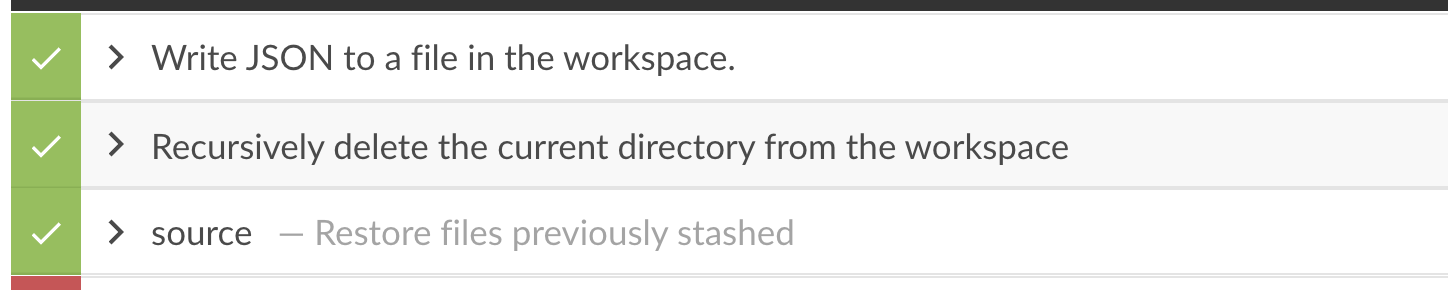
There is a deleteDir :/ , I'm fixing it
@v1v (or others), That change triggered a build error in each test step, as expected. For example: https://apm-ci.elastic.co/blue/organizations/jenkins/apm-agent-nodejs%2Fapm-agent-nodejs-mbp/detail/PR-2950/2/pipeline
Much better now, the filebeat exports the docker context accordingly:
- for instance, the docker containers for the node 10, can be found in here
I don't know if the output is enough to debug what's going on
Okay, that is better, yes. However, looking at the log, the only info I'm able to get out of this is that the Container "57722453bcf3" is unhealthy. error is referring to the "mongodb" container. That's an improvement, but not a whole lot for the amount of logs being collected here.
AFAICT there isn't any data in the collected log that tells us what is wrong in this case. In this particular case the issue is that the healthcheck in the docker-compose config:
    healthcheck:
      test: ["CMD", "mongo", "--quiet"]
is breaking, which eventually marks that container as unhealthy. We don't see anything of this from the log.
I wonder if a more useful change would be to gather some debug info where docker-compose up fails here: https://github.com/elastic/apm-agent-nodejs/blob/95436d491fbb85de9af93be93bdffa55ff6fc355/.ci/scripts/test.sh#L256-L264
I.e. do the same thing for docker-compose up that we are doing for docker-compose down just below that in the same file.
Another alternative would be to see if a log-level other than --log-level ERROR that we are currently using to docker-compose would provide more information (at least telling which container had the problem and not just its containerId).
Opinions? I'm happy to do the attempted change to ".ci/scripts/tests.sh" to try this out at some point.
I've been thinking about enriching the docker context for the healthcheck, and found we could use metricbeat (https://www.elastic.co/guide/en/beats/metricbeat/current/metricbeat-metricset-docker-healthcheck.html), so I'd propose to create a new library step in the apm-pipeline-library to help with grabbing the docker context:
- logs with filebeat
- metrics with metricbeat
And export those details as logs, similarly done with the filebeat.
i.e, the bellow snippet will be an example of the above proposal:
  dockerContext(filebeatOutput: "docker-${version}-${buildType}.log", metricbeatOutput: "", archiveOnlyOnFail: true){
          dir("${BASE_DIR}"){
            try {
              retryWithSleep(retries: 2, seconds: 5, backoff: true) {
                sh(label: "Run Tests", script: """.ci/scripts/test.sh -b "${buildType}" -t "${tav}" "${version}" """)
              }
            } finally {
              junit(testResults: "test_output/*.junit.xml", allowEmptyResults: true, keepLongStdio: true)
              archiveArtifacts(artifacts: "test_output/*.tap", allowEmptyArchive: true)
            }
  }
There is a metricbeat step in the shared library, but it's not supporting the docker context yet.
What do you think?
cc @kuisathaverat
Update
I'm testing https://github.com/elastic/apm-pipeline-library/pull/1895 within this PR, which will help to grab all the docker context (logs, health) using the existing filebeat and metricbeat components. Please bear with me while I'm testing this out
Metricbeat is now reporting the docker healthy status for all the containers in the current context -> see this
If needed we could even send those details to Elasticsearch.
Let me know if the metricbeat output is good for the debugging purposes
I admit it is pretty cool that with that file and ecslog you can do this:
% ecslog -k 'docker.healthcheck.failingstreak > 0' -i container.image.name,docker.healthcheck  docker-16-release-metricbeat.log-20220927.ndjson
...
[2022-09-27T14:55:53.857Z]  (on apm-ci-immutable-ubuntu-1804-1664290081867003348):
    container: {
        "image": {
            "name": "docker.elastic.co/elasticsearch/elasticsearch:8.2.1"
        }
    }
    docker: {
        "healthcheck": {
            "status": "starting",
            "failingstreak": 1,
            "event": {
                "end_date": "2022-09-27T14:55:25.802Z",
                "exit_code": 7,
                "output":
                      % Total    % Received % Xferd  Average Speed   Time    Time     Time  Current
                                                     Dload  Upload   Total   Spent    Left  Speed
  0     0    0     0    0     0      0      0 --:--:-- --:--:-- --:--:--     0
                    curl: (7) Failed to connect to localhost port 9200: Connection refused
                    ,
                "start_date": "2022-09-27T14:55:25.262Z"
            }
        }
    }
[2022-09-27T14:55:53.857Z]  (on apm-ci-immutable-ubuntu-1804-1664290081867003348):
    container: {
        "image": {
            "name": "mongo:6"
        }
    }
    docker: {
        "healthcheck": {
            "status": "unhealthy",
            "failingstreak": 49,
            "event": {
                "start_date": "2022-09-27T14:55:53.012Z",
                "end_date": "2022-09-27T14:55:53.153Z",
                "exit_code": -1,
                "output": "OCI runtime exec failed: exec failed: unable to start container process: exec: \"mongo\": executable file not found in $PATH: unknown"
            }
        }
    }
- I think this is a little bit of a round-about way to get to details on a
docker-compose upfailure. I.e. that adding code to "apm-agent-nodejs/.ci/scripts/test.sh" to gather info ifdocker-compose upfails would be more direct. - I think one needs to know what to look for to find this healthcheck failure information. So I think it would merit an addition to our "DEVELOPER.md" to discuss what info is here and how to look for a docker healthcheck data.
- Even though this is round-about, this is useful information right now. I think this metricbeat data could be useful for other theoretical docker failures, if we hit them.
I think this is worth adding to the CI. This will mean ~30-35MB more data collected per build. Is that a problem?
Is that a problem? Not at all.
We can even move away from the existing file based and send the data to ES if that will help to get the best of the UI from Kibana. They are even complementary.
Additionally, if there are too much verbose output, we could even reduce the number of metricsets as mentioned in https://github.com/elastic/apm-pipeline-library/pull/1895/files#r981397738
In any case, I will need to merge the above PR so I can release a new version and revert the library reference to the branch that I used for testing purposes
I think this is a little bit of a round-about way to get to details on a docker-compose up failure. I.e. that adding code to "apm-agent-nodejs/.ci/scripts/test.sh" to gather info if docker-compose up fails would be more direct.
Do you want to do it within this PR itself or in a follow up?
ecslog
Pretty cool, I've just found your repo :) neat!
Not at all.
Then let's include the metricbeat artifacts.
We can even move away from the existing file based and send the data to ES if that will help to get the best of the UI from Kibana. They are even complementary.
Personally I would find the file artifacts the most useful for the "healthcheck" metricsets. If only in ES I think (a) I would forget that they were there and (b) would struggle poking around to find the available data for a given build.
I.e. that adding code to "apm-agent-nodejs/.ci/scripts/test.sh" to gather info if docker-compose up fails would be more direct.
Do you want to do it within this PR itself or in a follow up?
I can do that in a follow-up PR, if necessary. I think adding the metricbeat artifacts here solves the "Container abcdef1234 is unhealthy" well.
@trentm , I think this PR is now ready, I reverted the changes required for testing this new behaviour of storing the docker context using the metricbeat and filebeat.