
egg

egg copied to clipboard
 eggjs
eggjs
提升 config.json 配置体验
请详细告知你的新解决思路(Your new RFCs):
https://github.com/microsoft/vscode/blob/4acf2d9b46b75748ae687cf3b2952a0799679873/extensions/typescript-language-features/package.json#L87
通过 json schema 可以实现 json 配置的提示体验,并且还能减少 js ts 代码负担。
跟进类型(Follow-up Types):
- [ ] 这是某个任务
- [ ] 这是一个具体的 PR 的地址(URL)

初步思路是通过 egg-bin postinstall 自动设置 .vscode/settings.json 里面 json.schemas
{
  "json.schemas": [
    {
      "fileMatch": [
        "config/config.json",
        "config/config.*.json"
      ],
      "url": "https://eggjs.org/config.schema"
    }
  ]
}
poc
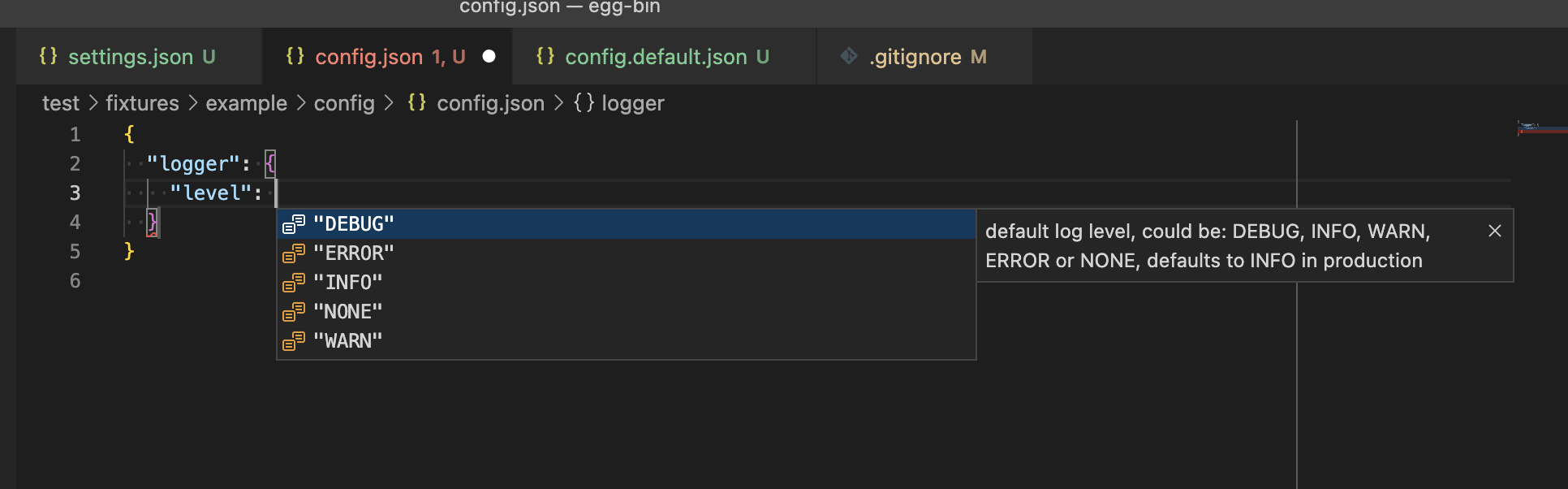
.vscode/settings.json
{
  "json.schemas": [
    {
      "fileMatch": [
        "config/config.json"
      ],
      "schema": {
        "type": "object",
        "properties": {
          "logger": {
            "type": "object",
            "properties": {
              "level": {
                "type": "string",
                "description": "default log level, could be: DEBUG, INFO, WARN, ERROR or NONE, defaults to INFO in production",
                "enum": [ "DEBUG", "INFO", "WARN", "ERROR", "NONE" ]
              }
            }
          },
          "name" : {
            "type": "string",
            "description": "The name of the entry"
          }
        }
      }
    }
  ]
}