

 eerimoq
Try to encode/decode a RRC message failed
I added a RRC message in test_ber.py under function test_rrc_8_6_0:
    decoded = {
        'message': (
            'c1',
            (
                'rrcConnectionRequest',
                {
                    'criticalExtensions': (
                        'rrcConnectionRequest-r8',
                        {
                            'ue-Identity' : ('randomValue',
                                #(b'0110110001110110100010101000100001000000',40)
                                (b'\x6c\x76\x8a\x88\x40',40)
                            ),
                            'establishmentCause' : 'mo-Signalling',
                            'spare' : (b'0', 1)
                        }
                    )
                }
            )
        )
    }

    I fed the encoded messages to decode like so:
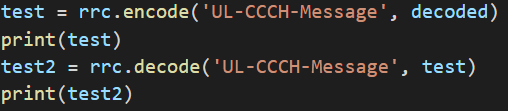
I executed the unit test, and checked the results:

My original 'ue-Identity' is b'\x6c\x76\x8a\x88\x40'
After decode, it became: b'lv\x8a\x88@'
What did I do wrong?

I also tried 'ue-Identity' as b'0110110001110110100010101000100001000000'
Here's the result:
 Only the first 5 digits remains, the rest was gone
❯ bpython
bpython version 0.18 on top of Python 3.8.10 /usr/bin/python3
>>> b'\x6c\x76\x8a\x88\x40' == b'lv\x8a\x88@'
True
>>>

Oh wow thanks @eerimoq , how do I convert b'lv\x8a\x88@' to b'\x6c\x76\x8a\x88\x40'? The former is really not readable.
Hi @eerimoq ,
How did you come up with this file? tests\files\3gpp\rrc_8_6_0.asn
I tried to construct the latest RRC ASN definitions from here: https://portal.3gpp.org/desktopmodules/Specifications/SpecificationDetails.aspx?specificationId=2440
But they only provide pdf files to download. I use the default "Save as text" function from the Acrobat Reader and they wrote a short script to extract the ASN messages:
import sys
import re
import pdb

if len(sys.argv) < 2:
  sys.exit("Please specify filename in txt format")

filename = sys.argv[1]
pattern1 = '^ETSI'  # Begin of every page
pattern2 = '3GPP TS 36.331 version 16.6.0 Release 16 *(\d+) ETSI' # End of every page
pattern3 = '-- ASN1START' # Begin of ASN definitions
pattern4 = '-- ASN1STOP'  # End of ASN definitions

asndef = ''
asn_section = 0

with open(filename, 'r', encoding='utf-8') as f:
  for line in f:
    # looking for Link down event
    regex =  re.search(pattern3, line)
    if regex:
        asn_section = 1
        continue

    if asn_section == 1:
        regex =  re.search(pattern1, line)
        if regex:
            continue
        regex =  re.search(pattern2, line)
        if regex:
            print(f'Page {regex.group(1)}')
            #if regex.group(1) == '888':
            #    pdb.set_trace()
            continue

        regex =  re.search(pattern4, line)
        if regex:
            asn_section = 0
        else:
            #pdb.set_trace()
            if '\x0c\n' == line:
                continue
            asndef += line

outputname = filename[:-4]+".asn"
with open(outputname, "w") as text_file:
    text_file.write(asndef)
But there were tons of errors converting from PDF to txt. Manually correcting those errors doesn't seem to be efficient. Just wondering how did you make it work.
Thanks!!
