davinci
 davinci copied to clipboard
 edp963
发送邮件图片时报错
错误日志如下
2021-01-20 09:36:30.034  INFO 27488 --- [           main] e.davinci.runner.CustomDataSourceRunner  : Load custom datasource finish
2021-01-20 09:36:30.128  INFO 27488 --- [           main] edp.davinci.runner.CronJobRunner         : Load cron job finish
2021-01-20 09:36:32.373  INFO 27488 --- [0.1-8080-exec-1] o.a.c.c.C.[Tomcat].[localhost].[/]       : Initializing Spring FrameworkServlet 'dispatcherServlet'
Starting ChromeDriver 87.0.4280.88 (89e2380a3e36c3464b5dd1302349b1382549290d-refs/branch-heads/4280@{#1761}) on port 38077
Only local connections are allowed.
Please see https://chromedriver.chromium.org/security-considerations for suggestions on keeping ChromeDriver safe.
ChromeDriver was started successfully.
2021-01-20 09:36:40.144  INFO 27488 --- [ null to remote] o.o.selenium.remote.ProtocolHandshake    : Detected dialect: W3C
2021-01-20 09:36:44.986  INFO 27488 --- [ Sheet-worker-1] com.alibaba.druid.pool.DruidDataSource   : {dataSource-3} inited
2021-01-20 09:36:44.986  INFO 27488 --- [ Sheet-worker-0] com.alibaba.druid.pool.DruidDataSource   : {dataSource-2} inited
2021-01-20 09:36:45.796  INFO 27488 --- [rkbook-worker-0] edp.davinci.service.excel.MsgNotifier    : Cronjob(1) send mail finish, xUUID:4309f382b0c44d9ca87184958aae765f
java.lang.IllegalArgumentException: File must not be null
        at org.springframework.util.Assert.notNull(Assert.java:193)
        at org.springframework.mail.javamail.MimeMessageHelper.addInline(MimeMessageHelper.java:912)
        at edp.core.utils.MailUtils.lambda$sendMail$1(MailUtils.java:184)
        at java.util.ArrayList.forEach(ArrayList.java:1257)
        at edp.core.utils.MailUtils.sendMail(MailUtils.java:181)
        at edp.davinci.service.impl.EmailScheduleServiceImpl.execute(EmailScheduleServiceImpl.java:181)
        at edp.davinci.service.impl.CronJobServiceImpl.lambda$executeCronJob$1(CronJobServiceImpl.java:355)
        at java.util.concurrent.Executors$RunnableAdapter.call(Executors.java:511)
        at java.util.concurrent.FutureTask.run(FutureTask.java:266)
        at java.util.concurrent.ThreadPoolExecutor.runWorker(ThreadPoolExecutor.java:1149)
        at java.util.concurrent.ThreadPoolExecutor$Worker.run(ThreadPoolExecutor.java:624)
        at java.lang.Thread.run(Thread.java:748)
配置
screenshot:
  default_browser: CHROME
  timeout_second: 600
  chromedriver_path: D:\program\davinci-0.3.1\chromedriver.exe
chrome版本
Google Chrome | 87.0.4280.88 (正式版本) (32 位)


application.yml中的server配置贴一下呢
server配置如下:
server:
     protocol: http
     address: 127.0.0.1
     prot: 8080

     servlet:
           context-path: /
server: protocol: http address: xx.xx.xx.xx 注意此处为部署本机地址或者主机名,不要使用127.0.0.1 port: 8080

server: protocol: http address: xx.xx.xx.xx 注意此处为部署本机地址或者主机名,不要使用127.0.0.1 port: 8080
我遇到同样的问题,这个地方修改为本机IP,或主机名一样报错,不能成功截图。
跟踪了代码,发现下层抛出的是org.openqa.selenium.WebDriverException: unknown error: DevToolsActivePort file doesn't exist 异常,不知道这个异常大家怎么解决的?

server: protocol: http address: xx.xx.xx.xx 注意此处为部署本机地址或者主机名,不要使用127.0.0.1 port: 8080
我遇到同样的问题,这个地方修改为本机IP,或主机名一样报错,不能成功截图。
跟踪了代码,发现下层抛出的是
org.openqa.selenium.WebDriverException: unknown error: DevToolsActivePort file doesn't exist异常,不知道这个异常大家怎么解决的?
通过调整chrome 和 chrome driver 的版本,解决了问题。
#chrome版本:
[root@localhost ~]# /usr/bin/google-chrome --version
Google Chrome 83.0.4103.106
#chromedriver版本:
[root@localhost ~]# /usr/local/bin/chromedriver -v
ChromeDriver 83.0.4103.14 (be04594a2b8411758b860104bc0a1033417178be-refs/branch-heads/4103@{#119})
修改代码
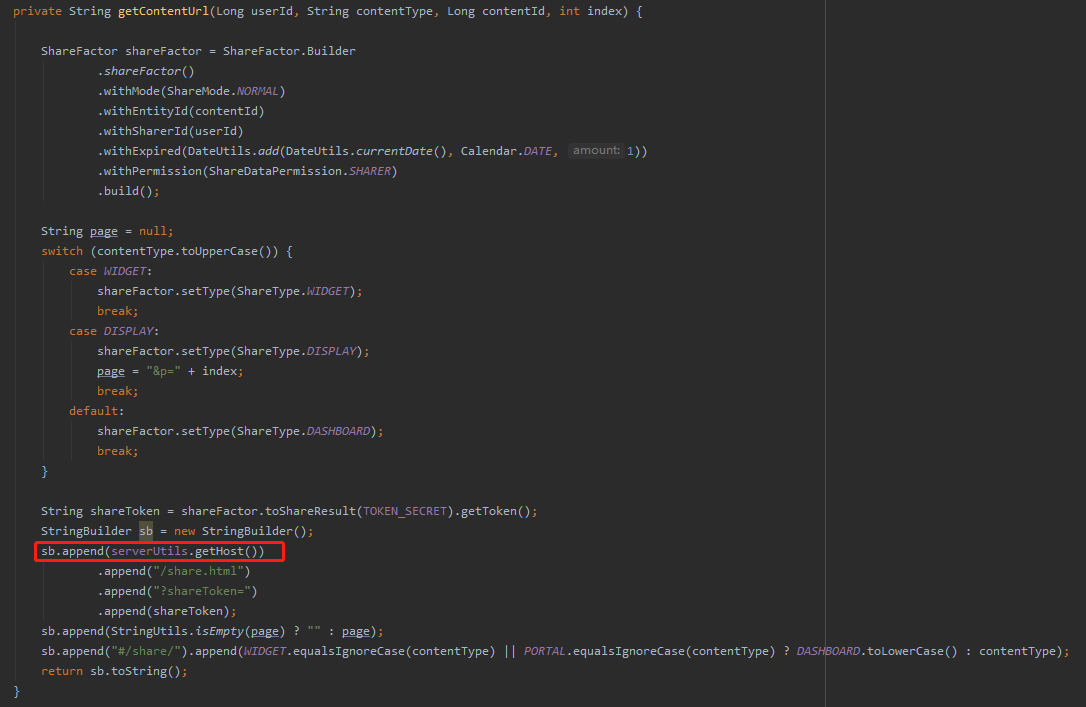
edp.davinci.service.impl.BaseScheduleService#getContentUrl
修改前:
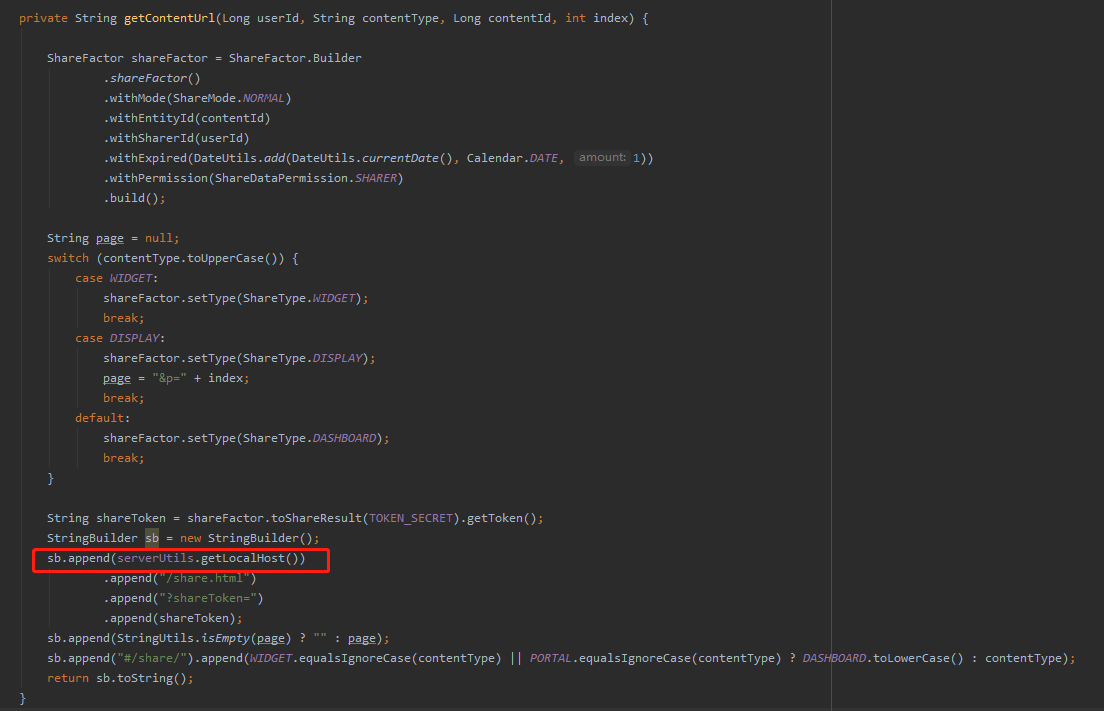 修改后:
修改后: