

 editor-js
How can I set language for code?

this would be awesome feature to have the ability to set language per snippet and be able to highlight the code with third party tools like highlight.js


Under the hood simple textarea, adding third party syntax highlight like highlight.js not resolve the issue. Need add code editor like codemirror for highlight on input. I think for this better create new block tool or include code editor into current block tool.

If anyone needs the solution , i have the custom version ready for production , with support for language as seen in below screenshots 😄


Update#1 : Works perfectly with language- tag for Prism.js as well , the sent data for language is in format of alias used for prism.js

I have a solution without highlighting the code. I'm a new learner. Here is the code:
/**
 * Build styles
 */
require('./codeplus.css').toString();

class CodePlus {

    static get toolbox() {
        return {
            icon: '<svg width="14" height="14" viewBox="0 -1 14 14" xmlns="http://www.w3.org/2000/svg" > <path d="M3.177 6.852c.205.253.347.572.427.954.078.372.117.844.117 1.417 0 .418.01.725.03.92.02.18.057.314.107.396.046.075.093.117.14.134.075.027.218.056.42.083a.855.855 0 0 1 .56.297c.145.167.215.38.215.636 0 .612-.432.934-1.216.934-.457 0-.87-.087-1.233-.262a1.995 1.995 0 0 1-.853-.751 2.09 2.09 0 0 1-.305-1.097c-.014-.648-.029-1.168-.043-1.56-.013-.383-.034-.631-.06-.733-.064-.263-.158-.455-.276-.578a2.163 2.163 0 0 0-.505-.376c-.238-.134-.41-.256-.519-.371C.058 6.76 0 6.567 0 6.315c0-.37.166-.657.493-.846.329-.186.56-.342.693-.466a.942.942 0 0 0 .26-.447c.056-.2.088-.42.097-.658.01-.25.024-.85.043-1.802.015-.629.239-1.14.672-1.522C2.691.19 3.268 0 3.977 0c.783 0 1.216.317 1.216.921 0 .264-.069.48-.211.643a.858.858 0 0 1-.563.29c-.249.03-.417.076-.498.126-.062.04-.112.134-.139.291-.031.187-.052.562-.061 1.119a8.828 8.828 0 0 1-.112 1.378 2.24 2.24 0 0 1-.404.963c-.159.212-.373.406-.64.583.25.163.454.342.612.538zm7.34 0c.157-.196.362-.375.612-.538a2.544 2.544 0 0 1-.641-.583 2.24 2.24 0 0 1-.404-.963 8.828 8.828 0 0 1-.112-1.378c-.009-.557-.03-.932-.061-1.119-.027-.157-.077-.251-.14-.29-.08-.051-.248-.096-.496-.127a.858.858 0 0 1-.564-.29C8.57 1.401 8.5 1.185 8.5.921 8.5.317 8.933 0 9.716 0c.71 0 1.286.19 1.72.574.432.382.656.893.671 1.522.02.952.033 1.553.043 1.802.009.238.041.458.097.658a.942.942 0 0 0 .26.447c.133.124.364.28.693.466a.926.926 0 0 1 .493.846c0 .252-.058.446-.183.58-.109.115-.281.237-.52.371-.21.118-.377.244-.504.376-.118.123-.212.315-.277.578-.025.102-.045.35-.06.733-.013.392-.027.912-.042 1.56a2.09 2.09 0 0 1-.305 1.097c-.2.323-.486.574-.853.75a2.811 2.811 0 0 1-1.233.263c-.784 0-1.216-.322-1.216-.934 0-.256.07-.47.214-.636a.855.855 0 0 1 .562-.297c.201-.027.344-.056.418-.083.048-.017.096-.06.14-.134a.996.996 0 0 0 .107-.396c.02-.195.031-.502.031-.92 0-.573.039-1.045.117-1.417.08-.382.222-.701.427-.954z" /> </svg>',
            title: 'Code'
        }
    }

    static get contentless() {
        return true;
    }

    static get enableLineBreaks(){
        return true;
    }

    static get DEFAULT_CODE_PLACEHOLDER() {
        return 'Enter some code';
    }

    static get DEFAULT_LANGUAGE_PLACEHOLDER() {
        return 'Select a format';
    }

    static get DEFAULT_FORMAT_CONFIG() {
        return ['Python', 'Matlab', 'R', 'Javascript', 'C', 'HTML'];
    }

    get CSS() {
        return {
            baseClass: this.api.styles.block,
            wrapper: 'cdx-codeplus',
            input: this.api.styles.input,
            language: 'cdx-codeplus__language',
            textarea: 'cdx-codeplus__textarea'
        };
    }

    constructor({
        data,
        config,
        api
    }) {
        this.api = api;

        this.textPlaceholder = config.textPlaceholder || CodePlus.DEFAULT_CODE_PLACEHOLDER;
        this.languagePlaceholder = config.languagePlaceholder || CodePlus.DEFAULT_LANGUAGE_PLACEHOLDER;
        this.format = config.format || CodePlus.DEFAULT_FORMAT_CONFIG;

        this.data = {
            language: data.language || '',
            text: data.text || ''
        };
    }

    render() {
        const container = this._make('div', [this.CSS.baseClass, this.CSS.wrapper]);
        const text = this._make('textarea', [this.CSS.input, this.CSS.textarea], {
            contentEditable: true,
            innerHTML: this.data.text
        });
        const selectwrapper=this._make('div',this.CSS.input);
        const language = this._make('select', this.CSS.language);


        text.dataset.placeholder = this.textPlaceholder;
        language.dataset.placeholder = this.languagePlaceholder;

        const format = this.format;


        for (let f in format) {
            let option = document.createElement('option');
            let v = document.createAttribute('value');
            let t = document.createTextNode(format[f]);
            v.value = format[f];
            option.appendChild(t);
            option.setAttributeNode(v);
            language.appendChild(option);
        }

        language.value = this.data.language;
        selectwrapper.appendChild(language);
        container.appendChild(selectwrapper);
        container.appendChild(text);

        return container;
    }

    onPaste(event) {
        const content = event.detail.data;
        this.data = {
            text: content.textContent
        };
    }

    save(codeElement) {
        const text = codeElement.querySelector(`.${this.CSS.textarea}`);
        const language = codeElement.querySelector(`.${this.CSS.language}`);
        let index = language.selectedIndex;

        return Object.assign(this.data, {
            text: text.value,
            language: language.options[index].value
        });
    }

    static get sanitize() {
        return {
            language: {},
            text: {}
        };
    }

    _make(tagName, classNames = null, attributes = {}) {
        let el = document.createElement(tagName);

        if (Array.isArray(classNames)) {
            el.classList.add(...classNames);
        } else if (classNames) {
            el.classList.add(classNames);
        }

        for (let attrName in attributes) {
            el[attrName] = attributes[attrName];
        }

        return el;
    }

    static get pasteConfig() {
        return {
            tags: ['pre'],
        };
    }
}
module.exports = CodePlus;
and the style file:
.cdx-codeplus__textarea {
    min-height: 200px;
    font-family: Menlo, Monaco, Consolas, Courier New, monospace;
    color: #41314e;
    line-height: 1.6em;
    font-size: 12px;
    background: #f8f7fa;
    border: 1px solid #f1f1f4;
    box-shadow: none;
    white-space: pre;
    word-wrap: normal;
    overflow-x: auto;
    resize: vertical;
}

.cdx-codeplus__language {
    width: 100%;
    cursor: pointer;
    padding-right: 2em;
    border: none;
    background: transparent;
    background-image: none;
    -webkit-appearance: none;
    -moz-appearance: none;
    appearance: none;
    text-indent: 0.01px;
    text-overflow: '';
}


@dukesx, dude where is the solution for this implementation? Can you please share the link here, would really appreciate it.

Sorry guys, I have been really busy with other projects. This implementation was actually for my cms project that I made and which went down in flames. Now I am remaking that cms, and I will be using editor.js with same implementation. I will upload the snippet here sometime later when I am out of design phase or you can follow my project "Write Grand CMS" to see updates on what's going on.

Hi all,
Check out new CodeBox tool. Has support for multiple languages and multiple themes.
If you use React in your project, the ERR tool might be useful to you. It helps with rendering your saved block data into styled and flexible react components.
PS: I build both tools for use on a project i'm currently working on, so thought others might benefit too. So, any questions feel free to ask directly.
Enjoy!

I've created a codemirror editor.js, with a selection of the code:
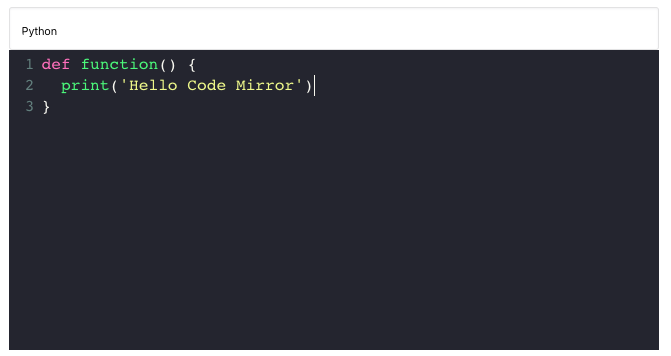
https://github.com/alexiej/editorjs-codemirror
There are couple of bugs from editor.js:
- Because of the blinking cursor, the content change every time
classandstylefor the div and the editor.js raise the event updated, and OnChange() every second when it is focused.
I've done with this on the editor.js to modificationsObserver.ts. Now OnChange only raises when there is a real change. https://github.com/alexiej/editor.js/commit/9902f69c7b5aac8ff26ee0e15ad38f13b412001c

I have created a fork from this repo, that lets you select the language code (supported by prismJs).
https://github.com/paraswaykole/editor-js-code


If anyone needs the solution , i have the custom version ready for production , with support for language as seen in below screenshots 😄
Update#1 : Works perfectly with language- tag for Prism.js as well , the sent data for language is in format of alias used for prism.js
Can you share the code

I have added a pull request here for this issue which allows the user to add their own language with a custom label

I found great solution here https://github.com/calumk/editorjs-codeflask
 Codeflask used as an editor

Another way to do it is by extending the CodeTool class without touching its core implementation:
import EditorJS from '@editorjs/editorjs';
import CodeTool from '@editorjs/code';

//========================================
// Class Extension
//========================================
class Code extends CodeTool {
  /**
  * Render plugin`s main Element and fill it with saved data
  */
  constructor({ data, config, api, readonly }) {
    super({ data, config, api, readonly });

    if (config.languages !== undefined && config.languages?.length > 0) {
      this.languages = config.languages;

      this.CSS.dropdown = "ce-code__dropdown";
      console.log(config.languages)

      this.nodes.dropdown = null;

      this.data.language = data.language;

      this.nodes.holder = this.drawView();
    }
  }

  /**
  * Create Tool's view
  */
  drawView() {
    // Create the default tool view
    const wrapper = super.drawView();
    const textarea = wrapper.querySelector("textarea");

    // Then, add dropdown menu
    if (this.languages !== undefined && this.languages.length > 0) {
      const dropdown = document.createElement("select");
      dropdown.classList.add(this.CSS.dropdown, this.CSS.input);
      dropdown.value = this.data.language;

      this.languages.forEach((lang) => {
        let option = document.createElement("option");
        option.classList.add(`${this.CSS.dropdown}__option`);
        option.textContent = lang;
        dropdown.appendChild(option);
      });

      wrapper.insertBefore(dropdown, textarea);
      this.nodes.dropdown = dropdown;
    }
    return wrapper;
  }

  /**
  * Extract Tool's data from the view
  */
  save(codeWrapper) {
    const data = super.save(codeWrapper);
    if (this.languages !== undefined && this.languages.length > 0)
      return {
        ...data,
        language: codeWrapper.querySelector("select")?.value,
      };
    else return data;
  }
}

//========================================
// Usage
//========================================
const editor = new EditorJS({
  holder: 'editorjs',
  tools: {
    code: {
      class: Code,
      config: {
        languages: ["js", "csharp"]
      }
    }
  }
});
Here is the css styles for the dropdown menu:
.ce-code__dropdown {
  -webkit-appearance: none;
  -moz-appearance: none;
  -ms-appearance: none;
  -o-appearnance: none;
  appearnance: none;
  margin-bottom: 8px;
}
Result
Output
