

 edgedb
install on WSL Ubuntu, doesn't generate credentials
Platform: WSL Ubuntu Version:20.04 Architecture: Installation method: curl from command line
I was trying to install edgeDB on my windows computer from the linux subsytem, ran into the error below.
/home/reyno/.edgedb/credentials/<instance name>.json: could not read file
/home/reyno/.edgedb/credentials/<instance name>.json`: No such file or directory (os error 2)
Output of edgedb server _detect:
{
  "os_type": "edgedb::server::ubuntu::Ubuntu",
  "os_info": {
    "codename": "focal",
    "distro": "Ubuntu",
    "sudo_path": "/usr/bin/sudo",
    "user_id": 1000
  },
  "detected": {
    "package": {
      "supported": true,
      "distro_name": "Ubuntu",
      "distro_version": "focal",
      "distro_supported": true,
      "version_supported": true
    },
    "docker": {
      "supported": false,
      "platform_supported": true,
      "cli": null,
      "docker_info_worked": false
    }
  },
  "methods": {
    "Package": {}
  }

Have you run edgedb server init <instance name>? (on WSL it will probably fail, and ask you to manually do edgedb server start --foreground, that's expected as WSL doesn't have systemd by default).
Also, I'm assuming that you replaced <instance name> in the log to anonymize it, right? It isn't meant to have literally runing edgedb -I<instance name> ? (that is a placeholder for an actual name)

Have you run
edgedb server init <instance name>? (on WSL it will probably fail, and ask you to manually doedgedb server start --foreground, that's expected as WSL doesn't have systemd by default).
I did run edgedb server init without root and it didn't fail. Would that be the solution, add systemd and start over?
Also, I'm assuming that you replaced
<instance name>in the log to anonymize it, right? It isn't meant to have literally runingedgedb -I<instance name>? (that is a placeholder for an actual name)
Yes, I just removed the actual instance name to anonymize it.
Have you run
edgedb server init <instance name>? (on WSL it will probably fail, and ask you to manually doedgedb server start --foreground, that's expected as WSL doesn't have systemd by default).I did run edgedb server init without root and it didn't fail. Would that be the solution, add systemd and start over?
No, if it worked it should be fine. What was the output of the server init?
It should be something like this:
$ edgedb server init test2
┌──────────────────────┬────────────────────────────────────────────┐
│ Instance Name        │ test2                                      │
│ Mode                 │ User Service                               │
│ Data Directory       │ /home/admin/.local/share/edgedb/data/test2 │
│ Credentials Path     │ /home/admin/.edgedb/credentials/test2.json │
│ Database Server Port │ 10701                                      │
│ Default User         │ edgedb                                     │
│ Default Database     │ edgedb                                     │
│ EdgeDB Version       │ 1.0b1-2021030102~buster                    │
└──────────────────────┴────────────────────────────────────────────┘
Created symlink /home/admin/.config/systemd/user/multi-user.target.wants/[email protected] → /home/admin/.config/systemd/user/[email protected].
Bootstrap complete. Server is up and running now.
To connect run:
  edgedb -Itest2
Where "Credentials Path" in the table should be the same as in the log. And if Bootstrap complete message is present, it should already have been written the credentials file.
So I remember getting that box, but am pretty sure I didn't get that text at the bottom because I was unsure how to connect and had to do some googling and watch some of the YouTube vids for the -I<instance name> part.
I guess i'll just try and hack a systemd into my WSL and see if I can get it to work.
So I remember getting that box, but am pretty sure I didn't get that text at the bottom because I was unsure how to connect and had to do some googling and watch some of the YouTube vids for the
-I<instance name>part.
It means that either there should have been an error or we have a bug somewhere (maybe it hanged for some time). I would appreciate feedback if the error was not clear enough.
I guess i'll just try and hack a systemd into my WSL and see if I can get it to work.
You don't have to. It should be easier to run:
edgedb server init --start-conf=manual
edgedb server start --foreground
This foreground run is obviously takes the terminal window, so you can run app in a diffferent window or tab or use shell's backgrounding operator & (latter should be used with care).
So I'm getting the following error when using the --start-conf=manual flag.
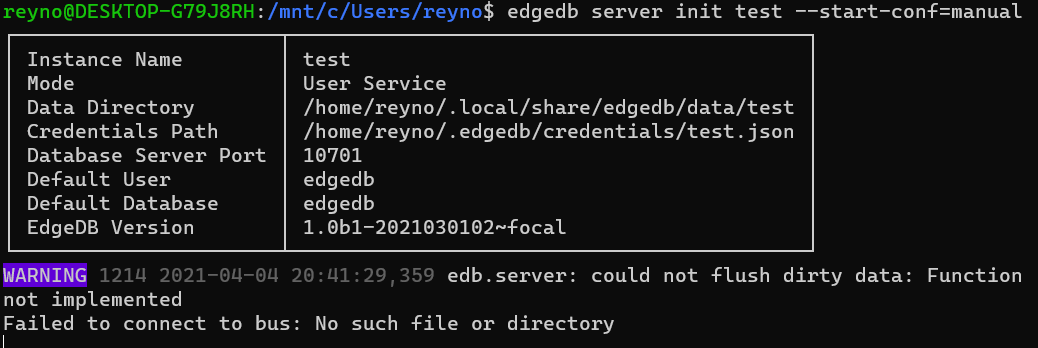
Hm, does it hang then? Looks like there is no next prompt at the bottom of the screenshot.
Here is how output looks like if systemd fails:
Failed to get D-Bus connection: No such file or directory
INFO 30239 2021-04-05 11:49:24,058 edb.server: EdgeDB server (1.0-beta.1+g2eee1afe4.d20210301) starting.
INFO 30239 2021-04-05 11:49:29,934 edb.server: Serving on 127.0.0.1:10700
INFO 30239 2021-04-05 11:49:29,935 edb.server: Serving on /run/user/1000/edgedb-test1/.s.EDGEDB.10700
INFO 30239 2021-04-05 11:49:29,935 edb.server: Serving admin on /run/user/1000/edgedb-test1/.s.EDGEDB.admin.10700
INFO 30239 2021-04-05 11:49:30,069 edb.server: Shutting down.
Bootstrap complete. To start the server:
  edgedb server start test1
edgedb error: cannot create service: process "systemctl" "--user" "daemon-reload" failed: exit code: 1
Bootstrapping complete, but there was an error creating the service. You can run server manually via:
  edgedb server start --foreground test1
Closing as this is very old. Please reopen if this does reproduce on EdgeDB CLI 3.0.