

 eclipse
on_massage callbacks stop working
Hello Guys, I have used two mqtt clients in same python script. here I'm facing one issue is after some time the on_massage callbacks for both mqtt clients stop working. i have ensured that mqtt connection is exist but the callbacks stop working . How to solve it please help me. Thanks

Could you provide a small example that demonstrates what you are doing please? Please don't include your whole application, just enough to demonstrate the problem.

sure @ralight,
like,
like i have raspberry pi as a access point and other esp32 are connected with pi access point and mqtt broker which is running in pi. now wrote python application to pass data coming from global broker topic to local broker topic .
so first i get data from global broker topic like on_massage global and that same massage pass to local broker topic and vice versa.
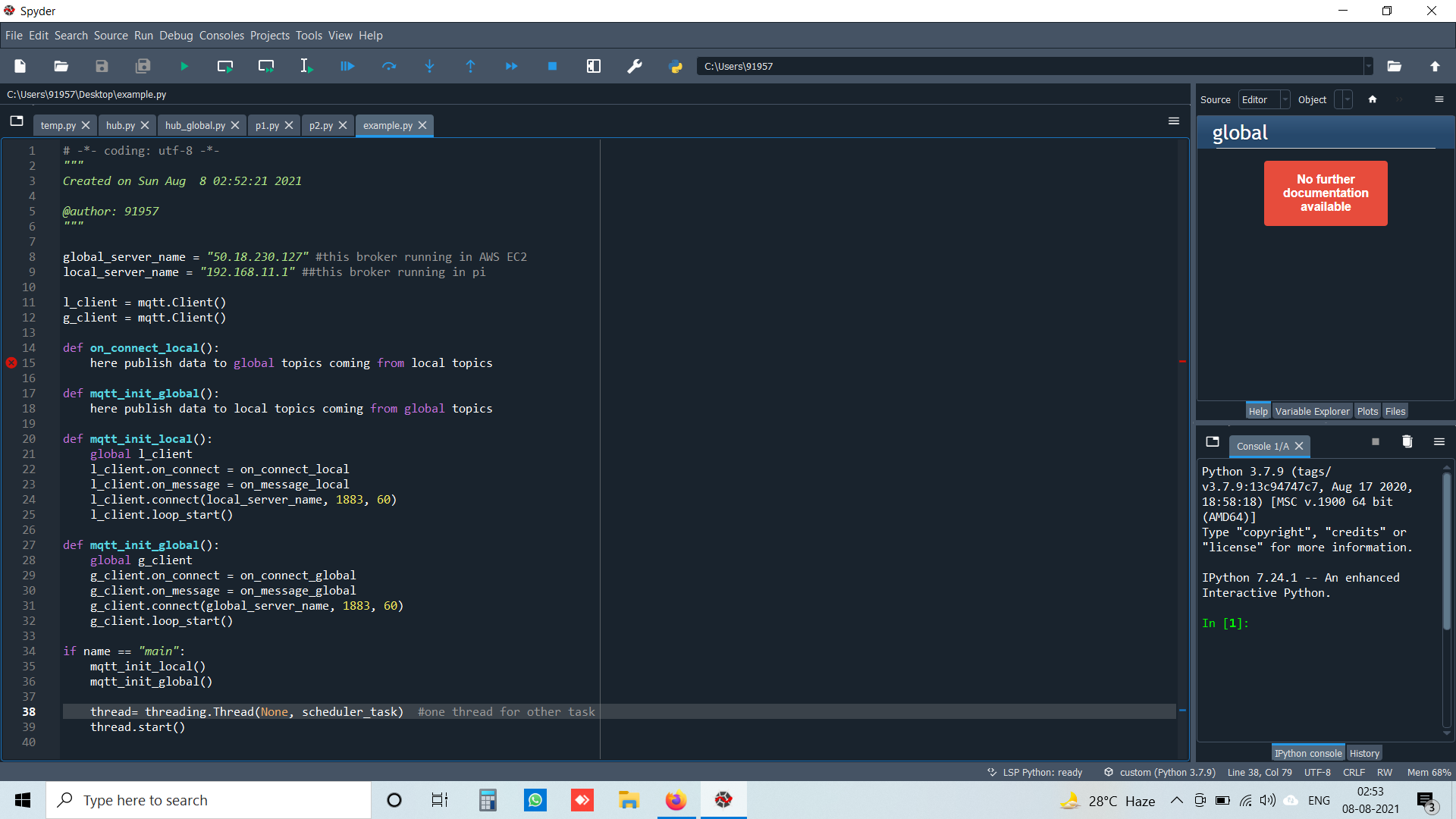
global_server_name = "50.18.230.127" #this broker running in AWS EC2 local_server_name = "192.168.11.1" ##this broker running in pi
l_client = mqtt.Client() g_client = mqtt.Client()
def on_connect_local(): here publish data to global topics coming from local topics
def mqtt_init_global(): here publish data to local topics coming from global topics
def mqtt_init_local(): global l_client l_client.on_connect = on_connect_local l_client.on_message = on_message_local l_client.connect(local_server_name, 1883, 60) l_client.loop_start()
def mqtt_init_global(): global g_client g_client.on_connect = on_connect_global g_client.on_message = on_message_global g_client.connect(global_server_name, 1883, 60) g_client.loop_start()
if name == "main": mqtt_init_local() mqtt_init_global()
thread= threading.Thread(None, scheduler_task)  #one thread for other task
thread.start()
I'm sorry but what I meant was a complete example. What you have there has functions missing, so I can't run the example. This might sound like me being picky, but it is exactly the details in those missing parts that may be causing the problem. Without them I would have to guess what is happening.
On Sat, 7 Aug 2021, 22:21 Manusinh Thakor, @.***> wrote:
sure @ralight https://github.com/ralight,
like,
like i have raspberry pi as a access point and other esp32 are connected with pi access point and mqtt broker which is running in pi. now wrote python application to pass data coming from global broker topic to local broker topic .
so first i get data from global broker topic like on_massage global and that same massage pass to local broker topic and vice versa.
global_server_name = "50.18.230.127" #this broker running in AWS EC2 local_server_name = "192.168.11.1" ##this broker running in pi
l_client = mqtt.Client() g_client = mqtt.Client()
def on_connect_local(): here publish data to global topics coming from local topics
def mqtt_init_global(): here publish data to local topics coming from global topics
def mqtt_init_local(): global l_client l_client.on_connect = on_connect_local l_client.on_message = on_message_local l_client.connect(local_server_name, 1883, 60) l_client.loop_start()
def mqtt_init_global(): global g_client g_client.on_connect = on_connect_global g_client.on_message = on_message_global g_client.connect(global_server_name, 1883, 60) g_client.loop_start()
if name == "main": mqtt_init_local() mqtt_init_global()
thread= threading.Thread(None, scheduler_task)  #one thread for other task
thread.start()
— You are receiving this because you were mentioned. Reply to this email directly, view it on GitHub https://github.com/eclipse/paho.mqtt.python/issues/590#issuecomment-894708162, or unsubscribe https://github.com/notifications/unsubscribe-auth/AAATNWVEUMATQELH56HTGP3T3WPWXANCNFSM5BXX3IMQ . Triage notifications on the go with GitHub Mobile for iOS https://apps.apple.com/app/apple-store/id1477376905?ct=notification-email&mt=8&pt=524675 or Android https://play.google.com/store/apps/details?id=com.github.android&utm_campaign=notification-email .
-- coding: utf-8 --
""" Created on Sun Aug 8 02:52:21 2021
@author: 91957 """ from datetime import datetime import json import requests import time import subprocess from time import sleep import os import threading import paho.mqtt.client as mqtt import sys import os
global_server_name = "50.18.230.127" #this broker running in AWS EC2 local_server_name = "192.168.11.1" ##this broker running in pi
l_client = mqtt.Client() g_client = mqtt.Client()
t_esp_state_control_l = "/manoj/local/topic" t_esp_state_control_g = "/manoj/global/topic"
def on_connect_local(client, userdata, flags, rc): print("Local MQTT Connected with result code " + str(rc)) client.subscribe(t_esp_state_control_l)
The callback for when the client receives a CONNACK response from the server.
def on_connect_global(client, userdata, flags, rc): print("Global MQTT Connected with result code " + str(rc)) # Subscribing in on_connect() means that if we lose the connection and client.subscribe(t_esp_state_control_g)
The callback for when a PUBLISH message is received from the server.
def on_message_local(client, userdata, msg): # local info = (msg.payload).decode("utf-8") print("local - " + msg.topic + " " + info) if (msg.topic == t_esp_state_control_l): g_client.publish(t_esp_state_control_g, info) print("card scan published")
The callback for when a PUBLISH message is received from the server.
def on_message_global(client, userdata, msg): # global info = (msg.payload).decode("utf-8") print("global - " + msg.topic + " " + info) if (msg.topic == t_esp_state_control_l): l_client.publish(t_esp_state_control_g, info) print("published")
def mqtt_init_local(): global l_client l_client.on_connect = on_connect_local l_client.on_message = on_message_local l_client.connect(local_server_name, 1883, 60) l_client.loop_start()
def mqtt_init_global(): global g_client g_client.on_connect = on_connect_global g_client.on_message = on_message_global g_client.connect(global_server_name, 1883, 60) g_client.loop_start()
def scheduler_task(): print("Schedular running")
if name == "main": mqtt_init_local() mqtt_init_global()
thread= threading.Thread(None, scheduler_task) #one thread for other task
thread.start()
def scheduler_task():
    print("Schedular running")

if __name__ == "__main__":
    mqtt_init_local()
    mqtt_init_global()

    thread= threading.Thread(None, scheduler_task)  #one thread for other task
    thread.start()
The problem is that the program exits immediately after calling thread.start(), so none of your callbacks will be called.
hi @ralight , actually callabacks are working for some time like 2,3 hours but after that it stops.
and the schedular task has while loop
This is why I asked you for a complete example that demonstrates the problem! :) The example you provided cannot run for more than the time it takes to connect to the brokers. There is code missing in the scheduler task which may be what is causing the problem. Without a full example it is impossible to say what is happening. I appreciate that you are trying to make it easier to debug by removing excess code - that is exactly what you should be doing, but the end result must still show the problem.
okay @ralight , can you please help like how I can ensure that callback is working or not is there any way to keep monitoring in code itself so I can take action when the callbacks stops?
I would suggest configuring logging for both of your clients, and perhaps checking that your payload decoding isn't raising an exception for the case that the payload isn't valid UTF-8.
I realise this is an old thread but this may still be of interest to someone searching this problem.
I have been seeing the same problem after running a day or two. As per @ralight 's suggestion I turned on logging and saw this:
2023-03-11 02:01:46 - DEBUG - emamqtt - Sending PUBLISH (d0, q0, r0, m212), 'b'ema/machine_room_heater/cmnd/Power'', ... (3 bytes)
2023-03-11 02:02:27 - DEBUG - emamqtt - Sending PINGREQ
2023-03-11 02:02:27 - DEBUG - emamqtt - Received PUBLISH (d0, q0, r0, m0), 'ema/machine_room_heater/tele/STATE', ...  (45 bytes)
2023-03-11 02:02:27 - ERROR - emamqtt - failed to receive on socket: [Errno 32] Broken pipe
2023-03-11 02:02:28 - DEBUG - emamqtt - Sending CONNECT (u0, p0, wr0, wq0, wf0, c1, k60) client_id=b'emamqtt'
2023-03-11 02:02:28 - DEBUG - emamqtt - Received CONNACK (0, 0)
2023-03-11 02:03:28 - DEBUG - emamqtt - Sending PINGREQ
2023-03-11 02:03:28 - DEBUG - emamqtt - Received PINGRESP
2023-03-11 02:04:28 - DEBUG - emamqtt - Sending PINGREQ
2023-03-11 02:04:28 - DEBUG - emamqtt - Received PINGRESP
The key being the failed to receive on socket: [Errno 32] Broken pipe. Since I am using client.loop_start() I can't see any way to use a try except. I'm going to try working around it by detecting a lack of call backs to the client.on_message = on_message and re-calling the client.subscribe() functions if looks to have stopped. It is likely to take a few days to see if this helps.
I can look at providing a stripped down version of my code here, or opening a fresh issue if it will help this project.

An update. The data did appear to stop coming in again, but with no Error 32 this time. It is possible it was not Paho but Mosquitto. However I suspect that is not the case. Regardless my strategy of re-subscribing if incoming data appears to have stop seems to have work in this case.
Hello Guys, I have used two mqtt clients in same python script. here I'm facing one issue is after some time the on_massage callbacks for both mqtt clients stop working. i have ensured that mqtt connection is exist but the callbacks stop working . How to solve it please help me. Thanks
I have a similar problem, did you find a solution for this issue? Pls let me know, I need it for my last project at university.

I worked around it by resubscribing if the message handler callback had not received anything for a while. Probably not good solution for some, but in my case it has been an effective way to keep my system running smoothly.
The c1 in Sending CONNECT (u0, p0, wr0, wq0, wf0, c1, k60) client_id=b'emamqtt' indicates that you are connecting with CleanSession = true (meaning that any existing subscriptions will be cleared). This is why the docs recommend subscribing in on_connect (you cannot assume that the connection will remain up forever).
I'm going to close this because the OP did not provide a minimal, reproducible, example and I believe the above answers the subsequent questions. If OP wants to reopen then please go ahead; if others have questions then please open a new issue (or, as this is more of a usability question, consider asking on stackoverflow as it's likely you will get an answer more quickly there).
