

 eclipse
Mr Tree algorithm - Specify horizontal nodes ordering
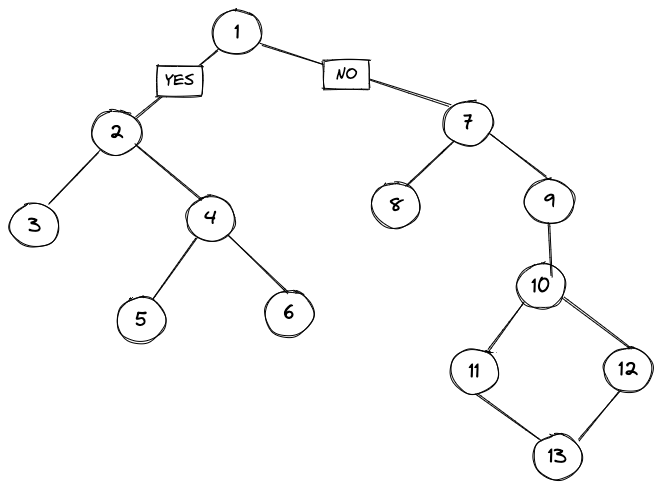
Im trying to represent a YES / NO split, and I would like to always have the YES to the left hand side. Would it be possible by specifying Priority or Weighting of Nodes? Also if I dynamically add nodes to the graph the horizontal positions of nodes are not stable, I wonder what are the conditions for moving the YES or NO part to the left / right hand side (is it based on number of nodes connected?, number of crossings?, number of edges?, complexity?) In layered algorithm I see that it is possible by specifying positions to the nodes, but it would be great if it would be possible also in Mr Tree.
This is what I would like to get:
Thanks!

I think that was already implemented in the thesis mentioned in https://github.com/eclipse/elk/issues/406, which is currently not added to ELK.

Is it planned to be added soon? I need to use it in ELKJs, it would be great if this feature could be included. What would be the way of usage? Would it be adding position within layout options in the node? So a lower position to node 2 in the image above would mean that it would be positioned to the left hand side of node 1. Thank you!
If I remember correctly, we used the input order as a default ordering and allowed to add constraints to set the level and the position in a level. This would be added in ELK 0.9.0 so it might take a few months until it is available since I am quite busy and 0.9.0 will introduce many other features.
I think that was already implemented in the thesis mentioned in #406, which is currently not added to ELK.
By this do you mean this feature is already merged in master? I'm thinking about maybe I can build ELKjs myself while you relase 0.9.0 version.
Would you mind to give me an example of how to specify the level and position constraints in the nodes?
Thank you very much
Hi @soerendomroes, hope you are well. Is there any updates on this? It would be super helpful to have this feature as I'm a bit limited in my project because of this. Thanks!

We are currently working on ELK 0.9.0 and this ticket is still something we want to add to this release.
Hello, just wanted to ask, how should the configuration settings be configured in the end?

@HP-283 You can find all mrtree layout options here. If I understand you correctly, the default ordering would be the input order of nodes and the position constraint (https://eclipse.dev/elk/reference/options/org-eclipse-elk-mrtree-positionConstraint.html) can be changed to change the order for a specific node.
I used this JSON below to test, when I removed e4, n2 and n3 changed the order unexpectedly. How can i fix the order of n2 and n3 when I add or remove edges. positionConstraint seems not work.
https://rtsys.informatik.uni-kiel.de/elklive/json.html
{
  "id": "root",
  "properties": {
    "elk.algorithm": "elk.mrtree",
    "elk.direction": "DOWN"
  },
  "children": [
    {
      "id": "n1",
      "width": 30,
      "height": 30
    },
    {
      "id": "n2",
      "width": 40,
      "height": 30,
      "layoutOptions": {
        "positionConstraint": 4
      }
    },
    {
      "id": "n3",
      "width": 10,
      "height": 30,
      "layoutOptions": {
        "positionConstraint": 5
      }
    },
    {
      "id": "n4",
      "width": 30,
      "height": 30
    },
    {
      "id": "n5",
      "width": 30,
      "height": 30
    }
  ],
  "edges": [
    {
      "id": "e1",
      "sources": [
        "n1"
      ],
      "targets": [
        "n2"
      ]
    },
    {
      "id": "e2",
      "sources": [
        "n1"
      ],
      "targets": [
        "n3"
      ]
    },
    {
      "id": "e3",
      "sources": [
        "n2"
      ],
      "targets": [
        "n4"
      ]
    },
    {
      "id": "e4",
      "sources": [
        "n3"
      ],
      "targets": [
        "n5"
      ]
    }
  ]
}
@HP-283 This might be the case, since this was only fixed in 0.9.X, which is currently not included in elklive.