

 eclipse
Introduce workspace composites
Context
Buildship can import composite builds, but there’s no convenient way to easily create composites within the workspace. Users are restricted to add includeBuild statements into the settings file or to declare --include-build arguments in the import configuration. A new UI that lets users select builds that participate in a composite would make developers’ work much easier.
High-level overview
The workspace composite feature should be based on working sets. Buildship should define a new “Gradle composite” working set. Users should be able to assign Gradle builds to working sets. Once a Gradle build is part of a composite, the synchronization should behave as follows:
- Buildship creates a synthetic root project in the workspace metadata folder. This project should define a composite build that includes all builds from the working set.
- Instead of launching the synchronization for the selected build, the composite root is synchronized.
Use-cases
1) Define workspace composite
Buildship contributes a wizard to define a custom working set. It is accessible from
- The
New…dialog (just like for the Java working set) - From the
Select Working Setdialogue - From a new
Configure Compositessubmenu under the Gradle entry in the context menu, next to theRefresh Gradle Projectentry.


In the working set wizard, the user can specify the name of the composite and the Gradle builds that participate in the composite, and the import preferences for the composite.
Optionally, the user can specify a project that will be the composite root.
When the user finishes the wizard then all Gradle builds that are associated with the working set will be part of the composite. If no composite root is specified then a synthetic root project is created in the .metadata folder referencing the selected builds.
2) Add a Gradle project from the workspace to a composite
The working set wizard lists all Gradle builds from the workspace. The builds are listed in a checkbox tree enumerating the root projects. The user can select which builds are to be part of the composite.
When the user finishes the wizard then the list of included builds are updated in the composite root project.
3) User changes settings for the composite
The user can configure the preferences for the composite with the same UI as provided for the workspace preferences. The UI is available on:
- The working set’s property page
- Via the
Configure Compositescommand from the context menu of any Gradle projects. - From the project preferences UI: the widgets in this dialog are disabled with a warning, that the build is part of a workspace composite. Also there’s a link is visible that opens the composite preferences.

The preferences are stored on the composite root project.
4) Add a Gradle build from an external location to a composite
The wizard has an Add External... button. Clicking on it opens a directory selection dialog. There the user can select an external Gradle project can be selected to be part of the composite. The selected folder appears with a different icon in the checkbox tree dialog explained in the use-case below.
When the user clicks finish then the external location is associated with the composite and the composite root is updated accordingly.
5) Add a build to a composite that already participates in another one
The wizard explicitly forbids this use-case. Gradle builds participating another composite are marked with a special label with the following format:
<project_name> (already associated with <composite_name> composite)
When the user selects such Gradle build then the wizard informs the user that the operation will remove the build from the previous composite.
When the user clicks finish than the Gradle build is moved from original composite to the new one and the associated composite roots are updated.
6) Remove a Gradle build from a composite
Buildship updates the working set and the composite root.
7) Execute synchronization
The project synchronization logic uses the composite root instead of the root project of the selected project. For each project, the path to the root project remains the original root and not the composite root. The project preferences used during the synchronization are loaded from the composite root.
8) Rename composite
If no composite root is defined for the working set then the synthetic root project is updated accordingly. Duplicate composite names are explicitly forbidden.
9) Delete composite
When the user deletes the composite, Buildship deletes the corresponding synthetic root. The contained builds synchronize exactly as before adding them to the composite.
10) Refresh task view
The tasks view presents the tasks loaded from the composite root instead of the individual builds.

Looks great. However I have couple of questions:
- What if I already have a project that play role of "synthetic root"? In my case this project also contains valuable environment specific configurations. Maybe it's fair to provide developer with an option of marking one of projects as a root project?
- Maybe it's also fair to make generated "synthetic root" visible? (Make this option configurable)

@donat, looks promising! The idea of mapping a Gradle composite build to a synthetic root project is great. :+1:
I just played around with this concept in my mind, trying to map all our use cases to it and it seems to work well for them.
What would be the next steps from your point of view?

@crc83
1. What if I already have a project that play role of "synthetic root"? In my case this project also contains valuable environment specific configurations. Maybe it's fair to provide developer with an option of marking one of projects as a root project?
As I understand, this would Buildship require to edit the settings.gradle file in the project, isn't it? On the other hand, it would make the composite more explicit (and simply revertible by an according VCS command). Which again would need to implicitely remove a Gradle composite working set. ... This could be a little challanging regarding user expirience (due to disappearing working sets).
2. Maybe it's also fair to make generated "synthetic root" visible? (Make this option configurable)
Could be helpful to make a composite more explicite. But I would treat it with lower priority.
Hi! Unfortunately I'm on sick leave at the moment. I'll get back to you with feedback next week.
@kuniss
As I understand, this would Buildship require to edit the settings.gradle file in the project, isn't it?
You can define composites by adding the --include-build <location> arguments to the build invocations.
I like the idea of using any projects as roots. I'll adjust the specs above. Also, I'll think about how can we manage this story.
@kuniss I've updated the spec to allow specifying custom root for a working set composite. I've also adjusted one thing: I think we should always include the composite root as well. The partial import should be treated as a completely separate story.
@kuniss Here's my proposal how should collaborate on this story.
Let's first start with the UI elements without the functionality. With that, we can first agree on the general behavior without touching the internal synchronization logic. Let's implement a custom working set and the associated wizard widgets, along with basic functionality of adding/removing/updating builds in the composite.
I'd leave it to your judgment how do you want to partition the story into smaller tasks. I could only recommend you to submit digestible chunks which are easy to review. For example, first submit the changes for a custom working sets, then SWT dialog composite, then the menu extensions, etc.
When we have the UI (more or less) ready, then we can jump into the composite features and the test coverage. Until that it's acceptable to replace the composite synchronization with simple console prints.
I propose to collaborate with a series of pull requests. When you finish with a task, submit a pull request on GitHub and request a review from me. There, we'll discuss what needs to be done before I can merge the changes. FYI this is also how what we do the development internally.
I've created a new branch for the story: https://github.com/eclipse/buildship/tree/workspace-composites. You can create PRs against it, and I'll merge it to master once the workspace composite feature is complete. I'll also make sure that this branch is in sync with master.
Looks like a plan. :smile:
How we should design the UI dialog for determining the composite root?
Maybe as a subsequent dialog at the "New ... " Working Set wizard with 2 radio buttons as alternatives:
Wizard Instruction: Select the project which will be used as Gradle composite root project. :white_circle: Synthetic Project (will automatically be created by the wizard and maintained by Buildship) :white_circle: Working Set Project (will manipulate the existing project)
The "Working Set Project" radio button may be followed by a drop down box where a project from working set collected before may be selected.
What about to make the changes persistent in settings.gradle in case "Working Set Project" is selected from above by adding approriate includeBuild statements. In that case the changes may be committed if desired and rolled back for temporary changes?
A simple wireframe will do it. You can share it as a set of pictures here, maybe a public Google doc, whatever you feel comfortable with.
In general, I agree with the composite root selection proposal. I'll comment on the minor details (labels, etc.) when we have the sketches. One thing to consider is the Working Set Project option. I think we should allow any project and even external directories) for the root. What do you think?
Regarding the settings.gradle modifications: I think we should not do it. A couple of reasons:
- If the user wants to commit/rollback changes then he can just go and edit the settings.gradle file.
- Parsing the
settings.gradlefile hard and error-prone. We don't want to implement language support as part of this story. - I think sharing composite builds contradicts with the intent of the feature. Its main purpose is to work on dependent projects that are otherwise developed independently. There might be a use-case out there which makes this point invalid; let me know if I miss something.
Regarding the settings.gradle modifications: I think we should not do it.
I agree with all your concerns. ... Would have them by myself, especially the parsing issue.
I think we should allow any project and even external directories for the root. What do you think?
Any Buildship Eclipse project - definitely yes! Non-Buildship projects should not be allowed, I think. Any external directory? I do not really have an opion here as we do not have an expirience with that (no use case for us at all). What are the others thinking about this?
Regarding wireframes: We will try to come up with a first scatch in the next 2 weeks.
... Maybe, this is helpful for scatching: https://wireframe.cc
Any external directory? I do not really have an opion here as we do not have an expirience with that (no use case for us at all). What are the others thinking about this?
If nobody objects I'd include this idea in the wireframe sketches.
... Maybe, this is helpful for scatching: https://wireframe.cc
Looks good. If you are conforable with it then go ahead.
Looking forward to your progress.
Wireframe worked out quite well
Here's what I got so far for the working set wizard https://wireframe.cc/tyQIAW

@kuzniarz The wireframe looks good! I have one major request. I think we should split the wizard into multiple pages. The first page should only display the required elements: the name and the selected projects. The subsequent pages should contain the optional settings:
- 2nd page: Gradle import preferences
- 3rd page: composite root project selection
We have a very similar split of pages in the import wizard.
A minor suggestion: the Composite root label is present twice on the wireframe. Project or Root project might be better for the second occurrence.
@kuzniarz The wireframe looks good! I have one major request. I think we should split the wizard into multiple pages. The first page should only display the required elements: the name and the selected projects.
@donat I'm happy to hear that! Actually, I was already thinking about splitting the wizard into multiple pages due to the rather overloaded feel with all the features. Additionally, using the first page exclusively for the name and the selected projects would offer better usability for the checkbox tree, so I'm onto it.
A minor suggestion: the
Composite rootlabel is present twice on the wireframe.ProjectorRoot projectmight be better for the second occurrence.
I think Root project should work fine in this case. I'll post an updated version soon.
So, I've finished a wireframe for every page of the wizard.
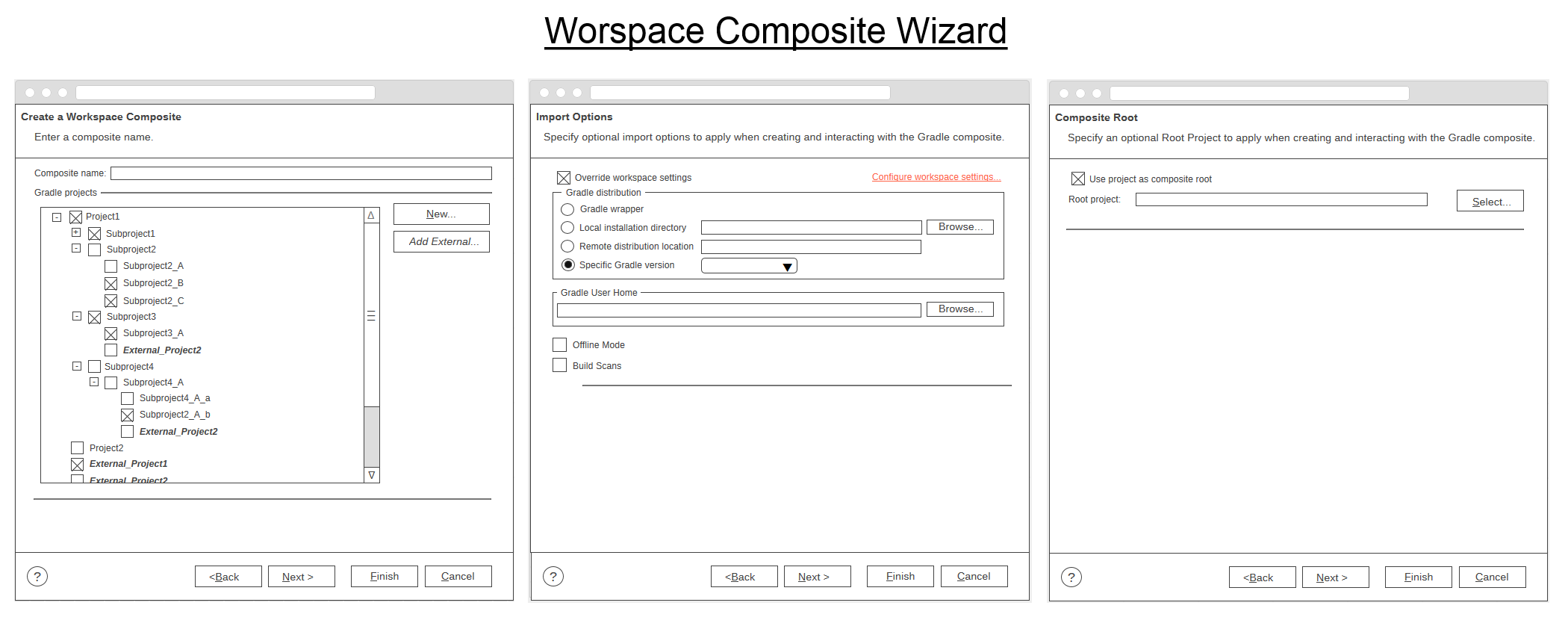
The corresponding wireframe links are:
- Page 1: https://wireframe.cc/tyQIAW
- Page 2: https://wireframe.cc/ipPkpx
- Page 3: https://wireframe.cc/Ez3275
Also I've also created wireframes for the Workspace Composite Properties. Just like the Java Working Set properties the GUI is nearly identical to the wizard GUI.
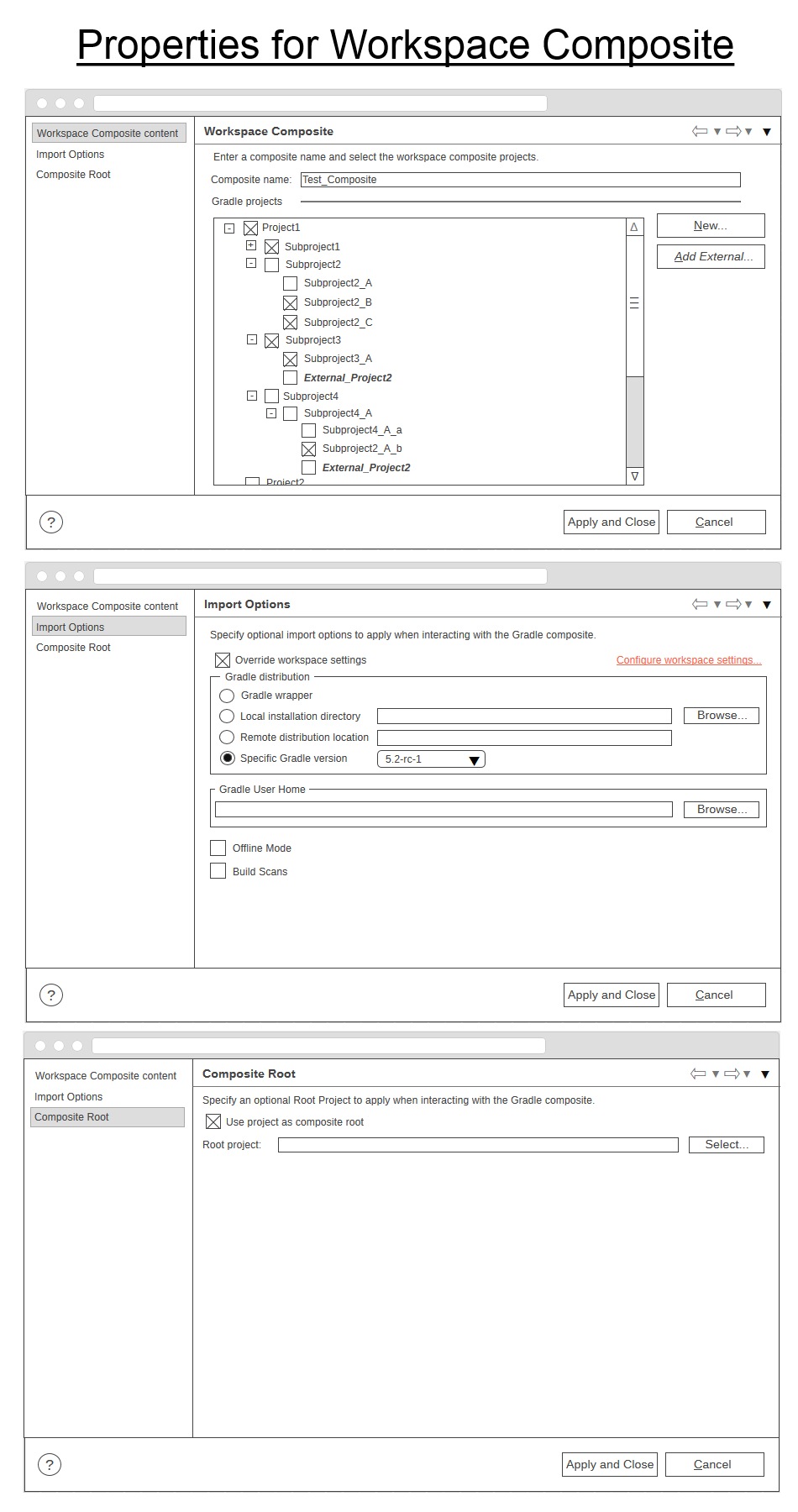
The property wireframe links are:
- Workspace content: https://wireframe.cc/fD2rIW
- Import properites: https://wireframe.cc/8fbi3d
- Composite root: https://wireframe.cc/M4v7Vs
This is exactly what I had in mind, thanks for investing time in the wireframes. I think we can move forward with the implementation. The next step would be to implement the UI without the functionality: clicking Finish should be a no-op.
@donat Yes, I've just finished implementing the UI for the wizard, but I haven't worked on the UI for the properties yet. I could commit my current progress if you'd like to have a look.
@donat Okay, so I've finished all the UIs, including the property UIs, but I haven't included the properties into the plugin.xml, because there's no "Gradle Workspace Composite" to test with.
What are the next steps?
Excellent! Please open a PR with your changes against the workspace-composites branch. We'll use the PR to do a review. When we finish with the review, I'll merge the PR and then we can continue with the next story.
I'll make sure that the workspace-composites branch is in sync with master (with periodical rebasing), so you don't have to worry about that.
Btw you can declare a dummy working set contribution in plugin.xml and you can assign the property UI to it.
Perfect! The PR is open, all checks have passed and the commits are awaiting your review. Let me know whenever you're ready.
Excellent. I've already started looking into the changes and stumbled upon a few problems. See my comments at https://github.com/eclipse/buildship/pull/866.
@kuzniarz I've merged the UI components PR. Thank you for the hard work!
I think the next big milestone will be to implement use-case no. 1. It might be a massive PR, so I propose to breaking it down into two smaller chunks. First, let's implement the project - composite association: the user should be able to define a composite in the UI and check/modify its properties, but the composite should not have any effect on the synchronization. Then, the follow-up implementation would change they synchronization itself. WDYT?
If you get started, please note that I've rebased the workspace-composites branch to master, so you might want to update your local branches.
I think we should continue with associating projects with workspace composites.
@kuzniarz I've merged the UI components PR. Thank you for the hard work!
thanks a lot!
First, let's implement the project - composite association: the user should be able to define a composite in the UI and check/modify its properties, but the composite should not have any effect on the synchronization. Then, the follow-up implementation would change they synchronization itself. WDYT?
Sounds good to me. I'll need to figure out, how to implement a project - composite association for eclipse, but I'd love to help with that.
I think we should have a list of preferences files that describe the workspace composites. You can use the plugin's state location to store the data. Here's an example: https://github.com/eclipse/buildship/blob/4ee595bd33bd84cb788debc15900a98af6f05c59/org.eclipse.buildship.core/src/main/java/org/eclipse/buildship/core/internal/preferences/DefaultModelPersistence.java#L167
@donat Yes! I've implemented some parts of the composite association. By using the wizard, a properties file is generated for a Gradle composite. Right now it contains some of the import options because I wasn't sure about the content of it. Additionally, a working set with the selected projects is generated. There are some issues with updating the workspace because the new working sets are not displayed in the Eclipse explorer after finishing the wizard. I always have to restart Eclipse for that, but I try to figure this out. I'm also not sure how to implement the working set as a Gradle composite type, so I can enter the properties of the composite by right-clicking it, etc.