buildship

buildship copied to clipboard
 eclipse
Build path set to JavaSE-17 after Gradle refresh although sourceCompatibility is set to 1.8
Expected Behavior
When I set sourceCompatility to 1.8 and do Gradle refresh, I expect the Eclipse project build path to use JRE library 1.8.
Current Behavior
The project build path seems to default to JavaSE-17 (Eclipse embedded justj hotspot jdk).
Context
Using a project that normally requires Gradle 2.3 only. With current tooling API I must use at least 2.6 I've tried various versions between 2.6 and 2.13.
Steps to Reproduce
I use a minimal build.gradle
apply plugin: 'java'
sourceCompatibility = '1.8'
targetCompatibility = '1.8'
I use this sequence of steps with Gradle version 2.x for different values of x
- Under the Gradle project in Eclipse, right click on JRE library, Build Path -> Remove from build path
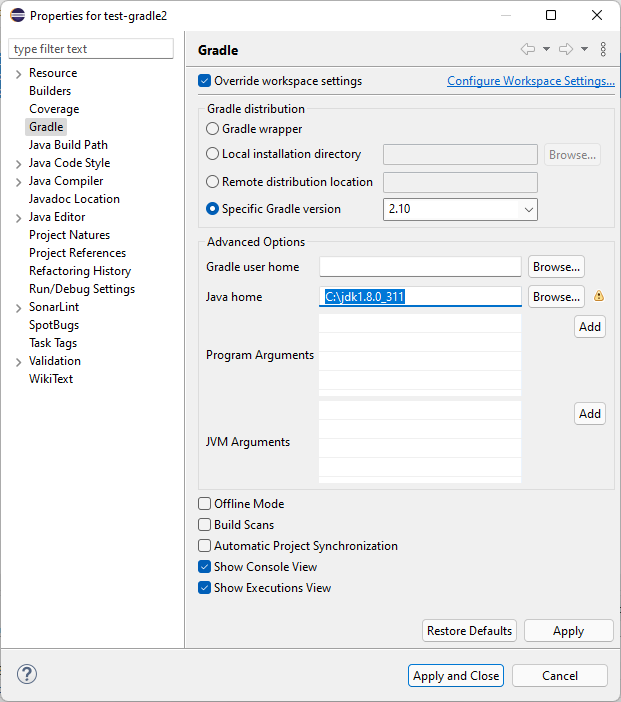
- Right-click on the project -> properties, and then in Gradle, override workspace settings, and change "Specific Gradle version" to 2.x and then "Apply and Close"
- Right-click on the project, Gradle -> Refresh
It seems to be working for versions 2.10+
If I change the version from 2.10 to 2.9 and do Gradle refresh, it changes the JRE system library from 1.8 to 17.
Your Environment
Version: 2021-12 (4.22.0) Build id: 20211202-1639