
sprotty
 sprotty copied to clipboard
 eclipse-sprotty
Incorrect layouting of ports with labels
When adding a label to a port, the size of that port is changed depending on the label:
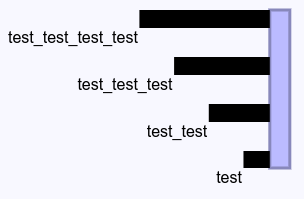 with
with PortLabelPlacement.INSIDE:

I'm not sure if this is a problem on the server- or client-side. I seems as if the bounds calculation of the port considers the label (since it is a child of the port), while ELK regards these as being indepentent.
To be able to reproduce I've made these changes to the circlegraph example:
build.gradle:
compile "org.eclipse.elk:org.eclipse.elk.alg.layered:${versions.elk}"
di.config.ts:
configureModelElement(context, 'graph', SGraph, SGraphView);
configureModelElement(context, 'label', SLabel, SLabelView);
configureModelElement(context, 'node', RectangularNode, RectangularNodeView);
configureModelElement(context, 'port', RectangularPort, RectangularNodeView);
configureViewerOptions(context, {
    needsClientLayout: true,
    needsServerLayout: true
});
GraphLayoutEngine.java:
ElkLayoutEngine.initialize(new LayeredOptions());

configurator.configureByType("graph")
		.setProperty(CoreOptions.ALGORITHM, LayeredOptions.ALGORITHM_ID);
configurator.configureByType("node")
		// .setProperty(CoreOptions.PORT_LABELS_PLACEMENT, PortLabelPlacement.INSIDE)
		.setProperty(CoreOptions.PORT_CONSTRAINTS, PortConstraints.FIXED_ORDER)
		.setProperty(CoreOptions.PORT_ALIGNMENT_DEFAULT, PortAlignment.JUSTIFIED)
		.setProperty(CoreOptions.NODE_SIZE_CONSTRAINTS, SizeConstraint.free());
GraphGenerator.java:
public SGraph generateGraph() {
	return new SGraph(graph -> {
		graph.setId("graph");
		graph.setChildren(new ArrayList<>());
		graph.getChildren().add(new SNode(node -> {
			node.setChildren(new ArrayList<>(4));
			for (int p = 0; p < 4; p++)
				node.getChildren().add(generatePort(p, "test" + Strings.repeat("_test", p)));
		}));
	});
}

private SPort generatePort(int p, String pLabel) {
	return new SPort(port -> {
		port.setId("port" + p);
		port.setChildren(Collections.singletonList(new SLabel(label -> {
			label.setId("port" + p + "/label");
			label.setText(pLabel);
		})));
	});
}

Workaround: Overwrite HiddenBoundsUpdater#getBounds to only return the bounds of the port figure.
We need a better solution here. Maybe a default port layout? @spoenemann any ideas?

I only want to mention that i had the same issue while playing around with Sprotty. My current solution is a custom Port Model like this:
export class Port extends RectangularPort {
  static readonly DEFAULT_FEATURES = [connectableFeature, selectFeature, boundsFeature, fadeFeature, hoverFeedbackFeature, layoutContainerFeature];
  readonly layout = 'stack';
  readonly layoutOptions = {
    resizeContainer: false
  };
  size = {
    width: 11, //10 and smaller will not work
    height: 11 //10 and smaller will not work
  };
}
This works fine for ports greater or equal to 11x11 (width and height). For ports smaller than 11x11 the port size is still changed during hidden render phase for some reason.
Port Size 11x11
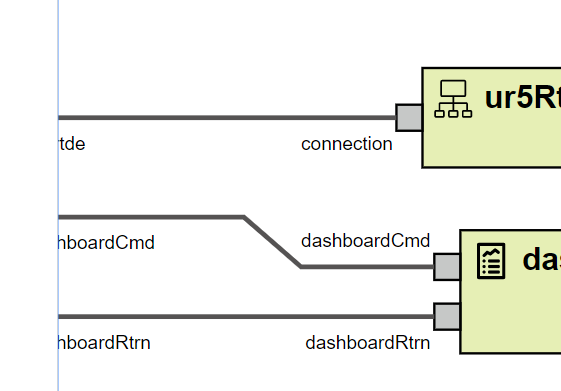
Port Size 10x10
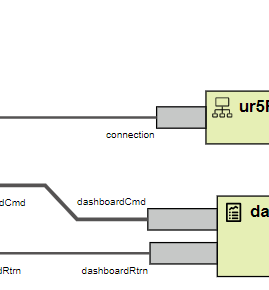

I fixed it by overriding HiddenBoundsUpdater like this:
protected getBounds(elm: SVGGraphicsElement, element: BoundsAware): Bounds {
    const bounds = super.getBounds(elm, element)
    if (element instanceof SPort) {
        return {
            x: bounds.x,
            y: bounds.y,
            width: 0,
            height: 0,
        }
    } else {
        return bounds
    }
}
This will make all ports invisible which might not be what u want.
Regardless there should be a way to restrict bounds calculation to part of the view, e.g.
<g>
    <g><!-- Use to calculate bounds --></g>
    <g><!-- Ignore this --></g>
</g>
I need to provide a proper size for the Ports during "Hidden Render Phase" because the size is also used by the ELK Layout Engine (https://github.com/eclipse/sprotty-layout/) to calculate the edge ends and label positions.
The main Problem now is that if you have some model like this:
      const port: PortSchema = {
        type: PORT_TYPE,
        id: id.toString(),
        portType: portType,
        children: [
          <SLabelSchema>{
            id: Guid.create().toString(),
            type: PORT_LABEL_TYPE,
            text: name
          }
        ]
      }
A Port with a Label as children … the current implementation will resize the Port based on the size of the Label. This is fine if someone wants to place the label inside the Port but if the label should be placed next to it resizing the port makes no sense.
Because of this i like the suggestion/question from JanKoehnlein to have a layout for ports where the user can decide if the container (Port in that case) should be resized or not. But maybe this issue should be moved to Sprotty main API
I moved this to eclipse/sprotty because it's a frontend issue.
We could introduce a special layout (or layout option) to support elements outside of their container's bounds. This does not affect only ports, it could happen with other elements, too.

I need to provide a proper size for the Ports during "Hidden Render Phase" because the size is also used by the ELK Layout Engine (https://github.com/eclipse/sprotty-layout/) to calculate the edge ends and label positions.
It should be possible to achieve this by creating a view similar to what I mentioned previously:
@injectable()
export class SquarePortView implements IView {
    render(port: SPort, context: RenderingContext): VNode {
        return <g>
            <rect class-sprotty-node={port}
                  class-mouseover={port.hoverFeedback} class-selected={port.selected}
                  x="0" y="0" width={Math.max(port.size.width, 0)} height={Math.max(port.size.height, 0)}></rect>
            {context.renderChildren(port)}
        </g>
    }
}
And then make the following change in HiddenBoundsUpdater:
protected getBounds(elm: SVGGraphicsElement, element: BoundsAware): Bounds {
    if (element instanceof SPort) {
        // Extract the rect element containing the port
        const rect = elm.firstChild == null ? undefined : elm.firstChild
        return super.getBounds(rect, element)
    }

    ...
Hi, can someone provide an example code of the correct implementation of using Ports? I can't find any documentation how Ports should be used.
Also the idea mentioned by @spoenemann to introduce a layout option to support elements outside of their container's bounds sounds very interesting. Is there any place where I can find documentation about all this features? I already opened an issue #276 regarding this topic.
Thanks for any help.

I made a proposal to fix this with an additional attribute in the respective views: #364
@tomvdbussche @BjBe82 @rsoika please have a look whether this is sufficient for your cases.