

 eclipse-sprotty
vbox and hbox layout do not center children properly in presence of 'minWidth', 'maxWidth' option
We created a model that contains some simple nodes that basically consists of a simple 'box' with a label inside of it.
We specify a minWidth and maxWidth on the container.
The label inside the container do not get centered even though we specify that as an option on the label.
What seems to be happening is that options to center the children are taken into account, but only considering the maximum width of the children, independent of container's minWidth/heigth.
So basically, let's consider a 'vbox' as example. If we place multiple children then they are centered with respect to eachother, and this looks fine if the largest child is wider than minWidth (i.e. if the children dictate the width of the container).
On the other hand, if the minWidth is larger than the width of the largest child then the children are only centered relative to eachother, but not relative to the larger container. And then the children end-up with the largest child stuck to the left side of the container.
Similar behavior is also observed with hbox (centering vertically in this case).
I tried to understand the sprotty VBox layouting code a little and I think the problem is that in here:
https://github.com/eclipse/sprotty/blob/master/src/features/bounds/abstract-layout.ts#L59
the layout is adjusting the final container width taking minWidth and minHeight into account but...
- these options are only factored in at the end, not during layout of children and
- the correction 'minWidth/heigth' applied at the end don't account for alignment options
I assume this is not intentional and so to be considered a bug?
I do not have a simple example to reproduce this unfortunately. I may try to create one later.

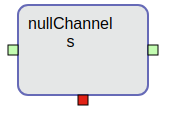
These screenshots illustrate the problem:
In this screenshot, notice how the labels inside the box are centered horizontally with respect to eachother. But they are not centered w.r.t. the containing box.
This next shot shows that the horizontal centering works properly (presumably because the wide label is wider than the node's minimum width).
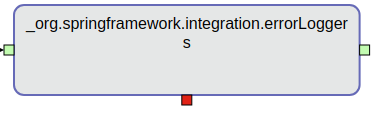
In both cases you can see that centering vertically has no effect.
This example was set up as
- node with layout 'hbox'
- containing a 'compartment' with layout 'vbox'
- containing two labels.
We applied options to center the nodes to everything (containing node, the compartment and all the labels) , both vertically and horizontally (though I assume that vbox/hbox layout will only obey one of the two.
For reference, here is the code that builds these node model elements in Java:
	private static SNode createNode(String id, String labelText, String type) {
		SNode node = new SNode();
		node.setId(id);
		node.setType("node:"+type);
		node.setLayout("hbox");
		node.setPosition(new Point(Math.random() * 1024, Math.random() * 768));
		node.setSize(new Dimension(80, 80));
		node.setChildren(new ArrayList<>());
		centerNode(node);

		SCompartment compartment = new SCompartment();
		node.getChildren().add(compartment);
		compartment.setId(id + "-comp");
		compartment.setType("compartment");
		compartment.setLayout("vbox");
		compartment.setChildren(new ArrayList<>());
		centerNode(compartment);

		{
			SLabel label = new SLabel();
			label.setId(id + "-label");
			label.setType("node:label");
			label.setText(labelText);
			centerNode(label);
			compartment.getChildren().add(label);
		}
		{
			SLabel label = new SLabel();
			label.setId(id + "-label-test");
			label.setType("node:label");
			label.setText("s");
			centerNode(label);
			compartment.getChildren().add(label);
		}


		SPort outputPort = new SPort();
		outputPort.setType("output-port");
		outputPort.setId("output-port-" + id);
		outputPort.setSize(new Dimension(10,10));
		node.getChildren().add(outputPort);

		SPort inputPort = new SPort();
		inputPort.setType("input-port");
		inputPort.setId("input-port-" + id);
		inputPort.setSize(new Dimension(10,10));
		node.getChildren().add(inputPort);

		return node;
	}

	private static void centerNode(SShapeElement shape) {
		LayoutOptions options = shape.getLayoutOptions();
		if (options == null) {
			options = new LayoutOptions();
			shape.setLayoutOptions(options);
		}
		options.setHAlign("center");
		options.setVAlign("center");
	}