

 eclipse-platform
Help wanted for https://bugs.eclipse.org/bugs/show_bug.cgi?id=329657
Hello, creating an issue here for https://bugs.eclipse.org/bugs/show_bug.cgi?id=329657 because I do not see one. This is still a problem 2 years since the last reply (and 12 years since it was created!) and is causing a lot of annoyance for some people. I have had the mentioned issue of editing a file while the project is building, having to wait for the build to finish before it actually saves, and then the project(s) immediately rebuilding because it changed.


Can you please provide exact steps to reproduce from a fresh IDE?
Have a workspace with many Java/plugin projects, try to edit a file while the workspace is being clean built.

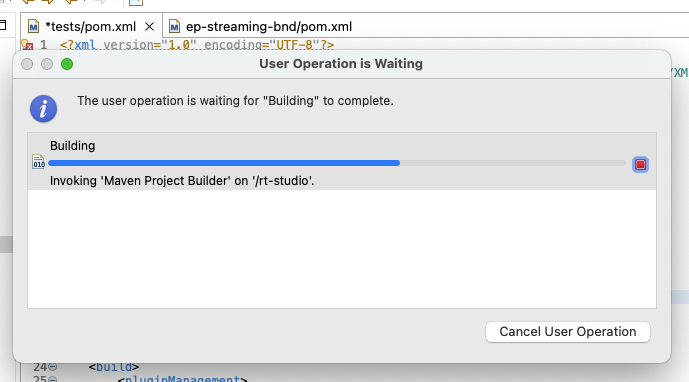 Example: Pressed save and blocked by a (long-running) build. I've also just had regular typing blocked by building (press a key > waiting for build > key appears in editor). Yes, I could disable auto-build, but that isn't a solution.
Not sure when this behavior was introduced but this is indeed sooooo anoying. -> You have to wait for the complete build until you can edit files again - no matter if they are in the same or another project (even editing of simple text-files is blocked)

This is easily the single largest annoyance I have in using Eclipse. And yes, it gets worse as you add in something like SonarLint, in that the number of background tasks that block and the delays involved are only multiplied.
If I cancel the background task to try not to wait, I have to wait somewhat anyway and Eclipse ends up confused about what needs to be rebuilt or redeployed in my workspace.
If I were to disable Build Automatically and so forth, I could avoid bumping into this issue so frequently, but then I would end up losing many of the benefits of using an IDE.

The general problem was addressed by Platform some years ago. However, it's still easily possible for some operations (eg some builders) to block more than necessary. Is everyone here seeing this issue only with the "Maven Project Builder" operation blocking other ones, or are there other operations causing this?
when importing a maven project for the first time, you are not able to open any editor because of downloading jars from maven repository.

when importing a maven project for the first time, you are not able to open any editor because of downloading jars from maven repository.
This particular case should be reported to eclipse-m2e project.
The general problem was addressed by Platform some years ago. However, it's still easily possible for some operations (eg some builders) to block more than necessary. Is everyone here seeing this issue only with the "Maven Project Builder" operation blocking other ones, or are there other operations causing this?
I don't use maven. I'm using JBoss Tools and SonarLint. The build and deploy sometimes, but not always block user input. I normally have it set to Build Automatically. Things seem to get worse if I've saved again while it was still building, deploying from the last save.
The more general question is what operation is blocking. It's usually "Building", but as it is shown in the screenshot shared above with "Invoking Maven Builder", the "Building" operation often describes a sub-operation going on. What is the blocking sub-operation for you.
I came across this issue when implementing a custom incremental builder. Trying to relax my builder's scheduling rule to a certain directory, say X folder in the project being built did not avoid blocking user operations, i.e. I was still not able to edit files in the project being built, although they were outside the X folder. (Details: I've overridden the method org.eclipse.core.resources.IncrementalProjectBuilder#getRule(int, Map<String, String>) and returned a custom scheduling rule for modifying the X folder in the current project instead of locking the whole workspace, which seems to be far too restrictive as default behavior.)
Does anyone know why that's not working? Is there any progress an solving this issue? Maybe @mickaelistria, @iloveeclipse, or @vogella?

I was still not able to edit files in the project being built, although they were outside the X folder.
Are you sure your builder is the only one locking a scheduling rule at the moment? If your build is called from a higher-level operation that locks the whole workspace, then external operations can still be blocked.
Hi @mickaelistria,
Thanks for asking.
I looked deeper into the code. In my case, the "Build Automatically" option is active. As soon as I add a new file in my test project, the auto-build is triggered and my builder is executed on the project. My test project has only one builder active, i.e. my custom builder that only locks a sub-folder X in that project.
The AutoBuildJob always locks the whole workspace, but the BuildManager seems to release the lock before executing my custom builder (calls getWorkManager().beginUnprotected() in BuildManager#basicBuild(int trigger, IncrementalProjectBuilder builder, Map<String, String> args, MultiStatus status, IProgressMonitor monitor)). The BuildManager uses my rule, i.e. an IFolder for X. But even after BuildManager's releasing the workspace lock and activating my rule, I cannot modify any file outside the X folder in my test project. The list of current builders in the BuildManager does only contain my custom builder, when my builder is run and when I try to edit any file in the test project outside the X folder.
How can I check, if there is some other operation / builder locking the whole workspace?
Could other projects in the same workspace being also built cause a lock on the whole workspace? I closed all workspace projects except of the test project, but when debugging, for some reason there was another project listed in BuildManager#builtProjects, i.e. .org.eclipse.egit.core.cmp. Could that one cause the workspace lock and why?