

 eclipse-platform
Table remains visible though setVisible(false) was called
Describe the bug Moved from bugzilla: Bug 578833 - [Win32] Table remains visible though setVisible(false) was called
To Reproduce Refer snippets in below attachment: https://bugs.eclipse.org/bugs/attachment.cgi?id=288075 https://bugs.eclipse.org/bugs/attachment.cgi?id=280361
Expected behavior A clear and concise description of what you expected to happen.
Screenshots https://bugs.eclipse.org/bugs/attachment.cgi?id=288076
Environment:
- Select the platform(s) on which the behavior is seen:
-
- [ ] All OS
-
- [x] Windows
-
- [ ] Linux
-
- [ ] macOS
-
Additional OS info (e.g. OS version, Linux Desktop, etc)
-
JRE/JDK version
Version since Eclipse or SWT version since when the behavior is seen [e.g. 4.23]
Workaround (or) Additional context Known bug in native api call: https://docs.microsoft.com/en-us/windows/win32/gdi/wm-setredraw

Solution is to explicitly identify such case where the table style differs from the table's 'visible' state and then restore the table's visibility state. Will share a PR shortly.
@niraj-modi : this broke some tables on Windows. Git History is empty, "Ctrl+3" is empty.
This must be fixed before M1, Eclipse is unusable since this change.

Reopening to handle: https://github.com/eclipse-jdt/eclipse.jdt.ui/issues/127#issuecomment-1170257023
History view seems to be still sometimes empty with this change, I have to re-select the repo to show content. Not reproducable though, so no need for you to do anything, but maybe you want to watch out for this behavior.

Found the reproducer:
Open History view with some content
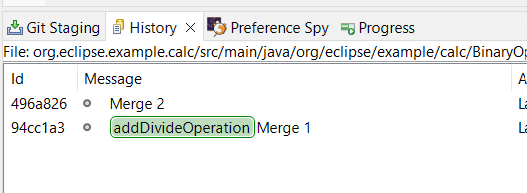
Resize the view
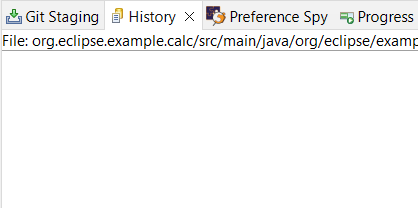
-> View is empty
Eclipse SDK Version: 2022-06 (4.25) Build id: I20220629-1800 OS: Windows 11, v.10.0, x86_64 / win32 Java vendor: Eclipse Adoptium Java runtime version: 17.0.2+8 Java version: 17.0.2
Also code completion popup is currently empty once it is triggered, you need to retrigger it to show its content.
Also code completion popup is currently empty once it is triggered, you need to retrigger it to show its content.
Will release a fix for this shortly.
Attempted fixes caused regression in Eclipse views, hence decided to revert the complete fix via #239
It looks like the problem is triggered in Table.setDeferResize(true) when invoking OS.IsWindowVisible (handle). Why is this call used and not, e.g. isVisible()?
