

 eclipse-che
Zombie processes remain in workspace container after a task is terminated.
Describe the bug
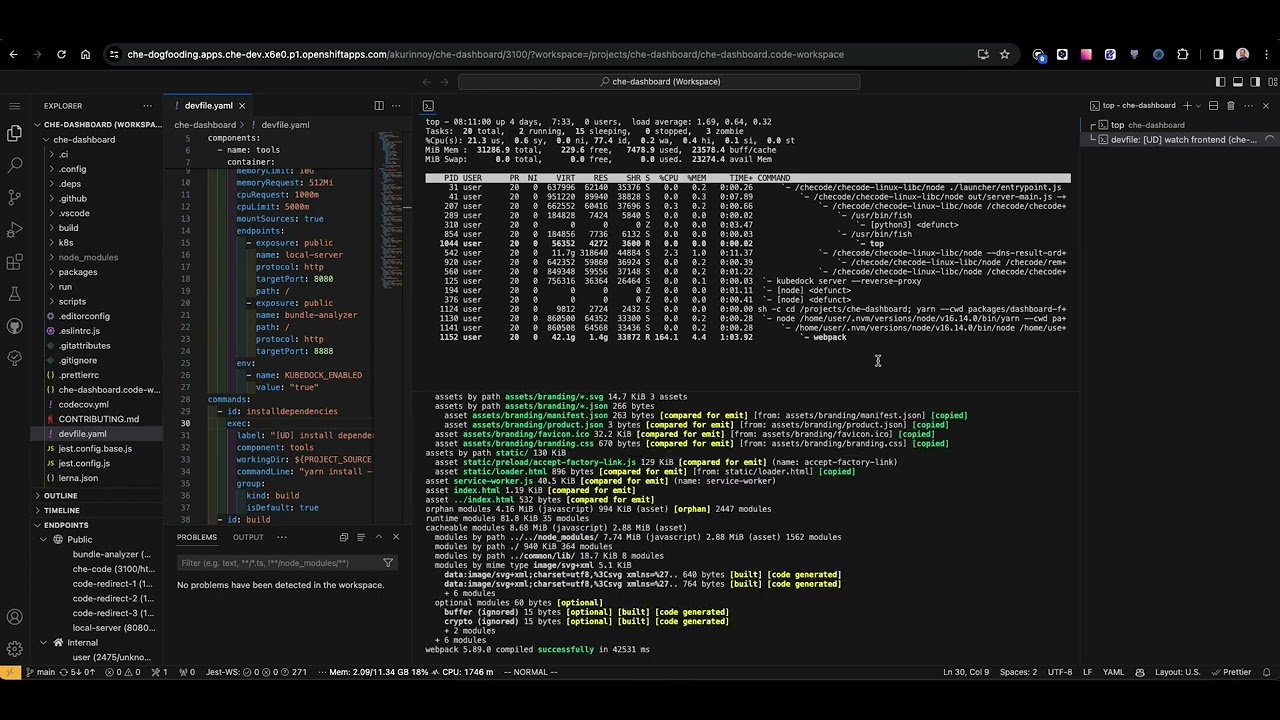
While working in che-code, I encountered a lot of processes labeled <defunct> in my workspace container. I noticed that every time a devfile task or corresponding yarn script gets terminated, one or more zombie processes appear.
Che version
next (development version)
Steps to reproduce
- Clone repository [email protected]:eclipse-che/che-dashboard.git
- Run the task "Install dependencies".
- Open the terminal and run the
topcommand (and hitcto see more than just the command name). You may see some zombie processes at this point. - Split the terminal, run
yarn build, and terminate it in a minute.- Alternatively, run the "build" task, and terminate it in a minute.
- In the terminal where the
topcommand runs, you can see a few more zombie processes. - You can try steps 4-5 with other tasks, e.g. "watch frontend", and "watch backend".
Expected behavior
No zombie processes should remain after a task termination.
Runtime
OpenShift
Screenshots
https://youtu.be/yWVRiQFYfxs
Installation method
other (please specify in additional context)
Environment
other (please specify in additional context)
Eclipse Che Logs
No response
Additional context
No response

I got the same when I played with ssh service. I've just started and stopped it several times by a command in terminal

I've just double checked it on the dogfooding instance and haven't faced any issues anymore.
No zombie processes appeared after running yarn install command.
I tried to launched yarn in both VS Code terminal and in the OpenShift console terminal. In both cases it was successful.