

 eblot
eblot
exhange command results in shifted data
about 34% of the time, the address read byte doesn't shift out the last clock from the C232HM-EDHSL-0 MPSSE cable, until the start of the data byte, which makes the data reported to python appear shifted right one clock. So I'm reading a 0x3A, and 30-45% of the time I get a 0x1D I've been testing my code with a known device with a known response. It does not seem to matter if I use the relax or start options in any configuration. Tested on multiple cables, and after a reboot.
Results of doing an 'exchange' single-transaction write-read or a discrete write then a read from the same device: badE is: 3424 (exchange) badWR is: 0 (write command then read command) of 10,000 runs 514.4302661418915 (seconds) Done
my code: import time import binascii from pyftdi.i2c import I2cController i2c=I2cController() i2c.configure('ftdi://ftdi:232h:FT0NCMMI/1')
slave = i2c.get_port(0x4C) t=time.time() badE=0 badWR=0 runs=10000
for x in range(0, runs): firmwareID = slave.exchange([0xD0], 1, relax='false', start='true') if int.from_bytes(firmwareID,byteorder='big')!=58 : badE+=1 slave.write([0xD0],relax='true', start='false') firmwareIDRead = slave.read(1,relax='true', start='false') if int.from_bytes(firmwareIDRead,byteorder='big')!=58 : badWR+=1
print('badE is:',badE) print('badWR is:',badWR) print('of ',runs,' runs') print(time.time()-t) print('done')
This is an exchange from command: slave.exchange([0xD0], 1)
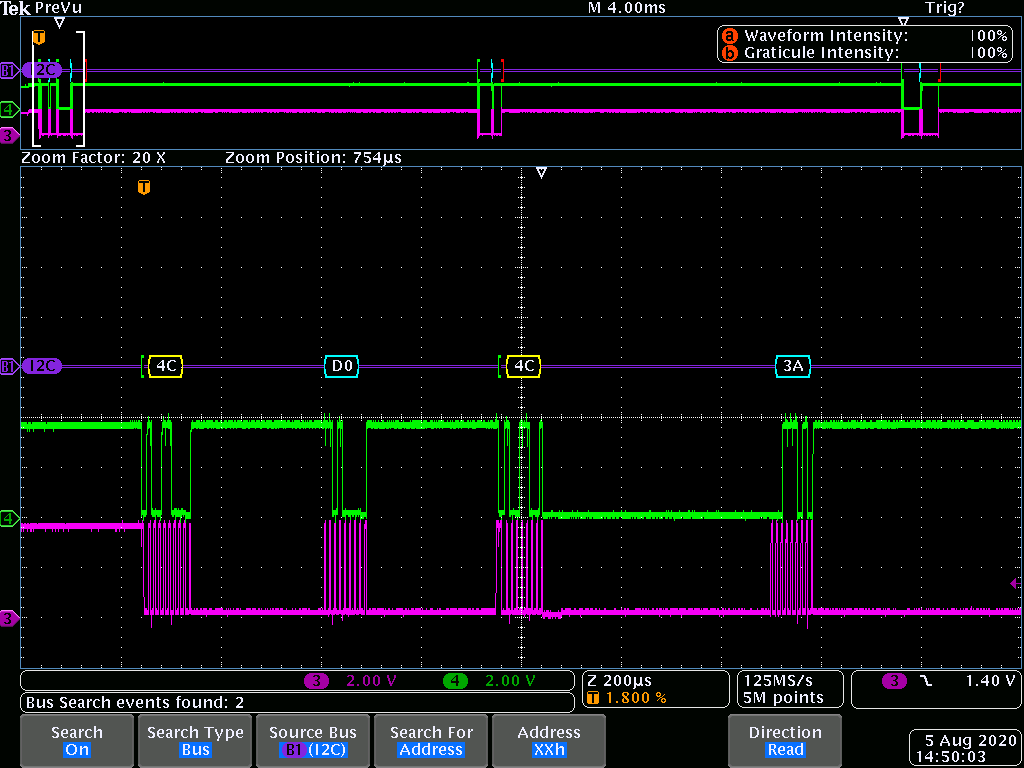
Note the last clock on the address read:
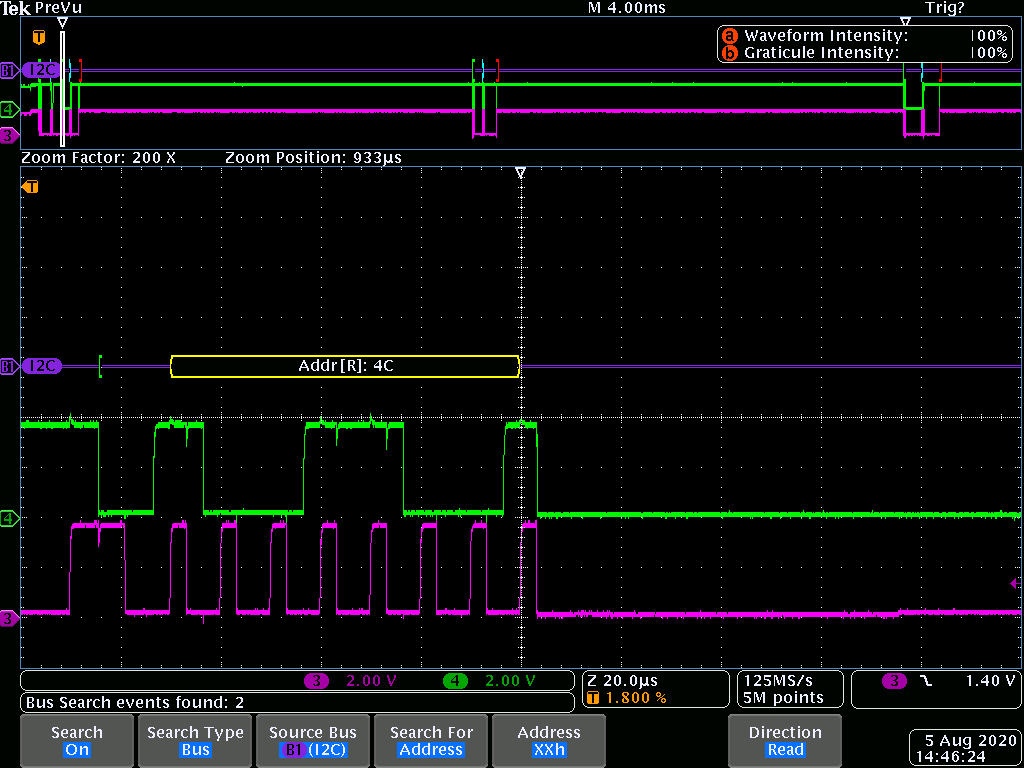 It looks to me as if the address[R] ack bit from the slave is not being clocked in.
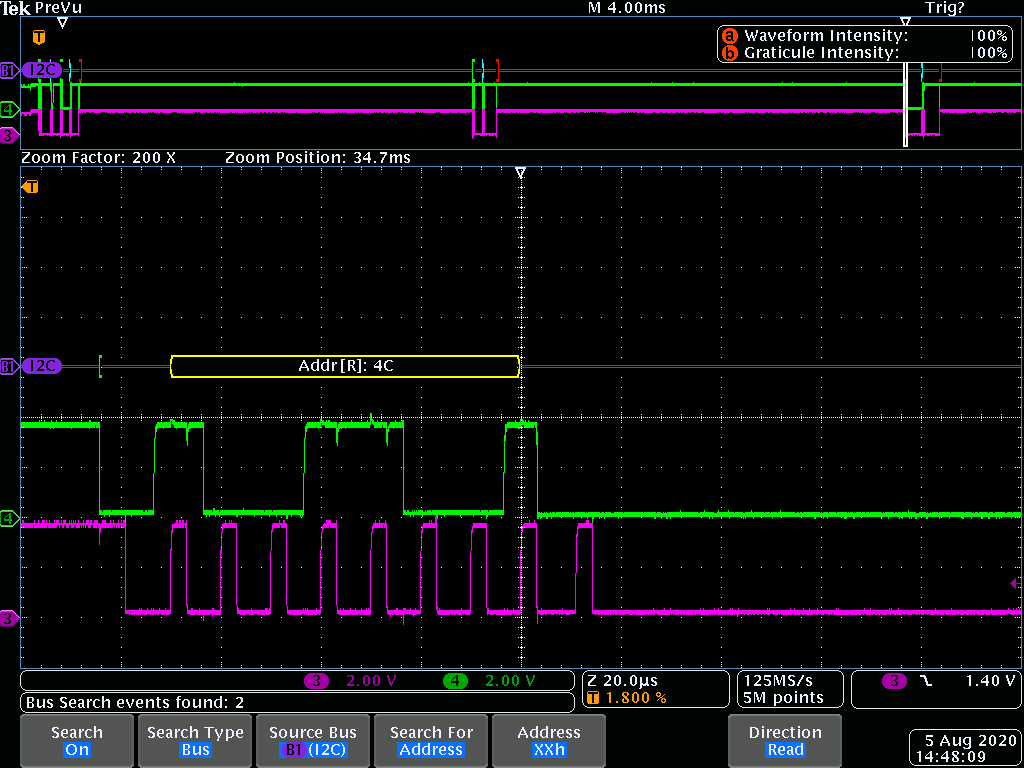
versus this "good one":
and here is the exchange version of the data read:
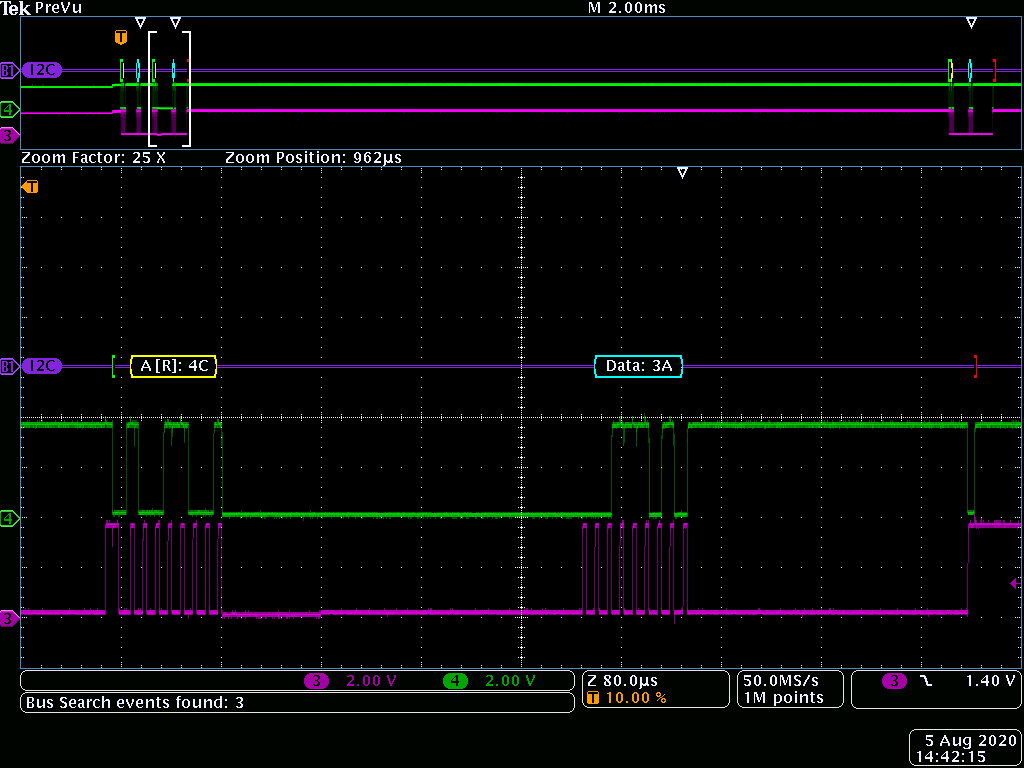 looks like the address[R] ACK is clocked right before the data byte is fetched, but counted as a clock for the data byte.
versus the read version of the data read (good one):
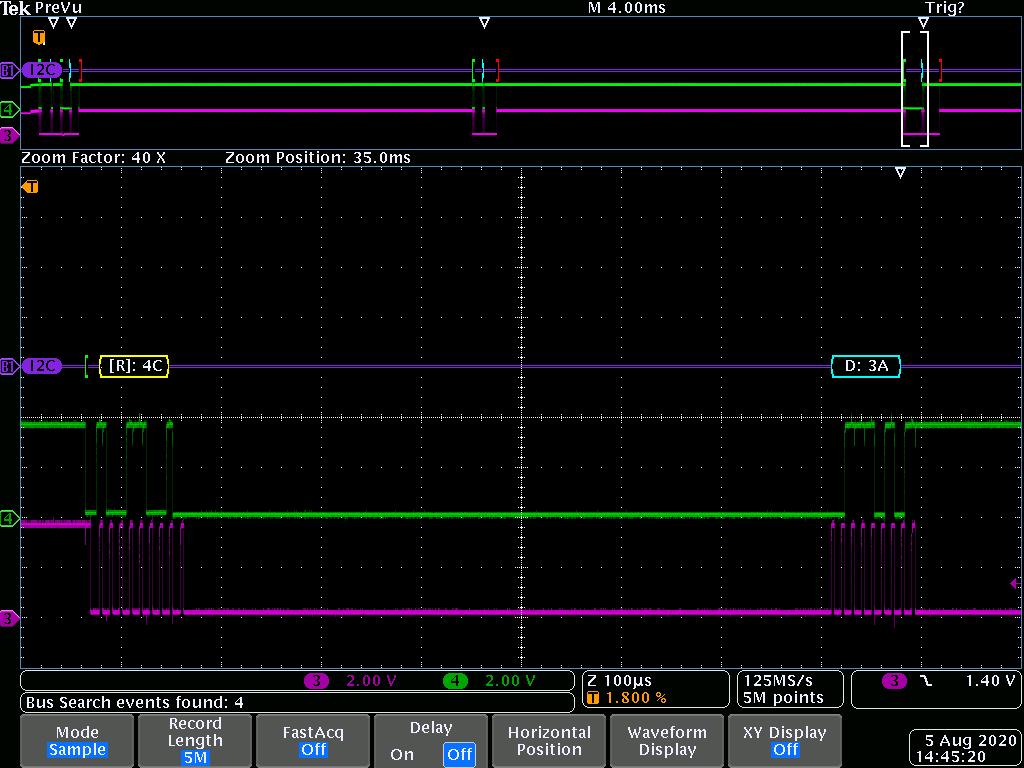
interesting that the scope (and I haven't checked yet, but I assume the slave part itself) always thinks this is OK. it's just the data into python that is shifted right one bit.
for now i'll use the write and then read commands as they work all the time (so far).

So a coworker (who is infinity better at this) ran the same code on their machine with no issues. The hunt is on for what is different.
Maybe a dup of #205.
Sorry, PyFtdi is on stall at the moment, I really have no spare time to look at those issues, but I'm pretty sure there is a bug.

I changed my pull-up values and "it's working perfectly now" although there's hardly any difference on the scope clock and data edges (the ack clock is no longer mis-positioned). My co-worker was using 1k pull-ups on the 3.3V FTDI, I was using 4.6k on the 5V FTDI. I've changed to 7.16k and it works now.
I'll come back to this once my bench is running and see if there is some small timing issue causing the concern.
I agree it is probably related to 205, though 205 deals with the stop, this is probably about timing more generally.
Hi, Follow up for folks having trouble with clock stretching. C232HM-EDHSL-0 MPSSE cable Blue wire "GPIO3" is schematically inside the dongle the "GPIO7"/ADBUS7 pin. Use a diode from slave clock (anode) to master clock (cathode) on the orange wire (master). Connect the blue wire to slave clock (anode of diode). Green and yellow together for SDA.
i2c = I2cController() i2c.configure('ftdi://ftdi:232h:FT0J75U1/1', frequency=100000, clockstretching=True)
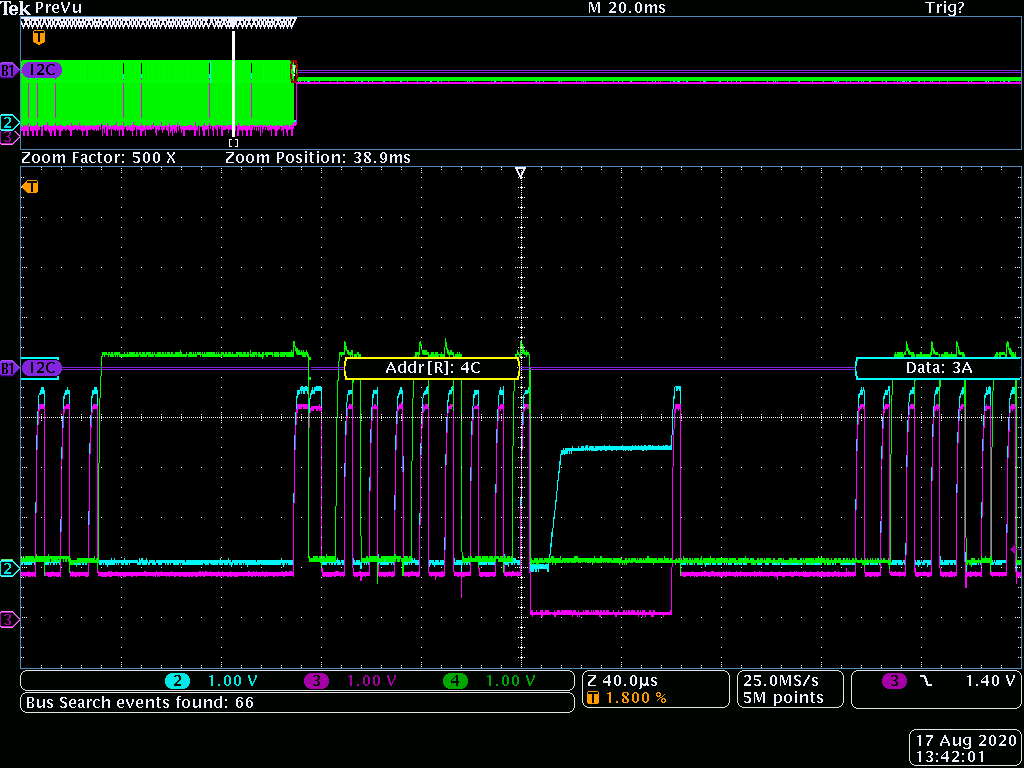 Note the CH2 is on the Orange master clock out, SCL_M.
CH3 is the Slave Clock (anode side), SCL_S
CH4 is SDA.
Note how this slave gets a ADDR[R] and stops the clock prior to the ACK bit. Any I2C Slave can stop or slow the clock anytime.. so that isn't a problem. This slave needed an extra ~60us to fetch the data since the end of the prior write command. Note how CH3 is low(er) pulled down by the slave until it is ready to clock out the data in the buffer.
Note the CH2 is on the Orange master clock out, SCL_M.
CH3 is the Slave Clock (anode side), SCL_S
CH4 is SDA.
Note how this slave gets a ADDR[R] and stops the clock prior to the ACK bit. Any I2C Slave can stop or slow the clock anytime.. so that isn't a problem. This slave needed an extra ~60us to fetch the data since the end of the prior write command. Note how CH3 is low(er) pulled down by the slave until it is ready to clock out the data in the buffer.
Happy I2Cing.
P.s. eblot, your library is EPIC. Well written, easy to use, and above all FAST!!
Sorry, not very active on this project at the moment. Why did you close this ticket? Have you find a bug and/or a workaround?
A post about this issue seems to not have gotten into github, or an edit I made I didn't save before logging off for the day. This "issue" isn't an issue at all. The slave device in this case was performing an I2C Clock Stretch PRIOR to the ACK bit being shifted. In other words, the slave recognized it's ADDR[R] address and stopped the clock immediately in order to finish fetching the data. This is perfectly allowed by the letter of the law (although I wouldn't have implemented it that way, technically there's no issue) and so there was no problem with pyftdi. The "problem" was that "Clock stretching mode" wasn't enabled properly in my setup. My follow-up post of Aug 17 explains how to use the clock stretching for anyone else who runs into this.
I have made the following changes in i2c.py and this is my accompanying readme:
"This version has clockstretching enabled. blue wire of the dongle must be connected to SCL slave side of a diode (anode) and orange SCL_master must connect to SCL slave through the diode (cathode).
Note, these (my code cells) are tested with the following change in C:\ProgramData\Anaconda32bit\Lib\site-packages\pyftdi\i2c.py
#I2C Timings had copy-paste error in definition # Fix frequency for 3-phase clock if frequency <= 100E3: timings = self.I2C_100K elif frequency <= 400E3: timings = self.I2C_400K # was self.I2C_100K else: timings = self.I2C_1M # was self.I2C_100K
#cmd = bytearray(self._idle * self._ck_delay) is implemented to cleanup the stop.
def _do_prolog(self, i2caddress: int) -> None:
    if i2caddress is None:
        return
    self.log.debug('   prolog 0x%x', i2caddress >> 1)
    #cmd = bytearray(self._idle) #original
    cmd = bytearray(self._idle * self._ck_delay) #new
    cmd.extend(self._start)
    cmd.extend(self._write_byte)
    cmd.append(i2caddress)
    try:
        self._send_check_ack(cmd)
    except I2cNackError:
        self.log.warning('NACK @ 0x%02x', (i2caddress>>1))
        raise
"
Another quick aside for those looking for absolute performance out of the FTDI driver. If any command is sent to the ftdi driver, such as an ADDR[R] or i2c.ftdi.read_data_bytes(1,4), or similar at least every 25ms or so, then the following round trip pc-slave-pc transactions to and from the slave(s) will be very fast indeed. This has nothing to do with pyftdi etc, but is a windows/USB latency problem. The FIRST transaction out of the USB port is slow, VERY slow. Using a trick or two (I recommend the ADDR command to avoid confusing someone who comes to the project later) to setup the USB transactions before a pile o data is blasted around might be helpful to some.