

 ebekker
IIS the system cannot find the file specified
Hello,
I'm using the following command to download an .pfx file to install into IIS Centralized Certificates.
Get-ACMECertificate cert-www-site-name -ExportPkcs12 "C:\www.site.com.pfx" -CertificatePassword '123456'
I'm able to download the cert, but when system adds the cert, it shows a red ex next to the domain and an error of the system cannot find the file specified.
I did some research and one topic I found talked about how the .pfx file may have been exported to be used with Linux and not IIS.
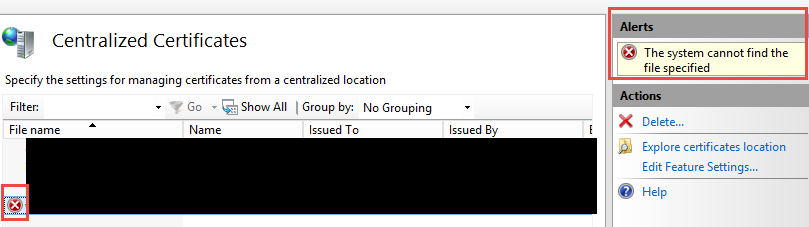

I tested you theory, by importing it into IIS (where the certificate is stored on the server itself) and then exporting it again. That worked and it should help your problem.

I'm maintaining a module for ACME v2 accociated with PKISharp (a GitHub Collection of multiple ACME Goodies, initiated by some People around @ebekker ) and I just stumbled over this very issue as well. Most times you are good to go, if you just Import / Export the certificate via MMC, but that does not always help. I opened an issue with .NET Core, since it's probably rooted there somewhere.
Interesting: if the Import / Export is done via the machines store, it'll work.
