

 easymodo
Feature request
*Can u add create new from clipboard option? To paste and create an image from snipped clipboard? An additional context menu option to "save clipboard as > jpeg jpg png bmp" would be enough more than enough!
-
Also can u add more video playback extension supports? like mp4 mpeg avi mov etc
-
Can we have thumbnail support for heif

i think i've already whitelisted those video formats.. are you using the 1.0.x qimgv release?
i asked because on setup i could only see mp4 and webm not mpeg or mov or avi if they are ok, np.
can u add support for a new context menu option? for my first request?
hello i couldn't find any localization file ini or dll. if u let me i can translate it to turkish
Hi. I'll let you know once i add translation support (probably over this weekend)
not important but just wanted to share. program icon is not shown in program add/remove

i hope it won't to add it as a menu option
It can even be paste from clipboard..... and opens the crop page. to crop&save as selected extension
great... can we have options for jpg or png extension while typing name and selecting location to save
Hi dev, were u able to update this weekend? may i have test version if u did?
hello i was looking for the same feature is it updated? i couldn't find the feature after install. thanks i need this too.

here, you can try it from this sketchy looking link https://www.dropbox.com/s/yrydpweurc9pce0/qimgv_1.0.2-3024b85.zip?dl=1
Couldn't test it because libopencv_core454.dll and libopencv_imgproc454.dll was not found.

Pasting image with Ctrl+V works fine 👍
Though pasting image from the clipboard (Win+V on Windows) does not work, maybe because it only checks for Ctrl+V.
~~you can just add a shortcut in qimgv (for pasteFile action)~~
nvm win+xx shortcuts wont work
perfect! ctrl+v is all i needed. are you going to add it also to the right click context menu?
thank you VERY much! it is already great as it is.
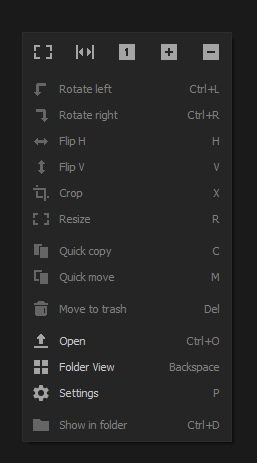
i need to redesign the menu before adding more stuff it's already a bit too large for my liking