
eXpand
 eXpand copied to clipboard
 eXpandFramework
Xpand.XAF.ModelEditor.WinDesktope.exe does not run for missing .net
I installed the standalone module, Xpand.XAF.Modules.GridListEditor on new fresh Winform XAF .Net Core project, When I try to run the Xpand ModelEditor, I get the following error
To run this application you must Install .Net
the default Devexpress model editor dont work after installing any Xpand module
Visual studio 2019 / Windows 11
I have .net core 5.0 Sdk installed on my system
below is the list of installed sdk
3.1.418 [C:\Program Files\dotnet\sdk] 5.0.407 [C:\Program Files\dotnet\sdk] 6.0.201 [C:\Program Files\dotnet\sdk] 6.0.202 [C:\Program Files\dotnet\sdk]
an idea of what may prevent the program from running, I tried to run the program from the outside VS and I get the same error

When I try to run the Xpand ModelEditor
how? elab ful details IDE version etc, if I cannot repro I won't spent resources to research around

the default Devexpress model editor dont work after installing any Xpand module
this also says nothing
the default Devexpress model editor dont work after installing any Xpand module
this also says nothing
Sorry, i edited initial ticket, i am under Visual studio 2019 OS Windows 11
when i try to open the default model editor i get the message below
The Model Editor server host terminated unexpectedly. Try to restart the Model Editor. If this does not help, send diagnostic information to DevExpress Support: https://www.devexpress.com/go/XAF_ModelEditor_Troubleshooting.aspx Details
à System.Runtime.CompilerServices.TaskAwaiter.ThrowForNonSuccess(Task task) à System.Runtime.CompilerServices.TaskAwaiter.HandleNonSuccessAndDebuggerNotification(Task task) à DevExpress.ExpressApp.Design.ClientHost.<WaitForInitAsync>d__116.MoveNext()
can u try the same using Rider? while u first clean all related dirs, I understand u may not have a valid Rider licence but for testing a trial is also fine.
all related dirs
these are your bin, %APPDATA%\Xpand.XAF.ModelEditor.Win\WinDesktop
or first try with VS after cleaning dirs see also #927 using that build it may be possible to use the native Xaf VS editor
https://github.com/eXpandFramework/Reactive.XAF/tree/master/tools/Xpand.XAF.ModelEditor video demos how to use the Xpand ME with Rider
can u try the same using Rider? while u first clean all related dirs, I understand u may not have a valid Rider licence but for testing a trial is also fine.
all related dirs
these are your bin, %APPDATA%\Xpand.XAF.ModelEditor.Win\WinDesktop
or first try with VS after cleaning dirs see also #927 using that build it may be possible to use the native Xaf VS editor
I dont have this dir in my Roaming folder, the complied Xpand ModelEditor is located on bin debug dir
C:\Users\user\source\repos\DXApplication4\DXApplication4.Module.Win\bin\Debug\net5.0-windows
i will try with Rider and and I'll keep you informed
as per Xpand ME wiki the editor is copied there from the Roaming folder
The model editor work in Rider,after installing the Jetbrains plugin the Xpand Model is is placed on the Roaming folder as mentionned
I uninstalled and reinstalled Xpand.XVSIX directly from Visual Studio extension manager; Now the model editor start, but I get error below, maybe it will help to debug
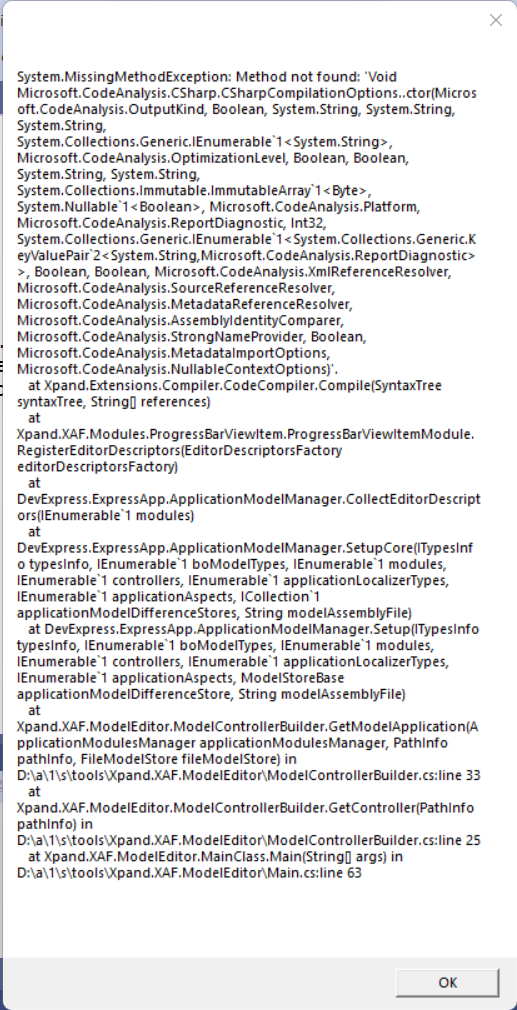
After this error when I try again, I get another error .
 When I clean the bin folder I come back to the first error.
i get the same errors under Rider.
I want to use vs2022 only, but i still need to use model editor for web proyecta

this plugin is now on 64bit so it won't support VS2019
@aityahiaidir did clean the assemblies from your bin? does it work on a new empty xaf solution for 21.2.7
Closing issue for age. Feel free to reopen it at any time.
.Thank you for your contribution.
