

 eKoopmans
i fixed back-break height bug
hi i fixed page-break have height is problem i used code :
        html2pdf().from(element).set({
        margin: 0,
        filename: 'test.pdf',
        html2canvas: {width: 1200},
        jsPDF: {orientation: 'portrait', unit: 'mm', format: 'a4', compressPDF: true}
        }).save();
this code is very simple and i want to use page-break but height is high then page
i fixed code in html2bundle.js
  Worker.prototype.toContainer = function toContainer() {
    ...
    var pxPageHeight = this.prop.pageSize.inner.px.height;
    var pxPageWidth = this.prop.pageSize.inner.px.width;
  if (rules.before) {
    var _ratio = clientRect.width / pxPageWidth;
    var _height = pxPageHeight - ( ( clientRect.bottom / _ratio ) % pxPageHeight);
    _height *= _ratio;

    var pad = createElement('div', { style: {
        display: 'block',
        height: _height + 'px'
      } });
    el.parentNode.insertBefore(pad, el);
  }
  if (rules.after) {
    var _ratio = clientRect.width / pxPageWidth;
    var _height = pxPageHeight - ( ( clientRect.bottom / _ratio ) % pxPageHeight);
    _height *= _ratio;

    var pad = createElement('div', { style: {
        display: 'block',
        height: _height + 'px'
      } });
    el.parentNode.insertBefore(pad, el.nextSibling);
  }
it's done i was very helpful i can't speak english well but i hope it helps thanks

Hello @mooksama. Are you still getting this kind of result, with the text being cut between pages?
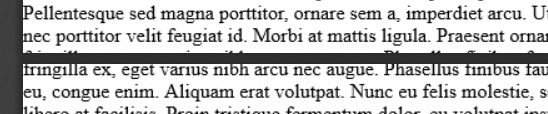

I am having the same issue when I print more than 8 pages. any fix for that. when I split the div into multiple and call print for each div with addPage() solves the text cutdown, but it takes more time to print.

I had a similar issue and fixed it in toContainer as follows:
var pxPageHeight = this.prop.pageSize.inner.px.height; // Check all requested modes.
var ratio = this.prop.src.clientWidth / this.prop.pageSize.inner.px.width;
pxPageHeight *= ratio;
